TimeFence: persistent focus timer HUD — buy direct, lifetime license.
Guided workflow variation

If you searched for“alternative to move mouse every minute script,”you are done babysitting a cursor.

StayGreen is a Microsoft Store, local utility that is designed to be a jiggler alternative the grown-up way: do not touch the mouse, touch the right OS hooks instead.

$2.49 USD — Perpetual License

One-time purchase · Lifetime updates · Delivered via the Microsoft Store

Purchased and updated securely through the Microsoft Store. No account needed on our site, no subscription, and a Microsoft receipt for easy corporate expensing.

Full StayGreen overview
One-time purchase No telemetry Local-first

windows · local-first · one-time purchase · no telemetry

If this sounds like your week

The “jiggler” market is 90% theater.

If the answer to corporate sleep policy is a USB widget that fakes a mouse, the problem is not solved—it is just relocated to procurement and security review.

Where tooling usually breaks

If your workflow depends on lying to input devices, the workflow is broken.

That is not moralizing; it is operational. You do not need a new gadget. You need the OS in the right execution state, with clear controls.

Where StayGreen lands

Same outcome, different mechanism.

StayGreen is a serious answer to “alternative to move mouse every minute script” because it is not pretending to be a video game. It is a one-time, Microsoft Store, Automata Labs app that targets Windows power behavior the way a systems person would, not a novelty Amazon vendor.

$2.49 USD — Perpetual License

One-time purchase · Lifetime updates · Delivered via the Microsoft Store

Purchased and updated securely through the Microsoft Store. No account needed on our site, no subscription, and a Microsoft receipt for easy corporate expensing.

Learn more about StayGreen

windows · local-first · one-time purchase · no telemetry

What you get

Feature highlights

Effectively Zero CPU Overhead

Uses Windows execution-state calls instead of polling loops or fake input.

Hardware Interlock

Auto-pauses when the charger is unplugged or the lid is closed for safer thermal and battery behavior.

Per-App Targeting

Keep awake only when specific apps like `ms-teams.exe` are active.

$4.99 USD perpetual license. Pay once, own it forever — buy direct on automatalabs.ca.

$4.99 USD perpetual license. Pay once, own it forever — buy direct on automatalabs.ca.

Engineering Proof

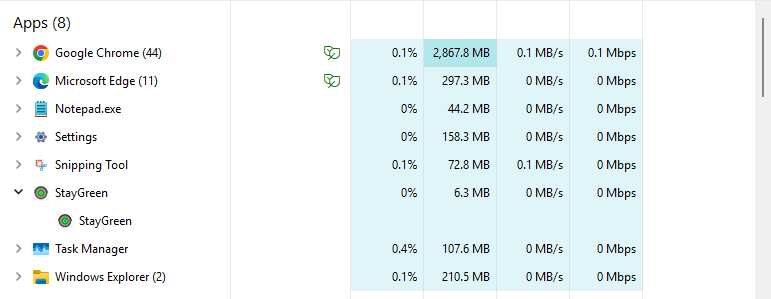
~0.0% CPU at idle · < 8 MB RAM

Direct Win32 signaling instead of background churn.

StayGreen uses SetThreadExecutionState to request the awake state directly from Windows. That means no fake mouse movement, no periodic wake pings, and no background loop burning cycles just to pretend the user is active.

For technical buyers, this is the whole point: the operating system does the work, while StayGreen simply sets the appropriate execution-state flags and gets out of the way. In our idle tests, Task Manager reports roughly 0.0% CPU usage with a memory profile under 8 MB for the keep-awake path.

  • No polling loop required to maintain state
  • No synthetic input events to trigger EDR or policy suspicion
  • Cleaner fit for enterprise-managed workstations with restrictive sleep defaults

Measured idle proof

Screenshot evidence for the low-overhead runtime profile.

StayGreen benchmark proof showing about 0.0 percent CPU usage at idle and a low memory footprint

Product Interface

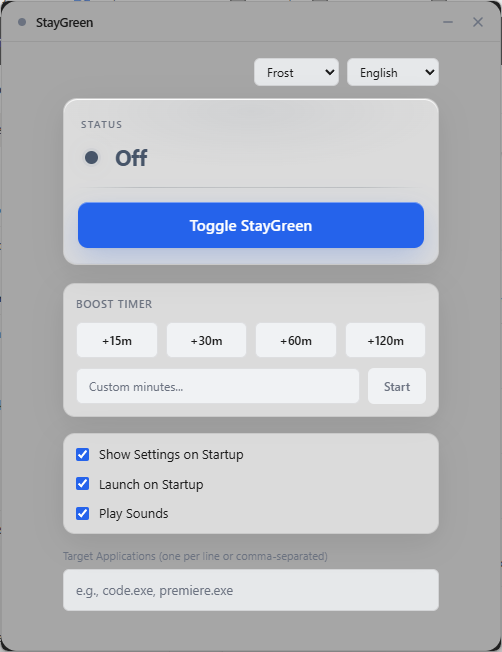
StayGreen interface in Frost theme (English) showing Premium Boost Timer and per-app targeting controls

A control panel built for intentional power-state overrides.

The StayGreen interface keeps the important decisions obvious: when to override sleep, how long to hold the state, and which app should trigger it. No command-line dance. No clutter disguised as enterprise UX.

Premium Boost Timer: Trigger a bounded keep-awake window for meetings, uploads, renders, or overnight monitoring without leaving the app enabled indefinitely.
Per-app targeting UI: Bind the behavior to foreground apps so the override becomes part of the workflow, not a blanket machine-wide hack.
Guardrail-first defaults: Laptop-aware conditions stay visible so the user understands when StayGreen will step back automatically.

Especially when

  • Keep a Windows machine awake without fake mouse movement or CPU-heavy polling loops
  • Prevent sleep during Teams, Slack, dashboards, uploads, meetings, or overnight monitoring
  • Work around aggressive Windows sleep policies with charger and lid guardrails

Trusted by pragmatic desktop users

Built for people who prefer tools that stay local.

Real workflows: focus timers that stay visible, batches that never leave the disk, and renames you can rewind.

Customer review 01

PinPoint: Always On Top saves me so much time as I can organize all my report materials without having to flip between windows or tabs. I love the fact that it is straightforward and simple.

Senior Accountant · Manufacturing Company · United States · PinPoint

Learn more
Customer review 02

I used to get so frustrated when my Taskbar would freeze and disappear. Taskbar Sentinel has eliminated that pain without subjecting me to another subscription.

Darren · Calgary, Alberta, Canada · Taskbar Sentinel

Learn more
Customer review 03

OpticBatch and MetaForge are a lifesaver for me as a person with a passion for photography. They give me the ability to stay organized and keep personal information confidential when I post pictures online.

Sherri · United States · OpticBatch & MetaForge

Learn more

Quotes are shown with customer permission; names and locations appear as reviewers provided them.

Our Core Moat

Engineered to respect your system boundaries.

Lightweight Native Stack

Compiled Rust core wrapped inside an optimized Tauri shell. No heavy background node loops or duplicate Chromium engines cooking your memory footprint (<5MB idle RAM).

100% Local-First Privacy

Executes entirely on-device with full offline isolation. Absolute zero background telemetry policies, no metrics aggregation, and zero mandatory cloud-sync accounts.

Perpetual Fallback Licenses

Pay a single, clear one-time purchase price. Own your specific native software utility execution tier permanently without artificial subscription paywalls or ongoing usage tax.

FAQ

Straight answers—no glossary dump

Does StayGreen make sense for people searching “alternative to move mouse every minute script”?

StayGreen is a Windows keep-awake utility from Automata Labs. It leans on Windows execution-state style behavior with effectively zero busy-wait CPU, optional battery and lid interlocks, and per-app targeting so you are not faking input just to look “active.” It is a one-time Microsoft Store purchase, local-first, with no telemetry. If the goal is a machine that does not go idle when the work is not done yet—calls, long jobs, or strict IT policies that punish sleep—this is the product category, not a browser extension.

Is fake mouse movement the same thing as a keep-awake utility?

No. Simulated input can violate policy, trigger security tooling, and still fail when the system wants to save power. A proper utility asks the OS to stay in the right state without wiggling hardware you do not need to wiggle.

Will this melt my battery if I am unplugged?

StayGreen is built with interlocks: things like auto-pausing on battery or when the lid is closed are part of the design so “stay present” is not a synonym for “ignore power reality.”

Is StayGreen a mouse jiggler alternative?

Yes, in the sense that it targets the same outcome—staying out of deep sleep in legitimate workflows—without the mouse-jig aesthetic. The difference is what it does on the way there: it is designed for compliance-minded environments, not a script that wiggles pixels.

No fake mouse input.
No busy-wait “keep awake” hacks.

StayGreen uses Windows execution-state calls with effectively zero CPU overhead, smart lid/battery interlocks, and per-app targeting when you need the machine to stay present for real work.

$2.49 USD — Perpetual License

One-time purchase · Lifetime updates · Delivered via the Microsoft Store

Purchased and updated securely through the Microsoft Store. No account needed on our site, no subscription, and a Microsoft receipt for easy corporate expensing.

Open full product page

Technical specifications

Technical specifications for procurement

Spec Implementation
Data Sovereignty Sleep-prevention state is local; no remote presence or activity reporting
Telemetry Status None
Core Runtime Native Windows binary using SetThreadExecutionState / execution-state APIs
Network Requirements Fully functional offline
Deployment Compatibility Windows 10 and 11 (x64); direct purchase and Microsoft Store
System footprint Near-zero idle CPU; no polling loops or fake input injection
Hardware guardrails Auto-pause on battery unplug or lid close