Submittal types are the categories a specification uses for what the contractor must send for review or for the record. The common ones are shop drawings, product data, samples, design data, test reports, certificates, manufacturer’s instructions, manufacturer’s field reports, operation and maintenance data, and closeout submittals. Each one is also either an action submittal, which the design team reviews and returns with a decision, or an informational submittal, which is filed for the record.
Knowing the types matters when you build a submittal register, because the type decides who reviews an item, how long it takes, and when it has to be sent. A sample may need weeks of back and forth on color; a certificate is usually filed and noted. Grouping the register by type is how most teams assign reviewers and set dates.
List every submittal in the spec book by type, on your own PC.
Get it from Microsoft
Action, informational, and closeout submittals
Most spec sections written to the CSI three-part format group their submittals in Part 1, under articles such as Action Submittals, Informational Submittals, and Closeout Submittals.
- Action submittals need a response from the architect or engineer before the work goes ahead: shop drawings, product data, samples, and delegated-design calculations are the usual examples.
- Informational submittals are reviewed for the record, without an approval decision: qualification data, certificates, test reports, and manufacturer’s field reports.
- Closeout submittals come at the end of the job: warranties, record documents, operation and maintenance manuals, spare parts, and extra stock.
Unified Facilities Guide Specifications (UFGS), used on many federal projects, mark the same split differently: each item ends with a classification, and a G means the Government must approve it. Items without a G are for information only. Our page on the UFGS submittal register covers that format.
The submittal types, one by one
| Type | What it is | Typical wording in the spec | UFGS heading |
|---|---|---|---|
| Preconstruction | Schedules, plans, and qualifications needed before work starts | ”Submittal Schedule”, “construction schedule” | SD-01 |
| Shop Drawings | Drawings made for this project by the fabricator or installer | ”Shop Drawings:”, coordination, fabrication, placing drawings | SD-02 |
| Product Data | Manufacturer’s published information on a product | ”Product Data:”, manufacturer’s literature, data sheets, catalog cuts | SD-03 |
| Samples | Physical pieces of the material, or a mock-up, for color, texture, or finish | ”Samples for Verification:”, “Samples for Initial Selection:”, mock-ups | SD-04 |
| Design Data | Calculations and design by the contractor’s engineer | delegated design, calculations, signed and sealed | SD-05 |
| Test Reports | Results of tests on materials or installed work | test reports, mix designs, field quality-control reports | SD-06 |
| Certificates | Statements that a product, installer, or welder meets a requirement | certificates, qualification data | SD-07 |
| Manufacturer’s Instructions | The maker’s installation instructions | installation instructions, manufacturer’s instructions | SD-08 |
| Manufacturer’s Field Reports | Reports from the manufacturer’s representative after a site visit | field reports, field service reports | SD-09 |
| Operation and Maintenance Data | Manuals the owner uses to run and maintain the building | operation and maintenance data, O&M manuals | SD-10 |
| Closeout | Documents and materials handed over at the end of the job | warranty, record documents, as-built, spare parts, extra stock | SD-11 |
| Sustainability | Documentation for sustainable-design requirements | sustainable design submittals and sustainability reports | — |
The wording varies from one office’s master specification to the next, but the type is almost always clear from a label at the start of the paragraph, such as Product Data:, or from the noun in a sentence that starts with Submit.
How a spec book asks for each type
A requirement usually takes one of three forms:
- A label and a scope. “Product Data: For each type of product indicated.” This is the most common CSI style.
- An imperative. “Submit manufacturer’s installation instructions.” The verb Submit at the start of the paragraph is the clearest signal.
- A UFGS item. “Concrete Mix Design; G” listed under the heading SD-03 Product Data.
Requirements also appear outside the Submittals articles: mock-ups under Quality Assurance, field reports under Field Quality Control in Part 3, and extra stock under Maintenance Material Submittals. Our submittal register checklist lists each place to look.
Ways to sort a register by type
| Method | How it works | Good fit | Notes |
|---|---|---|---|
| Tag each row by hand | Read each requirement and type its category into a column | A short specification | Consistency depends on who does the tagging |
| Keyword search in a spreadsheet | Search the description column for words such as samples or warranty | Teams that already have the text in a spreadsheet | Someone has to get the text into the spreadsheet first |
| A spec-reading app such as Spec Register Builder | Types each row as it reads the book, then sorts and filters by type | Teams building the register from the PDF | Twelve types from the wording, or from the SD number on UFGS books, with Action/Info from the article |
Meet Spec Register Builder
Spec Register Builder reads a spec book PDF and lists every submittal requirement it finds, typed and cited to its section, paragraph, and page.
It is a Windows app from Automata Labs that runs on your PC with no account and no network connections. Each row carries one of the twelve types in the table above, chosen from the label or the wording of the paragraph, and an Action/Info value taken from the article it sits in: Action, Informational, or Closeout, or G and Info on UFGS books.
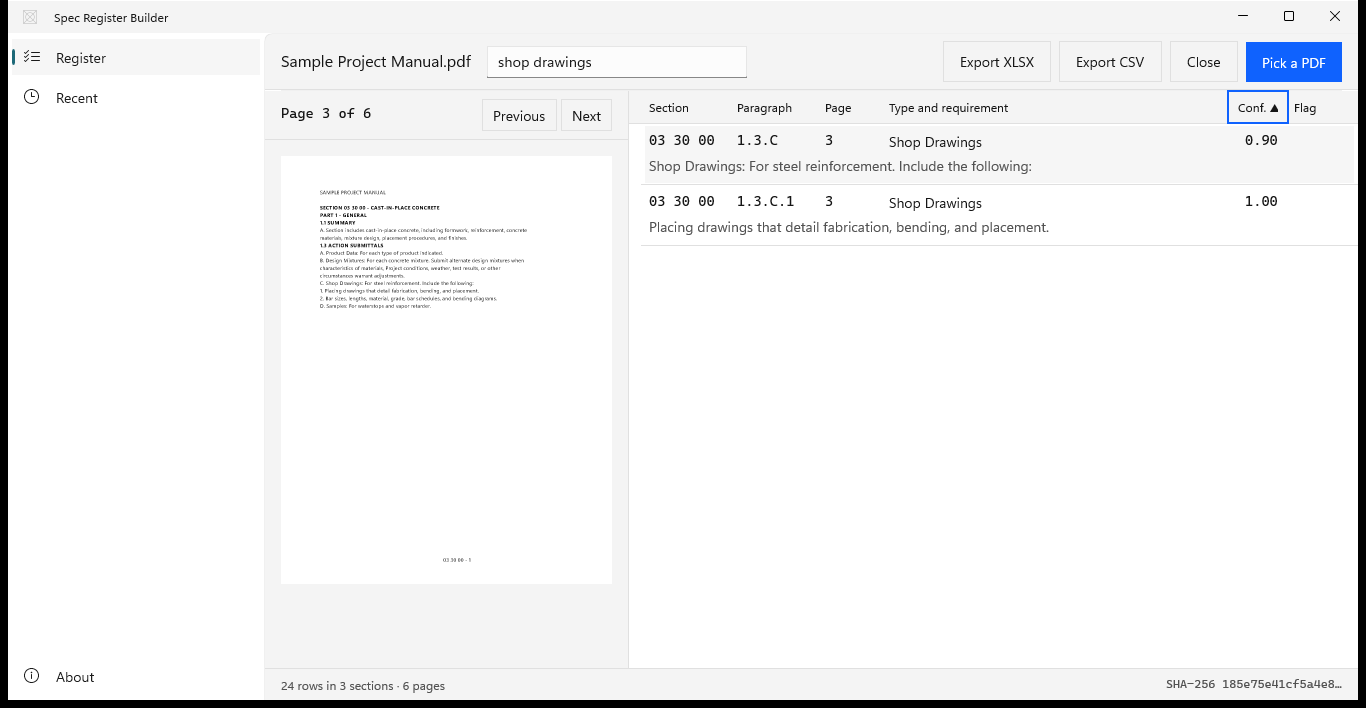
Screenshots use a sample project manual generated for testing, with placeholder text.
How to list submittals by type in Spec Register Builder
- Open the book. Choose “Pick a PDF” and select the project manual, or choose “or try the sample spec book” to look around first.
- Group the rows by type. Choose the “Type and requirement” header to sort the table by type. Choose it again to reverse the order.
- Focus on one type. Type its name in “Filter rows”, for example
samplesorproduct data. The filter also matches section numbers and requirement text. - Check a row against the book. Select it and its page renders on the left, so you can read the paragraph the row came from. “Previous” and “Next” step through the pages.
- Look at low-confidence rows. Choose the “Conf.” header to bring rows with the lowest confidence hint to the top. Rows at 0.40 or below carry a “Review” flag.
- Export. Choose “Export XLSX” or “Export CSV”. Every row is exported, with its “Type” and “Action/Info” columns, so you can filter by type in Excel and assign reviewers group by group.
Sort a real project manual by submittal type and compare it with your log.
Get it from Microsoft
For how the rows are found, see extract submittals from a spec book. For the register as a whole, see submittal register from specifications, and for the step-by-step build, our guide on how to create a submittal log.
Frequently asked questions
What is the difference between shop drawings and product data?
Shop drawings are made for this project, by the fabricator or installer, to show how something will be built or installed: dimensions, connections, and layout. Product data is the manufacturer’s published information about a standard product, such as data sheets and catalog cuts. A steel stair needs shop drawings; the paint on it needs product data.
What is an informational submittal?
An informational submittal is sent for the record rather than for an approval decision. Qualification data, certificates, test reports, and manufacturer’s field reports are common examples. In a CSI-style section they sit under the Informational Submittals article, and Spec Register Builder marks rows from that article as Informational in the Action/Info column.
What are closeout submittals?
Closeout submittals are the documents and materials handed to the owner at the end of the job: warranties, record documents, operation and maintenance manuals, spare parts, and extra stock. They are often listed under a Closeout Submittals article in each section and in a Division 01 closeout section, and Spec Register Builder marks rows from that article as Closeout in the Action/Info column.
What do SD-01 to SD-11 mean?
They are the UFGS submittal headings, from SD-01 Preconstruction Submittals to SD-11 Closeout Submittals. Each item listed under a heading belongs to that type, and a G after the item means Government approval is required. Spec Register Builder types UFGS items from their SD number and shows G or Info in the Action/Info column.
Try Spec Register Builder
Spec Register Builder is a one-time purchase in the Microsoft Store, and the Store runs a 15-day free trial with every feature, so you can sort a project manual you know by submittal type and compare it with the log you built. Nothing uploads, and the spec book is never written. See the Spec Register Builder product page for the screens and the full list of what you get.
Type every submittal in your spec book during the 15-day free trial.
Get it from Microsoft
MasterFormat is a trademark of The Construction Specifications Institute, Inc. (CSI). Spec Register Builder is not affiliated with or endorsed by CSI.
Last updated 15 October 2026. Published by Automata Labs, a software company in Canada.