Taskbar Sentinel: back up your pinned apps & restore your taskbar in one click — on the Microsoft Store.
Windows 10 & Windows 11

Clean the messy CSV. Replay it forever. Nothing leaves your PC.

CSVPrune is a fast, private, 100% local CSV workbench for Windows. Open the exports that break Excel, fix the encoding and delimiter garble that corrupts CRM and Shopify files, dedupe by any column, build calculated columns with a live formula engine—then save your steps as a recipe and let new files clean themselves.

$19.99 USD $14.99 USD One-time purchase · One-time purchase. No subscriptions. Local-first.
$14.99 USD — Perpetual License

One-time purchase · Lifetime updates · Delivered via the Microsoft Store

Purchased and updated securely through the Microsoft Store. No account needed on our site, no subscription, and a Microsoft receipt for easy corporate expensing.

Installation & support Explore all utilities

opens 100k+ rows · no cloud · zero telemetry · one-time purchase

The weekly grind

The same messy export, cleaned by hand, every single week.

Excel chokes on the big files, mangles your leading zeros, and only removes exact-duplicate rows. Web cleaners want you to upload customer data you’re not allowed to share. So you trim, find/replace, and dedupe by hand—again—and hope you didn’t miss a cell.

The CSVPrune workflow

Compose the cleanup once → save a recipe → drop in next week’s file.

CSVPrune opens what Excel can’t, fixes encodings and delimiters, dedupes by any key, and builds calculated columns with a live preview—then captures the exact steps as a replayable recipe you can batch-run or hand to a watch folder. All on your machine, with nothing uploaded.
Why people switch to CSVPrune

Power, automation, scale, and trust—in one local app

Opens what breaks Excel

A windowed virtual grid renders only what’s on screen and keeps the heavy work in Rust, so you scroll, search, filter, and numeric- and date-aware sort six-figure row counts instantly—no freezing, and no 1,048,576-row wall silently dropping your data.

Live formula engine

Build calculated columns with a real-time ghost-column preview—references, arithmetic, string logic, and helpers like coalesce(). Each becomes a saved, replayable step.

Clean once, replay forever

Save your steps as a recipe and apply it in one click, batch-run it across a folder, or point a watch folder at it so every new CSV is cleaned automatically. Recipe Packs for Shopify, Salesforce, and more get you started.

Fixes broken exports

Auto-detect or override delimiters (comma, semicolon, tab) and encodings (UTF-8/16, Latin-1) so CRM and EU files stop arriving garbled—and leading zeros and long IDs are never silently mangled.

Private, and provable

Every row stays in local memory; the app has no networking code at all. Watch it make zero connections in a network monitor. Export to CSV, JSON, or XLSX, or run an audited export with a full before/after sidecar.

See it in action

From a messy download to a clean, repeatable export.

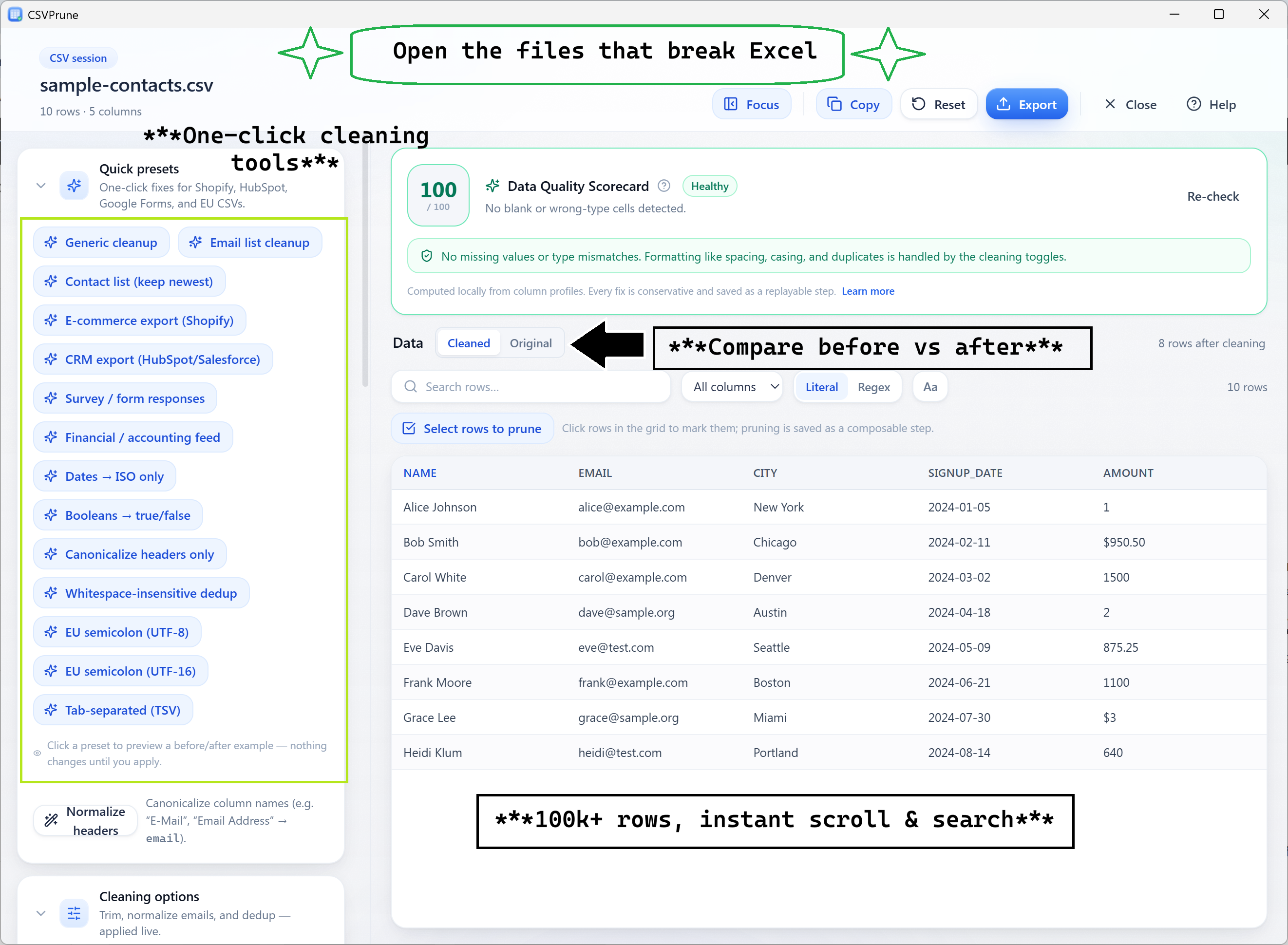
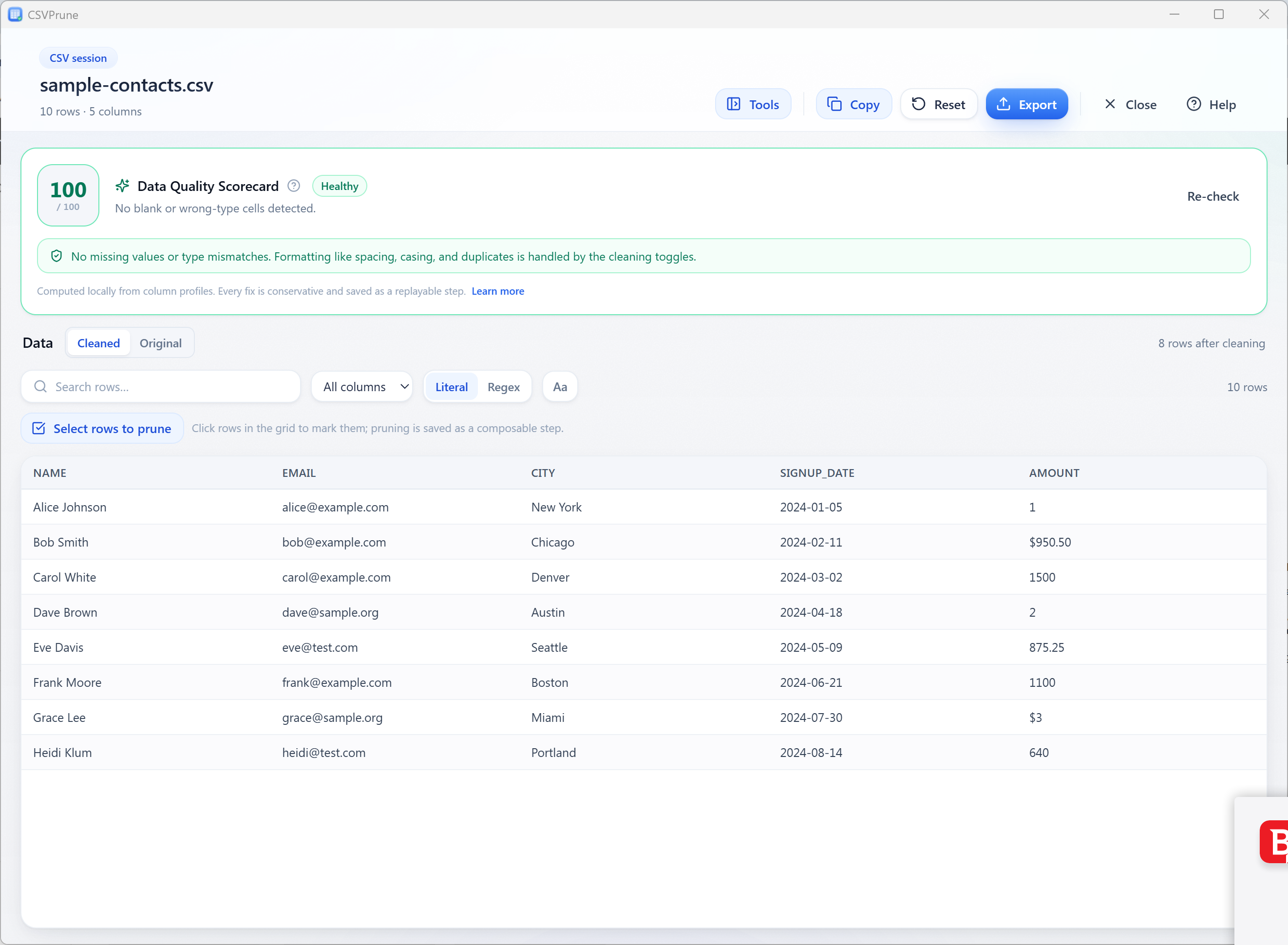
CSVPrune workspace showing a CSV loaded in a virtualized grid with columns, search, and the cleaning toggles.
The whole dataset in a fast, virtualized grid—search, filter (literal or regex), and numeric- and date-aware sort across 100k+ rows without Excel’s freezes or row limit.
CSVPrune grid focused on a filtered subset of rows with column profiling highlighting values.
Profile every column—types, blanks, distinct counts, and invalid cells—then filter to exactly the rows you need, including a one-click “show only invalid rows.”
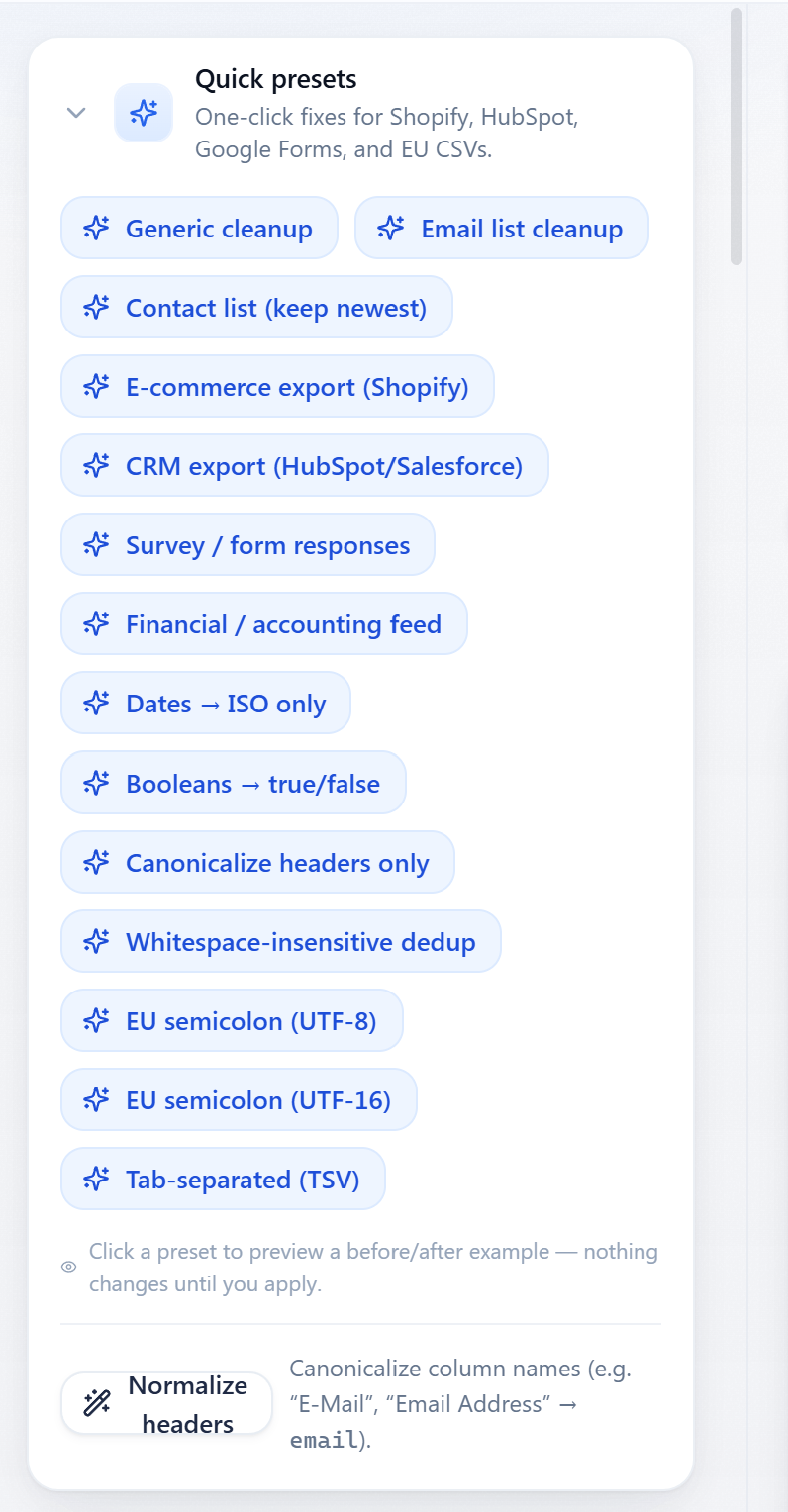
CSVPrune quick presets panel listing Common Export Fix presets for Shopify, HubSpot, Google Forms, and EU CSVs.
One-click Common Export Fix presets for Shopify, HubSpot, Google Forms, and EU semicolon/UTF-16 files, plus a smart header normalizer that canonicalizes column names.
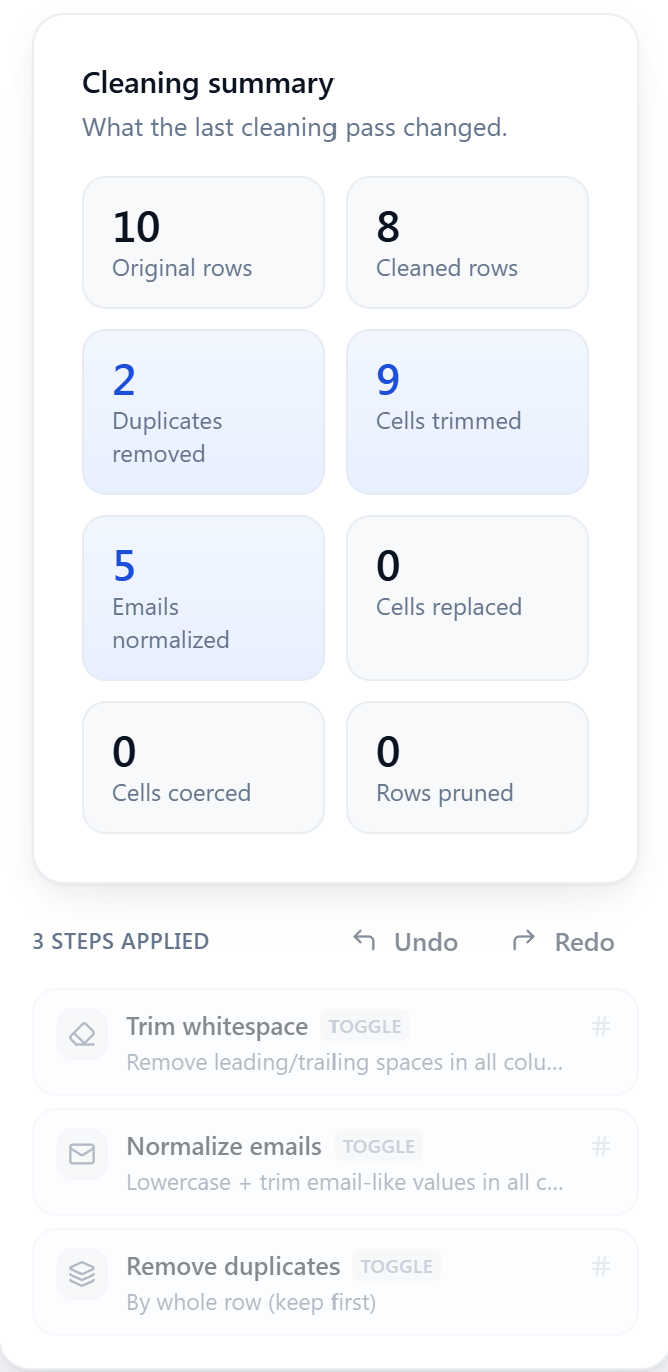
CSVPrune cleaning summary panel showing rows in and out, duplicates removed, cells trimmed, and more.
Honest, live stats for every run: rows in and out, duplicates removed, cells trimmed, emails normalized, values coerced, and rows pruned—no mystery about what changed.
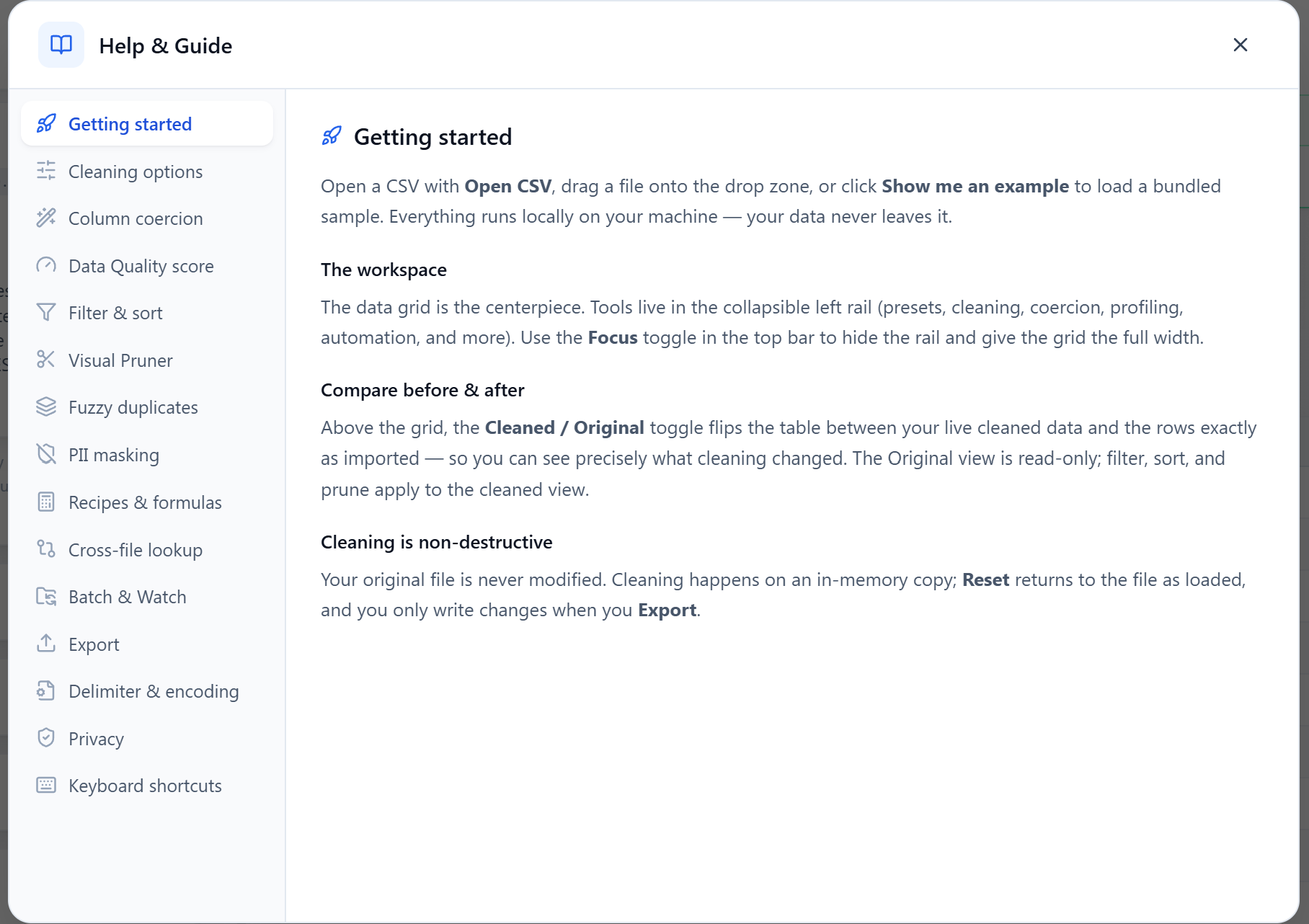
CSVPrune in-app help screen listing keyboard shortcuts for open, export, reset, and clear.
Built-in help and keyboard shortcuts—open, export, reset to original, and clear the session without leaving the keyboard.

Stop re-cleaning the same files—for $14.99 USD once.

If messy CSVs cost your team hours every week, a one-time purchase that turns the cleanup into a one-click recipe pays for itself on the first Monday. CSVPrune keeps the work fast, repeatable, and entirely on your machine.

$14.99 USD — Perpetual License

One-time purchase · Lifetime updates · Delivered via the Microsoft Store

Purchased and updated securely through the Microsoft Store. No account needed on our site, no subscription, and a Microsoft receipt for easy corporate expensing.

Ideal workloads

  • E-commerce and ops teams cleaning the same weekly Shopify, Salesforce, or Google Ads exports without redoing the work each time
  • Anyone who needs to open and search a CSV that is too big or too slow for Excel, without uploading it to a web tool
  • Finance and HR teams standardizing bank, ERP, and ATS feeds—fixing encodings, deduping, and coercing types—with an audit trail for compliance
  • Data and marketing professionals building calculated columns, enriching against a reference file, and exporting clean CSV, JSON, or XLSX

FAQ

CSV cleaning, clarified

Is CSVPrune really 100% local, and can I prove it?

Yes. CSVPrune contains no networking code and requests no network permission, so nothing you load can be uploaded. Every row is processed in local memory and the full dataset never even reaches the app’s web layer. You can confirm it by watching the process in Resource Monitor or Wireshark while you clean a file—it makes zero connections.

Will CSVPrune open files that are too big for Excel?

That’s a core use case. CSVPrune parses the file in a Rust backend and shows it through a virtualized grid that renders only the rows on screen, so hundred-thousand-row files open quickly and scroll smoothly. There’s no 1,048,576-row wall silently truncating your data, and search, filter, and type-aware sort stay instant.

How does CSVPrune fix garbled or single-column exports?

Those are delimiter or encoding mismatches. CSVPrune auto-detects comma, semicolon, and tab delimiters and lets you override the delimiter and encoding (UTF-8, UTF-16, Latin-1) so the file decodes correctly. Because values are treated as text, leading zeros and long IDs are preserved instead of being mangled into scientific notation.

Can I reuse my cleaning steps on next week’s file?

Yes—that’s the point. Save any sequence of operations (including formulas and prunes) as a named recipe, then apply it in one click, batch-run it across a folder, or point a watch folder at it so new CSVs are cleaned automatically. Built-in Recipe Packs for Shopify, Salesforce, Google Ads, banking, and HR give you a head start.

What can CSVPrune export to?

Clean, properly quoted UTF-8 CSV, structured JSON, or a formatted XLSX workbook—or copy straight to the clipboard. An audited export adds a full before/after sidecar JSON recording every changed cell, which is useful for finance, CRM, and compliance hand-offs.

Is CSVPrune a subscription?

No. CSVPrune is a one-time purchase on the Microsoft Store with no subscription and no account required. You own the version you buy and it keeps working offline.

Still stuck? Email [email protected] after checking the Support Center.

Technical specifications

Technical specifications for procurement

Spec Implementation
Data Sovereignty Every row stays in local Rust in-memory state for the session; the full dataset never crosses to the cloud and is serialized only for your explicit export or clipboard copy
Telemetry Status None; zero network code, verifiable with Wireshark or Resource Monitor
Core Runtime Rust + Tauri v2 backend (heavy CSV parsing, cleaning, and profiling stay in Rust) with a React 18 virtualized grid
Network Requirements Fully functional offline; no network access requested in the Tauri capability set
Deployment Compatibility Windows 10 and 11 via the Microsoft Store; macOS universal build via direct download
Import Auto-detects comma, semicolon, and tab delimiters; manual delimiter and UTF-8/16 + Latin-1 encoding override
Cleaning ops Trim, normalize emails, find/replace (regex), coerce number/currency/date/boolean, dedup-by-key, visual row prune, calculated columns
Automation Saved recipes, batch-run across a folder, and watch-folder auto-clean of new files
Export CSV, JSON, or XLSX, plus audited export with a full before/after sidecar JSON; ~500 MB file ceiling

Your data, cleaned on your machine.

Add CSVPrune to your toolkit—large-file freedom, encoding and delimiter fixes, a live formula engine, and recipe automation—and turn recurring CSV mess into background work.

$19.99 USD $14.99 USD One-time purchase. No subscriptions. Local-first.

$14.99 USD — Perpetual License

One-time purchase · Lifetime updates · Delivered via the Microsoft Store

Purchased and updated securely through the Microsoft Store. No account needed on our site, no subscription, and a Microsoft receipt for easy corporate expensing.

Browse catalog