Taskbar Sentinel: back up your pinned apps & restore your taskbar in one click — on the Microsoft Store.
Available on Windows $4.99 USD

Find every duplicate. Reclaim the space. Delete with confidence.


DupeDoctor is the local-first duplicate file and photo finder for Windows 11 — it scans the folders you choose, finds nine kinds of clutter under one “reclaimable” headline, and lets you recycle the extras safely.

Exact duplicates are confirmed with a full hash so renames never fool it. Resized and re-encoded photos are caught by perceptual matching. Deletion goes to the Recycle Bin only, every set always keeps at least one file, and the app runs 100% offline — no account, no telemetry, no cloud. Pay once, own it forever.

$4.99 USD — Perpetual License

One-time purchase · Lifetime updates · Delivered via the Microsoft Store

Purchased and updated securely through the Microsoft Store. No account needed on our site, no subscription, and a Microsoft receipt for easy corporate expensing.

See what it finds

$4.99 USD · $7.99 USD · perpetual license · pay once, own forever

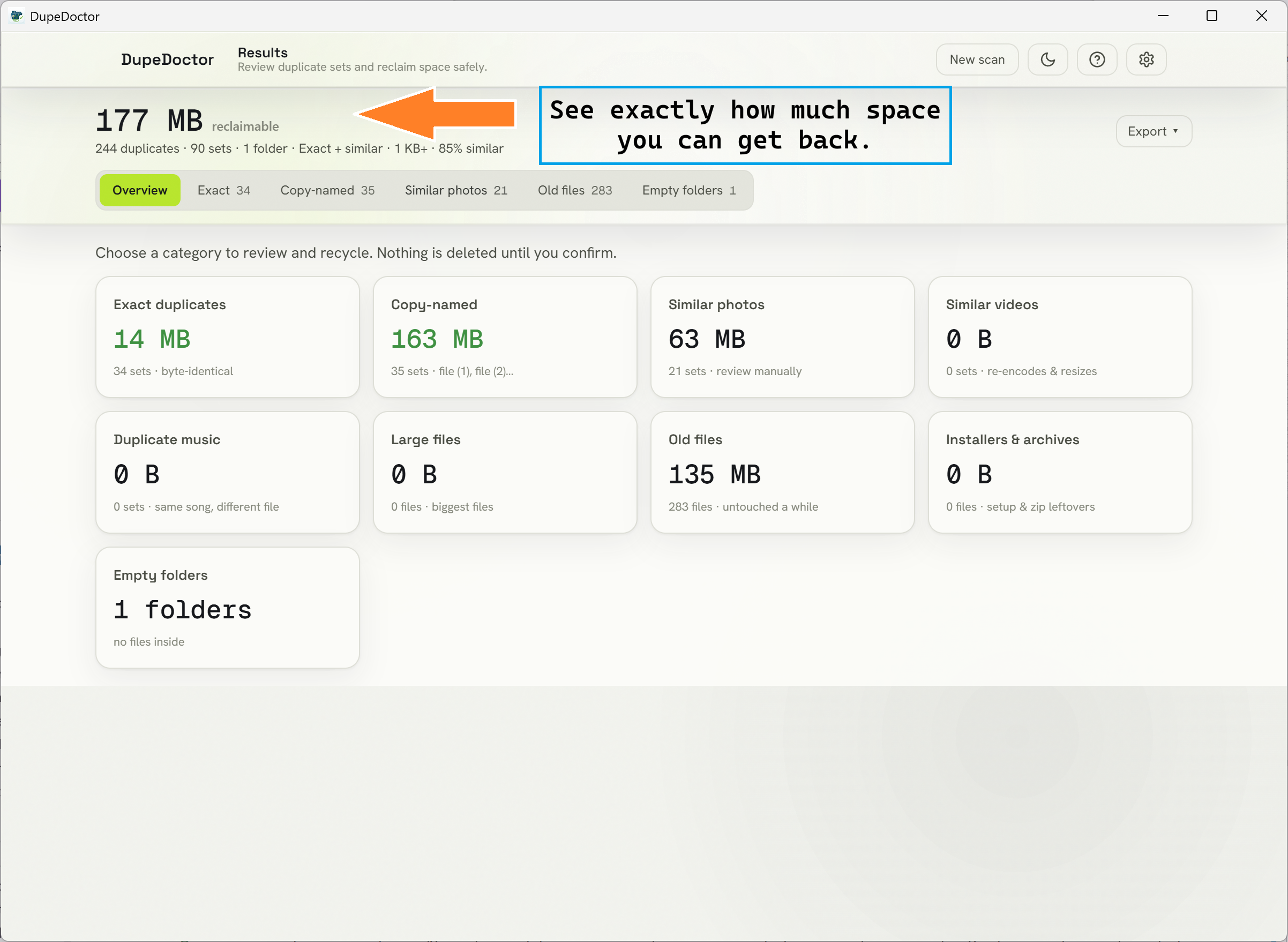
DupeDoctor results screen

DupeDoctor results screen showing thousands of duplicates grouped into sets with a large total reclaimable disk-space figure.
One scan, one headline: see exactly how many gigabytes you can reclaim, with every duplicate set sorted largest first.

The usual workflow

Sort by size in Explorer, eyeball the copies, and pray you delete the right one.

Manual hunting misses renamed duplicates and never catches a resized photo. The dated free tools are off-Store and intimidating enough to burn people into deleting an original. “PC cleaner” suites bury the feature under upsells and telemetry. None of them prove they only touched the copy.

The DupeDoctor workflow

Scan, review the reclaimable headline, keep one, recycle the rest.

Drop in your folders and DupeDoctor finds exact duplicates by content, look-alike photos and videos by perception, and the other clutter that quietly eats your disk. One-click keep-strategies pre-select the extras, you confirm, and everything goes to the Recycle Bin — recoverable, with at least one copy always kept.
One scan, nine kinds of clutter

Not just exact copies — everything quietly filling your drive.

Content-verified exact matching

A two-tier engine groups files by size, prunes with a fast partial hash, then confirms true duplicates with a full BLAKE3 hash. Matching is based on content, not names — so a renamed copy is still caught, and there are zero false positives. Hard links and files that change mid-scan are detected and skipped.

Similar photos & videos

Perceptual hashing clusters resized, cropped, and re-encoded images, and frame-level fingerprinting catches re-encoded or resized videos. Each match carries a similarity score — and, because they are not identical, they are never auto-selected for deletion.

Smart one-click selection

Apply Keep newest, Keep oldest, or Keep shortest path across the whole scan, then hand-tweak any set. A live counter shows exactly how much space your current selection will free, with undo and clear always one click away.

Three ways to reclaim

Recycle the extras safely, move them to a quarantine folder with collision-safe renaming, or replace exact duplicates with hardlinks — a space-saving relink that is gated by a full BLAKE3 re-verification of byte identity.

Set-and-forget automation

Add watched folders like Downloads, and DupeDoctor quietly re-scans them on launch, posts a native notification when there is space to reclaim, and can start with Windows minimized to the system tray. A persistent scan cache skips re-hashing unchanged files.

Every reclaim category, from a single enumeration pass

  • Exact duplicates Byte-identical files of any type, confirmed by a full BLAKE3 hash.
  • Copy-named files The “report (1)”, “Copy of report” convention, grouped by folder + name.
  • Similar photos Resized, cropped, or re-encoded images caught by perceptual hashing.
  • Similar videos Frame-level fingerprinting catches re-encodes, resizes, and format changes.
  • Duplicate music The same song grouped regardless of bitrate or file format.
  • Large files Your biggest space hogs, surfaced above a size threshold you set.
  • Old files Files you have not touched in months, sorted largest first.
  • Installer clutter Leftover installers and archives you downloaded once and forgot.
  • Empty folders The hollow folder trees left behind after a big cleanup.

The trust contract

Recycle Bin only · keep-one · content-verified

A duplicate finder you can trust with the delete button.

Deleting the wrong file destroys trust and data, so DupeDoctor treats safety as a set of hard invariants enforced in code — not optional settings you can footgun your way around.

  • Recycle Bin only. Every deletion is recoverable — there is no permanent-delete path.
  • Keep one per set. The engine always preserves at least one copy and warns before a set would empty.
  • Content-verified. Exact duplicates are confirmed by a full BLAKE3 hash, never by name or size alone.
  • Similar is never auto-selected. Look-alike photos and videos always require a deliberate manual choice.
Zero network · zero telemetry

Private by construction.

DupeDoctor has no HTTP client and no network capability in the build at all — the absence is the privacy guarantee. There is no telemetry, no account, and no cloud, and a locked content-security policy forbids remote origins. Open a network monitor while it scans and you will see no connections.

A protected-system-path guard refuses to recycle, move, or hardlink operating-system files, even when system folders are in scope — so a cleanup can never reach the files Windows depends on.

One-time purchase on the Microsoft Store, backed by the standard Microsoft refund policy — the honest substitute for a trial.

See it in action

A bright, premium light theme built around the reclaimable figure.

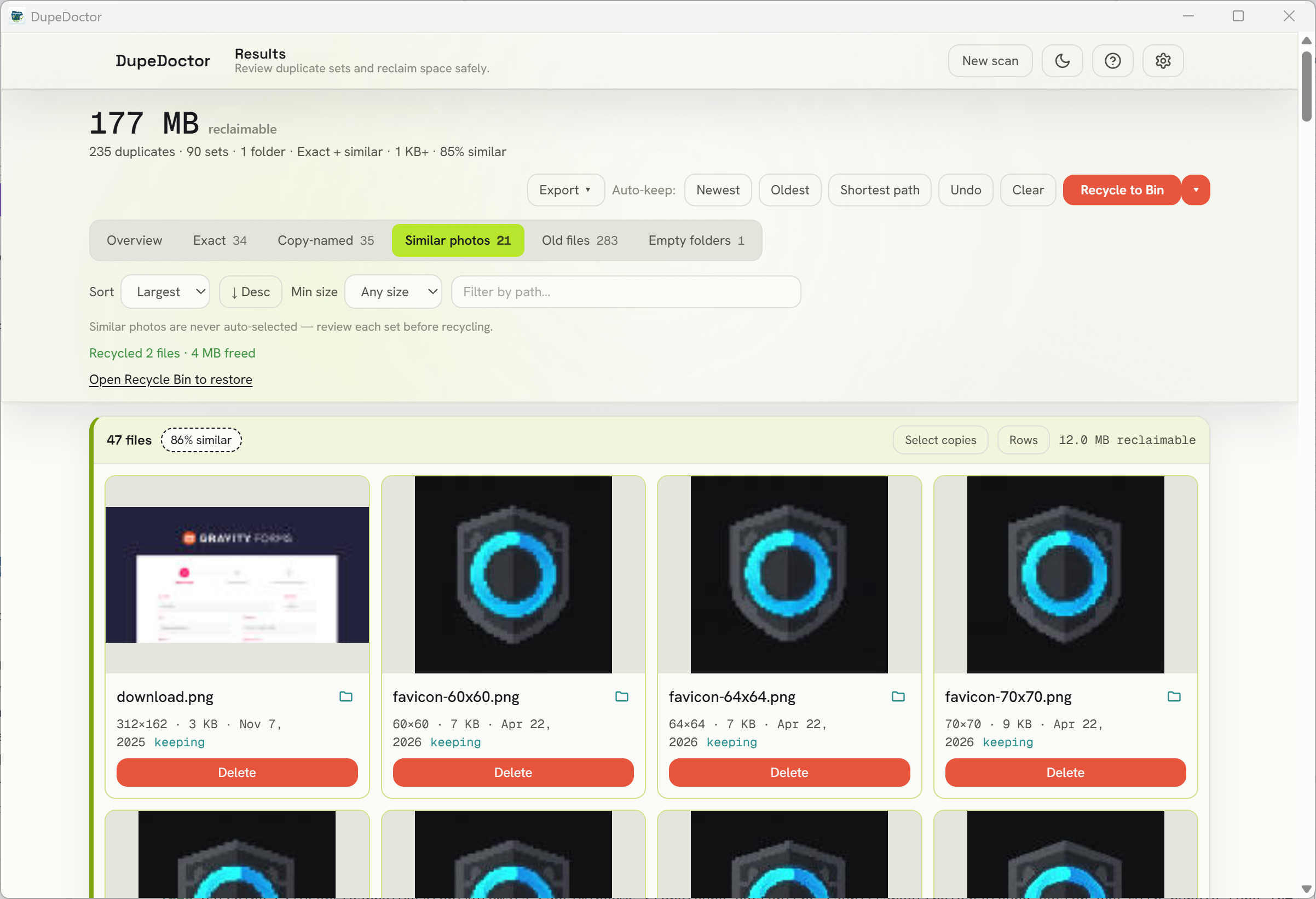
DupeDoctor side-by-side compare of two similar photos with dimensions, file size, and a similarity percentage.
Similar photos are flagged “similar, not identical”, shown side by side with dimensions and size, and are never auto-selected — so you keep the higher-resolution original.
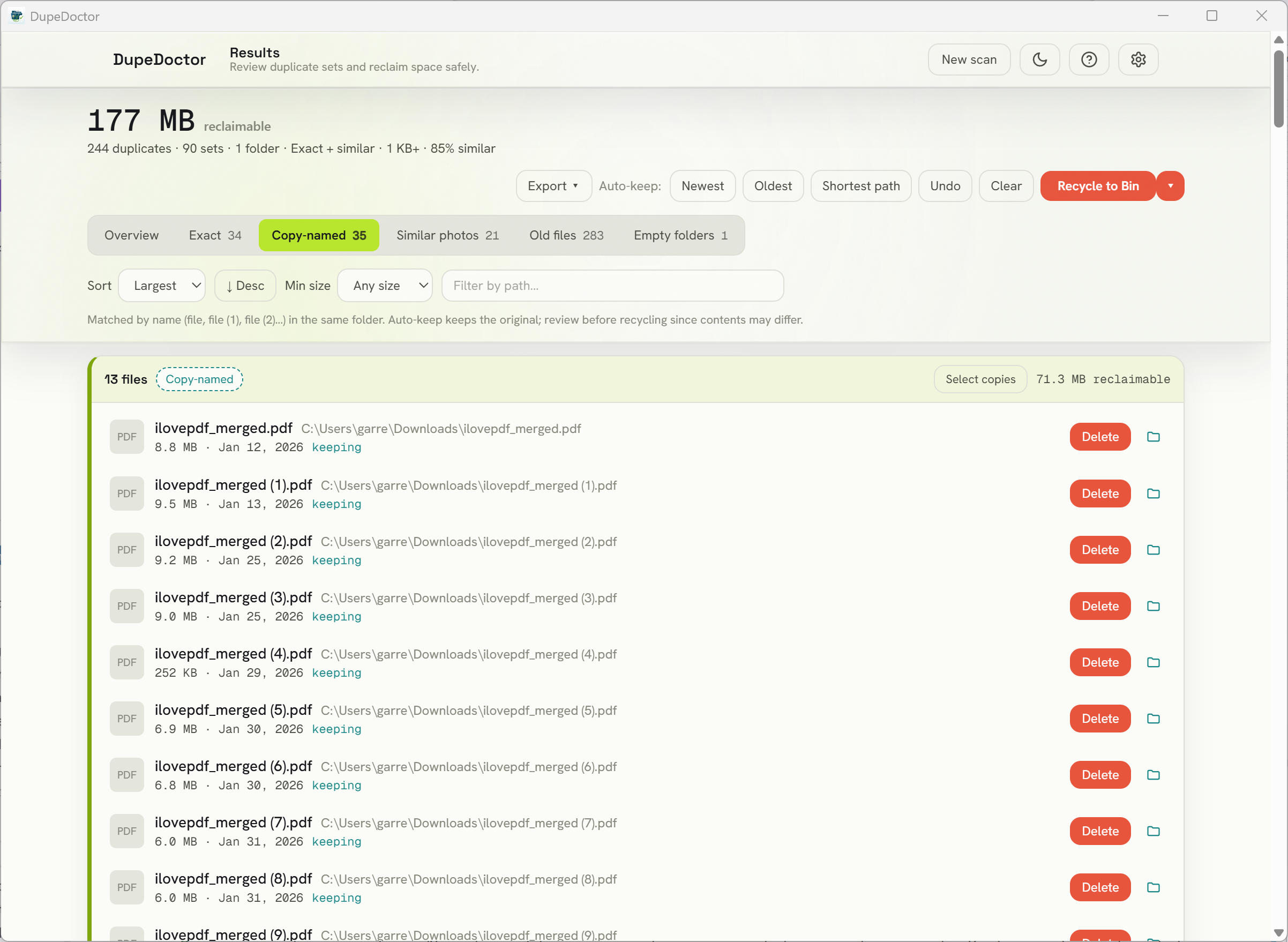
DupeDoctor copy-named detection grouping files like document (1) and Copy of document together.
Copy-named detection groups “file (1)”, “file (2)”, and “Copy of file” back together, with the suffix-free original as the natural keeper.
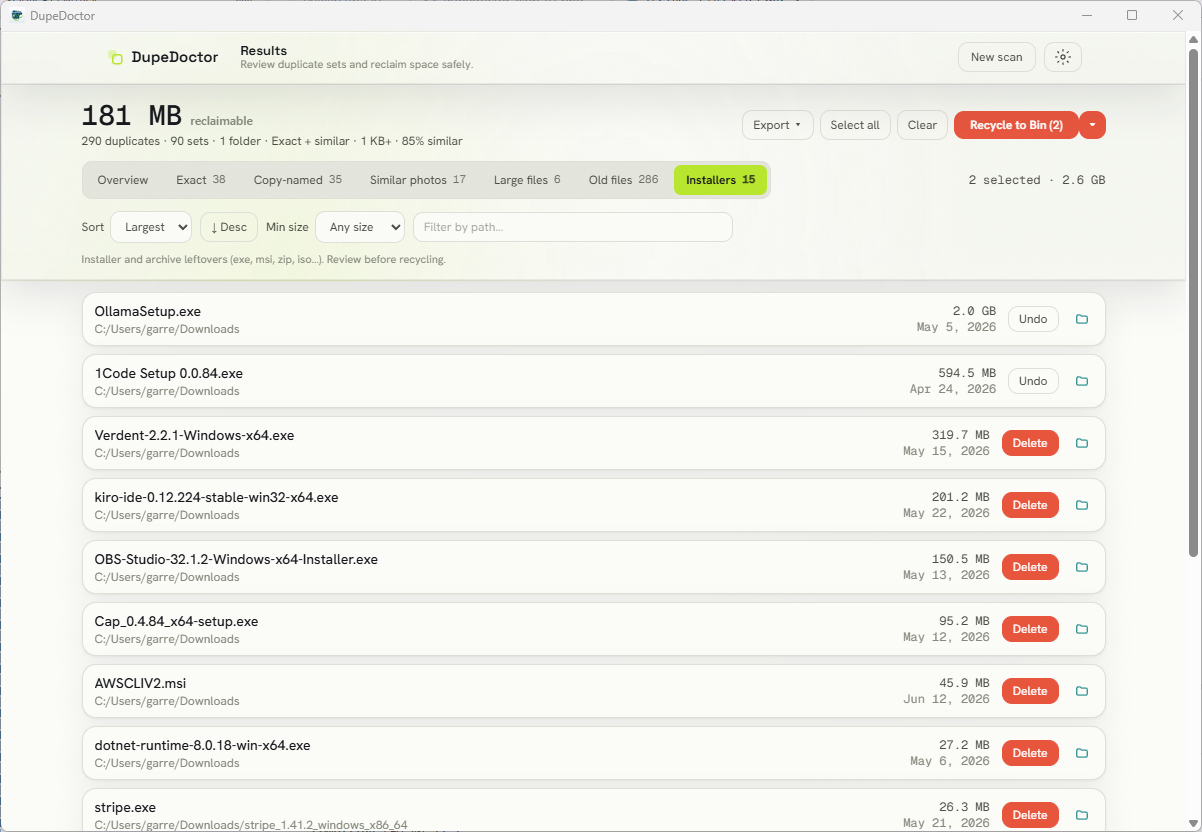
DupeDoctor installer and archive clutter view listing leftover setup files to reclaim.
Installer and archive clutter gets its own view — clear out the setup files you downloaded once and never needed again.
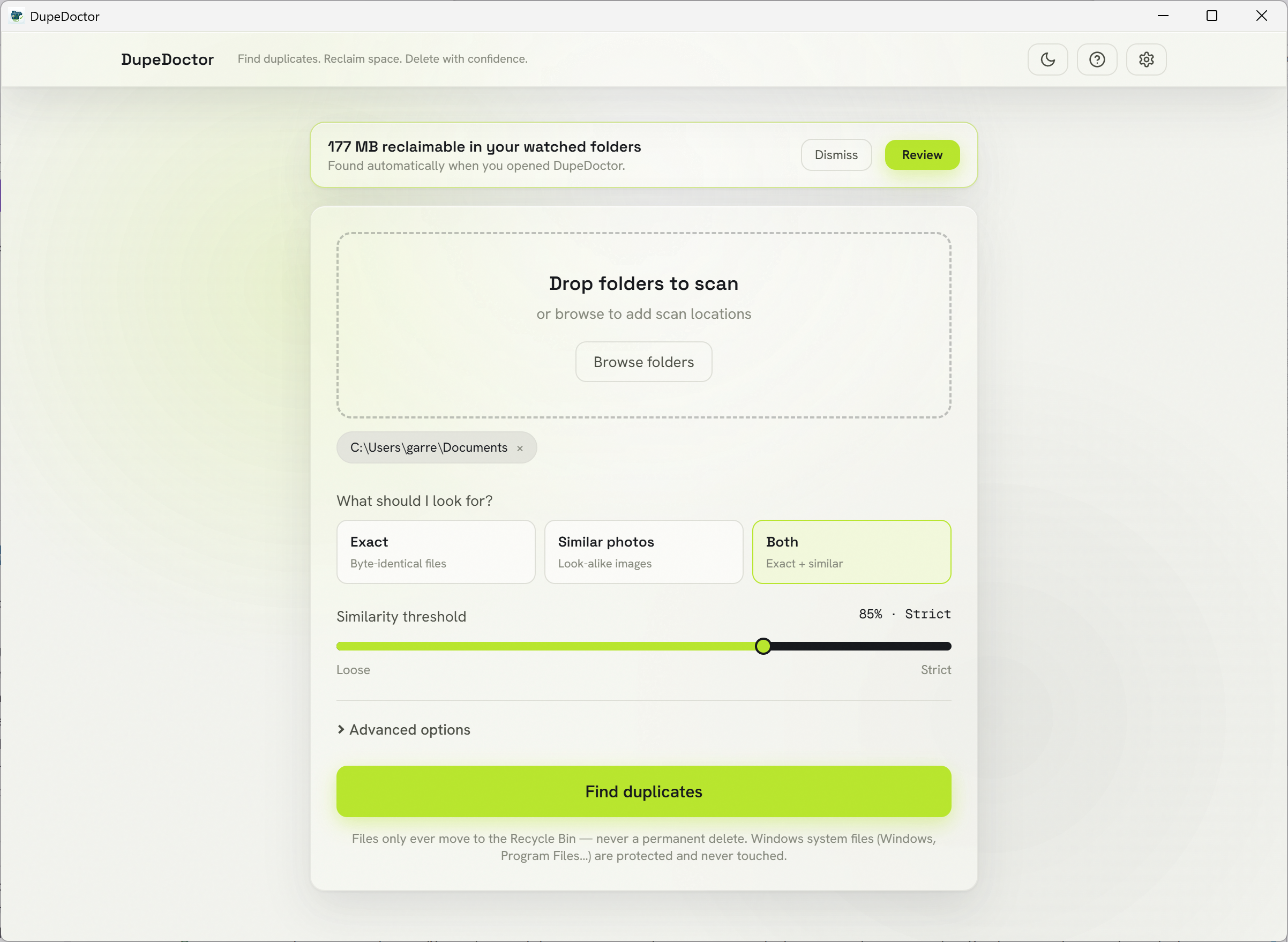
DupeDoctor watched-folder results shown on launch, summarizing reclaimable space without hijacking the UI.
Automation, on your terms: watched folders are quietly re-scanned on launch and summarized in a banner you can review or dismiss.

Automata Labs pricing philosophy

Reclaim your disk for the price of a coffee — once.

DupeDoctor follows the same ownership model as the rest of the Automata Labs catalog: $4.99 USD (list $7.99 USD) — one binary, a perpetual license, and no subscription taxing a local cleanup utility.

One-time purchase — no subscription to reclaim your own disk space
Pay once and keep the version you bought, forever
Backed by the Microsoft Store refund policy

Where it fits

  • Photographers reclaiming space from 3–5 copies of every shoot — keep the master, recycle the rest, with thumbnails and side-by-side compare
  • Consolidating overlapping backups across multiple drives using one-click keep-newest, keep-oldest, or keep-shortest-path strategies
  • Cleaning messy Downloads and Documents of "file (1)", "Copy of file" clutter and redundant installers
  • Finding resized or re-encoded photo copies (a 4000px master and its 1080px web export) without ever deleting the only original

Technical specifications

Technical specifications for procurement

Spec Implementation
Data Sovereignty Folder scans, hashes, and the persistent scan cache stay on your PC; file contents are read locally and never uploaded, and deletion only moves files to the Windows Recycle Bin
Telemetry Status None; the build ships with no network capability at all — verifiable with a network monitor (zero connections)
Core Runtime Rust (edition 2024) + Tauri v2 engine with multi-core BLAKE3 and perceptual hashing on a rayon pool; React 19 virtualized results grid
Network Requirements Fully functional offline; no HTTP client or network capability in the Tauri capability set, and a locked CSP forbids remote origins
Deployment Compatibility Windows 11 (recycle uses Windows shell APIs); one-time purchase on the Microsoft Store
Detection Exact (size → partial → full BLAKE3), copy-named, similar photos and videos (perceptual hash), duplicate audio, large/old files, installer clutter, and empty folders
Safety model Recycle Bin only (never a hard delete), keep-one-per-set, content-verified duplicates, similar matches never auto-selected, and protected system paths
Reclaim actions Safe recycle, move-to-quarantine with collision-safe renaming, and hardlink replacement gated by a full BLAKE3 re-verification
Automation Watched folders, launch re-scan, native notifications, system tray, run-on-login, and auto-keep rules
Results workflow Virtualized grid, image thumbnails, side-by-side photo compare, filter/sort, CSV/JSON export, and reveal-in-Explorer

Frequently asked questions

Quick answers about DupeDoctor

Will DupeDoctor delete my original files?

No. DupeDoctor keeps at least one file in every duplicate set, and deletion only ever moves files to the Windows Recycle Bin, so anything removed is recoverable. Exact duplicates are confirmed with a full BLAKE3 hash before they are flagged, and similar photos and videos are labelled “similar, not identical” and are never auto-selected — you choose them deliberately.

Can it find duplicate photos that were resized or re-encoded?

Yes. Alongside byte-identical matching, DupeDoctor uses perceptual hashing to cluster look-alike images — the same photo saved at a different resolution, lightly cropped, or re-encoded (JPG vs PNG, web exports). Each match gets a similarity score and a side-by-side compare with dimensions and file size so you keep the highest-quality original.

Is it safe? Can I undo a deletion?

DupeDoctor is built trust-first. Files go to the Recycle Bin (never a permanent delete), so a one-click restore is always available. The keep-one rule, content-verified duplicate confirmation, and a protected-system-path guard that refuses to touch OS files are all enforced in code — not just in the interface.

Does DupeDoctor work offline, or does it upload my files?

It is 100% offline. The build ships with no network capability at all — no HTTP client, no telemetry, no account, no cloud — and a locked content-security policy forbids remote origins. Open a network monitor while it scans and you will see zero connections. Your files never leave your PC.

How is DupeDoctor different from dupeGuru or CCleaner?

DupeDoctor is a polished, Store-native, one-time purchase with no ads, no upsells, and no telemetry. It finds nine kinds of clutter from a single scan — not just exact duplicates — including similar photos and videos, duplicate music, copy-named files, large and old files, installer clutter, and empty folders, with reclaim actions (safe recycle, move-to-quarantine, and BLAKE3-verified hardlinking) that the dated free tools in this niche lack.

How much does DupeDoctor cost?

DupeDoctor is a one-time purchase on the Microsoft Store — $4.99 USD (regular $7.99 USD), no subscription and no account. You own the version you buy, and it is backed by the standard Microsoft Store refund policy.

Stop letting duplicates eat your drive.

DupeDoctor finds every duplicate file and look-alike photo, shows you exactly how much space you can reclaim, and recycles the extras safely — Recycle Bin only, keep-one by design, 100% offline. Pay once, own forever.

$4.99 USD — Perpetual License

One-time purchase · Lifetime updates · Delivered via the Microsoft Store

Purchased and updated securely through the Microsoft Store. No account needed on our site, no subscription, and a Microsoft receipt for easy corporate expensing.

Review what it finds