ContextCleaner: see every entry in the Windows 11 right-click menu, and which app added it — on the Microsoft Store.
Windows 10 & Windows 11 Updated 2026-10-15

Open a PST without Outlook and export the mail you need, on this PC.

PstVault is a Windows app from Automata Labs that opens an Outlook data file (.pst) without Outlook, searches it by sender, recipient, subject, body, and date, and exports the messages you pick as EML, PDF, offline HTML, vCard 4.0, iCalendar, or a contact CSV, on your PC with nothing uploaded. Combine a selection into one bookmarked PDF, keep every original attachment, and get a JSON report with a SHA-256 hash for each file written. The PST is opened read-only and never changed.

One-time purchase · 15-day free trial in the Microsoft Store · One-time purchase. No subscriptions. Local-first.
Pay once. Own it forever.

One-time purchase on the Microsoft Store · No subscription · Instant install

Buy through the Microsoft Store—instant install, automatic updates, and a Microsoft receipt for easy expensing. No account needed on our site, and no subscription on Store purchases.

How it works See the screens

no outlook needed · seven export formats · bookmarked pdf · json report with sha-256 · pst never changed · nothing uploads

PstVault folder tree, message list, and preview

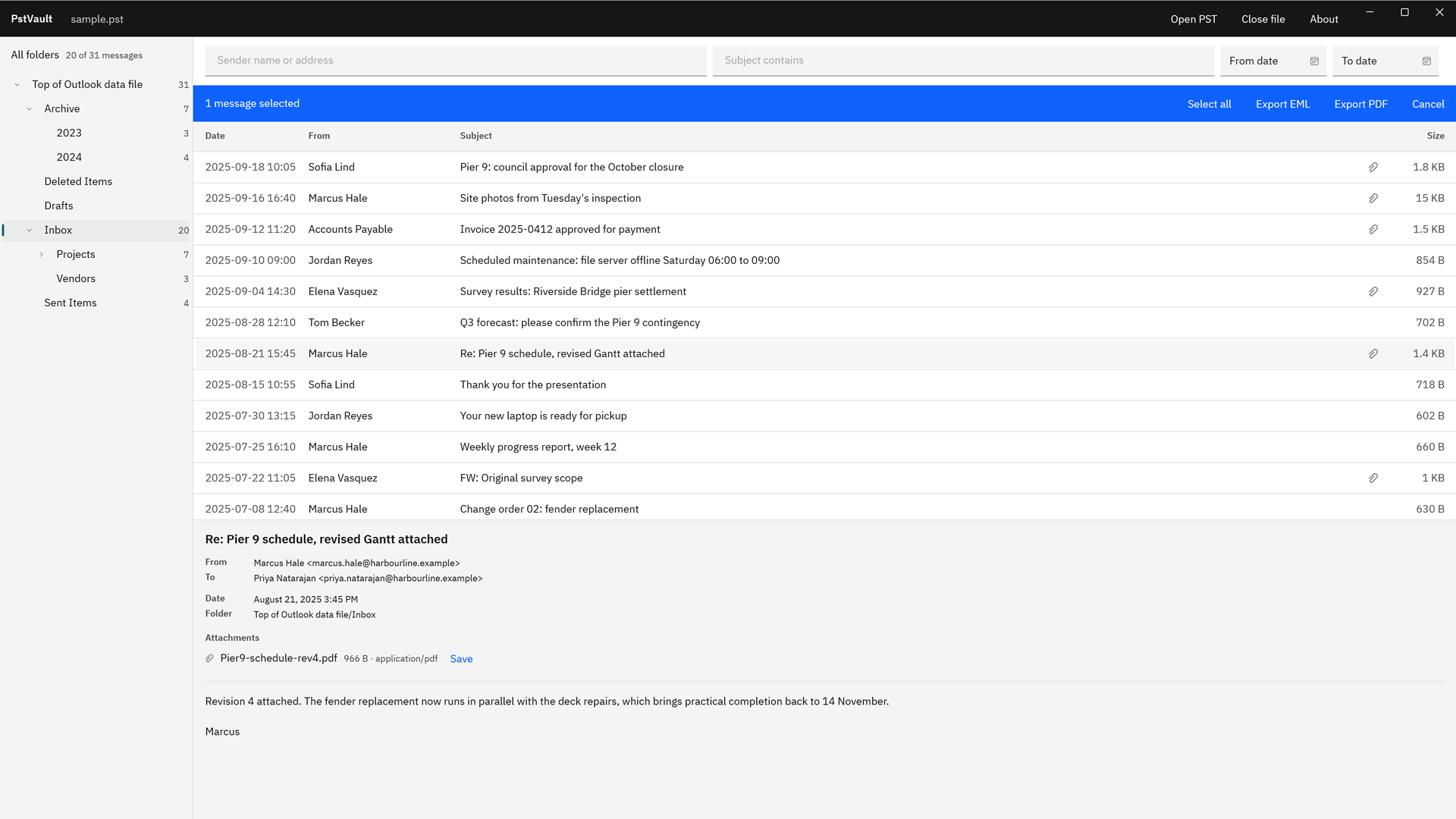
PstVault with a sample PST open: the folder tree with message counts, the Inbox listing 20 of 31 messages by date, sender, and subject, and a preview of one message with its sender, recipient, folder, and a PDF attachment with a Save link.
Browse the folders of a PST, read any message, and see its attachments before you export.

The problem

The mail you need is in a PST, and Outlook is not on this PC.

A departed colleague’s mailbox, an old backup, an archive handed over by IT or a client: the messages are inside a .pst file, and the usual way in is to install Outlook, attach the file to a mail profile, and dig through it there. All you wanted was a few dozen messages and their attachments as files you can read, send, print, or keep.

With PstVault

Open the file. Find the mail. Export what you pick.

PstVault reads the PST in place, read-only, and shows its folders with message counts. Filter by sender, recipient, subject, body text, or date, select the results, and export them as EML, PDF, offline HTML, or contact and calendar files. The folder you choose gets the files, the original attachments if you want them, and a JSON report of everything saved.

Key benefits

Search the archive and keep what matters, in the format you need

Opens a PST without Outlook

PstVault reads Outlook data files directly, so Outlook does not need to be installed, signed in, or set up with a mail profile. Choose Open PST, double-click a .pst in File Explorer, or reopen one from the Recent list, and the folder tree appears with a message count for every folder, from Inbox and Sent Items to the archive folders someone made years ago.

Find mail by sender, recipient, subject, body, or date

Filter one folder or a whole subtree. Sender and Subject sit above the list, and More filters adds Body, Recipient, From date, and To date. Results are listed newest first, and a body search shows how far it has read.

One bookmarked PDF, or one per message

Export a selection as one PDF with a bookmark per item, or one PDF per item, on Letter or A4. Append PDF, PNG, JPEG, and text attachments as pages, and embed the original files in the PDF.

EML and offline HTML with the attachments

EML files keep the headers, the message bodies, and the attachments in the standard format mail apps open. The HTML reading copy is sanitized, shows inline pictures from local files, and opens offline in any browser.

Contacts and calendars in their own formats

Contacts export as vCard 4.0 or one CSV table for Excel, and calendar events as .ics with all-day events, recurring series, and time zones. Native files picks EML, VCF, or ICS for each item by its type.

A report of everything saved

Each export writes a JSON report: the source, the filters behind the selection, every item with the format it was saved in and the file it became, and the size and SHA-256 hash of each file, read back from the folder.

The PST stays exactly as it was

The archive is opened read-only and never written. Exports are new files in the folder you choose, and a file that already exists there is never replaced.

How it works

Open, find, pick, export

Open

Choose Open PST, or double-click a .pst file in File Explorer. PstVault opens it read-only and lists every folder with its message count. Recent keeps the archives you opened last, ready to reopen.

Find

Pick a folder or All folders, then type a sender or subject. More filters adds body text, recipient, and a date range. Select any item to read its headers, folder, and attachments.

Pick

Select the messages you need, or choose Select all results. The bar above the list counts the selection and offers Export files and Export PDF.

Export

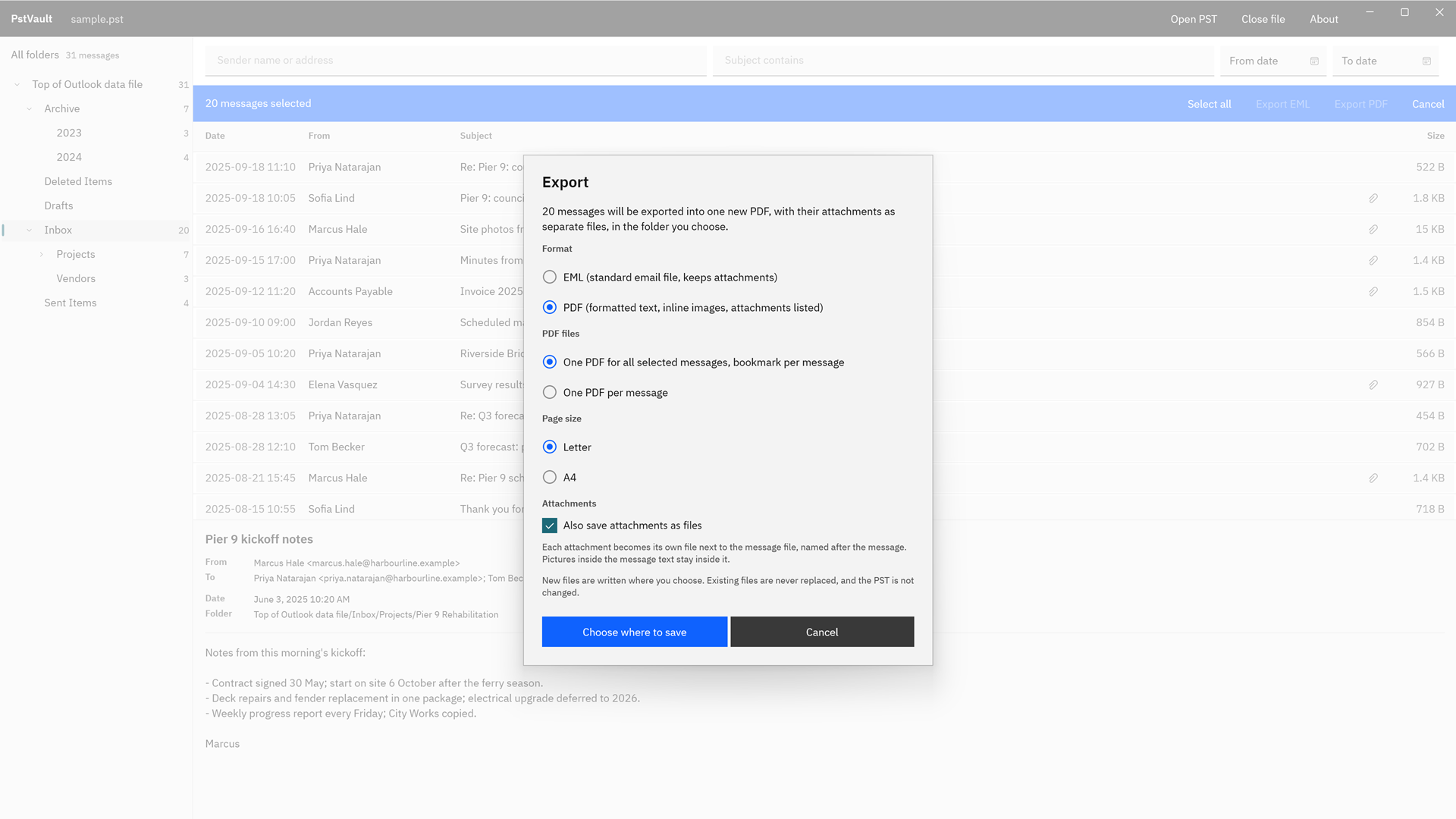
Choose a format, set the PDF and attachment options, then Choose where to save. The files land in that folder named by date and subject, next to a JSON report of everything saved.

Every export is named by date and subject, so the folder reads like the mailbox it came from. See everything an export can include.

See it in action

The archive, the search, and the export

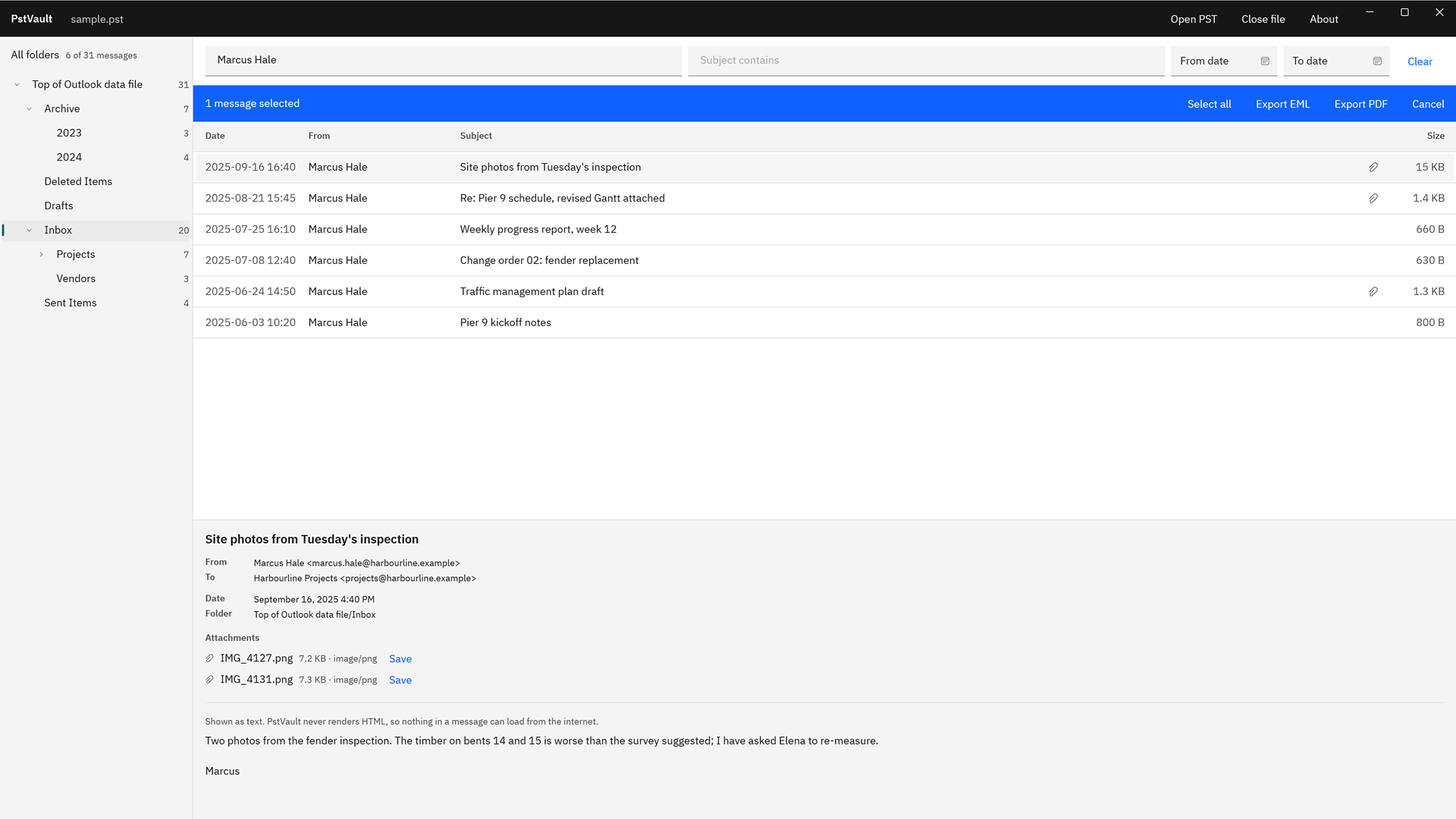
PstVault filtered by the sender Marcus Hale, showing six matching messages out of 31 and a preview of a site photos message with two PNG attachments, each with a Save link.
Filter one folder or a whole subtree by sender, subject, body, recipient, and date. Save any attachment straight from the preview.
The PstVault Export dialog for 20 selected messages, with PDF chosen, one PDF for all selected messages with a bookmark per message, Letter page size, and attachments saved as files.
Pick the format and the PDF options. New files go where you choose, and existing files are never replaced.
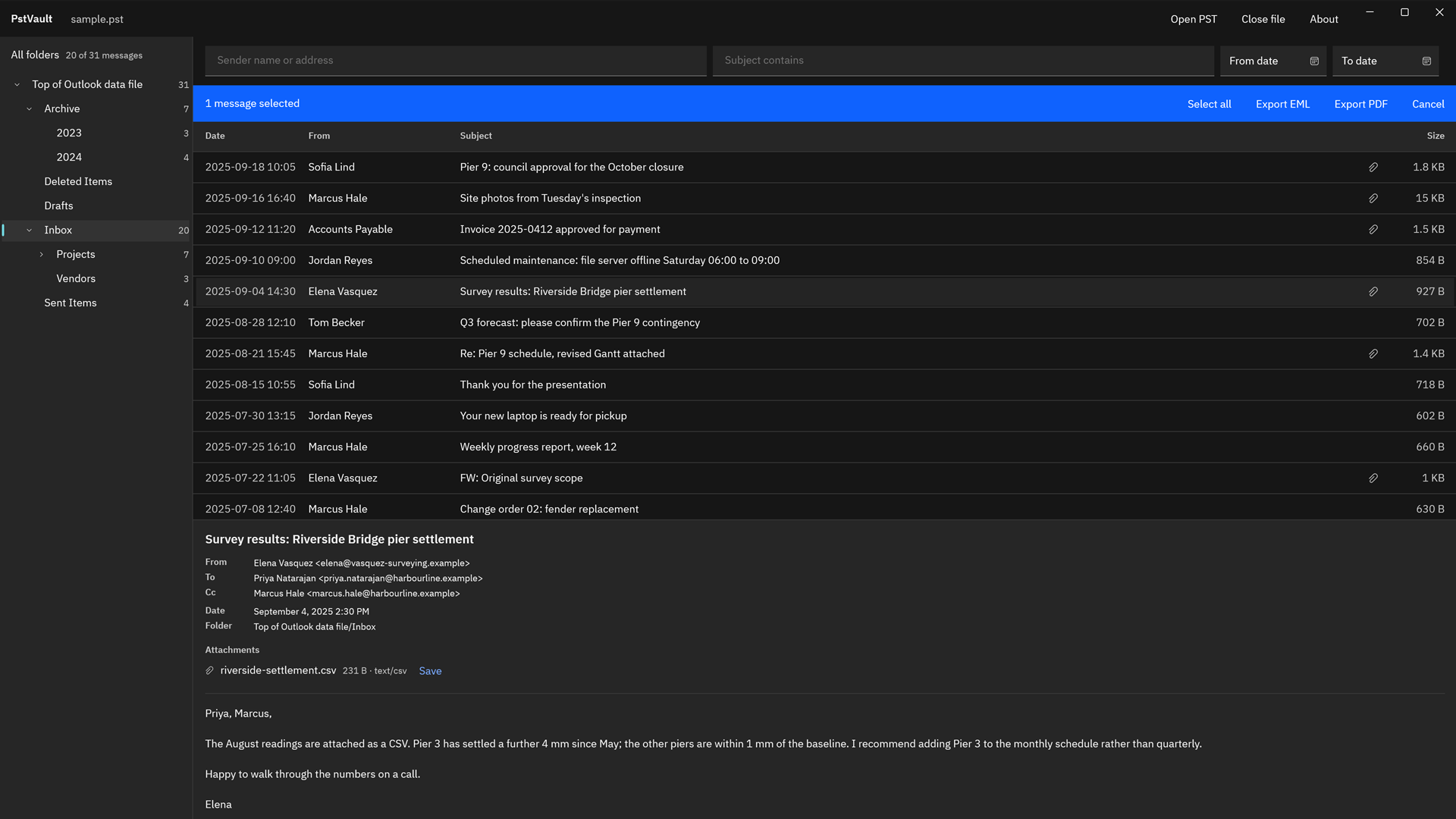
PstVault in the dark theme with the Inbox listed and a survey results message previewed, showing its To and Cc lines and a CSV attachment.
PstVault follows your Windows light or dark theme.
PstVault showing the folders of a sample PST, including Archive, Inbox, Projects, Vendors, and Sent Items with their message counts, and one selected message ready to export.
Every folder with its message count, and every message with its sender, recipients, folder, and attachments, one click from export.

Screenshots use a sample PST generated for testing, with invented people and companies.

Privacy

Nothing uploads

PstVault runs on your PC in the Windows app sandbox and declares no capabilities. It makes no network connections, has no account, and collects no telemetry. It reads only the PST you open, read-only, writes only to the folder you choose, and keeps its settings and recent-file list in its own local storage.

The preview shows message text, and the offline HTML copy loads no remote content and runs no scripts, so nothing inside an old message can reach out to the internet while you read it.

What you get

  • EML files with the headers, the message bodies, and the original attachments
  • One PDF per message, or one PDF for the selection with a bookmark per item
  • PDF, PNG, JPEG, and text attachments appended as pages, and originals embedded in the PDF
  • An offline HTML reading copy that opens in any browser, with inline pictures saved beside it
  • Contacts as vCard 4.0 files, or one contact table (.csv) that opens in Excel
  • Calendar events as .ics files, with recurring series, all-day events, and time zones
  • Original attachments, inline pictures included, saved as ordinary files beside each message
  • A JSON export report with the size and SHA-256 hash of every file written

Try it on the PST you already have.

The Microsoft Store runs a 15-day free trial with every feature. Open the archive you need to search, find the messages, and export them to a test folder as PDF, EML, or HTML. If it does the job, buy it once. There is no subscription.

Pay once. Own it forever.

One-time purchase on the Microsoft Store · No subscription · Instant install

Buy through the Microsoft Store—instant install, automatic updates, and a Microsoft receipt for easy expensing. No account needed on our site, and no subscription on Store purchases.

Who uses it

  • Office managers and IT staff who receive a departed employee’s PST and need specific emails out of it without installing Outlook
  • Paralegals and bookkeepers gathering correspondence or emailed invoices from an archive into one bookmarked PDF or a folder of EML files
  • People who find an old Outlook archive on a backup drive and want to read it, save the attachments, and keep the mail as PDF or HTML
  • Consultants and small businesses moving contacts and calendar items out of an old PST into a CRM, a phone, or a shared calendar

FAQ

Quick answers about PstVault

What is PstVault?

PstVault is a Windows app that opens an Outlook data file (.pst) without Outlook, searches it by sender, recipient, subject, body, and date, and exports the messages you pick as EML, PDF, offline HTML, vCard 4.0, iCalendar, or a contact CSV, on your PC with nothing uploaded. Every export comes with a JSON report of what was saved.

Can I open a PST file without Outlook installed?

Yes. PstVault reads the PST directly, so Outlook does not need to be installed, signed in, or set up with a mail profile. Choose Open PST, double-click a .pst file in File Explorer, or reopen one from the Recent list. It opens Unicode PST files, the format Outlook 2003 and later versions create.

How do I find specific emails in a PST?

Pick a folder, or All folders, and type in Sender or Subject above the list. More filters adds Body, Recipient, From date, and To date, and the filters cover the selected folder and everything under it. Results are listed newest first, and a body search shows how many messages it has searched.

Which formats can PstVault export?

Seven: Email (.eml), PDF reading copy (.pdf), HTML reading copy (.html), Contacts (.vcf, vCard 4.0), Calendar (.ics), Contact table (.csv), and Native files, which picks .eml, .vcf, or .ics for each item by its type. Choose the format in the Export dialog, then Choose where to save.

Can it put many emails into one PDF?

Yes. Choose One PDF for the selection, bookmark per item, on Letter or A4 paper. Each message starts on a new page with its headers, text, and inline pictures. Turn on Append supported attachments as PDF pages to add PDF, PNG, JPEG, and text attachments as pages, and Embed original attachments in PDF to carry the files inside it.

How do I save the attachments?

Select a message and choose Save next to any attachment in the preview. For a whole selection, turn on Also save original attachments as files in the Export dialog: every original, inline pictures included, is saved beside its message, named after the message date and subject, so each file stays with the mail it came from.

Can it export contacts and calendar items?

Yes. Contacts export as vCard 4.0 files or as one contact table (.csv) per selection, with names, company, job title, up to three email addresses, phones, addresses, and notes, ready for Excel. Calendar items export as .ics files with timed and all-day events, recurring series, deleted occurrences, and time zones.

What is in the export report?

Each export writes a JSON file named PstVault export report, with the date and time, into the same folder. It records the source PST, the folder and filters behind the selection, every selected item with its folder path, subject, the format it was saved in and the file it became, and the size and SHA-256 hash of every file written.

What happens to my original PST?

It stays exactly as it was. PstVault opens the PST read-only and never writes to it. Every export is a set of new files in the folder you choose, each written to a temporary name first and then committed, and a file that already exists in that folder is never replaced.

How does PstVault keep my mail private?

Everything stays on your PC. PstVault runs in the Windows app sandbox with no declared capabilities, makes no network connections, has no account, and collects no telemetry. The preview shows message text, and the offline HTML copy loads no remote content and runs no scripts, so nothing in an old message can reach the internet.

What does it cost, and is there a trial?

PstVault is a one-time purchase in the Microsoft Store, and the listing shows the current price in your currency. The Store runs a 15-day free trial with every feature, and there is nothing to activate in the app. There is no subscription, and the Store installs and updates it.

What Windows version do I need?

Windows 10 version 2004 or later, or Windows 11, on an x64 or ARM64 PC, with at least 4 GB of RAM and 300 MB of disk space plus room for your exports. For archives above 50,000 messages, 8 GB of RAM is recommended.
Still stuck? Email [email protected] after checking the Support Center.

Technical specifications

Technical specifications

Spec Implementation
Data Sovereignty Reads only the PST you open, read-only, from the Windows file picker or a File Explorer double-click; writes new files and the JSON export report only to the folder you choose, never replacing an existing file; settings and the recent-file list stay in the app’s own local storage
Telemetry Status None; no account, no telemetry, and the app makes no network connections
Core Runtime .NET 10 and WinUI 3 (Windows App SDK), packaged as MSIX; runs in an AppContainer with no declared capabilities; reads the PST with its own managed reader, with no Outlook or MAPI needed
Network Requirements Fully functional offline; the app makes no network connections
Deployment Compatibility Windows 10 version 2004 or later and Windows 11, x64 or ARM64; one-time purchase on the Microsoft Store with a 15-day free trial
Inputs Outlook data files (.pst) in the Unicode format created by Outlook 2003 and later; open from the file picker, a File Explorer double-click, or the Recent list
Search Sender, subject, body, recipient, and a from and to date, across one folder and its subfolders or all folders; results listed newest first
Export formats Email (.eml), PDF reading copy, HTML reading copy, Contacts (.vcf, vCard 4.0), Calendar (.ics), Contact table (.csv), and Native files (EML, VCF, or ICS per item)
PDF options One PDF for the selection with a bookmark per item, or one PDF per item; Letter or A4; PDF, PNG, JPEG, and text attachments appended as pages; original attachments embedded
Attachments Save any attachment from the preview, or save every original, inline pictures included, beside its message on export
Export report JSON report per export: source, folder and filters, each item with its format and output file, and the size and SHA-256 hash of every file written, read back from the destination
System requirements 4 GB of RAM and 300 MB of disk space plus room for exports; 8 GB of RAM recommended for archives above 50,000 messages

Windows Tips & Tools

What Is in %USERPROFILE%\AppData\Local? AppData Local vs Roaming vs LocalLow Explained

What AppData Local, Roaming and LocalLow hold in Windows 11 and 10, how to open them, why AppData gets big, and what you can safely delete.

Windows Tips & Tools

Microsoft 365 Subscription Ended? How to Still Read Your Old PST Email Archives

What happens to Outlook and your PST archives when a Microsoft 365 subscription ends, personal or business, and how to keep reading and exporting old mail.

Windows Tips & Tools

How to Find Old Outlook PST Files on an Old Hard Drive or Backup

Where Outlook kept PST files on Windows 10, 11 and older versions, how to search a whole drive for them, and how to tell a real mail archive from an OST cache.

Windows Tips & Tools

"The File Is Not an Outlook Data File (.pst)": What the Error Means and How to Get Your Mail Back

What the Outlook error "is not an Outlook data file (.pst)" means, how to check a PST's header without Outlook, and how to get the mail out safely.

Workflow

How to Export Calendar Appointments From an Old PST File Without Outlook (to .ics)

Get appointments out of an old Outlook PST as .ics files without Outlook: what exports, what Google Calendar imports, and when Outlook is the better tool.

Workflow

How to Pull Emailed Invoices and Receipts Out of an Old Outlook PST for Taxes or an Audit

Find a tax year's emailed invoices and receipts in an old Outlook PST and hand over one bookmarked PDF plus the originals, without Outlook.

A PST in. The messages you need out.

PstVault opens the archive without Outlook, finds the mail by sender, recipient, subject, body, or date, and exports it as EML, PDF, offline HTML, vCard, ICS, or CSV with a report of every file. The PST is never changed, and nothing uploads.

One-time purchase. No subscriptions. Local-first.

Pay once. Own it forever.

One-time purchase on the Microsoft Store · No subscription · Instant install

Buy through the Microsoft Store—instant install, automatic updates, and a Microsoft receipt for easy expensing. No account needed on our site, and no subscription on Store purchases.

Browse catalog

Microsoft and Outlook are trademarks of the Microsoft group of companies. PstVault is not affiliated with or endorsed by Microsoft.