STL stores only a list of triangles, with no units, colors, or parts. 3MF stores the mesh together with its units, colors, materials, components, placement on the build plate, metadata, and a thumbnail, in one zipped package. OBJ sits in between, with named groups and material references. For a single-color part, STL works well. For multi-color, multi-part, or project files, 3MF keeps more of the job together, and it should be repaired as a 3MF rather than converted to STL first.
The choice matters most when a file is broken. A 3MF can lose its colors and layout if the repair route understands triangles alone.
Repair STL, OBJ, and 3MF files in their own format, on your own PC.
Get it from Microsoft
The three formats side by side
| STL | OBJ | 3MF | |
|---|---|---|---|
| What it stores | Triangles, each with its own three corners and a normal | Vertices, faces, optional texture coordinates and normals | Meshes with shared vertices, inside a zipped package |
| Units | None | None | Micron, millimeter (the default), centimeter, inch, foot, or meter |
| Colors and materials | No standard way; some programs use spare bytes | Material references to a separate .mtl file | Color groups, base materials, and textures, per object or per triangle |
| Several parts | One surface, or several pieces with no names | Named objects and groups | Named objects, plus components that reuse one object several times |
| Placement on the plate | None | None | Build items with their position |
| Thumbnail and metadata | An 80-byte header in binary files | Comments | A preview image and named metadata |
| Mesh rules | Written down by no standards body | None | The core specification requires model meshes to be closed and consistently oriented |
| How MeshMedic exports a repair | STL again, binary or ASCII as it was, with each triangle’s attribute bytes kept | OBJ again, with objects, groups, materials, and smoothing groups kept | 3MF again, with every other part of the package copied byte for byte |
STL: the common denominator
Binary STL has an 80-byte header, a triangle count, and 50 bytes per triangle; ASCII STL spells the same data out as text, from solid to endsolid. Every slicer reads it. The cost is that STL holds nothing but triangles: no units, so a part can arrive at the wrong scale, and no shared corners, so every edge has to be matched up before software can tell whether the surface is closed.
OBJ: groups and materials
OBJ is a text format that lists vertices, then faces that point back to them. It can name objects and groups, refer to materials in a separate .mtl file, and mark smoothing groups. Like STL, it has no units.
3MF: the whole job in one package
3MF is a ZIP archive that holds an XML model description, plus any textures and a thumbnail. Objects share vertices, colors and materials can be set per object or per triangle, components let one mesh appear several times, and build items record where each one sits on the plate. Slicers also save their own settings inside the package. The 3MF Core Specification requires every edge of a model mesh to be shared by exactly two triangles, with every triangle facing outward.
Why converting a 3MF to STL to repair it costs you
When a repair tool reads STL alone, the usual detour is to export the 3MF as STL, repair that, and import it again. The STL carries none of the colors, materials, components, or plate layout, so all of it goes back in by hand.
| Method | Colors and parts | Good fit | What to weigh |
|---|---|---|---|
| Export STL, repair it, rebuild the project | Colors and materials dropped, parts merged | Single-color, single-part models | The project has to be rebuilt in the slicer afterward |
| Let the slicer repair on import | Depends on the slicer | Quick personal prints | The fix usually stays inside that slicer, with no corrected file |
| An online repair service | Varies by service | Non-sensitive files | The project is uploaded |
| MeshMedic | Kept, with only the repaired mesh rewritten | Multi-color and multi-part projects, and shop intake | Why it works: the rest of the package is copied byte for byte, and the table, preview, and note show what changed |
Meet MeshMedic
MeshMedic repairs a broken STL, OBJ, or 3MF on Windows and exports the same format, so a 3MF keeps its colors, materials, components, and build items.
It runs on Windows 10 version 2004 or later and Windows 11, on x64 PCs, in the Windows app sandbox with no network connections and no account.
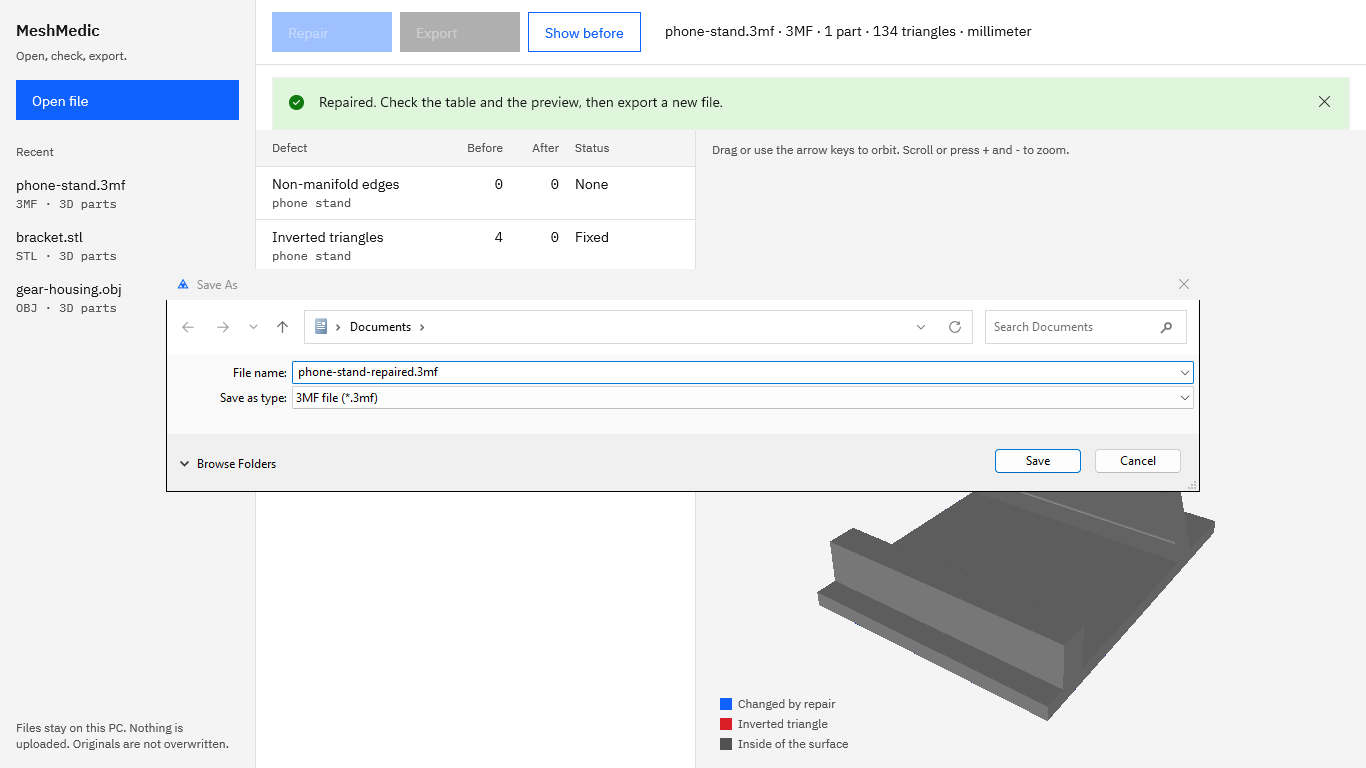
Screenshots show sample parts made for testing.
How to repair a 3MF in MeshMedic and keep its colors
- Open the 3MF. Choose “Open file” and pick the file. The label shows the name, the format, the parts, the triangle count, and the unit, for example
phone-stand.3mf · 3MF · 1 part · 134 triangles · millimeter. - Read the rows for each object. Every mesh object gets its own rows for “Non-manifold edges”, “Inverted triangles”, and “Holes”, labeled with its name. An object used twice shows a count such as ×2, and modifier volumes saved inside one object are listed as separate parts.
- Choose “Repair”. Each triangle keeps its color or material reference through the repair. Triangles added to cap a hole take the object’s default color or material.
- Check the result. The “After” column and the status fill in, repaired and added triangles turn blue in the preview, and “Show before” switches back to the mesh as it was.
- Choose “Export”. The save dialog suggests the original name with -repaired added and the type “3MF file”. MeshMedic copies the rest of the package byte for byte and replaces only the vertices and triangles of the repaired objects.
- Keep the note. The note lists each object’s counts before and after and the triangles flipped, added, and removed. Choose “Copy” or “Save note”.
- Open the new 3MF in your slicer. The objects, colors, components, and plate layout are where they were, with the repaired meshes in place.
Repair a 3MF and keep its colors during the 15-day free trial.
Get it from Microsoft
For the details of what MeshMedic keeps, see 3MF repair that keeps colors, materials, and parts. When the file is a plain STL, the guide to repairing an STL file covers binary and ASCII. For the errors themselves, read STL mesh errors explained.
Frequently asked questions
Is 3MF better than STL for 3D printing?
For multi-color, multi-material, or multi-part jobs, 3MF keeps far more of the job in one file: units, colors, materials, components, plate layout, and a thumbnail. For a single part in one color, STL works well and every tool reads it.
Does 3MF store units?
Yes. A 3MF model declares its unit: micron, millimeter, centimeter, inch, foot, or meter, with millimeter as the default. STL and OBJ store plain numbers, so the reading program has to assume a unit. MeshMedic shows a 3MF’s unit in the file label and writes it back unchanged.
What does MeshMedic keep in an OBJ?
The objects and groups, the material library and material assignments (mtllib and usemtl), and the smoothing groups. Each OBJ group is read as its own part, so the table shows which group holds a defect. The export writes vertices and triangle faces, with a comment on the first line that names MeshMedic and sums up the repair.
Can I repair a 3MF that a slicer saved as a project?
Yes. MeshMedic reads every model part in the package, repairs the mesh objects, and copies the slicer’s own settings files across byte for byte. Modifier volumes saved inside one object are listed and repaired as separate parts and written back into the same object, so the project opens in the slicer as it was saved.
Try MeshMedic
MeshMedic is a one-time purchase in the Microsoft Store, and the Store runs a 15-day free trial with every feature, so you can repair a real project 3MF and open it in your slicer before you buy. Nothing uploads, and the original is never overwritten. If the problem is triangles facing the wrong way, start with how to fix flipped normals in an STL file, and see everything else on the MeshMedic product page.
Repair STL, OBJ, and 3MF files without converting them.
Get it from Microsoft
Last updated 15 October 2026. Published by Automata Labs, a software company in Canada.