A Bates number format is a prefix, a zero-padded sequential number, and sometimes a suffix, such as ABC000001 or ABC-00000001. The prefix identifies the producing party or the matter, the zero padding keeps every label the same width so files and pages sort correctly, and each page gets the next number in a single sequence.
The format is usually settled once, early in discovery, and then has to hold for every production that follows. Changing the digit count or the prefix halfway through a matter means two numbering systems in one case file, so it pays to choose with the whole matter in mind, not just the first folder of documents.
Set a prefix, padding, and start number once and reuse them for every production.
Get it from Microsoft
The parts of a Bates number
| Part | Example | What it does | Common choice |
|---|---|---|---|
| Prefix | ACME, ABC- | Identifies the producing party, client, or matter | A few capital letters, the same in every production |
| Separator | -, _, . | Optional mark between the prefix and the number | Many protocols use none or a hyphen |
| Number | 00000001 | The page’s place in the sequence | Zero-padded to a fixed width |
| Suffix | .001 | Optional text after the number | Used only when an agreement or office convention calls for it |
In practice the separator is simply the last character of the prefix. In BatesBind, a prefix of ABC- with 8 digits and a start number of 1 gives ABC-00000001.
The Sedona Conference glossary describes Bates numbering as a sequential system that gives each page or file a unique number, often used together with a prefix or suffix. Court orders and agreements then fill in the details for a given matter.
How many digits to use
Six digits is a common default and covers up to 999,999 pages. Eight digits is common in larger matters and in many published ESI orders, and covers up to 99,999,999 pages. A useful rule is to size the padding for the largest the matter could become, not for the first production.
Two reasons to settle the digit count early:
- Sorting. Without leading zeros,
ABC10sorts beforeABC9in a plain text sort, and file lists, spreadsheets, and review tools can show pages out of order. With padding,ABC000009comes beforeABC000010everywhere. - Consistency. Some ESI orders say the number of digits should not change in later productions. A matter that starts at six digits should stay at six.
If a number ever grows wider than the padding, BatesBind prints it in full rather than cutting it short, but planning the width up front avoids that mismatch.
Prefix rules that avoid trouble
- No spaces. Some orders ask for labels without blank spaces, and a space inside a label is easy to misread when a page is cited.
- Plain characters. Letters, digits, and a simple separator. Some orders ask for no special characters at all, which rules out characters such as slashes and ampersands. BatesBind accepts letters, digits, hyphens, underscores, and periods, up to 32 characters, and refuses spaces.
- One prefix for the matter. The prefix should stay the same in every production from the same party, so every page in the case file reads as part of one series.
Writing a Bates range
A document is described by its first and last label, often called the beginning and ending Bates numbers:
| Document | Pages | Range |
|---|---|---|
| Master services agreement | 14 | ACME000001 to ACME000014 |
| Statement of work | 6 | ACME000015 to ACME000020 |
| Cover letter | 1 | ACME000021 |
A one-page document has a single label. A production letter usually gives the range for the whole production as well, and a production log lists the range for each document. When copies are named by their range, the file name reads ACME000015-ACME000020.pdf.
Gaps matter. Some ESI protocols ask that any skipped numbers be explained in the cover letter. If a file cannot be processed, a one-page slip sheet that holds one number keeps the sequence whole, and the log can say why that page is a placeholder.
Continuous or one range per document
Most productions use one continuous sequence, unique across the production, so no two pages anywhere share a label. Some exhibit sets are numbered differently, with each document’s pages starting again from the same value. In BatesBind, that is “Restart at the start number for each file”. Because labels then repeat across files, name the copies with “Bates range and original name” or keep the original names, so no two files collide.
Where the number goes
Several ESI orders put the Bates number in the lower right corner of every page and a confidentiality designation, if any, in the lower left, without obscuring the document’s content. BatesBind defaults to exactly that layout: the number at the bottom right, half an inch from the edges, at 10 points, and the legend at the bottom left. The order in your matter decides, and the settings let you follow it.
Meet BatesBind
BatesBind turns a chosen Bates format into labels on every page of a folder of PDFs, and keeps that format for the next production.
BatesBind is a Windows app that numbers a folder of PDFs with one continuous Bates range, adds a confidentiality legend and exhibit labels in the same pass, and writes the index as PDF and CSV, on your PC with nothing uploaded.
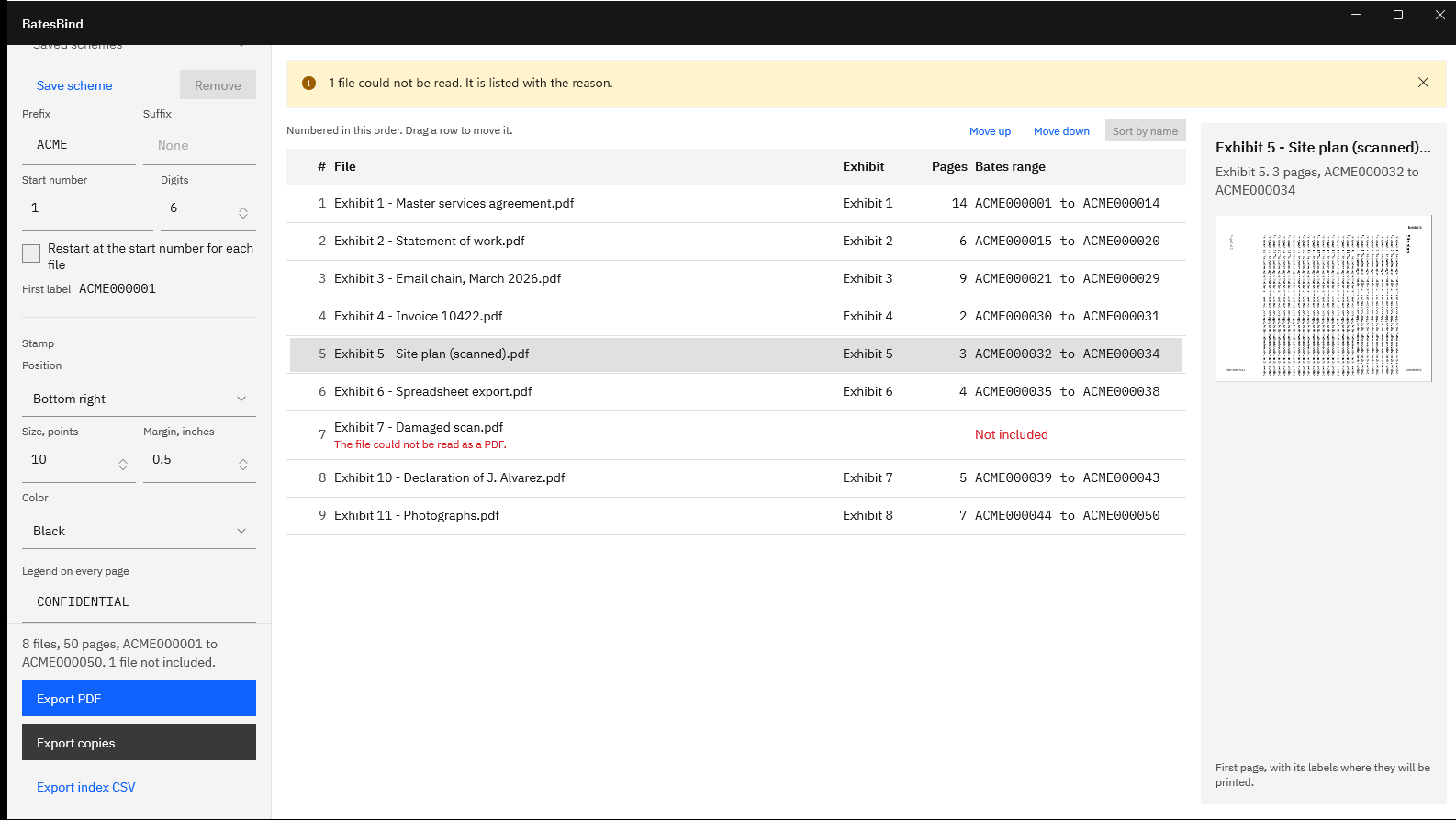
Screenshots use a sample exhibit folder generated for testing, with placeholder text and fictitious names.
Set the format in BatesBind
- Open the folder. Choose “Open a folder” or drop the folder on the window.
- Type the prefix. Under Numbering, type it in “Prefix”, including any separator, such as
ACMEorABC-. - Add a suffix only if needed. “Suffix” follows the same character rules as the prefix.
- Set the width. Set “Digits” to the padding you chose, from 1 to 15.
- Set the start. Type the “Start number”: 1 for a first production, or the next number for a later one.
- Read the first label. “First label” shows exactly what page one will carry, such as
ACME000001, and the table shows every file’s range. - Save the scheme. Choose “Save scheme” and give it the matter’s name. A saved scheme keeps the prefix, suffix, digits, start number, and legend, and its start number moves on after each export.
- Continue next time. After an export, “Last export ended at” shows the last label, and “Continue” sets the start number to the next one.
Check your matter’s format in the First label preview before anything is stamped.
Get it from Microsoft
For applying the format across a whole folder, see Bates stamp a folder of PDFs, and for the list of ranges that goes with a production, the Bates production log guide.
Limits
- The label is prefix, number, and suffix in one monospaced typeface; there are no date stamps or extra text fields beyond the legend and exhibit labels.
- Six positions are available: top or bottom, left, center, or right.
- BatesBind numbers PDF files only, and does not run OCR, redact, or remove stamps added earlier.
- The format itself is set by the order or agreement in your matter. BatesBind makes no claim about what a court or opposing counsel will accept, and this article is general information, not legal advice.
Frequently asked questions
How many digits should a Bates number have?
Enough for the largest the matter could become, and the same in every production. Six digits covers up to 999,999 pages and is a common default; eight is common in larger matters and in many ESI orders. If an order or agreement specifies the count, follow it. BatesBind accepts 1 to 15 digits.
Can a Bates number contain letters or a hyphen?
Yes. The prefix is usually letters, often followed by a hyphen, as in ABC-00000001. Avoid spaces and special characters, which some orders exclude. In BatesBind, the prefix and suffix accept letters, digits, hyphens, underscores, and periods, up to 32 characters each, and the app refuses spaces with a message naming the problem.
What does a Bates range look like?
A range is the first and last label of a document, such as ACME000015 to ACME000020 for a six-page document. A one-page document has one label. A production log lists the range for every document, and a production letter usually gives the range for the whole set, from the first page to the last.
Should Bates numbers restart for each document?
Usually not. Most productions use one continuous sequence so every page has a unique label. Some exhibit sets number each document separately; BatesBind supports that with “Restart at the start number for each file”. Because labels then repeat across files, keep the file names distinct and follow the convention your order or agreement sets.
Try BatesBind
BatesBind is a one-time purchase in the Microsoft Store, with a 15-day free trial run by the Store, so you can set your matter’s format and check the labels on your own files first. Nothing uploads. See the BatesBind product page and its FAQ, or read how to Bates number PDFs on Windows for the full walkthrough.
Set the prefix and padding once and number the whole folder.
Get it from Microsoft
Last updated 7 October 2026. Published by Automata Labs, a software company in Canada.