To calculate flooring square footage from plans, measure each room’s length and width at the plan’s scale, multiply them, and split L-shaped rooms into rectangles. Group the rooms by flooring material, add each material’s waste allowance, and total. Carpet is often ordered in square yards, so divide its square feet by 9.
The arithmetic is simple. The work is in reading the plan: knowing which rooms get which floor, where one material stops and the next starts, whether closets and halls are included, and whether the room sizes on the drawing run to the face of each wall or to its center line.
Take flooring areas off your next plan PDF, room by room.
Get it from Microsoft
The manual method, step by step
- Find out which floor goes where. A finish plan or a room finish schedule names the flooring for each room. Mark each room on the floor plan with its material.
- Get each room’s size. Room tags often print a nominal size, such as 12’-6” x 10’-9”. Check it against the dimension strings, which show where the size is measured from.
- Convert feet and inches to decimal feet. Divide the inches by 12 and add them to the feet: 12’-6” is 12.5 feet and 10’-9” is 10.75 feet.
- Multiply. 12.5 x 10.75 is 134.375, so that room is about 134.4 square feet.
- Split odd shapes. Break an L-shaped room into two rectangles, measure each, and add them. Treat a closet or a hall as its own small rectangle if it gets the same floor.
- Total by material. Add up every room that gets carpet, every room that gets vinyl plank, and so on.
- Add waste. Multiply each material’s total by one plus its waste percentage. The right allowance depends on the material, the pattern, and how cut up the rooms are, so use the figure your supplier or installer works with.
- Convert for ordering. Divide carpet square feet by 9 for square yards. For boxed flooring, divide by the square feet in one carton and round up.
Here is a small worked example. The sizes are illustrative, not from a real job.
| Room | Size on the plan | Decimal feet | Area (sq ft) | Material |
|---|---|---|---|---|
| Bedroom 1 | 12’-6” x 10’-9” | 12.5 x 10.75 | 134.4 | Carpet |
| Bedroom 2 | 11’-0” x 10’-0” | 11 x 10 | 110.0 | Carpet |
| Living room | 18’-4” x 14’-0” | 18.333 x 14 | 256.7 | Vinyl plank |
| Kitchen, L-shaped | 10’-0” x 12’-0” plus 4’-0” x 6’-0” | 120 + 24 | 144.0 | Vinyl plank |
Carpet comes to 244.4 square feet, which is about 27.2 square yards before waste. Vinyl plank comes to 400.7 square feet before waste. Every figure in the table depends on reading the right size for each room, and that is where the care goes.
What to watch for on the plan
- Wall faces or center lines. Dimension strings can run to wall faces, stud faces, or center lines. Floors cover the room between finished wall faces, so know which the plan uses.
- Fixed cabinets and islands. Decide with the installer whether the floor runs under them, and leave them out of the area if it does not.
- Transitions. Where two materials meet in a doorway, decide which room the doorway belongs to, so it is counted once.
- Stairs. Treads and risers are not floor area on a plan. Count them, or measure them separately.
- Reduced prints. If you measure rather than read room tags, check the scale first; see how to set the scale on a PDF drawing.
On a large job, the risk moves from the arithmetic to the bookkeeping: a skipped closet, or a room counted under two materials.
Meet MeasureSet
MeasureSet measures flooring areas straight from the plan PDF: set the scale, click inside each room, and get totals by material for Excel.
MeasureSet is a Windows app for construction takeoff from plan PDFs: set the scale from a dimension you know, measure length, area, and counts, and export the totals to Excel, CSV, or a marked-up PDF. It works on your PC with no account, nothing uploads, and the plan PDF is never written over.
Flooring square footage in MeasureSet, step by step
- Open and calibrate. Choose Open > PDF plan and pick the set. On the floor plan sheet, choose Calibrate (C), click both ends of a long printed dimension, and type its length. Measure a second dimension with Segment (S) to check the scale.
- Choose the area unit. In the Units section under the Scale box, set the area unit to Square feet, or to Square yards to read carpet totals in yards.
- Label the first material. Under Next mark, pick a color and type a label such as Carpet.
- Click inside each room. Choose Room (R) and click inside each room that gets that floor. Its area appears in the Marks list. Where walls are drawn filled on a calibrated sheet, it measures wall to wall. Shift+click measures only the open floor, stopping at every drawn line, such as cabinets drawn against a wall.
- Switch materials. Change the label to LVP or Tile and click inside the rooms that get it.
- Outline what the room tool cannot close. For open-plan spaces, choose Area (A) and click around the boundary, or drag a rectangle. New points snap to the corners of areas already drawn, so adjoining areas meet.
- Take out what gets no floor. Keep the room’s label, tick Deduct from the total, then outline an island or a stair opening with the area tool. It comes off that label’s total.
- Add waste. Choose Select (V), click one Carpet area, and type the waste percent in the inspector. It applies to every area labeled Carpet, and the Totals list shows the area with waste beside the net area.
- Export. Choose Export > Excel workbook (.xlsx) for the order and the price, and Export > Marked-up plan (.pdf) to show the installer which rooms got which floor.
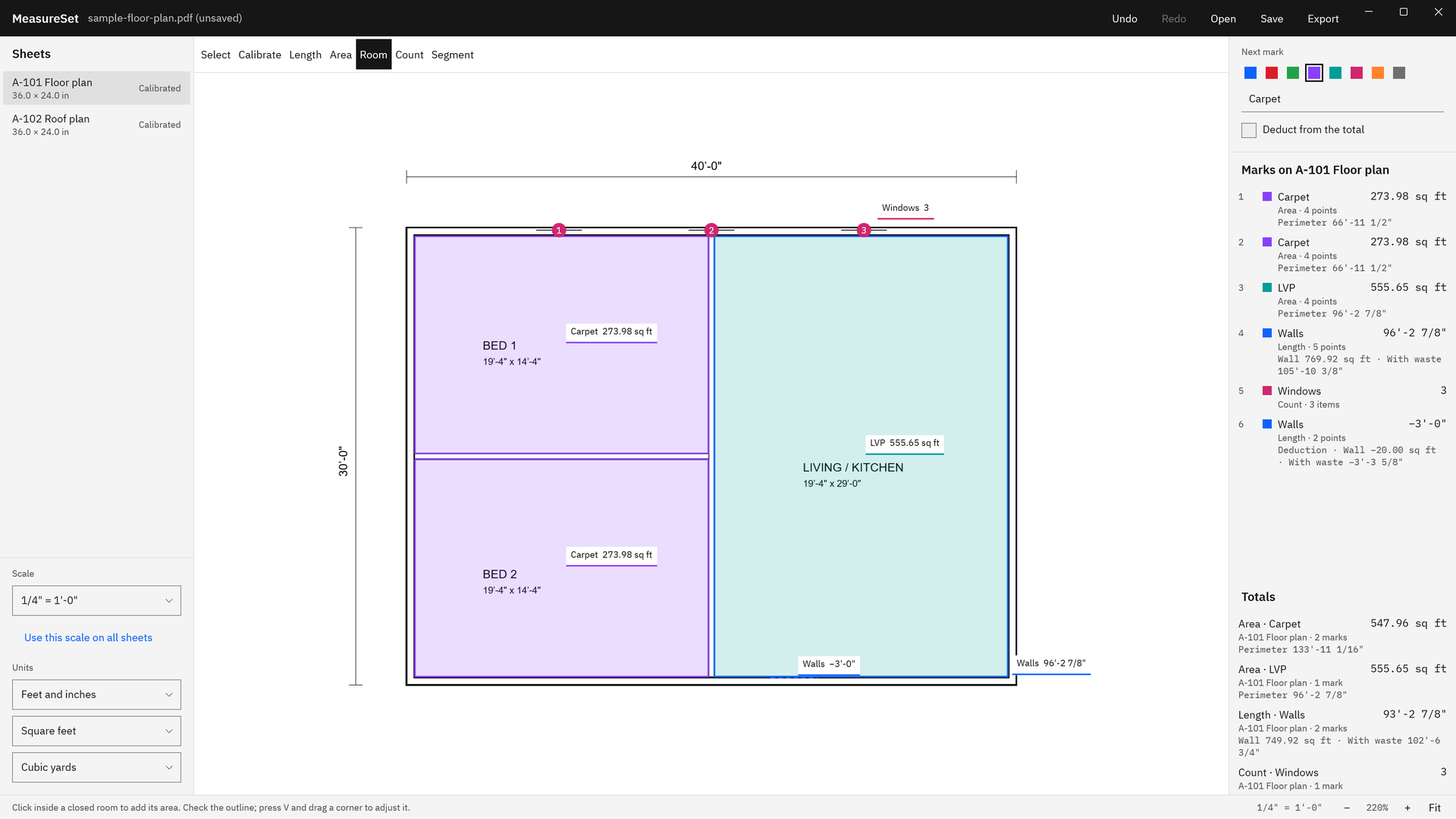
Screenshots use a sample floor plan drawn for software demonstration, not a real building or client.
Click inside each room and read the totals by material.
Get it from Microsoft
When the room tool needs help
The room tool reads the drawing, so it needs a closed room. It tells you when it cannot find one.
- Open-plan spaces. A kitchen open to a living room has no wall between them, so the space runs on. Outline each area with the area tool where the floor changes.
- Lines across the room. A dimension line drawn across a room can cut it in two. Outline that room by hand with the area tool.
- Doorways without door symbols. A gap in a wall with no door drawn can let the space run into the next room. Outline it point by point.
- Shapes inside the room. Closed shapes inside a room, such as furniture, count in its area, and MeasureSet says so when they make up 15% or more of the outline.
Remember that a measurement is only as good as the calibration and the drawing. A floor plan that is out of scale, or a room drawn smaller than its tag says, gives the wrong area however it is measured, so check a known dimension on every sheet.
For the bigger picture, see how to do a takeoff from a PDF plan, PDF takeoff software for Windows, and measure PDF drawings to scale.
Limits
- MeasureSet opens PDF files only, each sheet has one scale, and there is no circle or arc tool.
- It measures and totals areas. It does not lay out seams, plan cuts, or count cartons, and it has no cost database; those steps happen in your spreadsheet.
- The waste allowance is the percent you type, so set it from your supplier’s or installer’s figure.
See good to know before you buy for the full list.
Frequently asked questions
How do I convert square feet to square yards for carpet?
Divide the square feet by 9, because one square yard is three feet by three feet. A 244.4 square foot carpet total is about 27.2 square yards before waste. In MeasureSet you can set the area unit to Square yards, and the totals and the export then read in yards.
How much waste should I add to flooring square footage?
It depends on the material, the installation pattern, and the shape of the rooms, so use the allowance your supplier or installer works with for that product. In MeasureSet you type the percent once on a label, every area with that label carries it, and the totals show the area with and without waste.
Do I include closets in flooring square footage?
Include a closet if it gets the same floor as the room. Measure it as its own area with the same label, so it adds into that material’s total. If the closet gets a different floor, or none, give it a different label or leave it out, and the totals stay correct by material.
Can I measure flooring from a PDF plan without printing it?
Yes. Takeoff software measures the PDF on screen once the sheet has a scale. In MeasureSet you calibrate the floor plan from a printed dimension, click inside each room with the room tool, and export the area totals by material to Excel, with no printing and no retyping.
Try MeasureSet
MeasureSet is a one-time purchase in the Microsoft Store, and the Store runs a 15-day free trial with the full app, so you can take off a floor plan you have already bid and compare the areas. It works on your PC, and nothing uploads. See the screens and how it works on the MeasureSet product page.
Measure your next flooring job during the free trial.
Get it from Microsoft
Last updated 7 October 2026. Published by Automata Labs, a software company in Canada.