Yes, an iTunes or Apple Devices backup includes your text messages, unless they already sync with Messages in iCloud. Apple says a backup made on a computer leaves out iMessages and text (SMS) and multimedia (MMS) messages that already sync to iCloud. Then the backup may hold few or no conversations.
The question tends to come up at an awkward moment. An old phone has been replaced, a conversation is needed, and a backup on the PC may be where that conversation still lives. Before you spend time on it, it helps to know what Apple puts in a computer backup, and how to check a backup on your PC without restoring anything.
Open the backup on your PC and see which conversations it holds.
Get it from Microsoft
What does Apple say about messages in a backup?
Apple says a backup made on a computer leaves out iMessages and text (SMS) and multimedia (MMS) messages that already sync to iCloud. The page is Apple’s Backup methods for iPhone or iPad, published on 25 February 2025. Apple covers the setting separately, in its guide to Messages in iCloud.
Read Backup methods for iPhone or iPad for Apple’s wording. Apple explains the setting in its guide, Set up iCloud for Messages on all your devices. Use the free trial to see what your backup holds.
Text messages here means iMessages and SMS texts in the Messages app. BackupPaper reads the Messages app only. It does not read other chat apps, such as WhatsApp or Signal.
What else does a computer backup leave out?
On the same page, Apple says a computer backup includes almost all of your device’s data and settings. Apple lists what it leaves out, including data already synced and stored in iCloud, such as iCloud Photos and the messages above. Apple also lists Activity, Health and Keychain data, which a computer backup holds only when it is encrypted.
So a large backup folder is not proof that your conversations are inside. A backup can take plenty of space and still hold no messages if they sync with iCloud.
Meet BackupPaper
BackupPaper answers the question for your own backup: open it, and it lists the conversations inside with message counts and last dates.
BackupPaper is a Windows app that saves one conversation from an iPhone backup on your PC as a PDF or CSV file. It reads backups made by iTunes or Apple Devices, unencrypted or encrypted, and it opens them read-only. It makes no network connections, needs no account, and does not need the iPhone connected. For more on reading, see reading text messages from an iTunes backup.
How can I tell whether a backup has my messages?
Open the backup in BackupPaper during the 15-day free trial. It lists the conversations in the backup with message counts and last dates. If the backup holds none, BackupPaper says the backup has no conversations. The trial has every feature, so you can also export a conversation.
- Find the backup folder. See where iPhone backups are stored on Windows.
- Open BackupPaper and choose the backup folder. If the backup is encrypted, type the password you set.
- Read the conversation list. Each line shows a message count and a last date, newest first.
- If the list is empty, BackupPaper says the backup has no conversations.
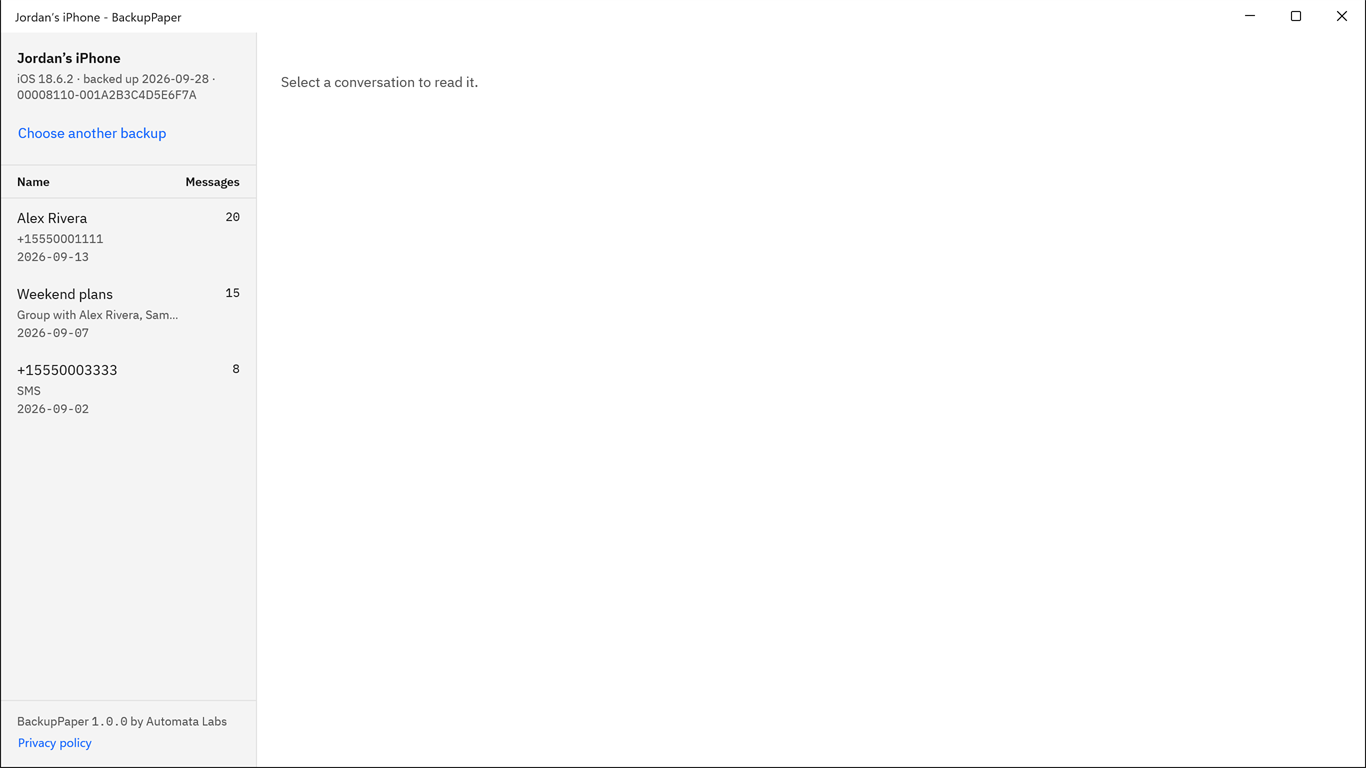
Screenshots use a synthetic backup with fictitious names.
BackupPaper shows the messages the backup holds. It does not bring back deleted messages. It runs on Windows 10 version 2004 or later and on Windows 11.
Check what your backup holds during the 15-day free trial.
Get it from Microsoft
What should I do if Messages in iCloud is on?
Read Apple’s guide to the setting before you change anything on the iPhone. Then make a new backup on your PC with Apple Devices or iTunes. Open it in BackupPaper to see which conversations it holds. BackupPaper reads backups on the PC only, not Messages in iCloud.
Apple’s guide is Set up iCloud for Messages on all your devices. To make the new backup, connect the iPhone with a cable in Apple Devices or iTunes and select it. Choose to back up to this computer, then choose Back Up Now. Apple describes this on its backup page. If you work in the Apple Devices app, our page on exporting text messages from the Apple Devices app picks up from there.
Do encrypted and unencrypted backups both hold messages?
Yes. Both kinds of backup hold messages, unless they already sync with Messages in iCloud. According to Apple, an encrypted backup also holds saved passwords, Wi-Fi settings, website history, health data and call history. You turn encryption on in iTunes or Apple Devices.
| Item | Where it is |
|---|---|
| Text messages | Both kinds of backup, unless they sync with Messages in iCloud |
| Saved passwords, Wi-Fi settings, website history, health data, call history | Encrypted backups, per Apple |
| How to turn it on | Choose Encrypt local backup in iTunes or Apple Devices and set a password |
| Opening it in BackupPaper | Encrypted backups need the password you set |
Apple covers this in its page on encrypted backups. Our guide explains how to open an encrypted iPhone backup on Windows.
What other ways are there to check?
There are a few ways to find out what a backup holds. Some answer a different question than the one you are asking.
| Method | What it tells you | Watch for |
|---|---|---|
| The Messages in iCloud setting on the iPhone | Whether messages sync with iCloud now | It does not say what an older backup holds |
| The size of the backup folder | How much space the backup takes | Size says nothing about messages |
| Restoring the backup to an iPhone | What comes back on the phone | You need a phone to restore, and an encrypted backup needs its password |
| Opening the backup in BackupPaper | Which conversations the backup holds, with counts and dates | It reads backups on the PC only |
Opening the backup on the PC is the direct check. It answers the question for that exact backup, without a restore and without changing anything, because BackupPaper opens the backup read-only.
Frequently asked questions
Can I read the text messages in an iTunes backup?
Yes, if the backup holds them. Open the backup in BackupPaper to see its conversations, with message counts and last dates. BackupPaper reads backups made by iTunes or Apple Devices on your PC, unencrypted or encrypted. For an encrypted backup, type the password you set.
Why does my backup have no conversations?
The backup may leave them out. Apple says a backup made on a computer leaves out iMessages and text (SMS) and multimedia (MMS) messages that already sync to iCloud. If Messages in iCloud is on, BackupPaper may say the backup has no conversations. It does not read iCloud.
Does BackupPaper read my phone or iCloud?
No. BackupPaper reads a backup that is already on your PC, made by iTunes or Apple Devices. It does not read the phone, iCloud backups or Messages in iCloud, so you do not need to connect the iPhone. It makes no network connections and uploads nothing.
Does a backup include deleted text messages?
BackupPaper shows the messages the backup holds and does not bring back deleted messages. A backup is a copy of what the phone held when the backup was made. To see what a particular backup holds, open it in BackupPaper and read the conversation list, with message counts and last dates.
Try BackupPaper
BackupPaper is a one-time purchase in the Microsoft Store, with a 15-day free trial run by the Store. The trial has every feature, with no watermark and no message limit, so you can open your backup and see whether your conversations are there before you pay. The Store installs and updates the app, and the receipt comes from Microsoft. Read more on the BackupPaper product page.
Find out what your backup holds before you buy.
Get it from Microsoft
Last updated 5 October 2026. Published by Automata Labs, a software company in Canada.
iPhone, iMessage and iTunes are trademarks of Apple Inc., registered in the U.S. and other countries and regions. BackupPaper is not affiliated with or endorsed by Apple.