Export emails from a PST as EML when the messages need to go into another mail program, an archive, or a review platform; as PDF when people need to read, print, or file them; and as offline HTML when someone needs to read them in a web browser with nothing else installed. Contacts belong in vCard or CSV, and calendar items in ICS. PstVault writes every one of these from a PST, on your PC, without Outlook.
Choose for the person who will open the export, with whatever they have: a mail app, a PDF reader, a browser, Excel, or a phone.
Export the same messages as EML, PDF, or HTML from one PST, on your own PC.
Get it from Microsoft
The formats at a glance
| Format | What it keeps | Opens in | Good fit |
|---|---|---|---|
| EML (.eml) | Headers, plain and HTML bodies, pictures in the body, and every attachment inside | Desktop mail programs, archiving systems, review platforms | Moving mail into another system, or sending someone the message itself |
| PDF (.pdf) | A reading copy: headers, text, pictures, and attachments as pages or embedded files | Any PDF reader, and any printer | Sharing with lawyers, accountants, and family, and printing |
| Offline HTML (.html) | A sanitized reading copy, with pictures and attachments saved beside it | Any web browser | Reading the mail with no mail program at all |
| vCard (.vcf) | One contact: names, organization, email addresses, phones, addresses, notes | Phones, mail apps, contact managers | Moving people into an address book |
| Contact CSV (.csv) | One table, a row per contact, with a header row | Excel, CRMs, database tools | Contact lists for spreadsheets and imports |
| iCalendar (.ics) | Events with start, end, location, attendees, recurrence, and time zone | Calendar apps | Moving appointments into a calendar |
EML: the message as a message
EML is the standard internet message format: the headers (From, To, Cc, date, subject, Message-ID) followed by the body and any attachments, all in one file.
PstVault rebuilds those headers from the PST, writes the plain and HTML bodies a message carried as alternatives, links pictures in the body as related parts so they show in place, and keeps every attachment inside the file. An email attached to another email becomes an EML inside its parent. Files are named by date and time, then subject, so a folder of exports sorts by date in File Explorer.
Choose EML when the messages are going into another mail app, an archiving system, or a review platform, or when the recipient needs the email itself rather than a picture of it. Our convert PST to EML page covers each header and part.
PDF: the message as a document
A PDF is the format people expect when they ask for “the emails”. It opens on any device and prints the same everywhere.
PstVault offers two layouts. One PDF for the selection, bookmark per item writes every selected message into one document, each starting on a new page and listed in the bookmark pane by date and subject. One PDF per item writes a file for each message. Pages are Letter or A4, every page carries a Page n of m footer, and pictures from the message body are drawn in place. Turn on Append supported attachments as PDF pages and PDF, PNG, JPEG, and text attachments follow their message as pages; turn on Embed original attachments in PDF and the original files travel inside the document.
Choose PDF when people will read, print, or file the mail, especially as one bookmarked set. See export PST to PDF for the details.
Offline HTML: the message in a browser
An HTML reading copy opens in any web browser, which makes it the format for someone who has no mail program and no PDF habit. PstVault writes a sanitized page for each message, saves the pictures from the body as local files beside it, and links attachments for download. Every link is relative and the page carries a content security policy, so the copy loads nothing from the internet and runs no scripts. Move or zip the whole export folder and the pages still open, pictures and all.
Choose HTML when the reader has nothing but a browser, or when you want a lightweight copy that opens anywhere.
Contacts and calendars
Mail is only part of a PST. PstVault exports contacts as vCard 4.0 files, with labeled phones, email addresses, postal addresses, organization, and notes, or as one contact table (.csv) with a header row and a row per contact, ready for Excel or a CRM import. Calendar items export as .ics files with start and end, location, organizer, attendees, recurring series, and time zones. When a selection mixes item types, Native files writes EML for mail, VCF for contacts, and ICS for calendar items in one pass. The extract contacts from PST to CSV page lists every column.
Ways to make these files
| Method | Formats you get | Good fit when |
|---|---|---|
| Print to PDF from Outlook | PDF, one print job at a time | Outlook is installed and you need a few messages |
| Drag messages out of Outlook | Outlook’s own message files | The files will only ever be opened in Outlook again |
| An online converter | Varies by service | The mail holds nothing private |
| PstVault | EML, PDF, offline HTML, vCard, ICS, contact CSV, and Native files, from one Export dialog | You want any of these from a PST without Outlook, on your own PC, with a JSON report of every file saved |
Meet PstVault
PstVault opens an Outlook PST without Outlook, searches it by sender, recipient, subject, body, and date, and exports the messages you pick as EML, PDF, offline HTML, vCard, ICS, or CSV, with nothing uploaded.
It runs on Windows 10 version 2004 or later and Windows 11, opens the PST read-only, and follows your Windows light or dark theme. Each export writes a JSON report with the size and SHA-256 hash of every file, so you know exactly what went out.
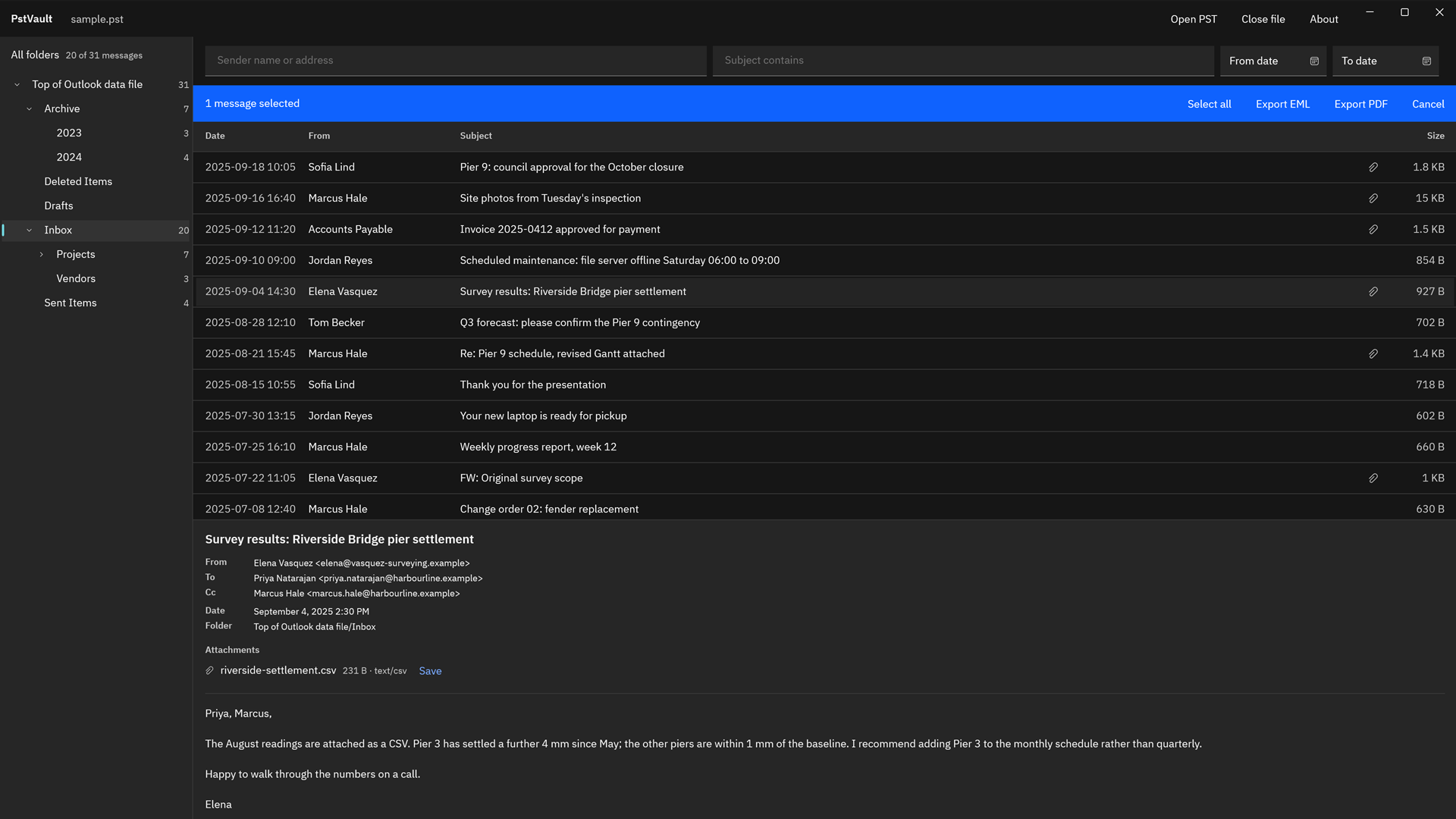
Screenshots use a sample PST generated for testing, with invented people and companies.
How to export the same messages in two formats
- Open the PST. Choose “Open PST” and pick the file, or double-click it in File Explorer.
- Find the messages. Pick a folder or “All folders”, type in “Sender” or “Subject”, and use “More filters” for “Body”, “Recipient”, “From date”, and “To date”.
- Select them. Ctrl+click or Shift+click rows, or choose “Select all results”.
- Export the PDF. Choose “Export PDF”, pick “One PDF for the selection, bookmark per item”, set “Page size”, and choose “Choose where to save”.
- Export the EML files. With the same selection, choose “Export files”, set “Format” to “Email (.eml)”, turn on “Also save original attachments as files” if you want loose copies, and choose “Choose where to save” with a second folder.
- Check the reports. Each folder holds its own
PstVault export reportJSON file listing every item and file, with a SHA-256 hash for each.
The PST is opened read-only, so you can export the same selection as many times, in as many formats, as you need. The full walk-through is in how to export emails from a PST file, and the format itself is explained in what is a PST file.
Export one selection as PDF for reading and EML for keeping.
Get it from Microsoft
Frequently asked questions
Is EML or PDF better for keeping old emails?
Keep both if you can. EML keeps each message as a message, with its headers and attachments inside, so it can be opened in a mail program or imported elsewhere later. PDF is the easier reading copy for people and printers. PstVault exports the same selection in both, and the PST stays unchanged between runs.
Can I read the HTML copies offline?
Yes. PstVault’s HTML reading copies use relative links and save pictures as local files beside each page, so they open in any browser with no connection. They load no remote content and run no scripts, and the whole export folder can be moved or zipped as a unit.
Which format should I use for contacts?
Use the contact table (.csv) for Excel, a CRM, or any tool that imports a spreadsheet: every contact in one file with a header row. Use vCard (.vcf) for phones and address books. PstVault writes either from the PST’s Contacts folder.
Try PstVault
PstVault is a one-time purchase in the Microsoft Store, and the Store runs a 15-day free trial with every feature, so you can export your own messages in every format and compare them before you buy. Nothing uploads, and there is no account. Read about the formats on the PstVault product page, or start with open a PST file without Outlook.
Try every export format on your own PST during the 15-day free trial.
Get it from Microsoft
Microsoft and Outlook are trademarks of the Microsoft group of companies. PstVault is not affiliated with or endorsed by Microsoft.
Last updated 15 October 2026. Published by Automata Labs, a software company in Canada.