To estimate the ink coverage of a PDF, measure how much cyan, magenta, yellow and black each page lays down, as a percentage of the page area, from the colour values in the file. Windows opens and prints PDFs but has no coverage report of its own, so use a coverage app. InkQuote reads the PDF page by page on your PC and gives per-page and document figures you can price from.
The question usually arrives at the counter. A customer sends a brochure, a programme or a set of posters and asks what it will cost to print. Paper and finishing are easy to count. The ink or toner is the part that swings: a page of text and a page of full-bleed photography both count as one page, but one of them empties the cartridges far faster. Coverage is how you put a number on that difference before the job runs.
Estimate the coverage of tonight’s job on your own PC, page by page.
Get it from Microsoft
What an ink coverage figure tells you
Coverage is reported per process colour. A page that reads C 12, M 9, Y 8, K 20 carries cyan equal to 12 percent of the page area at full strength, and so on for the other three inks. A half-strength tint spread over the whole page counts half as much as a solid fill, so the figure tracks how much ink actually goes down, not just how much of the paper is touched.
The four channels added together give the page’s total, which can run well past 100 on a heavy page, up to 400 in theory. For a whole document, pages should be weighted by their area: a tabloid page holds twice the ink of a letter page at the same percentage. Our explainer on what ink coverage is covers these terms, the 5 percent yield standard, and rich black in more depth.
Ways to estimate ink coverage
| Method | How it works | Where it fits |
|---|---|---|
| Judging the proof by eye | Flick through the pages and call the job light, medium or heavy | A quick sense check on simple jobs |
| Browser coverage calculator | Draws each page on screen in RGB, then converts back to CMYK to count | Occasional checks on files you are happy to open in a website |
| Printer or RIP usage report | The device reports toner or ink used after the job has printed | Reconciling supplies costs after the fact |
| Prepress suite | Separation and ink previews inside a full prepress workflow | Shops already running that workflow for every job |
| InkQuote | Reads the CMYK values written in the PDF and estimates C, M, Y, K and total for every page, then builds a quote sheet | Good fit: quoting digital print before it runs, on the counter PC, with nothing uploaded and the figures kept with the quote |
The difference that matters most for pricing is when you get the number. A usage report is exact about the past but arrives after the job is printed and priced. A coverage estimate from the file arrives before you name a price, which is when it is worth money.
Before you measure
- Get the final file. Measure the PDF that will actually print. A revised version with darker backgrounds is a different job.
- Check it is print-ready. Fonts, bleed and image resolution are a separate check. Our print-ready PDF checklist walks through them.
- Know the run. Copies, sides, and paper size all feed the price alongside coverage.
- Have your rates to hand. Your supplies cost per page at standard coverage, or your click rates, turn coverage into money. See toner coverage of a PDF for the arithmetic.
Meet InkQuote
InkQuote estimates the cyan, magenta, yellow and black coverage of every page in a PDF from the file’s own colour values, then turns a price per copy into a one-page quote sheet, on your Windows PC with nothing uploaded.
InkQuote reads DeviceCMYK values natively, so solid black text stays black ink only. Grayscale counts as black, RGB content is converted with the PDF specification’s formula, and spot colours are converted through the file’s own tint transforms and listed by name. The document total is weighted by page area, so mixed sizes read correctly. It runs on Windows 10 version 2004 or later and Windows 11, on x64 and ARM64 PCs, in the Windows app sandbox with no network access.
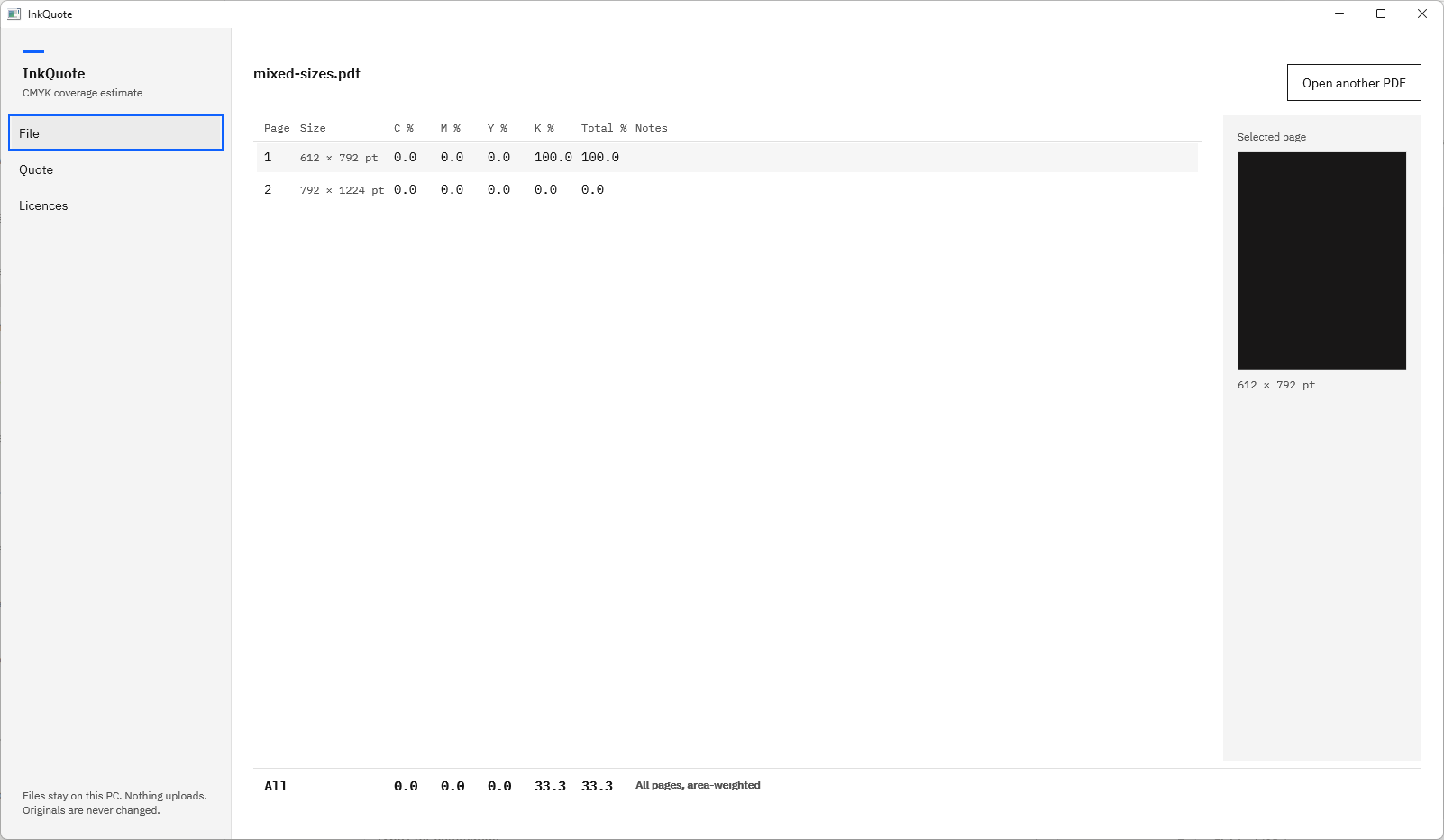
Screenshots use small test PDFs generated for InkQuote’s own test suite. They contain no customer artwork.
How to estimate ink coverage in InkQuote
- Open the PDF. On the File page, the empty state reads “Open a PDF to estimate its ink coverage.” Choose “Open PDF” and pick the file in the Windows Open dialog, or click a file in the “Recent” list.
- Enter a password if asked. A protected file shows a sentence such as “brochure.pdf needs a password.” with a password box. Type it and choose “Retry”.
- Let it measure. Progress reads “Page 3 of 12” as each page is painted into a coverage map at about 100 dots per inch. Rows appear in the table as pages finish. “Cancel” stops the run and keeps every page done so far.
- Read the table. Each row shows “Page”, “Size” in points, “C %”, “M %”, “Y %”, “K %”, “Total %” and “Notes”, to one decimal place. Heavy pages stand out at a glance.
- Select a page. The “Selected page” pane shows a preview, the page size, its notes spelled out, and any spot colours it uses.
- Read the document total. The “All” row below the table gives each channel and the total for the whole file, captioned “All pages, area-weighted”.
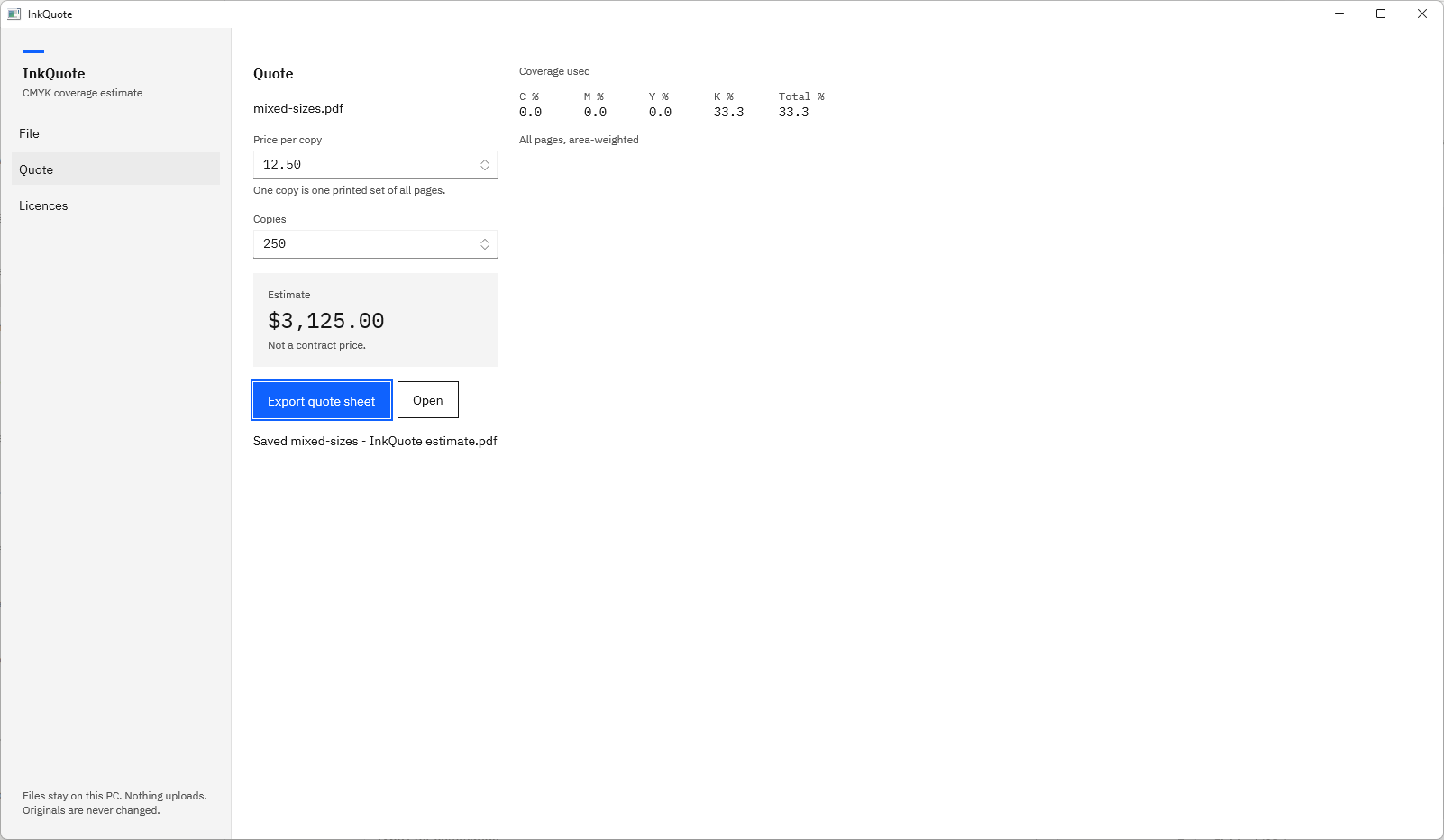
- Price it. Choose “Quote” in the left navigation. Type a “Price per copy” and the number of “Copies”. The “Estimate” box shows price per copy times copies, and “Coverage used” beside it repeats the document figures.
- Export the quote sheet. Choose “Export quote sheet”. The Save As dialog suggests a name such as “brochure - InkQuote estimate.pdf” with the type “PDF quote sheet”. Choose “Save quote sheet”, then “Open” to view it.
Run these steps on a job you have already printed and compare the figures.
Get it from Microsoft
Reading the result
- Look for the heavy pages first. A catalogue with a light average can still hide a few dark spreads. The table shows them by number. Our guide to CMYK coverage per page explains each column.
- Check the black channel. Text set in solid black reads in K only, whether the file stores it as CMYK, grayscale or RGB, so text-heavy documents keep their colour figures low.
- Trust the area weighting. A file with a letter page of solid black and a blank tabloid page totals K 33.3, because the tabloid page is twice the size. That is the figure to price from.
- Note the spot colours. Named spot inks are counted in the process figures and listed by name, so you can see when a brand colour is part of the job.
- Keep the sheet with the job. The exported quote sheet lists the page table, the document total, the spot colours, the notes and the quote, so a reprint starts from the same numbers. See print quote from a PDF for what is on it.
Frequently asked questions
Which Windows tool shows the ink coverage of a PDF?
A coverage app. Windows opens and prints PDFs, but its own viewers report pages, not ink. InkQuote is a Windows app that reads the PDF and estimates C, M, Y and K coverage for every page, with an area-weighted total and a one-page quote sheet.
Can I estimate ink coverage for an RGB PDF?
Yes. InkQuote converts RGB content with the device formula from the PDF specification, so an export from Word or a browser still gets a full set of C, M, Y and K figures. Black text in RGB comes out as black ink only.
What resolution does InkQuote measure at?
About 100 dots per inch for common page sizes such as Letter and A4, which is fine enough for a page-level coverage estimate and keeps long documents moving. Smaller pages are measured at a higher resolution.
Try InkQuote
InkQuote is a one-time purchase in the Microsoft Store, with a 15-day free trial of every feature run by the Store. Nothing uploads, and your original PDF is never changed. Choosing a tool? Read what to look for in a PDF ink coverage calculator, and when you are ready to put a price on the job, our guide on how to price a print job by ink coverage. The InkQuote product page shows how it works and the screens.
Estimate the coverage of your next job during the 15-day free trial.
Get it from Microsoft
Last updated 15 October 2026. Published by Automata Labs, a software company in Canada.