To price a digital print job by ink coverage, estimate how much ink or toner each page uses, turn that into a supplies cost per copy, add paper, clicks, finishing and margin, and multiply by the number of copies. The coverage step is the one most counters skip, and it is the one that separates a profitable photo job from one that quietly loses money.
Most small shops start with a price per page and adjust by feel. That works while jobs look alike. It stops working when a customer sends a programme that is half full-bleed photography, or a deck with dark backgrounds on every slide, and the same per-page price that covers a text document leaves nothing on a heavy one. Coverage gives you the number to adjust by, and a record of why.
Put coverage behind your next quote, on the counter PC.
Get it from Microsoft
What goes into a price per copy
A copy here means one printed set of all the pages. Its price is built from:
- Paper. Sheets per copy, by stock and size.
- Impressions. Click charges on a contract device, or wear and service on your own, usually different for colour and black.
- Ink or toner. The part that moves with coverage. A rated cartridge yield assumes about 5 percent coverage per colour; heavy pages use several times more.
- Finishing. Folding, stapling, binding, trimming, laminating.
- Setup and handling. File checks, proofs, and time at the counter.
- Margin. What the job has to earn.
Coverage only changes one line of that list, but on photo-heavy work it can be the biggest line.
Pricing methods compared
| Method | How it prices | Where it fits |
|---|---|---|
| Flat price per page | One rate per side, colour or black | Text documents and steady repeat work |
| Bands by eye | Call each job light, medium or heavy and pick the matching rate | Experienced staff with a feel for the press |
| Click cost plus a heavy surcharge | Contract click rates, with an extra charge when a job looks dark | Shops on a click contract that tiers colour by coverage |
| Measured coverage with InkQuote | Estimated C, M, Y and K for every page from the PDF, then price per copy times copies on a one-page quote sheet | Good fit: any job where coverage varies, because the price starts from a figure and the quote sheet shows it to the customer |
Bands by eye are only as good as the person making the call, and nothing records the call. A measured figure keeps the bands but puts a number under them, so a new staff member makes the same call as the owner.
A worked example
Take a 12-page newsletter, 150 copies, printed single-sided in colour on a toner device. Say your supplies cost at the rated 5 percent coverage is 1 cent per colour per page.
- Measure. The document reads C 9, M 7, Y 6, K 14 in the area-weighted total.
- Scale the supplies. Divide each by 5: 1.8, 1.4, 1.2 and 2.8 times the rated cost. That is 7.2 cents of toner per page, against 4 cents if you had assumed the box figure.
- Per copy. Twelve pages make 86.4 cents of toner per copy. Add paper, clicks, finishing and margin from your own price list to reach a price per copy.
- Multiply. The price per copy times 150 copies is the quote.
The rated yield and your real yields will differ with the device and its settings, so tune the baseline with your own supplies records. The structure stays the same, and the coverage is what tells you which jobs need the higher line.
Quote checklist
- The final PDF. The version that will print, not an earlier draft.
- Page count and sizes. Mixed sizes need area weighting in the coverage total.
- Copies and sides. One copy is one set of all pages.
- Coverage per page and in total. Note the heavy pages by number.
- Black and colour pages. Pages with any cyan, magenta or yellow usually bill as colour clicks. See estimate click charges.
- Spot colours. On a digital press they print as a CMYK mix, so they count in the coverage.
- Paper stock and finishing. Priced from your own list.
- Turnaround and validity. How long the price holds, and for which file version.
- The word estimate. A coverage-based price is an estimate. Say so on the quote, and keep the figures with it.
Meet InkQuote
InkQuote estimates CMYK coverage for every page of a PDF, multiplies your price per copy by the number of copies, and exports a one-page quote sheet that shows the coverage behind the number.
It reads the colour values written in the PDF, so solid black text stays black ink only, and it weights the document total by page area. The quote sheet is a new PDF titled Ink coverage estimate, with the source file name, the date, the page table, the document total, any spot colours and notes, and the quote. It runs on your Windows PC with no network access, and your original PDF is never changed.
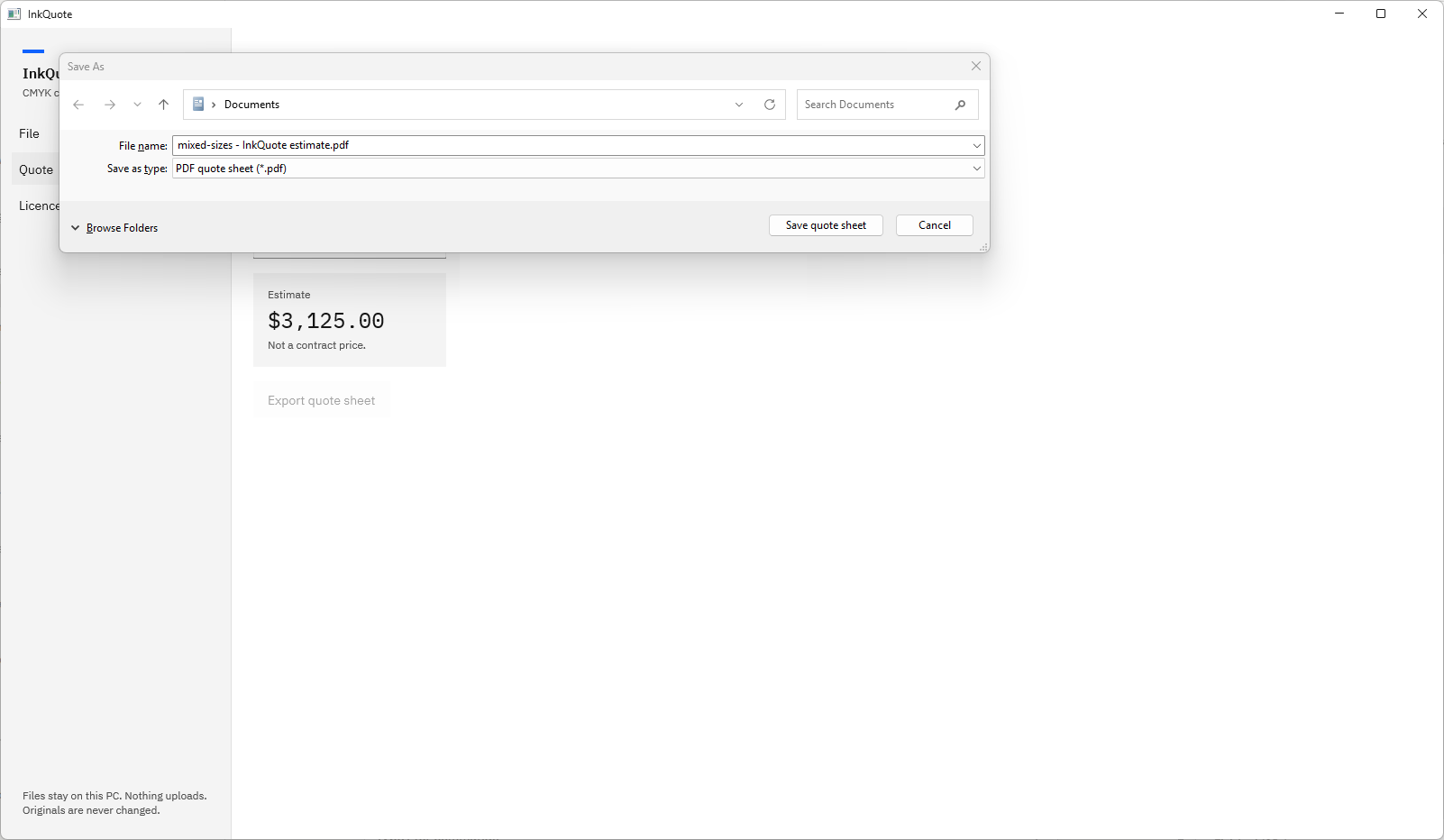
Screenshots use small test PDFs generated for InkQuote’s own test suite. They contain no customer artwork.
Price a job in InkQuote, step by step
- Open the file. Choose “Open PDF” on the File page and pick the customer’s PDF, or reopen it from “Recent”. Progress reads “Page 3 of 12” while it measures.
- Read the coverage. The table lists each page’s “C %”, “M %”, “Y %”, “K %” and “Total %”. The “All” row gives the document figures, “All pages, area-weighted”.
- Find the heavy pages. Select a row to see its preview in the “Selected page” pane and spot dark spreads or colour on text pages.
- Set the price. Choose “Quote” in the left navigation. Type your “Price per copy”, built from the figures and your price list, and the number of “Copies”.
- Check the estimate. The “Estimate” box shows price per copy times copies in the currency symbol from your Windows regional settings, and “Coverage used” shows the figures beside it.
- Export. Choose “Export quote sheet”. The Save As dialog suggests “newsletter - InkQuote estimate.pdf” with the type “PDF quote sheet”. Choose “Save quote sheet”.
- Send it. The status line reads “Saved” with the file name. Choose “Open” to view or print the sheet, or attach it to your reply.
Quote a job you have already run and compare the price.
Get it from Microsoft
For more on the sheet itself, see print quote from a PDF. For the coverage columns, see CMYK coverage per page, and for cartridge arithmetic, toner coverage of a PDF.
Frequently asked questions
Should I charge more for high ink coverage?
Many shops do, because heavy pages use several times the ink or toner of a text page. The fair way is to price from a measured figure: estimate the coverage of the job, compare it with the coverage your cartridge yields assume, and raise the price per copy by the difference.
How do I explain a coverage-based price to a customer?
Show them the figures. InkQuote’s quote sheet lists the coverage of each page beside the quote, so a customer can see which pages are heavy and why the price differs from a text job. When they send a revised file, the new sheet shows exactly what changed.
What does one copy mean in an InkQuote quote?
One printed set of all pages in the PDF. A 12-page newsletter at 150 copies is 150 complete newsletters, so the price per copy should cover all 12 pages. InkQuote multiplies the price per copy by the number of copies.
Try InkQuote
InkQuote is a one-time purchase in the Microsoft Store, with a 15-day free trial of every feature run by the Store. Start with how to estimate the ink coverage of a PDF, brush up on the terms in what ink coverage is, and compare tools in our guide to the PDF ink coverage calculator. The InkQuote product page has the screens and the full FAQ.
Price your next job from its coverage during the 15-day free trial.
Get it from Microsoft
Last updated 15 October 2026. Published by Automata Labs, a software company in Canada.