You need the password you set when you turned on encrypted backups. Type it into BackupPaper, and BackupPaper opens the encrypted iPhone backup on your Windows PC. BackupPaper uses the password on this PC only and does not save it. Apple says that without the password, you won’t be able to use previous encrypted backups.
An encrypted backup looks like any other backup folder on the PC. The difference shows up when you try to read it. Apple says you must enter the password before restoring an encrypted backup, and BackupPaper asks for it before it shows any messages. The task is getting from that password prompt to the conversation you need, on the PC, without changing the backup.
Know the backup password? Open the encrypted backup and read its conversations.
Get it from Microsoft
Why are iPhone backups encrypted?
Encrypted backups hold more data than unencrypted ones. According to Apple, they also hold saved passwords, Wi-Fi settings, website history, health data and call history. You turn them on in iTunes or Apple Devices with Encrypt local backup, and you set a password.
Apple covers this in its page on encrypted backups, updated on 21 September 2026.
How can I tell whether a backup is encrypted?
Apple gives two signs. In Apple Devices or iTunes, the Encrypt local backup checkbox is checked when backups are encrypted. In the backup list, under Manage Backups in Apple Devices or in the Devices pane of iTunes preferences, a lock appears next to the device’s name, along with the date and time the backup was made. BackupPaper also asks for the password when you open an encrypted backup.
Meet BackupPaper
BackupPaper opens an encrypted iPhone backup on your PC with the password you type, then lets you read and export its conversations.
BackupPaper is a Windows app that saves one conversation from an iPhone backup on your PC as a PDF or CSV file. It reads unencrypted and encrypted backups made by iTunes or Apple Devices. For an encrypted backup, the password is used on this PC only and is not saved. It makes no network connections, so nothing is uploaded, and the iPhone does not need to be connected. Our iPhone backup viewer for Windows page shows the rest of what it reads.
How do I open an encrypted backup in BackupPaper?
Start BackupPaper, choose the backup folder, and type the password you set. BackupPaper checks the password on your PC, then lists the conversations. Pick one to read its text messages. You do not need to connect the iPhone, and the backup stays unchanged.
- Find the encrypted backup folder. See where iPhone backups are stored on Windows.
- Open BackupPaper and choose the backup folder.
- Type the password you set for encrypted backups.
- Wait for the password check. On our test PC it took about five seconds.
- Pick a conversation to read it. To save it, follow our guide to saving iPhone text messages as a PDF on Windows.
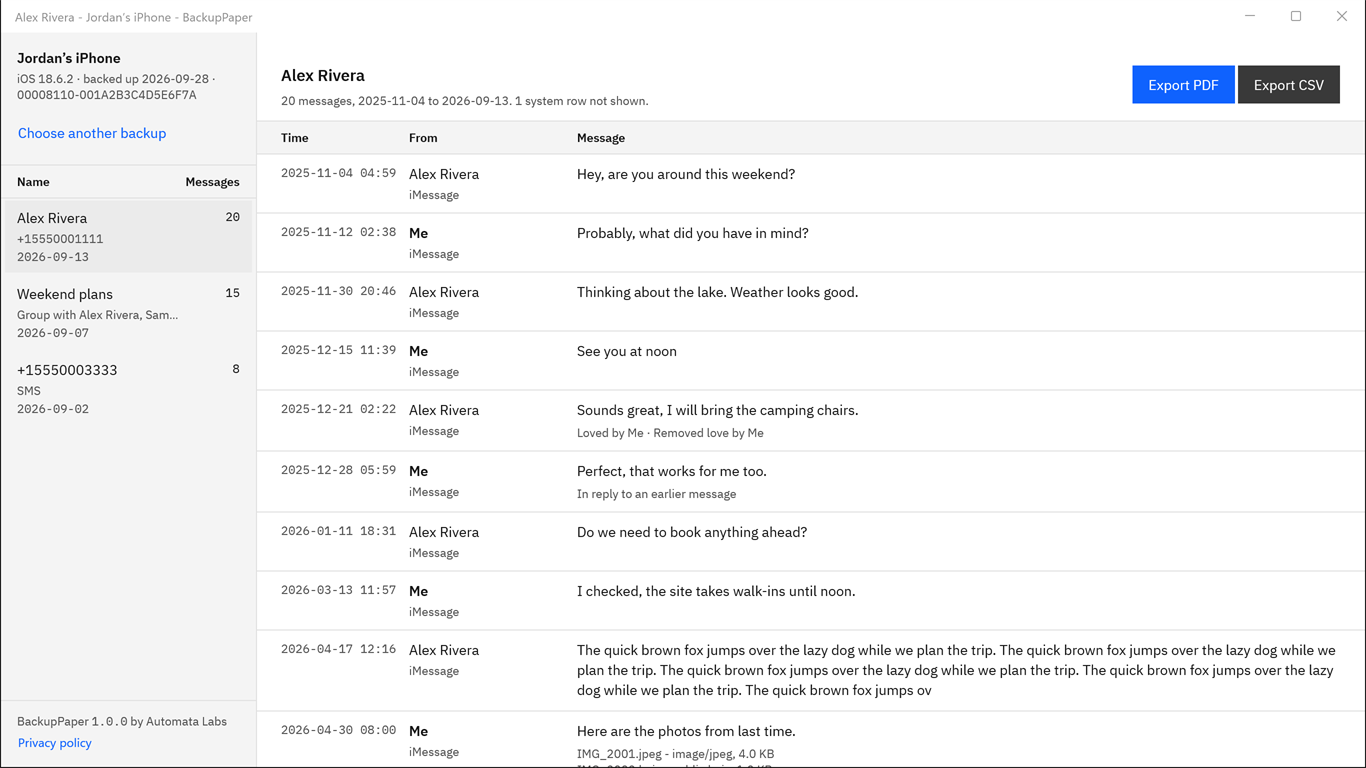
Screenshots use a synthetic backup with fictitious names.
BackupPaper opens the backup read-only and never changes it. Each message shows its time, sender and text, plus reactions, replies and attachment names. Our page on reading text messages from an iTunes backup covers reading in more depth.
Type the password, wait a few seconds, and read the conversation.
Get it from Microsoft
Will an encrypted backup hold my text messages?
Only if they are not already syncing with Messages in iCloud. Apple says a backup made on a computer leaves out iMessages and text (SMS) and multimedia (MMS) messages that already sync to iCloud. If the backup holds none, BackupPaper says the backup has no conversations.
Read Backup methods for iPhone or iPad for Apple’s wording. Apple explains the setting in its guide, Set up iCloud for Messages on all your devices. Use the free trial to see what your backup holds.
How long does the password check take?
About five seconds on our test PC. The wait is deliberate, because the backup’s key derivation is slow on purpose. Your PC may take more or less time. When the check finishes, BackupPaper lists the conversations in the backup with message counts and last dates.
What if I forgot the password?
BackupPaper cannot recover or reset a password, and it cannot open an encrypted backup without it. Apple says that if you forget the password, you won’t be able to use your previous encrypted backups. Apple describes resetting the password so you can make a new encrypted backup of your current data, but older encrypted backups stay out of reach.
Apple’s page on encrypted backups explains Apple’s options. If you remember the password later, type it into BackupPaper as usual.
What happens to my password?
BackupPaper uses the password on this PC only and does not save it. It clears the password when you close the backup. BackupPaper makes no network connections, so it uploads nothing. Decrypted working copies stay in the app’s own local cache while the backup is open, and the app deletes them when it closes.
What other ways are there to read an encrypted backup?
Every route through an encrypted backup needs its password. What differs is what you get at the end.
| Method | Works well for | Watch for |
|---|---|---|
| Restoring the backup to an iPhone | Putting the backup’s information back on a phone | Apple says you must enter the password before restoring, you need a phone to restore, and you still need a way to make a file |
| A Mac with the same messages | Printing a conversation to PDF from the Mac’s print dialog | You need a Mac that has the messages |
| Screenshots on a phone | A few messages, with nothing to install | Only works if the messages are on a phone you have |
| Reading the backup on the PC with BackupPaper | One conversation from an encrypted backup already on your PC | You need the password, and the backup must hold the messages |
Reading the backup on the PC is the practical route when the backup is already there and you know the password. There is no restore, the backup stays unchanged, and the conversation ends up in a PDF or CSV file you name.
Limits
- BackupPaper reads the Messages app only: iMessage and SMS. It does not read other chat apps.
- It does not read the phone, iCloud backups or Messages in iCloud.
- Attachments appear by name. Photos and videos are not placed in the PDF.
- It exports one conversation per file.
Frequently asked questions
Can BackupPaper open an encrypted iPhone backup without the password?
No. You need the password you set. BackupPaper cannot recover or reset a password, and it cannot open an encrypted backup without it. Apple also says that if you forget the password, you won’t be able to use your previous encrypted backups, even after you set a new one.
Does BackupPaper work with encrypted iPhone backups?
Yes. Type the password you set when you turned on encrypted backups. On our test PC the password check took about five seconds. BackupPaper reads unencrypted backups the same way. It opens the backup on your PC and makes no network connections. It cannot recover or reset a forgotten password.
Can I view the messages in an encrypted iPhone backup?
Yes, if the backup holds them. Apple says a backup made on a computer leaves out iMessages and text (SMS) and multimedia (MMS) messages that already sync to iCloud. Open the backup in BackupPaper with its password to see the conversations, or a note that the backup has none.
Is my backup password sent anywhere?
No. BackupPaper uses the password on this PC only and does not save it, and it clears the password when you close the backup. BackupPaper makes no network connections, has no account and no iCloud sign-in, and uploads nothing. The backup itself is opened read-only and never changed.
Try BackupPaper
BackupPaper is a one-time purchase in the Microsoft Store, with a 15-day free trial run by the Store. The trial has every feature, with no watermark and no message limit, so you can open your encrypted backup with its password and read it before you pay. The Store installs and updates the app, and the receipt comes from Microsoft. Read more on the BackupPaper product page.
Open your encrypted backup during the 15-day free trial.
Get it from Microsoft
Last updated 5 October 2026. Published by Automata Labs, a software company in Canada.
iPhone, iMessage and iTunes are trademarks of Apple Inc., registered in the U.S. and other countries and regions. BackupPaper is not affiliated with or endorsed by Apple.