Screen printing separation terms describe how one design becomes several screens: the separation type (spot, index, simulated process, or four-color process), the white underbase under bright inks on dark shirts, the choke and spread that make colors overlap, and the halftone ruling, angle, and dot gain that decide how tones print. Each term below says what it means on press and where it is set in Underbase.
These words show up on job tickets, in supplier emails, and at the press, often with two names for the same thing. Knowing them makes it easier to read an old ticket or set up film the press crew expects.
See every one of these settings on your own artwork.
Get it from Microsoft
Separation types
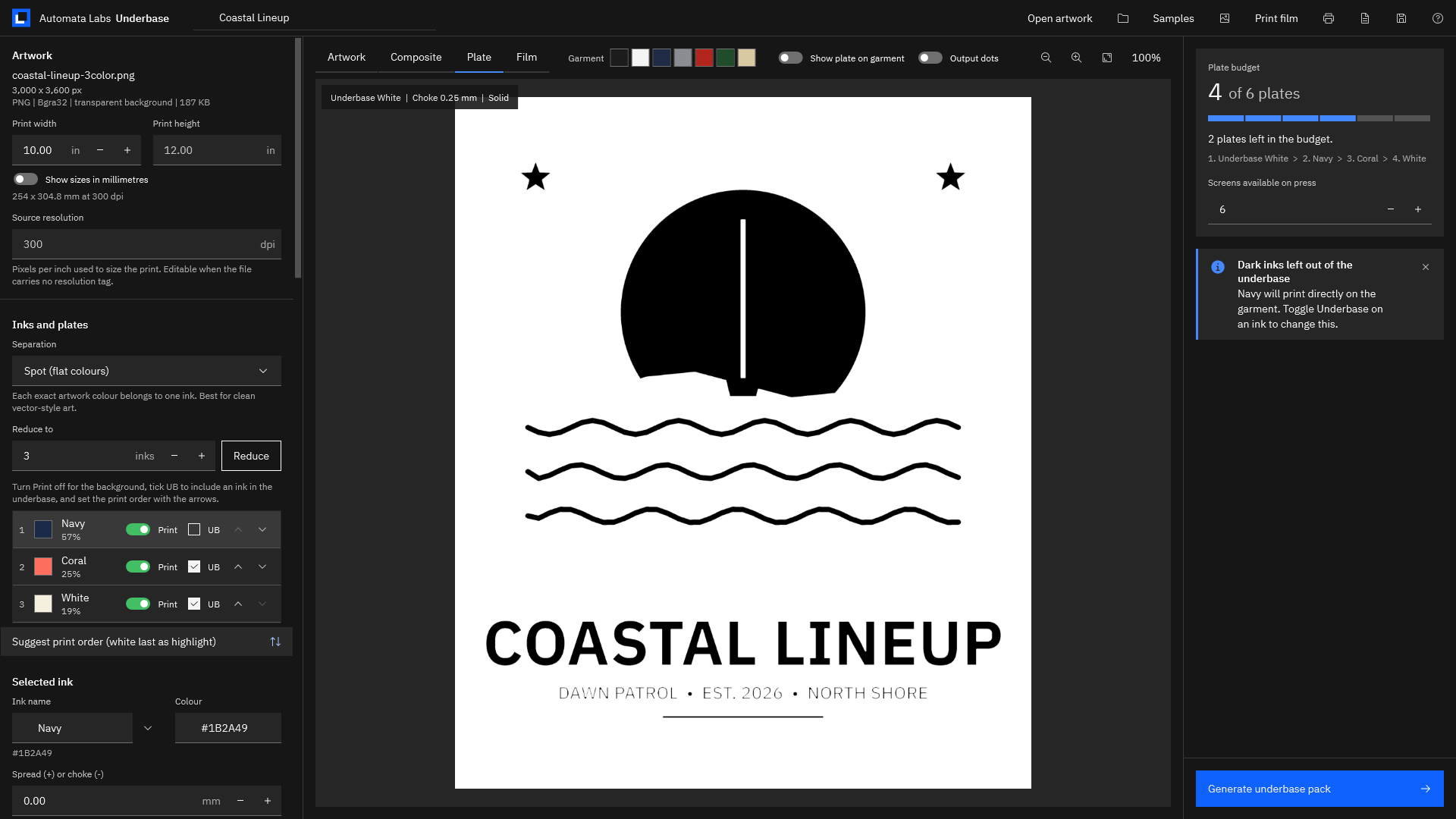
Spot color separation. Each flat color in the design gets its own ink and its own screen, printed solid. It suits logos, lettering, and vector-style art. Anti-aliased edges, the in-between pixels along curves, are shared between neighboring inks so outlines stay smooth.
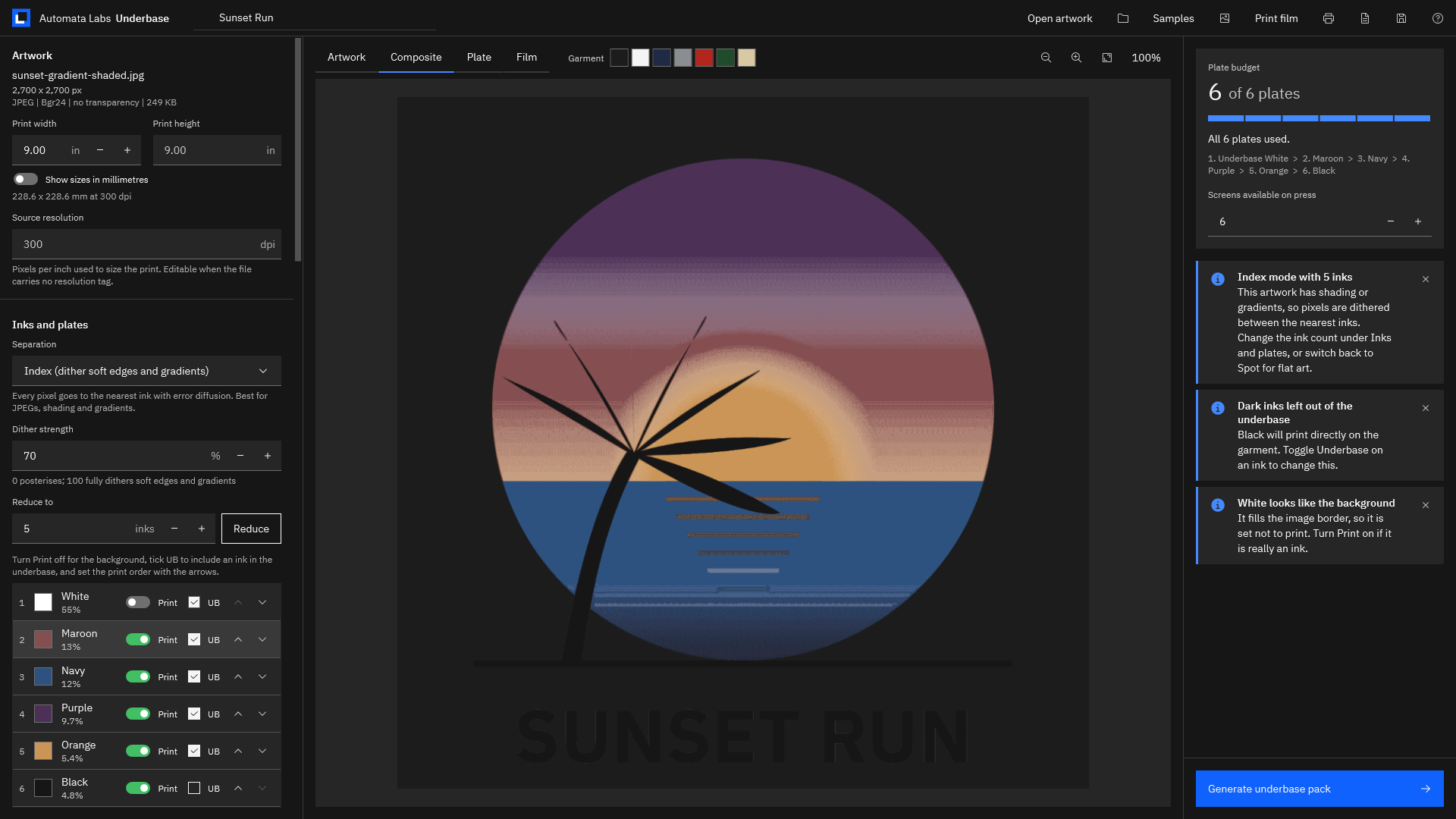
Index separation. Every pixel is assigned to one ink from a small palette, and the leftover color difference is passed to neighboring pixels, a technique called error diffusion. Gradients and soft shadows print as a fine pattern of solid inks. It suits shaded logos and JPEG art on a limited number of screens. Read more on index separations for screen printing.
Simulated process. A photographic technique that builds a full-color image from a larger set of spot inks, each screened with halftone dots, usually on dark garments.
Four-color process (CMYK). Cyan, magenta, yellow, and black halftones combined to make a full range of colors, most often on white or light garments.
Plates and film
Plate. One ink’s image, the thing that becomes one screen. A separation is a set of plates.
Film positive. A clear sheet with the plate printed in solid black at true size, used to expose the screen. Film is usually printed on an inkjet or laser printer, often through a RIP that controls black density.
Registration marks. Identical targets printed in the same place on every plate, so the screens can be lined up on the press. Center ticks on the edges of the artwork help place the film on the screen.
Right-reading and emulsion down. A right-reading film reads normally when you look at the printed side. Some shops expose with the printed side against the mesh and print the film mirrored, called emulsion down.
Gang sheet. Several plates printed on one sheet of film, each with its own registration marks, to save film on small designs.
Plate budget. The number of screens the press can hold, counting the underbase. A six-head press has a budget of six.
Underbase terms
Underbase. A plate of white ink printed first, under the brighter colors, so they stay vivid on a dark garment. Our page on the white underbase for dark shirts covers it in depth.
Choke. Pulling a plate’s edges inward. A choked underbase sits slightly inside the colors on top of it, so white does not peek out when registration moves a little.
Spread. Pushing a plate’s edges outward, the opposite of a choke.
Trap. A small overlap where two colors meet, made by spreading the lighter ink under the darker one, so a hairline gap never shows the shirt.
Highlight white. A second white printed last, on top, for the brightest areas. It is a separate screen from the underbase.
Flash. Partly curing a layer of ink, usually the underbase, with a flash dryer before the next color goes on.
Halftone terms
Halftone. A plate made of dots of varying size, so one ink can print lighter and darker tones.
Screen ruling (lpi). How many rows of dots per inch. Textile work uses coarser rulings than paper.
Screen angle. The angle of the rows of dots. Choosing it well avoids moiré, a wavy pattern between the dots and the mesh threads.
Mesh count. Threads per inch in the screen. A common guide is a mesh of at least four times the line count for halftones.
Dot gain. The growth of dots on press as ink spreads into the fabric, which makes midtones print darker. Compensation thins the dots on film to allow for it.
Tint. A whole plate printed at a set percentage instead of solid.
Output resolution (dpi). The resolution of the film image. Film TIFFs are 1-bit: every pixel is pure black or clear.
Where each term lives in Underbase
| Term | What it controls | Where you set it in Underbase |
|---|---|---|
| Spot or index | How the art becomes inks | The “Separation” list: “Spot (flat colours)” or “Index (dither soft edges and gradients)“ |
| Dither strength | How much index mode blends | ”Dither strength”, 0 to 100 |
| Underbase | White under bright inks | ”Print a white underbase first” and the “UB” box on each ink |
| Choke | How far the base sits inside the colors | ”Choke”, 0 to 3 mm |
| Spread or trap | Overlap between inks | ”Spread (+) or choke (-)” per ink, or “Apply to all inks” |
| Highlight white | A top white | ”Suggest print order (white last as highlight)“ |
| Screen ruling and angle | Halftone dots | ”Halftone this plate”, “Screen ruling”, “Screen angle”, “Suggest ruling from mesh” |
| Dot gain | Midtone compensation | ”Dot gain compensation”, 0 to 50 percent |
| Plate budget | Screens on the press | ”Screens available on press” |
| Film, marks, and mirror | Film output | ”Film size”, “Sheet layout”, “Output resolution (dpi)”, “Mirror (emulsion down)“ |
Meet Underbase
Underbase puts every term above into one window: it separates artwork in spot or index mode, builds a choked white underbase, traps colors, and writes true-size film with registration marks and a production ticket.
It is a Windows app for small custom-apparel shops that opens PNG, TIFF, JPEG, SVG, PDF, Illustrator (.ai), and other files and runs entirely on your PC.
Screenshots use the sample artwork bundled with Underbase. Illustrator is a trademark of its owner; Underbase is not affiliated with or endorsed by the trademark owner.
See the terms on a real job
- Open a sample. Choose “Samples” and pick “Sunset Gradient (JPEG, shaded)”. It opens in index mode, with a notice that the artwork has shading or gradients.
- Watch the dither. Change “Dither strength” and look at the Composite tab. At 0 the art posterizes; higher values blend the transitions.
- Look at the underbase. Choose “Show underbase plate”. The label reads the plate name, the choke, and the screening.
- Try a choke. Change “Choke” and watch the white pull in. The helper shows the amount in pixels at the source resolution.
- Trap the colors. Choose “Apply to all inks” and select a light ink to see its “Spread (+) or choke (-)” value.
- Halftone a plate. Select an ink, turn on “Halftone this plate”, choose “Suggest ruling from mesh”, and turn on “Output dots” in the Plate tab.
- See the film. Open the Film tab, try “Mirror (emulsion down)”, and switch “Sheet layout” to “Gang plates on each sheet” on a small design.
Open the bundled samples and try each setting yourself.
Get it from Microsoft
For the full workflow, read how to make color separations for screen printing, then run the film positive checklist before the first screen is burned. For film output in depth, see halftone film positives for screen printing.
Frequently asked questions
What is the difference between a choke and a spread?
A choke pulls a plate’s edges in; a spread pushes them out. The underbase is usually choked so it hides under the top colors. Lighter top colors are usually spread a little under darker neighbors, which is called trapping. In Underbase, a negative “Spread (+) or choke (-)” value chokes an ink and a positive value spreads it.
What is a good choke for a white underbase?
Underbase starts at 0.25 mm and suggests a typical range of 0.2 to 0.5 mm, more on loose mesh or manual presses where registration moves more. Check the result with “Show underbase plate” before printing film.
What screen ruling should I use for halftones?
Match it to the mesh. A common guide is a mesh of at least four times the line count. In Underbase, “Suggest ruling from mesh” sets the ruling from the mesh count at 22.5 degrees, and the ruling and mesh print on the film label and the ticket.
What does index separation mean?
Each pixel goes to the nearest ink in a small palette, and the leftover difference passes to its neighbors, so shading prints as a dither of solid inks. Underbase uses it for shaded art, with a “Dither strength” control.
Try Underbase
Underbase is a one-time purchase in the Microsoft Store, with a 15-day free trial run by the Store. It runs on Windows 11 version 24H2 or later, and your artwork never leaves your PC. Read more on the Underbase product page, or see how it compares as screen printing color separation software.
Put these terms to work on your own artwork during the 15-day free trial.
Get it from Microsoft
Last updated 15 October 2026. Published by Automata Labs, a software company in Canada.