ContextCleaner: see every entry in the Windows 11 right-click menu, and which app added it — on the Microsoft Store.
Windows 11 Updated 2026-10-15

Separate the art, choke the underbase, and print the film, on this PC.

Underbase is a Windows app from Automata Labs that turns limited-color customer artwork into press-ready screen printing separations. It finds the inks in flat art or dithers shaded art between a fitted set of inks, builds a choked white underbase, traps colors in one click, and keeps the job inside your plate budget. Then it writes 1-bit film TIFFs, a true-size film PDF with registration marks, and a production ticket. Everything runs on your PC.

One-time purchase · 15-day free trial in the Microsoft Store · One-time purchase. No subscriptions. Local-first.
Pay once. Own it forever.

One-time purchase on the Microsoft Store · No subscription · Instant install

Buy through the Microsoft Store—instant install, automatic updates, and a Microsoft receipt for easy expensing. No account needed on our site, and no subscription on Store purchases.

How it works See the screens

spot and index seps · choked underbase · one-click trapping · true-size film · nothing uploads

Underbase inks, plates, and plate budget

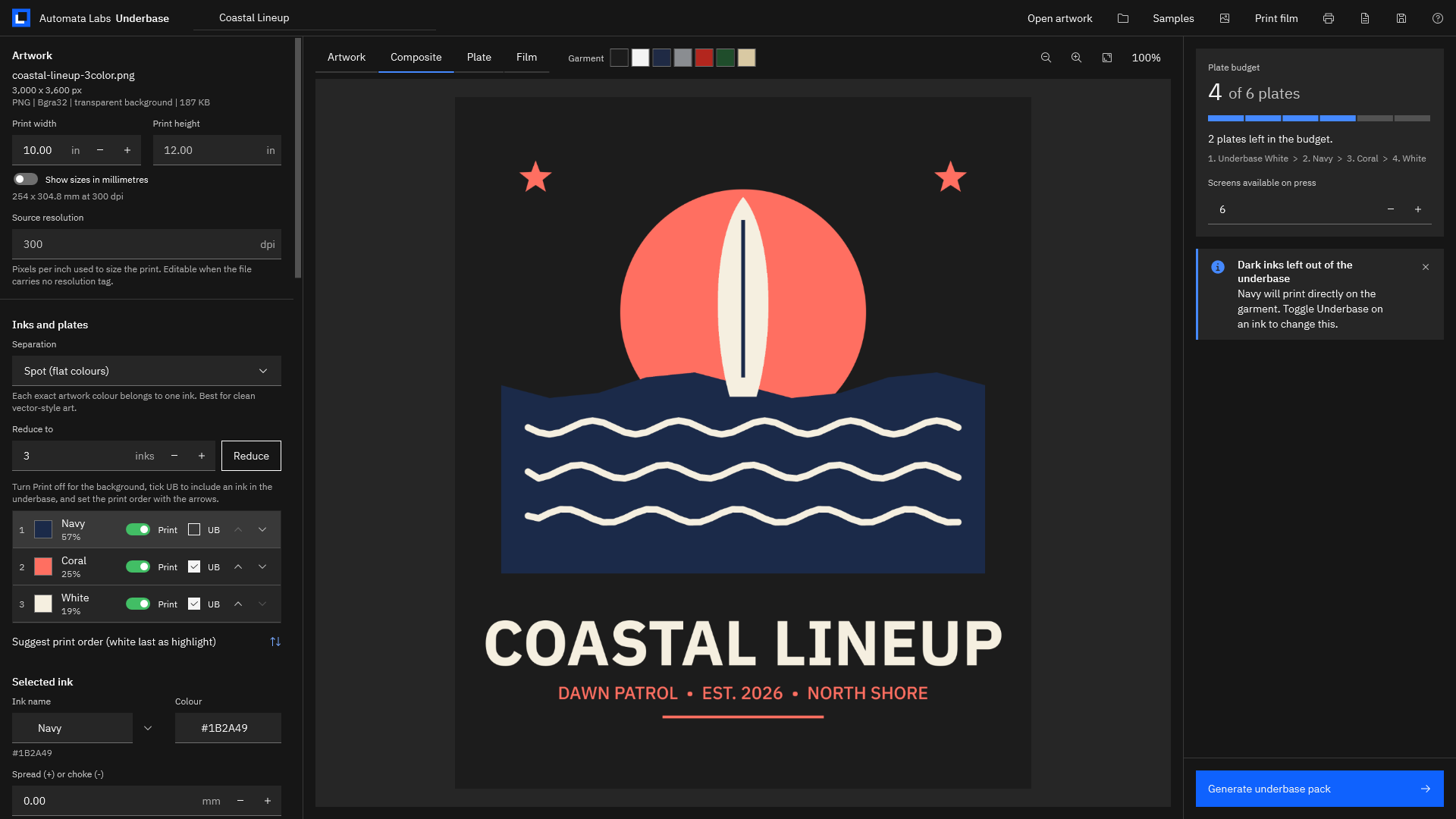
Underbase with a three-color surf logo on a black garment preview, the Navy, Coral, and White inks listed with coverage, Print and UB toggles, and a plate budget of 4 of 6 plates.
Confirm the inks Underbase found, choose which ones sit on the underbase, set the print order, and watch the plate budget.

The problem

The order is due Friday, and the art is a customer’s JPEG.

Before a single screen is coated, the art has to become plates: one per ink, a white base for the dark shirts, traps where colors meet, and film at true size with marks that line up. In a general design program that means selections, channels, and hand-placed targets for every job. Sending it to an outside separator means waiting for files and paying per design.

With Underbase

Open the art. Confirm the inks. Generate.

Underbase finds the inks, opens shaded art in index mode, builds the choked underbase from the inks you tick, and counts every screen against your press. When the preview looks right, one click writes the film PDF, 1-bit TIFFs, unscreened channels, and a production ticket into one job folder.

Key benefits

From customer file to film in one app

Spot or index separation from the files customers send

Open PNG, TIFF, JPEG, BMP, GIF, WebP, SVG, PDF, or Illustrator (.ai) files. Spot mode gives each flat color its own ink, grouping close shades and anti-aliased edges and leaving the background unprinted. Index mode dithers shaded art, soft shadows, and gradients between a fitted set of inks, with a dither-strength control and one-click ink reduction.

A choked white underbase

Built from the inks you tick and pulled in from 0 to 3 mm, shown in source pixels too. Dark inks print straight on the shirt, and any plate can be previewed on seven garment colors.

Trapping in one click

Spread or choke any ink in 0.05 mm steps, or choose Apply to all inks to tuck every ink under the darkest by the default trap.

Halftones tuned to your press

Screen any plate at your ruling, angle, and tint, take a ruling suggested from the mesh, and thin halftones for the dot gain you measure. Output dots shows the plate as the film will carry it.

A plate budget you can see

Set the screens your press holds. Underbase counts the underbase and every printing ink, holds generation until the job fits, and merges inks to fit the budget in one click.

True-size film with registration marks

A film PDF on Letter through A2 or a custom sheet, one plate per sheet or ganged, with identical marks, center ticks, plate labels, and a mirror option for emulsion-down output. Plus 1-bit TIFFs at up to 1440 dpi.

How it works

Open, confirm, set, generate

Open

Choose Open artwork, drop a file on the window, or try a bundled sample. Underbase sizes the print from the file, finds the inks, and opens shaded art in index mode.

Confirm

Check every ink in the Inks and plates list: rename, merge, reorder, or turn Print off for the background. Tick UB on the inks that need white beneath them.

Set

Set the underbase choke, trapping, halftone ruling, and dot gain, then the film size, sheet layout, output resolution, and output folder. The plate budget counts every screen as you go.

Generate

Choose Generate underbase pack (Ctrl+G). The film PDF, 1-bit TIFFs, unscreened channels, production ticket, preview, and job file land in one folder named for the job.

Every plate, mark, and label can be checked in the Plate and Film tabs before anything is written. See the screens.

See it in action

The plates, the underbase, and the film

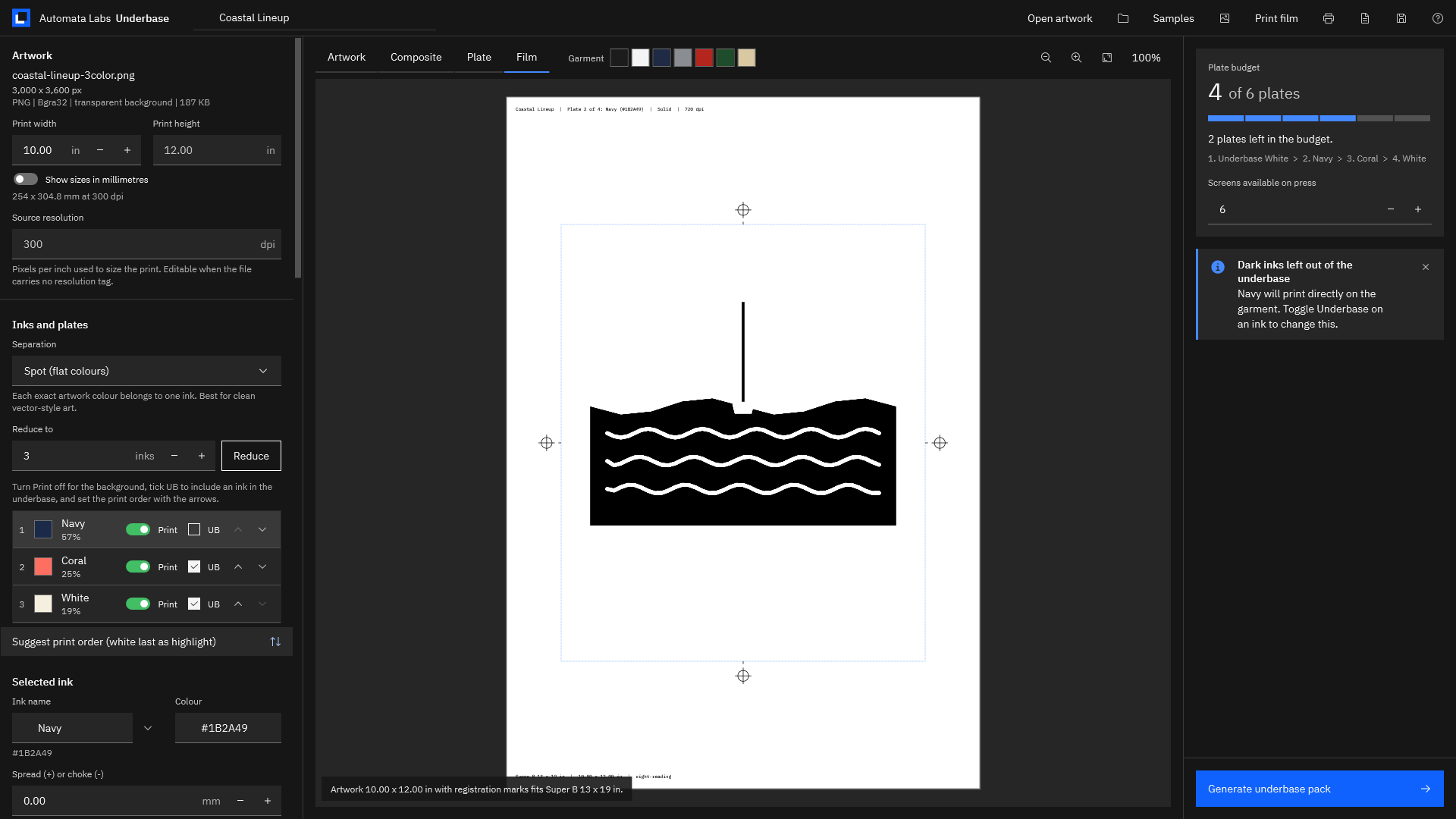
The Film tab showing the Navy plate on a Super B sheet with registration marks on four sides, a plate label at the top, and the note that the 10 x 12 in artwork with marks fits Super B 13 x 19 in.
True-size film on the sheet you load, with identical registration marks, center ticks, and a label on every plate.
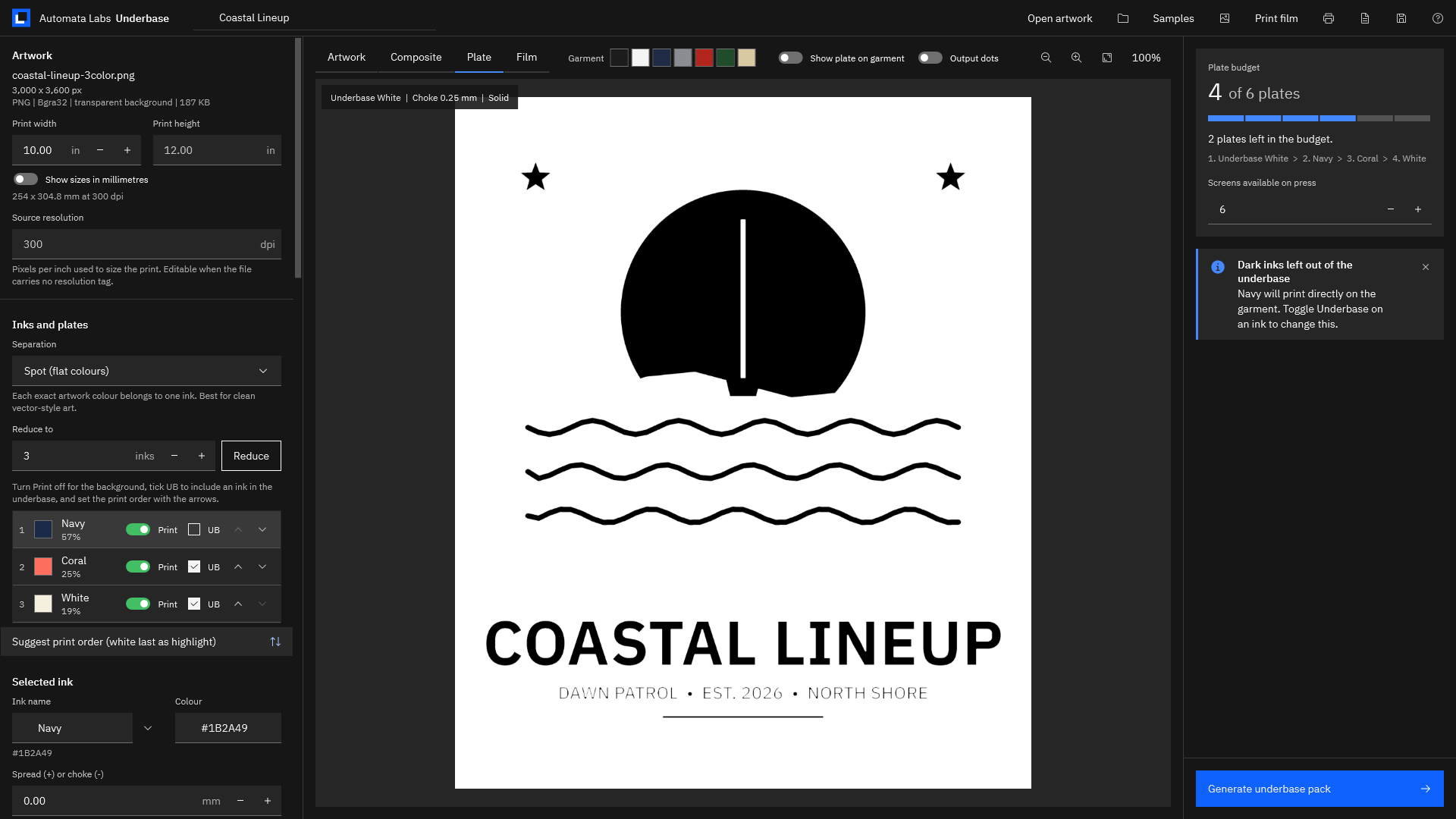
The Plate tab showing the Underbase White plate for the surf logo in black on white, labeled Choke 0.25 mm and Solid.
The white underbase, choked by the millimeter and previewed as it will print on film.
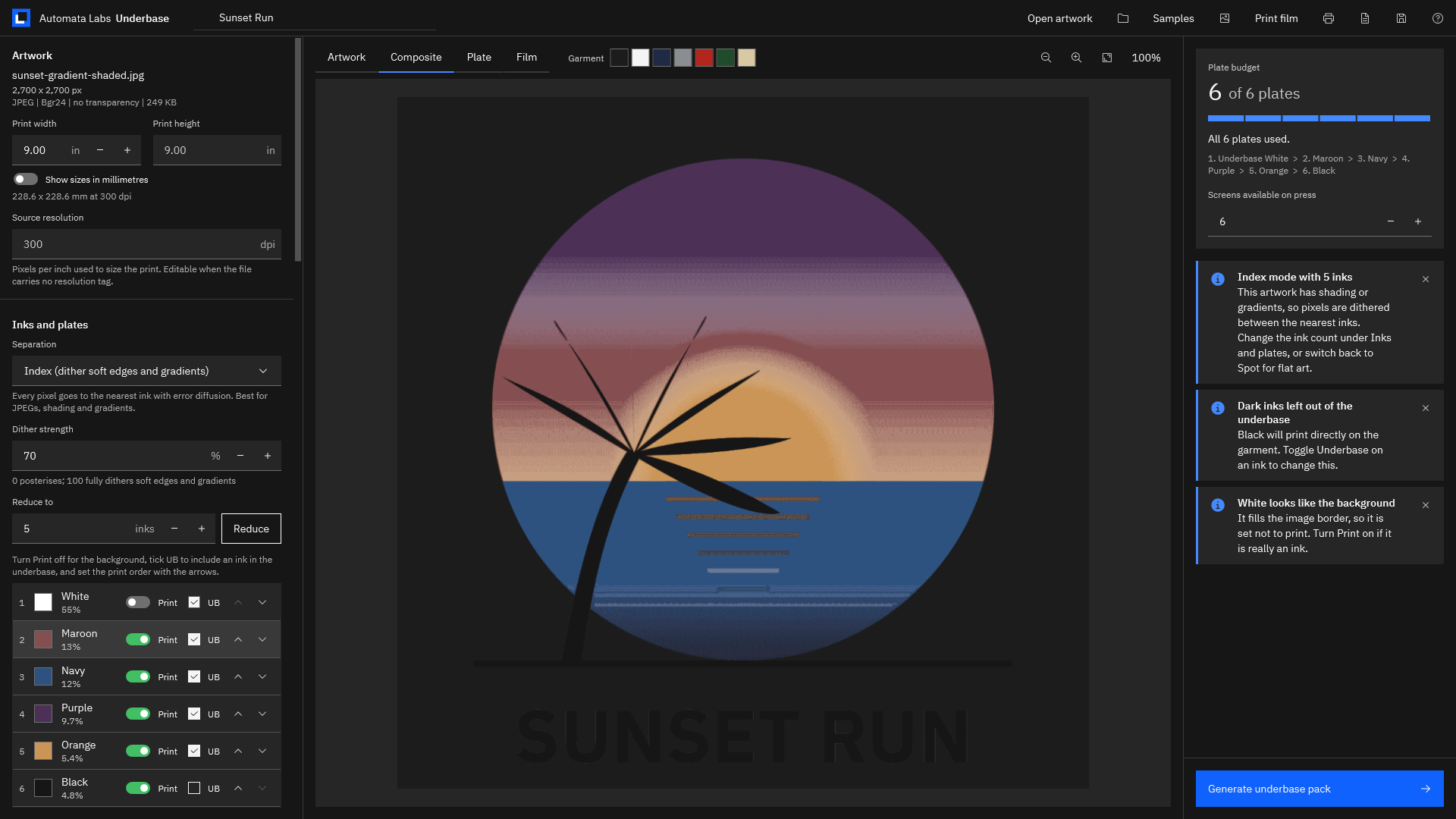
A shaded sunset JPEG separated in index mode with five inks, a dither strength of 70, and a plate budget of 6 of 6 plates.
Shaded JPEGs open in index mode: pixels dither between a fitted set of inks, with the dither strength under your control.
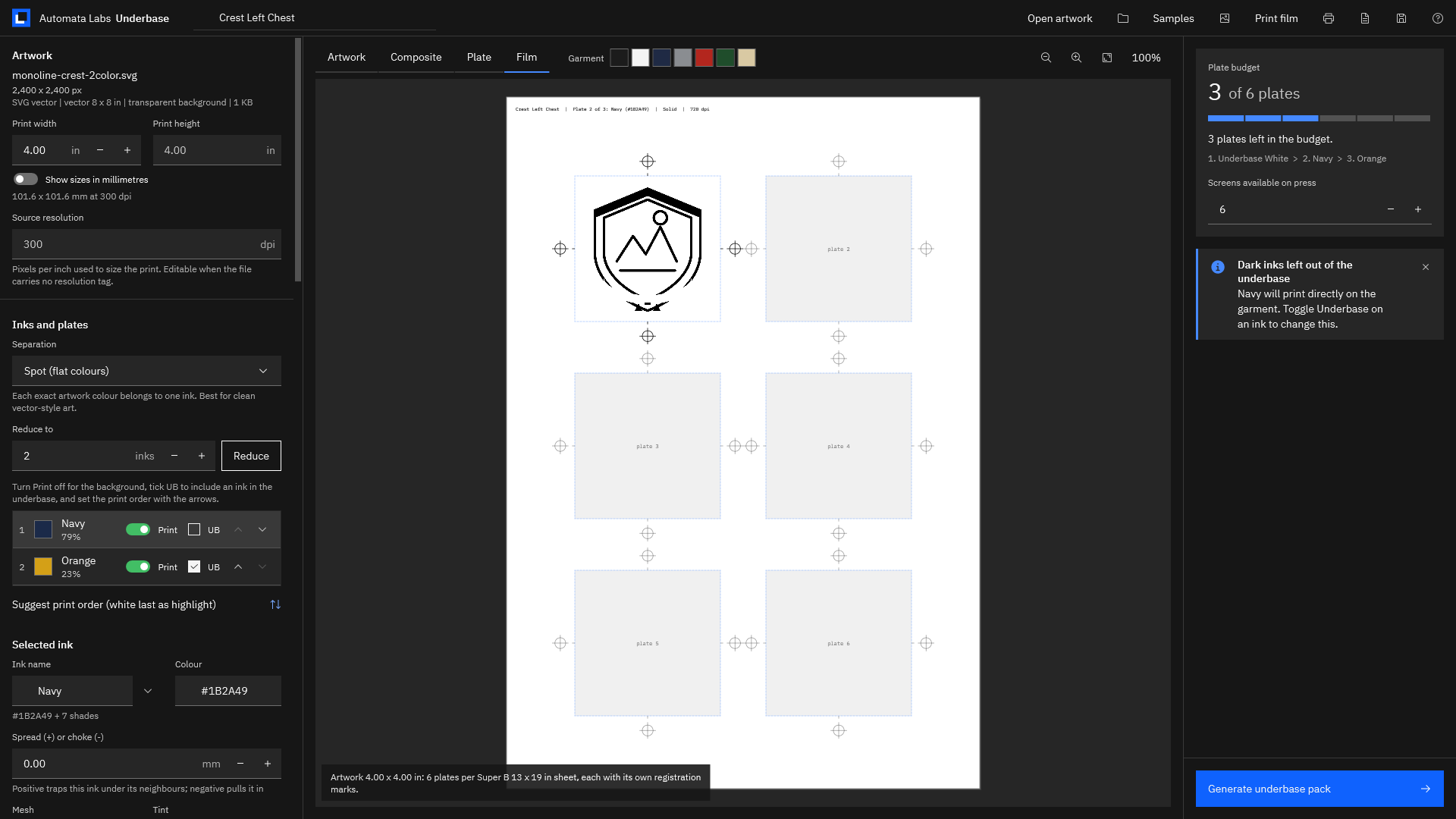
The Film tab with a 4 x 4 in crest ganged six to a Super B sheet, each slot with its own registration marks.
Small designs gang several plates on one sheet of film, each with its own registration marks and label.

Screenshots use the sample artwork bundled with Underbase.

Privacy

Customer artwork stays on this PC

Underbase runs entirely on your PC. There is no account, no upload, and no telemetry, and the app makes no network connections. It reads the artwork you open, writes each job into the output folder you choose, and keeps its settings in local app data.

Your artwork file is only read. Every plate, film page, and ticket is a new file in the job folder, and a saved .underbase job reopens the order as you left it for the reprint.

What you get

  • Spot and index separation for PNG, TIFF, JPEG, BMP, GIF, WebP, SVG, PDF, and Illustrator (.ai) files.
  • A white underbase built from the inks you tick, choked from 0 to 3 mm in 0.05 mm steps.
  • Spread or choke on any ink, plus one-click trapping under the darkest ink.
  • Solid or halftone plates with your ruling, angle, and tint, and dot-gain compensation.
  • 1-bit CCITT Group 4 film TIFFs at 600, 720, 1200, or 1440 dpi, plus unscreened 8-bit channels.
  • A true-size film PDF with registration marks and plate labels, one plate per sheet or ganged.
  • A production ticket as PDF and JSON with print order, mesh, coverage, and sign-off boxes.
  • Saved .underbase jobs for reorders, and six bundled samples to try the whole workflow.

Try it on a job you have already printed.

The Microsoft Store runs a 15-day free trial. Open the artwork from a recent dark-shirt order, or one of the six bundled samples, set the same print width and choke, and compare the plates, film, and ticket with what went to press. If it fits your shop, buy it once. There is no subscription.

Pay once. Own it forever.

One-time purchase on the Microsoft Store · No subscription · Instant install

Buy through the Microsoft Store—instant install, automatic updates, and a Microsoft receipt for easy expensing. No account needed on our site, and no subscription on Store purchases.

Who uses it

  • Owner-operators of small custom-apparel shops separating customer logos for a manual or small automatic press
  • Shops printing bright inks on dark garments that need a choked white underbase and a highlight white
  • Separating shaded JPEG logos and gradient art into a few spot inks with index separation
  • Printing true-size film positives in-house, one plate per sheet or ganged, with a production ticket for the press crew

FAQ

Quick answers about Underbase

What is Underbase?

Underbase is a Windows app for limited-color screen printing separations. It opens customer artwork, finds the inks or dithers shaded art between a fitted set of inks, builds a choked white underbase, traps colors, keeps the job inside your plate budget, and writes 1-bit film TIFFs, a true-size film PDF with registration marks, and a production ticket, all on your PC.

What artwork files does it open?

PNG, TIFF, JPEG, BMP, GIF, WebP, SVG, PDF, and Illustrator (.ai) files. Choose Open artwork, drop the file on the window, or pick one of the six bundled samples. Vector files are rasterised at 300 dpi at their true size, and raster files are sized from their resolution tag. When a file has none, Underbase uses 300 dpi and lets you edit it or type the print width.

Spot mode or index mode: which should I use?

Spot (flat colours) suits clean logos and vector-style art: every exact color belongs to one ink, close shades are grouped, and anti-aliased edges are shared between neighbors. Index (dither soft edges and gradients) suits JPEGs, soft shadows, and gradients: every pixel goes to the nearest ink with error diffusion, under a dither-strength control. Underbase opens shaded art in index mode on its own.

How does it build the white underbase?

Turn on Print a white underbase first and tick UB on every ink that needs white beneath it; dark inks start unticked and print straight on the shirt. Set the choke from 0 to 3 mm in 0.05 mm steps, 0.25 mm by default, and the helper shows it in source pixels. Show underbase plate previews it, and it can print solid, tinted, or halftoned.

Can it trap colors so they do not gap on press?

Yes. Select an ink and set Spread (+) or choke (-) from -3 to +3 mm in 0.05 mm steps; a positive value tucks that ink under its neighbors. For the whole job, set Default trap and choose Apply to all inks, which spreads every ink except the darkest so lighter colors sit under its edge. The default trap is 0.15 mm.

Can it make halftone plates?

Yes. Turn on Halftone this plate for any ink, or Halftone the underbase, and set the screen ruling from 10 to 120 lpi, the angle, and a tint. Suggest ruling from mesh picks a ruling from the mesh count. Dot gain compensation thins halftone plates for the mid-tone gain you measure on press, and Output dots shows the plate at the output resolution.

How does the plate budget work?

Set Screens available on press, from 1 to 16 (6 by default). The Plate budget tile counts the underbase and every printing ink, shows the print order, and turns red when the job needs more screens than the press has. Generation waits until the job fits, and Merge inks to fit the budget merges the closest inks in one click.

What does Generate underbase pack write?

One folder named for the job, holding the true-size film PDF with one page per plate, a 1-bit CCITT Group 4 film TIFF per plate at the output resolution, an unscreened 8-bit channel TIFF per plate, the production ticket as PDF and JSON, a composite preview PNG, and the .underbase job file. Open folder, Film PDF, and Ticket links appear when it finishes.

What film sizes can it output, and can I print film directly?

Letter, Legal, Tabloid, Super B, ANSI C, A4, A3, A3+, A2, or a custom sheet up to 60 by 120 inches, at 600, 720, 1200, or 1440 dpi, one plate per sheet or ganged, and mirrored for emulsion-down output. Print film sends the true-size pages to any Windows printer, and the 1-bit TIFFs go straight to a RIP.

Does my artwork stay on my PC?

Yes. Underbase runs entirely on your PC with no account, no upload, and no telemetry, and the app makes no network connections. It reads the artwork you open, writes each job into the output folder you choose, and keeps its settings in local app data on this PC.

What does it cost, and is there a trial?

Underbase is a one-time purchase in the Microsoft Store, and the listing shows the current price in your currency. The Store runs a 15-day free trial, so you can separate a job you have already printed before you buy. There is no subscription.

What Windows version do I need?

Windows 11 version 24H2 or later on an x64 PC, with about 400 MB of disk space. 8 GB of RAM is recommended for very large artwork, such as 10,000 by 12,000 pixels.
Still stuck? Email [email protected] after checking the Support Center.

Technical specifications

Technical specifications

Spec Implementation
Data Sovereignty Reads only the artwork you open or drop on the window and never writes to it; writes each job (film PDF, TIFF plates, channels, ticket, preview, and .underbase job file) to a folder inside the output folder you choose; settings stay in local app data on this PC
Telemetry Status None; no account, no upload, no telemetry, and no network code in the app
Core Runtime .NET 10 and WPF, self-contained, distributed through the Microsoft Store as an MSIX package; separation, halftoning, TIFF, and PDF output run in the app’s own engine, with PDF and Illustrator (.ai) pages rendered by a bundled PDFium engine
Network Requirements Fully functional offline; the app makes no network connections and nothing is uploaded
Deployment Compatibility Windows 11 version 24H2 or later (10.0.26100), x64; 8 GB RAM recommended for very large artwork, about 400 MB of disk; one-time purchase in the Microsoft Store with a 15-day free trial
Inputs PNG, TIFF, JPEG, BMP, GIF, WebP, SVG, PDF, and Illustrator (.ai) files; vectors rasterised at 300 dpi at true size; print size from the file’s resolution tag or a print width you set, in inches or millimeters
Separation Spot mode (one ink per flat color, close shades grouped, background left unprinted) or index mode (error-diffusion dither between a fitted ink set, dither strength 0 to 100); reduce to 1 to 16 inks; rename, merge, reorder, or switch off any ink
Underbase and traps White underbase from the inks you choose, choke 0 to 3 mm; spread or choke per ink from -3 to +3 mm; one-click trapping of every ink under the darkest; suggested print order with highlight white
Screening Solid or halftone per plate at 10 to 120 lpi, any angle, with tint; ruling suggested from mesh count; dot-gain compensation from 0 to 50 percent; output dots preview at the output resolution
Outputs True-size film PDF with registration marks, center ticks, and plate labels, one plate per sheet or ganged, mirror for emulsion down; 1-bit CCITT G4 film TIFF per plate at 600, 720, 1200, or 1440 dpi; unscreened 8-bit channel TIFFs; production ticket as PDF and JSON; preview PNG; .underbase job file
Film sizes Letter, Legal, Tabloid, Super B, ANSI C, A4, A3, A3+, A2, or a custom sheet up to 60 x 120 in; direct printing to any Windows printer

Customer art in. Press-ready film out.

Underbase separates flat and shaded art, builds a choked white underbase, traps colors, keeps the job inside your plate budget, and writes true-size film with registration marks and a production ticket. Everything runs on your PC.

One-time purchase. No subscriptions. Local-first.

Pay once. Own it forever.

One-time purchase on the Microsoft Store · No subscription · Instant install

Buy through the Microsoft Store—instant install, automatic updates, and a Microsoft receipt for easy expensing. No account needed on our site, and no subscription on Store purchases.

Browse catalog