A PST file is an Outlook data file: a single file with the .pst extension that stores a copy of a mailbox, with its folders, email messages, attachments, contacts, calendar items, tasks, and notes. PST stands for Personal Storage Table. Outlook creates one when you export or archive mail, and the file can be copied, backed up, and opened later, even on a computer that has no Outlook, with an app that reads the format.
Most people meet a PST at a moment of change. A laptop is retired, an employee leaves, a company moves to a new mail system, or IT hands over an old mailbox as one file. The mail survives in the PST long after the computer and the account that made it are gone.
Open a PST on Windows and search it, with no Outlook and nothing uploaded.
Get it from Microsoft
What is inside a PST
A PST is a database in one file. Microsoft publishes its structure as an open specification called MS-PST, and the parts that matter to a reader are simple:
| What it holds | How it is stored | What you can turn it into |
|---|---|---|
| Folders | A tree, starting at a root such as Top of Outlook data file, with Inbox, Sent Items, and any folders the owner made | The same structure, browsed folder by folder |
| Email messages | Headers, a plain-text body, often an HTML or rich-text body, and properties such as importance | EML files, PDF reading copies, or offline HTML |
| Attachments | Stored inside the message they came with, including pictures shown in the message body | The original files, saved beside each message |
| Contacts | Names, company, job title, email addresses, phones, postal addresses, and notes | vCard files or a CSV table |
| Calendar items | Start and end, location, organizer, attendees, and any recurrence | iCalendar (.ics) files |
Because everything sits in one file, a PST is easy to move and hard to read. You cannot open it in Notepad or a web browser; you need software that understands the format.
PST and OST: what is the difference
Outlook uses two kinds of data file:
- PST (Personal Storage Table). A standalone file you own. It is what Outlook writes when you export or archive mail, and it is what POP mail accounts used for their whole mailbox. Copy a PST to another drive and it still holds everything.
- OST (Offline Storage Table). A local cache of a mailbox that lives on a server, such as Exchange or Microsoft 365. It lets Outlook work offline and syncs back to the server.
If you have been handed an archive, it is almost always a PST, because a PST is the file Outlook makes for keeping and moving mail.
Unicode and ANSI PST files
Outlook 2003 introduced the Unicode PST format, which handles text in any language and allows far larger files than the older ANSI format used by Outlook 97 to 2002, which was capped at 2 GB. Unicode PSTs are what Outlook 2003 and every later version create, so nearly every archive made in the last twenty years is a Unicode PST.
Where Outlook saves PST files
Classic Outlook 2010 and later save new data files in the Outlook Files folder inside your Documents folder by default. Older versions kept them in the hidden AppData folder for your Windows profile. In practice, archives turn up wherever someone copied them: a backup drive, a shared folder, a USB stick, or an email from IT.
How to open a PST file
| Method | Good fit when |
|---|---|
| Classic Outlook, using Open Outlook Data File or the Import/Export wizard | Outlook is already installed and licensed on the PC, and you are happy to attach the archive to a profile |
| New Outlook | You also have classic Outlook installed, which Microsoft’s support article for new Outlook lists among the requirements for opening a PST at the time of writing |
| An online viewer or converter | The archive holds nothing private and is small enough to upload |
| A desktop app such as PstVault | You want to open the file on its own, read-only and offline, then search it and export what you need |
Whichever route you take, keep the original file. A PST that has been attached to a working Outlook profile can be changed by that profile, for example when items are moved or deleted, so many people prefer to read an archive with a tool that only reads it.
Meet PstVault
PstVault opens an Outlook PST without Outlook, read-only, searches it by sender, recipient, subject, body, and date, and exports the messages you pick as EML, PDF, offline HTML, vCard, ICS, or CSV.
PstVault is a Windows app from Automata Labs for Windows 10 version 2004 or later and Windows 11. It opens Unicode PST files, the kind Outlook 2003 and later create, shows every folder with its message count, and previews each item with its attachments. It runs in the Windows app sandbox, makes no network connections, and never writes to the PST.
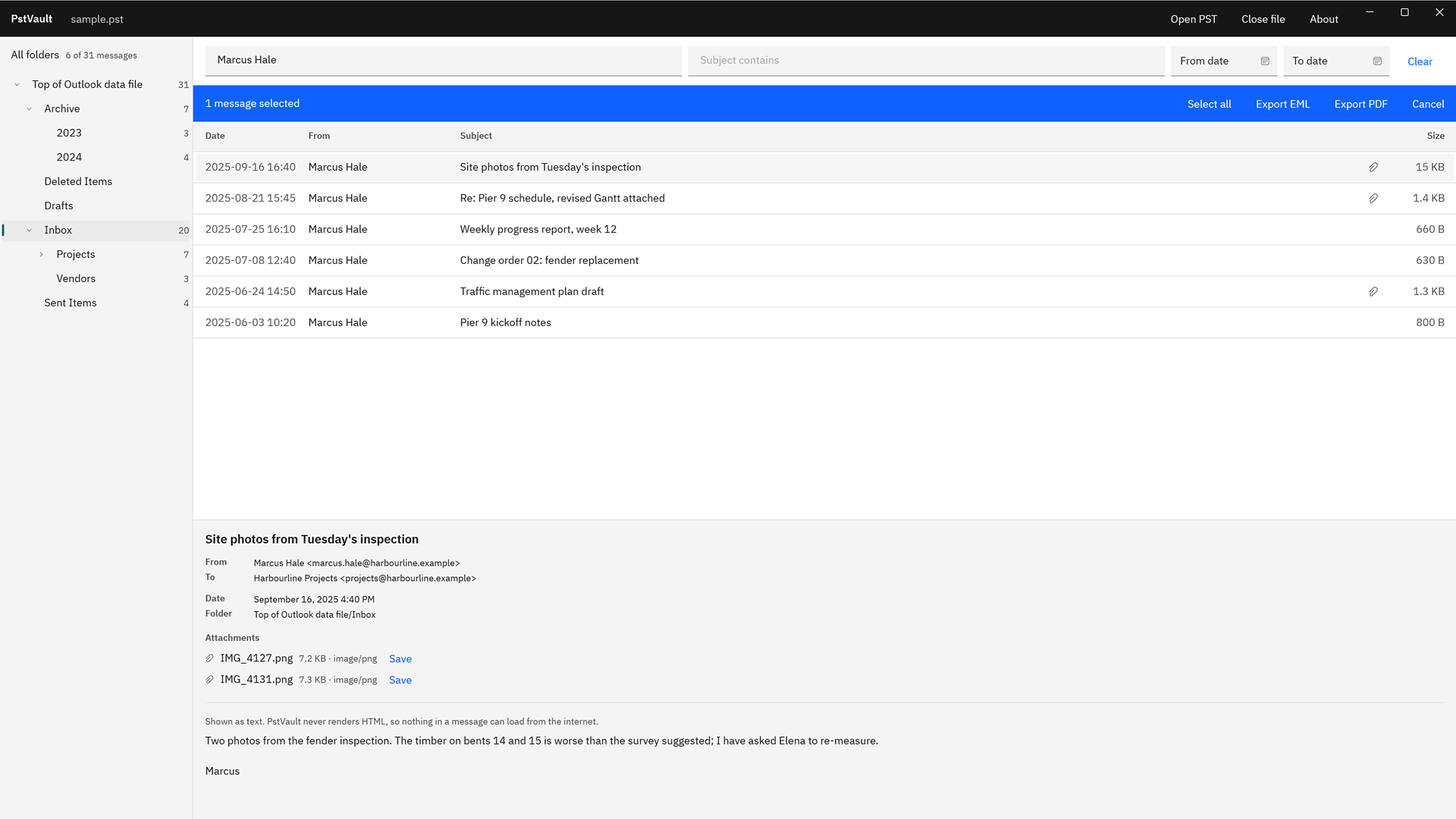
Screenshots use a sample PST generated for testing, with invented people and companies.
Open a PST and look inside, step by step
- Open the file. In PstVault, choose “Open PST” and pick the .pst, or double-click it in File Explorer, where PstVault is registered for Outlook Data File.
- Read the folder tree. The tree starts at “Top of Outlook data file” and shows every folder with its message count. “All folders” covers the whole file.
- Pick a folder. Select Inbox, Sent Items, or any folder the owner created. Messages are listed newest first, with “Date”, “From”, “Subject”, and “Size”.
- Read an item. Select a row to see the preview: From, To, Cc, Bcc, the date, the “Folder” it lives in, its “Attachments”, and its text. Contacts and calendar items show their own fields.
- Find something specific. Type in “Sender” or “Subject”, or choose “More filters” for “Body”, “Recipient”, “From date”, and “To date”.
- Take what you need. Choose “Save” beside an attachment, or select messages and choose “Export files” or “Export PDF” to write them out in the format you pick, with a JSON report of every file.
The full export walk-through is in our guide on how to export emails from a PST file, and the formats are compared in EML, PDF, or HTML for exported email.
Frequently asked questions
Can I open a PST file without Outlook?
Yes. A PST is a documented file format, and apps that read it directly do not need Outlook installed. PstVault opens a PST read-only on Windows, shows its folders and messages, and exports what you select. Our page on how to open a PST file without Outlook covers the steps.
Is a PST file safe to open?
Opening a PST read-only leaves it unchanged, which is what PstVault does. It also shows message bodies as text in its preview, and its offline HTML copies load no remote content and run no scripts, so nothing in an old message can reach the internet while you read it.
Can I get the contacts and calendar out of a PST?
Yes. Contacts export as vCard 4.0 files or one CSV table, and calendar items export as .ics files with their recurrence and time zones. See extract contacts from PST to CSV for the columns and options.
How big can a PST file be?
Unicode PST files can hold many gigabytes of mail, and Outlook 2010 and later set a default size ceiling of 50 GB for new ones. Archives built up over many years are often several gigabytes. PstVault lists the folders with their counts so you can see what a large archive holds before you search it.
Try PstVault
PstVault is a one-time purchase in the Microsoft Store, and the Store runs a 15-day free trial with every feature. Open the PST you have, look through its folders, and export a few messages before you buy. Compare it with other ways to read an archive in our PST viewer for Windows guide, or go to the PstVault product page.
See what is inside your PST during the 15-day free trial.
Get it from Microsoft
Microsoft and Outlook are trademarks of the Microsoft group of companies. PstVault is not affiliated with or endorsed by Microsoft.
Last updated 15 October 2026. Published by Automata Labs, a software company in Canada.