Ink coverage is the amount of ink or toner a printed page carries, given as a percentage of the page area for each process colour: cyan, magenta, yellow and black. A page of solid black is 100 percent black coverage, a typical letter is a few percent, and the four colours added together give the page’s total coverage. Print shops use it to estimate supplies cost and to price jobs.
The numbers get quoted loosely. Cartridge boxes talk about 5 percent coverage, prepress talks about total coverage limits, and some calculators report how much of the page is marked rather than how much ink it takes. This guide sorts out the terms so the figure you price from means what you think.
See the coverage of your own PDF, page by page, in a few clicks.
Get it from Microsoft
Coverage for each colour
Every page printed in CMYK is four layers: cyan, magenta, yellow and black. Coverage for one layer is how much ink that layer puts down, averaged over the whole page. Two things feed it: how much of the page the colour touches, and how strong the colour is where it does.
- A solid black rectangle covering a quarter of the page is K 25.
- A 50 percent cyan tint spread across the whole page is C 50.
- The same 50 percent tint over half the page is C 25.
That last pair is the point people miss. A tint is less ink than a solid, so a coverage figure that only counts touched area will overstate light tints and pale backgrounds.
Total coverage
Add the four channels and you get the page’s total coverage. A page that reads C 30, M 25, Y 20, K 35 has a total of 110. The scale runs from 0 to 400, because each of the four inks can reach full strength on its own. Heavy photographic pages often run well past 100 in total, which is why they cost so much more to print than text pages.
You will also meet total area coverage as a prepress limit, usually written as a maximum such as 300 percent. That limit is about the darkest single spot on the page, where too much ink can smear or dry slowly. The coverage that matters for pricing is the average over the page, which is a different and much smaller number.
The 5 percent standard
When a toner cartridge is rated at a certain number of pages, the rating is commonly based on about 5 percent coverage per colour. Yield testing for laser toner follows ISO/IEC 19752 for monochrome cartridges and ISO/IEC 19798 for colour, using standard test pages that are mostly white with some text and simple graphics.
That gives every shop a handy baseline. A job that averages 15 percent black uses roughly three times the black toner of the rated page, and a full-bleed photo flyer can sit many times higher on every colour. Comparing a job’s coverage with 5 percent is the quickest way to see how far it is from the cost you assumed.
Two ways to read coverage
| Reading | What it counts | A 50 percent cyan tint over the whole page | Where it fits |
|---|---|---|---|
| Marked area | Share of the page where any ink appears | Reads as full coverage, because every spot is touched | Spotting which pages carry colour at all |
| Ink amount | How much of each ink goes down, averaged over the page | Reads C 50 | Estimating supplies use and pricing |
| InkQuote | Ink amount for each of C, M, Y and K, from the colour values in the PDF, weighted by page area across the document | Reads C 50.0 | Why it works: ink amount follows what the cartridges spend, so the figure prices the job |
Why RGB conversion changes the answer
Screens work in RGB. A tool that has to draw a page on screen before it measures it converts the file’s CMYK to RGB, then converts the result back to CMYK to count. The trip out and back can turn a headline set in solid black into a rich black made of all four inks, adding cyan, magenta and yellow the designer never asked for.
Reading the CMYK values written in the file avoids the round trip. In a print-ready PDF those values are the separation the designer chose, so solid black text stays black ink only. Files that really are RGB, such as Word or browser exports, still need converting, and the PDF specification gives a standard formula for it that maps RGB black to black ink only.
Rich black and black text
A rich black mixes black with some cyan, magenta and yellow so large dark areas print deeper. It is common in backgrounds and big headlines, and it pushes total coverage up quickly. Body text is usually set in black alone. When you read a coverage report, a text-heavy document with high cyan, magenta and yellow figures is worth a second look at how its black was specified.
Mixed page sizes
Coverage is a percentage of each page, so a document total has to account for page size. A tabloid page holds twice the area of a letter page. Take a two-page file with a solid black letter page and a blank tabloid page: a plain average of the two pages gives K 50, but weighted by area the total is K 33.3, because the blank page is twice as large. The area-weighted figure is the one that matches the paper and ink you will use.
Spot colours on a digital press
Brand work often names spot colours. On an offset press each spot ink can get its own plate, but a digital press usually prints them as a CMYK mix. A PDF describes how to make that mix through a tint transform, and following it is how a spot colour gets counted in the four process figures.
Meet InkQuote
InkQuote estimates ink-amount coverage for cyan, magenta, yellow and black on every page of a PDF, from the colour values in the file, and turns it into a one-page quote sheet on your Windows PC.
It reads DeviceCMYK natively, counts grayscale as black, converts RGB with the PDF specification’s formula, and runs spot colours through the file’s own tint transforms, listing each one by name. The All row weights every page by its area. Nothing uploads, and the original PDF is never changed.
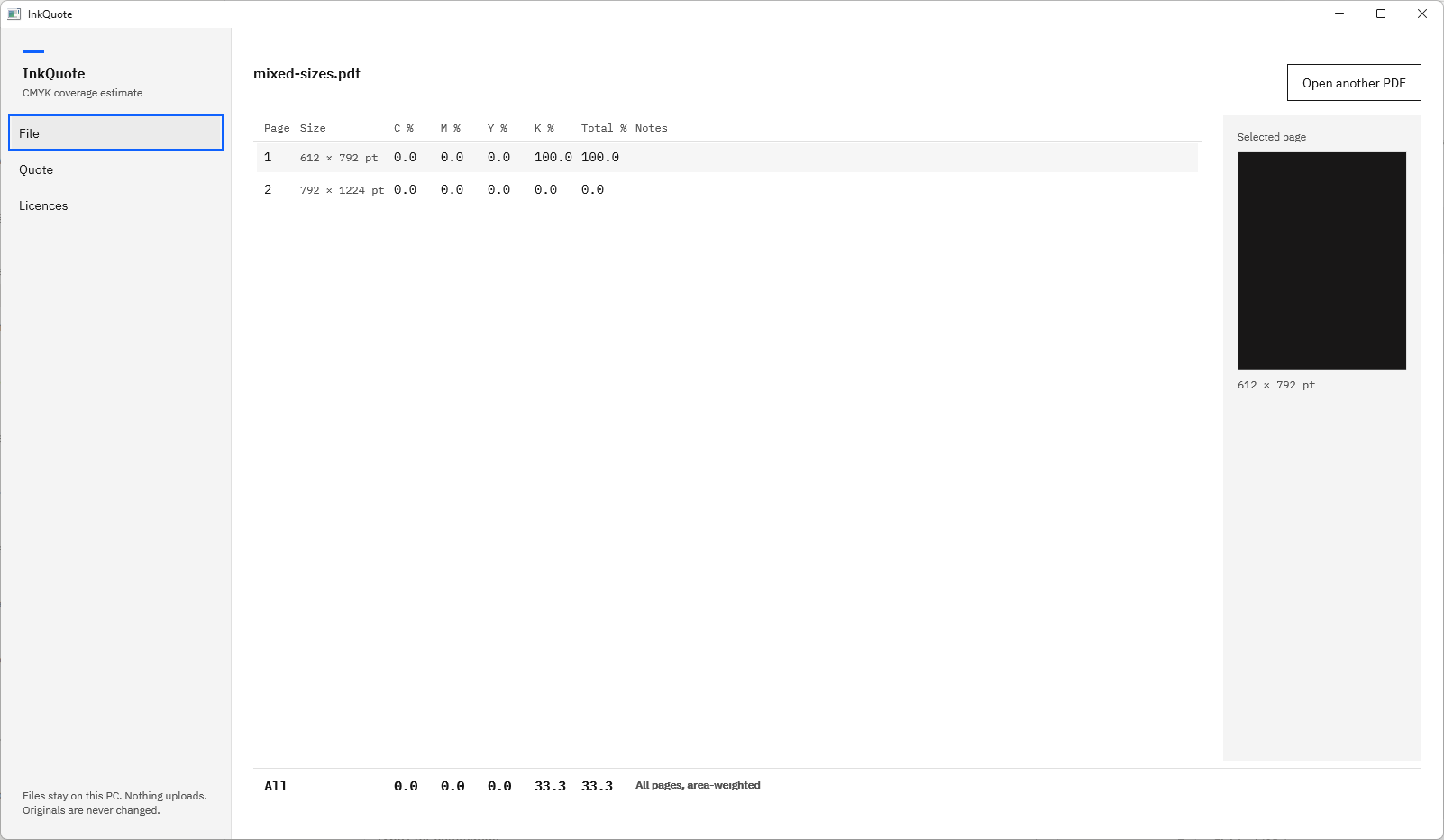
Screenshots use small test PDFs generated for InkQuote’s own test suite. They contain no customer artwork.
See the coverage of your own file
- Choose “Open PDF” on the File page and pick the file, or reopen one from “Recent”.
- Read the table. “C %”, “M %”, “Y %” and “K %” are the ink amounts for each page, and “Total %” is their sum.
- Select a row to see the page in the “Selected page” pane, with its size, notes, and any spot colours.
- Read the “All” row for the document figures, captioned “All pages, area-weighted”.
- Choose “Quote” in the left navigation to turn the figures into a price with “Price per copy” and “Copies”, then “Export quote sheet”.
For the full walk-through, read how to estimate the ink coverage of a PDF. For the columns in detail, see CMYK coverage per page, and for cartridge arithmetic, toner coverage of a PDF.
Frequently asked questions
What is a normal ink coverage for a page?
It depends on the content. A plain text letter sits around the 5 percent figure used for cartridge yields. Pages with charts or a logo run higher, and full-bleed photography or dark backgrounds can reach totals well past 100. That spread is why coverage belongs in the price.
Is 5 percent coverage per colour or for the whole page?
For colour cartridges, yield ratings are commonly based on about 5 percent for each colour, under ISO/IEC 19798. For monochrome cartridges, ISO/IEC 19752 applies to the single black toner. Compare each channel of a job with 5 percent, not the total.
Can total coverage be more than 100 percent?
Yes. Total coverage adds cyan, magenta, yellow and black, so it runs from 0 to 400. A dark photograph with all four inks at strength can total well above 200. Each single channel stays between 0 and 100.
Try InkQuote
InkQuote is a one-time purchase in the Microsoft Store, with a 15-day free trial of every feature run by the Store. Pick a PDF ink coverage calculator that reads CMYK as CMYK, then learn how to price a print job by ink coverage. The InkQuote product page has the screens and the full FAQ.
Read the coverage of your own files during the 15-day free trial.
Get it from Microsoft
Last updated 15 October 2026. Published by Automata Labs, a software company in Canada.