ContextCleaner: see every entry in the Windows 11 right-click menu, and which app added it — on the Microsoft Store.
Guided workflow variation

The build won't clean.A process still has the file.

LockGhost names the exact holder of a locked `bin`, `obj`, DLL, or `node_modules` file and lets you end just that one — guarded — so your rebuild and `git clean` stop failing. Local, no telemetry.

LockGhost names the exact process pinning a locked build artifact and ends just that one — guarded — so rebuilds and `git clean` stop failing. Local-only, no telemetry.

Pay once. Own it forever.

One-time purchase on the Microsoft Store · No subscription · Instant install

Buy through the Microsoft Store—instant install, automatic updates, and a Microsoft receipt for easy expensing. No account needed on our site, and no subscription on Store purchases.

Full LockGhost overview
One-time purchase No telemetry Local-first

windows · offline · zero telemetry · buy direct

If this sounds like your week

The build won't clean because a process still has the output open.

`bin`, `obj`, a DLL, or a `node_modules` file won't delete: "EPERM," "operation not permitted," or "file used by another process." A test runner, a file watcher, a debugger, or a previous run is still holding a handle, and your rebuild or `git clean` dies on it.

Where tooling usually breaks

Killing the wrong process costs you the whole dev session.

You could kill node, or the IDE, or the debugger — but which one actually has the file? Guess wrong and you lose unsaved state or restart a long process. Task Manager won't tell you which PID owns *this* locked artifact.
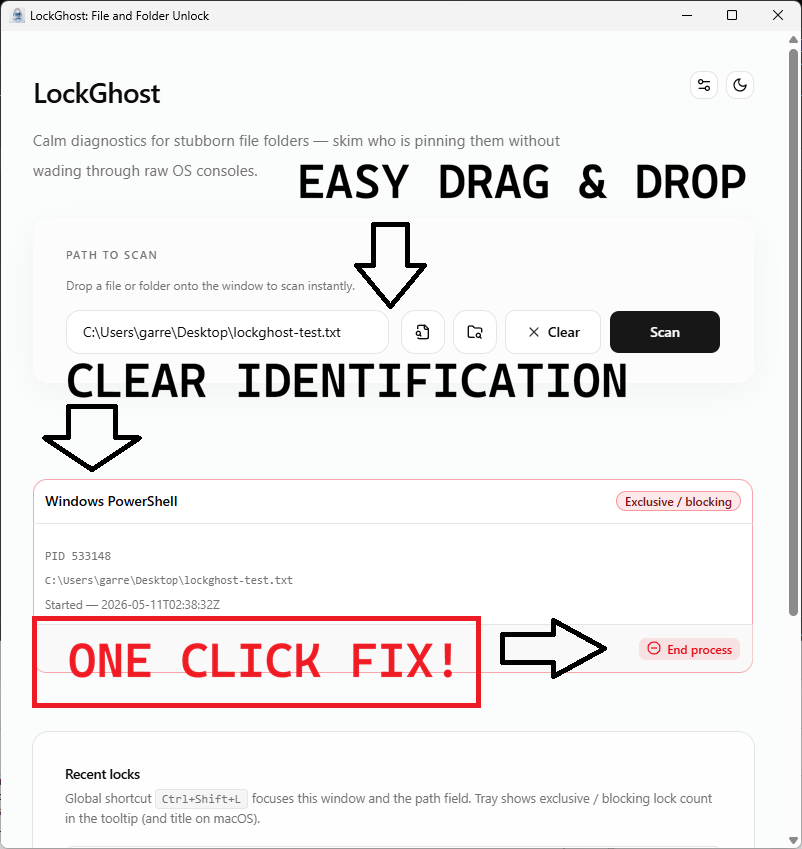
Where LockGhost lands

Go straight to the process pinning your build artifact.

LockGhost names the exact holder of a locked file via the Restart Manager API and lets you end just that process — guarded, so you don't nuke a critical service by accident. Clean the build, unblock `git`, and keep moving. Local-only, zero telemetry, right-click from Explorer where the file already is.

Pay once. Own it forever.

One-time purchase on the Microsoft Store · No subscription · Instant install

Buy through the Microsoft Store—instant install, automatic updates, and a Microsoft receipt for easy expensing. No account needed on our site, and no subscription on Store purchases.

Learn more about LockGhost

windows · offline · zero telemetry · buy direct

What you get

Feature highlights

Sub-50ms lock detection via the Windows Restart Manager API

see whether OneDrive sync, antivirus, Windows Search indexing, or another service is holding handles—without guesswork.

Explorer-native workflow

right-click context integration so the answer appears where you already are, not buried in another tool.

Friendly resolution UI

process names you can recognize, color-coded lock severities, and one-click End Process with guardrails against terminating critical system roles by accident.

Feels like part of Windows 11

Mica-friendly presentation, system tray presence, and customizable global hotkeys so LockGhost stays invisible until the lock isn’t.

100% offline & privacy-first

zero telemetry, zero cloud sync, zero network calls—lock history and preferences live in a local database on your disk. One-time purchase. No subscriptions. Local-first.

Product Interface

LockGhost showing the processes holding a file, each with a friendly name and color-coded lock severity
The answer Windows never gives you: every process holding the path, by friendly name, with color-coded severity instead of cryptic PIDs.

Detect, identify, and resolve—without leaving Explorer.

LockGhost turns the opaque “file in use” dialog into a clear, actionable list. The Windows Restart Manager API names the real holder in under 50 ms, and a guarded one-click action ends it safely.

Friendly names, not PIDs: recognize OneDrive, Defender, Search, or a stray dev watcher at a glance.
Color-coded severity: know what is safe to end and what to wait out before you touch a thing.
Guarded termination: critical system roles are hard-blocked, so a stuck file never becomes a crashed machine.

Especially when

  • Find which process has a file open when Windows only says “File in use”
  • Avoid dangerous blind “end task” cleanup when a lock could be OneDrive, Defender, or Explorer
  • Resolve folder delete and document save blocks with clear, local-only diagnostics

Who benefits

Real-world scenarios

The build that won't clean

`git clean` and your rebuild die because a DLL or `node_modules` file is "used by another process" — a watcher or a previous run never let go.

LockGhost names the exact holder so you end only that process, not your whole IDE, and the build cleans on the next try. No more nuking node and hoping.

The file that won't delete

You drag an old folder to the Recycle Bin and Windows refuses: "open in another program." You have nothing open that touches it, and the dialog won't say what does.

You right-click the folder, LockGhost names the holder via the Restart Manager API, and you end it with a guarded click — or wait it out, now that you know who to wait for. Deleted, no reboot.

The repeat ticket

"File in use" comes back for the third time today and you're tired of launching Process Explorer and running a handle search every time.

LockGhost answers it from Explorer's right-click in seconds with a recognizable name and a guarded kill, so the fix is fast and low-risk on managed machines.

Deep dive

Why build artifacts stay locked — and how to end only the right process

On Windows, a file can't be deleted while any process holds an open handle to it with a sharing mode that denies deletion. In a dev loop the usual suspects are file watchers (nodemon, webpack, Vite), test runners that didn't exit cleanly, a debugger still attached, or an antivirus mid-scan on a freshly written binary. The error surfaces as EPERM / "operation not permitted" / "used by another process," but none of those name the holder.

LockGhost queries the Windows Restart Manager — the same subsystem Windows uses to figure out what to close before an update — to map the locked path to the exact process holding it. You end that single process (guarded against critical system roles) instead of force-killing your IDE and losing state, then your rebuild or `git clean` succeeds.

# The errors that mean "a process still has the file open":
# Windows: The process cannot access the file because it is being used by another process.
# Node:    Error: EPERM: operation not permitted, unlink '...\node_modules\...'
# Git:     error: unable to unlink old 'bin/app.dll': Permission denied

# LockGhost names the holder via the Restart Manager API — end just that one.
Trusted by pragmatic desktop users

Built for people who prefer tools that stay local.

Real workflows: focus timers that stay visible, batches that never leave the disk, and renames you can rewind.

Customer review 01

PinPoint: Always On Top saves me so much time as I can organize all my report materials without having to flip between windows or tabs. I love the fact that it is straightforward and simple.

Senior Accountant · Manufacturing Company · United States · PinPoint Reviewed About PinPoint
Customer review 02

I used to get so frustrated when my Taskbar would freeze and disappear. Taskbar Sentinel has eliminated that pain without subjecting me to another subscription.

Darren · Calgary, Alberta, Canada · Taskbar Sentinel Reviewed About Taskbar Sentinel
Customer review 03

OpticBatch and MetaForge are a lifesaver for me as a person with a passion for photography. They give me the ability to stay organized and keep personal information confidential when I post pictures online.

Sherri · United States · OpticBatch & MetaForge Reviewed Browse the full catalog

Quotes are shown with customer permission; names and locations appear as reviewers provided them.

Our Core Moat

Engineered to respect your system boundaries.

System Resource Monitor (Idle State Comparison)
Automata Labs low idle memory footprint compared to generic Electron applications

Lightweight Native Stack

Compiled Rust core wrapped inside an optimized Tauri shell. No heavy background node loops or duplicate Chromium engines cooking your memory footprint (<25MB idle RAM).

100% Local-First Privacy

Executes entirely on-device with full offline isolation. Absolute zero background telemetry policies, no metrics aggregation, and zero mandatory cloud-sync accounts.

Perpetual Fallback Licenses

Pay a single, clear one-time purchase price. Own your specific native software utility execution tier permanently without artificial subscription paywalls or ongoing usage tax.

FAQ

Straight answers—no glossary dump

How do I find which process is locking a file on Windows?

Windows only tells you a file is "in use," not what's using it. LockGhost adds a right-click action in Explorer that queries the Windows Restart Manager API and names the exact holding process in under 50 ms — no Task Manager guesswork, no PID hunting.

Is it safe to end the process LockGhost finds?

LockGhost color-codes severity and guards termination of critical system roles, so you don't accidentally take down something essential. For ordinary apps, one guarded click ends the lock; for system or sync processes, it warns you first.

Does LockGhost use Process Explorer or send anything to the cloud?

Neither. LockGhost uses the official Windows Restart Manager API directly and runs 100% offline — zero telemetry, zero network calls. Lock history and preferences live in a local database on your disk.

How do I get LockGhost, and is it a subscription?

LockGhost is a one-time purchase on the Microsoft Store — no subscription, no account required for core use. Use the Microsoft Store button on this page for the current listing and price.

Stop guessing which app
has your file open.

LockGhost uses the Windows Restart Manager API for fast lock discovery, Explorer right-click integration, friendly process names, and guarded termination—without shipping data off your machine.

Pay once. Own it forever.

One-time purchase on the Microsoft Store · No subscription · Instant install

Buy through the Microsoft Store—instant install, automatic updates, and a Microsoft receipt for easy expensing. No account needed on our site, and no subscription on Store purchases.

Open full product page

Technical specifications

Technical specifications for procurement

Spec Implementation
Data Sovereignty Lock discovery and history stored in a local on-disk database; no cloud sync
Telemetry Status None; zero network calls in shipping builds
Core Runtime Native Windows utility using Restart Manager API and Explorer shell integration
Network Requirements Fully functional offline
Deployment Compatibility Windows 11 (Microsoft Store and direct purchase)
Detection Sub-50ms lock queries via Windows Restart Manager
Integration Explorer right-click context menu and system tray