Construction drawing sheet numbers usually pack three things into a short code: a discipline letter, a sheet type digit and a sequence number. In A-101, A is architectural, 1 marks a plan, and 01 is the first sheet of that kind; by the same pattern, S-201 is the first structural elevation. Firms vary, so check the sheet index.
The number is how everyone on a project refers to a drawing. A detail bubble marked 5/A-501 points to detail 5 on sheet A-501, the drawing index on the cover sheet lists every sheet by number, and questions, revisions and reprint requests all name sheets the same way.
Read the sheet numbers from every title block in a set, and check them in one table.
Get it from Microsoft
The standard pattern: discipline, sheet type, sequence
The United States National CAD Standard, published by the National Institute of Building Sciences, includes a Uniform Drawing System that sets out how sheets are organized and identified. The A/E/C CAD Standard, Release 6.0, the US Department of Defense implementation of the national standard, describes the sheet identifier as three parts: a discipline designator, a sheet type designator, and a sheet sequence number. Its own example, A-102, is the second architectural plan sheet.
The discipline letter
The first character names the discipline responsible for the sheet. The second is either a hyphen or a second letter that subdivides the discipline, which is why you see both A-101 and two-letter prefixes. In the A/E/C standard, for example, FA covers fire detection and alarm and FX fire suppression; firms also use their own, such as FP. The standard lists these single-letter designators, in this order:
| Letter | Discipline | Letter | Discipline |
|---|---|---|---|
| G | General | F | Fire protection |
| H | Hazardous materials | P | Plumbing |
| V | Survey and mapping | M | Mechanical |
| B | Geotechnical | E | Electrical |
| C | Civil | T | Telecommunications |
| L | Landscape | R | Resource |
| S | Structural | X | Other disciplines |
| A | Architectural | O | Operations |
| I | Interiors |
The standard also uses this as the order of disciplines in a set: a set that follows it opens with G sheets, then civil, landscape, structural and architectural, then fire protection, plumbing, mechanical and electrical.
The sheet type digit
The digit after the discipline says what kind of drawing the sheet holds:
| Digit | Sheet type |
|---|---|
| 0 | General: symbols, legends, notes |
| 1 | Plans: horizontal views |
| 2 | Elevations and profiles: vertical views |
| 3 | Sections |
| 4 | Large-scale views that are not details |
| 5 | Details |
| 6 | Schedules and diagrams |
| 7, 8 | User defined |
| 9 | 3D representations: isometrics, perspectives, photographs |
The sequence number
The last two digits number the sheets of one discipline and type, from 01 to 99. The national standard allows gaps, so a team can insert sheets later without renumbering the rest. For a sheet added between two existing ones, the A/E/C standard appends a letter, as in A104A between A104 and A105 in its file-name example.
Worked examples
| Sheet number | Reads as |
|---|---|
A-101 | Architectural, plan, first sheet |
S-201 | Structural, elevation, first sheet |
A-501 | Architectural, details, first sheet |
M-601 | Mechanical, schedules and diagrams, first sheet |
G-001 | General, general information, first sheet |
Variations you will meet
Many firms follow the standard loosely or not at all. Expect these forms:
| Form | Example | What to know |
|---|---|---|
| Hyphen | A-101 | The standard form |
| No separator | A101 | Same meaning, written tight |
| Period | A1.01, S2.01 | Often the sheet type before the period and the sequence after |
| Letter suffix | A-401B, M-1A | Often an inserted sheet |
| Zero-padded | G-000, C-001 | Often cover and general sheets |
| Short | T1, E-1 | Seen on small sets |
| Four digits | A-1001 | Large projects with many sheets |
| Two-letter prefix | FA-101, FP-101 | A subdivided discipline; the letters vary by standard and firm |
The sheet index on the cover sheet is the authority for any one set. If it lists A1.01, then A-101 is a different sheet to everyone reading it, so keep the printed form exactly when you name files or bookmarks.
Where the number sits in the title block
Title blocks usually run along the bottom of the sheet with the key cells in the bottom-right corner, or as a vertical strip down the right edge. The sheet number is normally the largest text in the block, in a cell labeled SHEET NUMBER, SHEET NO or DWG NO. The title sits under SHEET TITLE or DRAWING TITLE, and the current revision sits under REV, or as the latest row of a revision table.
Reading sheet numbers with software, and what goes wrong
Text recognition on title blocks has its own failure modes. Knowing them tells you where to look when you check the results:
- Lookalike characters. The letter O and the digit 0, and the letters I and L and the digit 1, are easy to confuse in small type.
- Hyphens. A hyphen can come back as a period or a long dash, which turns
P-103into something that looks like a valid dotted number. - Very short marks. A sheet number like
T1, or a one-letter revision, can be dropped entirely. - Plausible misreads.
A-107read where the sheet saysA-101looks like a real sheet number, and only a duplicate or a check against the index reveals it.
Meet SheetStamp
SheetStamp reads the sheet number, title and revision from every title block in a plan-set PDF, flags what it is unsure of in a review table, and writes the checked names into bookmarks, page labels or single-sheet files.
It recognizes the forms in the variations table, reads O, I and L inside a number as digits, and looks for common English and French title block labels. It runs on your Windows PC with the text recognition built into Windows, and nothing uploads.
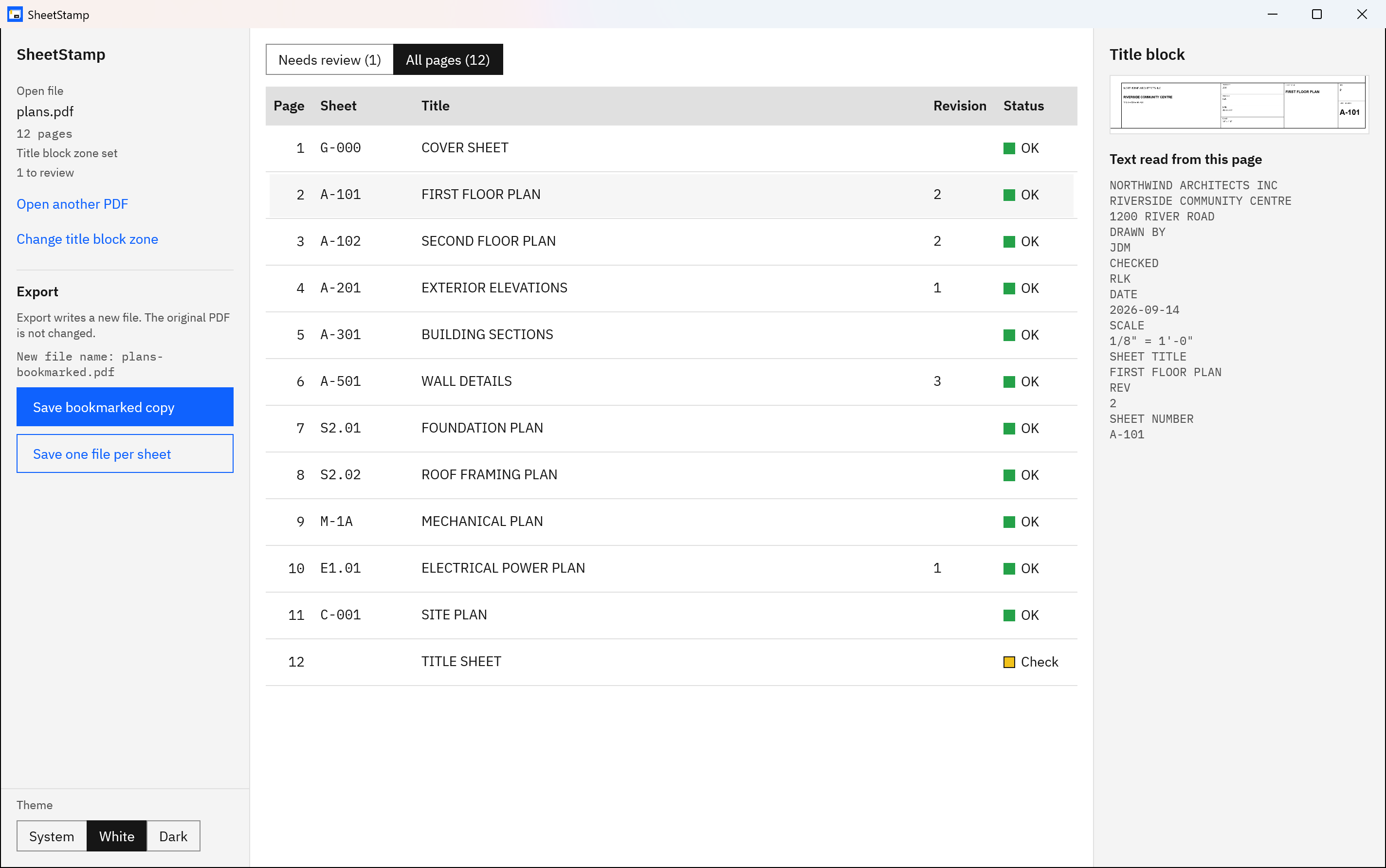
Screenshots use a synthetic sample plan set with a fictitious project and firm.
Read the sheet numbers in a set, step by step
- Open the PDF. Choose Open PDF and pick the plan set.
- Mark the title block. Drag a rectangle around it on page 1, or choose Bottom-right block or Right-edge strip for the two common layouts.
- Read. Choose Read all pages. Each page’s sheet number, title and revision appear in the table.
- Work through Needs review. Flagged rows come first. Select one to see the title block crop, the text read from it, and the reason, then type the correct value.
- Scan All pages. Read down the Sheet column against the drawing index. This is where a plausible misread gets caught.
- Save. Choose Save bookmarked copy for bookmarks and page labels, or Save one file per sheet for named single-sheet PDFs.
Check a whole set’s sheet numbers against the index in one table.
Get it from Microsoft
What SheetStamp flags, and what it cannot
A row goes to Needs review when its sheet number or title is not found, when a value is read with low confidence, when two pages share a sheet number, or when a number is written unlike the others of its discipline, such as P.103 among P-101 and P-102. The reason is shown with the row.
Some misreads pass without a flag. A number misread in its usual spot is trusted unless it duplicates another sheet, a missed one-letter revision leaves the cell empty without a flag, and accented capitals can come back slightly wrong. SheetStamp only knows the pages it received, so a sheet missing from the PDF has to be spotted against the index. Extracting sheet numbers from a plan set covers the reading in more detail, and the page labels guide shows how the numbers end up in the viewer’s page box.
Limits
- One title block zone for the whole set; a sheet whose block sits elsewhere is flagged.
- No spreadsheet or CSV export of the sheet list. The values go into bookmarks, page labels and file names.
- The revision is shown for checking but is not written into bookmarks or file names.
- Windows needs a text recognition (OCR) language installed.
Frequently asked questions
What does the A in A-101 stand for?
Architectural. In the standard discipline letters, A marks sheets prepared by the architect, such as floor plans, elevations, sections and details. S is structural, M mechanical, E electrical, P plumbing and C civil. Check the sheet index on the cover sheet, because a firm’s own scheme can differ.
Why do some sets use A1.01 instead of A-101?
It is a firm or project convention. A period often separates the sheet type from the sequence, so A1.01 and A-101 usually describe the same kind of sheet. They are still different identifiers, so copy whichever form the title block prints when you name files or bookmarks, and never mix both forms in one set.
Why are there gaps in the sheet numbers?
The national standard lets sequence numbers skip, so a design team can insert sheets later without renumbering everything after them. A set that jumps from A-103 to A-106 is not necessarily missing sheets. The drawing index on the cover sheet is the place to confirm which sheets belong to the issued set.
Can software read sheet numbers from a scanned set?
Yes, if it reads the title block as an image. SheetStamp does, so scanned and exported sets are read the same way. Low-resolution or noisy scans are harder for text recognition, so more rows get flagged, and each flagged row shows the crop so you can type what the drawing says.
Try SheetStamp
SheetStamp is a one-time purchase in the Microsoft Store, with a 15-day free trial that has every feature. It runs on Windows 10 version 2004 or later and Windows 11, and nothing uploads. Read how it works and how reliable the text reading is on the SheetStamp product page. To put the numbers to work, see how to bookmark a construction drawing set and how to split a plan set PDF into individual sheets.
Read every sheet number in your next set, then check the table before you save.
Get it from Microsoft
Last updated 7 October 2026. Published by Automata Labs, a software company in Canada.