LUFS measures how loud audio sounds, using the K-weighted, gated method in ITU-R BS.1770; LKFS is the same measurement under the name ATSC uses. LU is a difference in loudness, where one LU equals one dB. dBTP is true peak, the highest level of the rebuilt waveform, and LRA is loudness range, the spread between the quieter and louder parts of a programme. Delivery specs set a target in LUFS, a ceiling in dBTP, and sometimes a limit on LRA.
These terms show up on every delivery sheet, from a broadcaster’s technical requirements to a podcast host’s upload page to the ACX audiobook rules. They are easy to mix up because several of them use decibels and two of them are the same thing under different names. This glossary covers what each one measures and the values specs ask for.
Measure every one of these values for a whole batch in one pass.
Get it from Microsoft
The terms at a glance
| Term | What it measures | Where you see it |
|---|---|---|
| LUFS | Loudness, K-weighted, relative to digital full scale | EBU R 128, podcast and streaming specs |
| LKFS | The same measurement as LUFS, under ATSC’s name | ATSC A/85 for US television |
| LU | A difference in loudness; 1 LU equals 1 dB | Tolerances such as ±1 LU, and LRA |
| Integrated loudness | Gated loudness of the whole file | The target in every loudness spec |
| Short-term loudness | Loudness over a sliding 3-second window | The -18 LUFS maximum in EBU R 128 s1 |
| Momentary loudness | Loudness over a sliding 400 ms window | Optional maxima on some delivery sheets |
| LRA | The spread of short-term loudness, in LU | Guidance in UK DPP and ARD/ZDF/ORF specs |
| dBTP | True peak, measured with 4× oversampling | Ceilings of -1, -2 or -3 dBTP |
| dBFS | Level relative to digital full scale | Sample peak and RMS figures |
| RMS | Root-mean-square level of the whole file | The ACX range of -23 to -18 dB |
| Noise floor | Level of the quietest part of the recording | The ACX limit of -60 dB RMS |
| Room tone | The quiet sound of the room at the head and tail | The ACX range of 1 to 5 seconds |
How BS.1770 measures loudness
ITU-R BS.1770 is the international recommendation behind every loudness figure on a delivery sheet. It filters the audio with a K-weighting curve that approximates how people hear, rolling off the lowest frequencies and lifting the highs. It then measures power in 400 ms blocks that overlap by 75 %, and averages them with two gates. The absolute gate drops blocks quieter than -70 LUFS, so silence does not drag the figure down. The relative gate then drops blocks more than 10 LU below the level of what remains, so long pauses in speech do not either. The result is integrated loudness, the single number a spec calls the target.
For surround files, BS.1770 weights the channels: the surrounds count slightly more than the front channels, and the LFE channel is left out. The current edition, BS.1770-5, also defines the true-peak meter described below.
LUFS and LKFS are the same measurement
LUFS stands for Loudness Units relative to Full Scale, the term the EBU uses. LKFS stands for Loudness, K-weighted, relative to Full Scale, the term ATSC uses. Both name the BS.1770 measurement, so -24 LKFS on an ATSC A/85 sheet and -24 LUFS on a meter are the same level. A tool that displays LUFS measures an A/85 delivery without any conversion.
LU: the unit for differences
An LU is a relative unit, like a dB. A file at -20 LUFS is 3 LU louder than one at -23 LUFS, and turning it down 3 dB brings it to target. Tolerances are written in LU: EBU R 128 broadcast allows ±1.0 LU, UK DPP AS-11 tightens that to ±0.5 LU, and Spotify’s audio ad specification allows ±1.5.
Short-term, momentary and loudness range
EBU Tech 3341 defines two shorter windows. Momentary loudness uses a 400 ms window and short-term loudness uses a 3-second window, both updated as the audio plays. Specs that care about sudden jumps set a maximum, such as the -18 LUFS short-term ceiling in EBU R 128 s1 for promos and commercials.
EBU Tech 3342 defines loudness range, LRA, from the short-term values: after gating, it takes the spread between the 10th and the 95th percentile, in LU. A narrated documentary might sit well under 10 LU, while a film mix with quiet dialogue and loud action runs much wider. UK DPP AS-11 gives 18 LU as guidance, and the ARD, ZDF and ORF guidelines give 20 LU.
True peak and dBTP
A sample-peak meter reads the highest sample value in dBFS. The waveform a converter rebuilds from those samples can rise higher between them, and those inter-sample peaks turn into clipping when the file is resampled or encoded. True peak catches them by oversampling the signal, four times with the reference filter in BS.1770-5 Annex 2, and reads the result in dBTP. Ceilings are -1 dBTP under EBU R 128, -2 dBTP under ATSC A/85 and for Spotify audio ads, and a -3 dBTP recommendation under UK DPP. Our guide on how to fix true peak overs in WAV files walks through the correction.
RMS, noise floor and room tone: the audiobook terms
ACX, the audiobook marketplace run by Audible, states its rules in older terms. RMS is the root-mean-square level of the whole file in dBFS, and ACX asks for -23 to -18 dB. Its peak limit of -3 dB is a sample peak. The noise floor is the level of the room when nobody is speaking, at or below -60 dB RMS. Room tone is that quiet stretch at the start and end of each chapter, between one and five seconds. WavSpec measures the noise floor as the quietest 500 ms window above digital silence, and room tone as the time before the first and after the last 50 ms window louder than -40 dBFS. The ACX requirements check covers the rules in detail.
Which numbers each spec uses
| Spec | Level | Peak | Also checks |
|---|---|---|---|
| EBU R 128 broadcast | -23 LUFS ±1.0 LU | -1 dBTP | 48 kHz PCM, loudness metadata |
| EBU R 128 s1 short-form | -23 LUFS | -1 dBTP | -18 LUFS short-term maximum |
| UK DPP AS-11 | -23 LUFS ±0.5 LU | -3 dBTP recommended | 18 LU loudness range as guidance |
| ATSC A/85 (2026), short-form | -24 LKFS ±2 dB | -2 dBTP | Full-mix measurement |
| Apple Podcasts | about -16 LKFS ±1 dB | -1 dBFS true peak | Stereo, 44.1 kHz or higher |
| Spotify audio ads | -16 LUFS ±1.5 | -2 dBTP | 192 kbps MP3, 0.5 s at each end |
| ACX audiobook | -23 to -18 dB RMS | -3 dB sample peak | Noise floor, room tone, 192 kbps MP3 |
Meet WavSpec
WavSpec measures every value in this glossary for a whole batch, checks each file against a named delivery spec, corrects what the spec needs, and writes a report you can send.
WavSpec is a Windows app that implements ITU-R BS.1770-5 natively, with short-term and momentary loudness per EBU Tech 3341, loudness range per Tech 3342, and true peak per BS.1770-5 Annex 2. Its test suite checks the meter against the EBU Tech 3341 and 3342 test signals. For voice specs it adds whole-file RMS, noise floor and room tone. Everything runs on your PC, and nothing uploads.
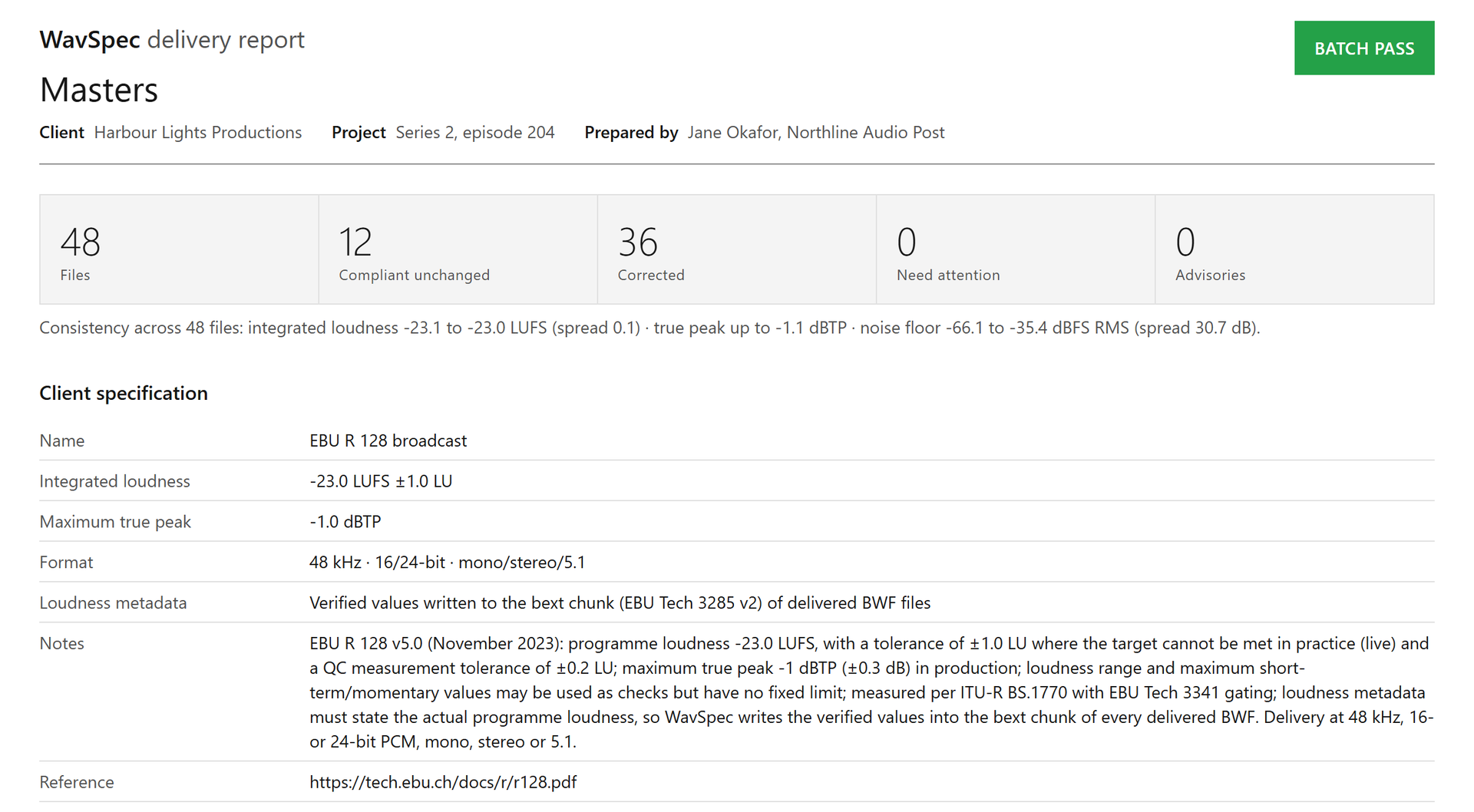
Screenshots show WavSpec’s own sample batches, with synthesized speech, music and effects, and fictitious client details.
Reading these numbers in WavSpec
- Add a batch. Drag files or folders into the window. WavSpec reads WAV, BWF, RF64, AIFF, FLAC, MP3, AAC, M4A and WMA.
- Pick a spec. Choose a “Client specification”. For LUFS specs the table shows “Integrated” and “True peak”; for ACX it switches to “RMS dBFS” and “Sample peak”.
- Measure. Press “Check only” (F6). Every file is measured and marked “Pass” or “Fail” without writing anything.
- Open a file. Select a row. The detail pane lists every criterion the spec sets, with the measured value above the required one.
- Read the timeline. The graph shows short-term loudness as a blue line, the target and tolerance as a band, and integrated loudness as a dashed line, so you can see where a file runs hot.
- Read the method. Run “Check and correct batch” (F5) and open the HTML report. Its Method section states the gates, windows and filters used, and every file lists its values before and after.
See integrated loudness, true peak and LRA for every file in your next batch.
Get it from Microsoft
Frequently asked questions
Is -16 LUFS louder than -23 LUFS?
Yes, by 7 LU, which is the same as 7 dB of gain. Podcast platforms aim around -16 LUFS because people listen on phones and earbuds, often in noisy places. Broadcast aims at -23 LUFS, or -24 LKFS in the United States, and leaves more room for dynamics. Normalize to the number on the sheet you are delivering against.
What is a typical loudness range?
It depends on the content. Speech-led programmes and podcasts often sit under 10 LU, while drama and film mixes run wider. UK DPP AS-11 gives 18 LU as guidance and the ARD, ZDF and ORF guidelines give 20 LU. WavSpec reports LRA for every file and checks it against any limit a spec sets, as a failure or as guidance.
Why do audiobook specs use RMS instead of LUFS?
ACX wrote its rules in RMS and sample peak, and Author’s Republic follows the same pattern. WavSpec’s audiobook presets switch the level to whole-file RMS in dBFS and the ceiling to sample peak, so the numbers in the table match the numbers on the platform’s page.
How do I see loudness over time instead of one number?
Select a file in WavSpec. The detail pane draws its 3-second short-term loudness against the target band, and the HTML and PDF reports include the same timeline for every file.
Try WavSpec
WavSpec is a one-time purchase in the Microsoft Store, and the Store runs a 15-day free trial of the full product. Load the sample batch to see every one of these values measured on real files. For the full delivery routine, work through the audio delivery QC checklist, or go straight to normalizing audio to EBU R 128 or normalizing a podcast to -16 LUFS. The WavSpec product page has the screens and the full FAQ.
Measure LUFS, dBTP and LRA across a whole batch during the 15-day free trial.
Get it from Microsoft
ACX and Audible are trademarks of Audible, Inc. or its affiliates. Apple Podcasts is a trademark of Apple Inc. Spotify is a trademark of Spotify AB. WavSpec is not affiliated with or endorsed by them.
Last updated 15 October 2026. Published by Automata Labs, a software company in Canada.