STL mesh errors are places where the triangle surface stops describing a clean, closed solid: holes where faces are missing, non-manifold edges shared by more than two triangles, inverted triangles that face inward, and degenerate or duplicate triangles that add nothing. A slicer needs a closed, consistently oriented surface to tell inside from outside, so these errors show up as warnings, missing walls, or infill in the wrong place.
STL makes them easy to create. It stores every triangle on its own, with its own three corners and a normal: no shared vertices and no record of which triangles belong together.
Count every one of these errors in your file before you slice it.
Get it from Microsoft
The errors at a glance
| Error | What it is | What you see in the slicer | How MeshMedic repairs it |
|---|---|---|---|
| Hole | A closed loop of edges that each belong to only one triangle, where faces are missing | Gaps in walls, layers that do not close, warnings | Caps the loop with new triangles that face outward |
| Non-manifold edge | An edge shared by three or more triangles | Unclear inside and outside, missing or extra walls | Splits the edge so each surface has its own boundary |
| Bow-tie vertex | Two surfaces that touch at a single corner | A pinched point, warnings | Splits the vertex so each surface has its own corner |
| Inverted triangle | A triangle wound the wrong way compared with its neighbors, often called a flipped normal | Walls that vanish or fill, a part treated as inside out | Flips it so the whole shell faces outward |
| Degenerate triangle | A triangle with zero area, such as two corners in the same place | Usually harmless alone, but it confuses edge counts | Removes it |
| Duplicate triangle | The same triangle stored twice | An edge that looks shared by too many faces | Removes the copy |
| Unwelded corners | Corners stored separately at the same position | Every edge looks open | Welds them before counting |
| Stray fragments | Bits of surface too small to enclose a volume | Specks and stray islands | Clears them when the part has other shells |
Holes
A hole is the simplest error to picture: some faces are missing, so the surface has an open rim. Every edge along that rim belongs to one triangle instead of two, and the edges join into a closed loop. A missing face on a cube makes one hole with four edges.
MeshMedic counts each loop in the Holes row and caps it with new triangles that face outward, the same way as their neighbors.
Non-manifold edges and bow-tie vertices
In a well-formed solid, every edge has exactly two triangles, one on each side. When three or more triangles share an edge, the edge is non-manifold, and there is no single answer to which side is solid. It happens where separate bodies touch along a line or where faces were stacked during editing. A bow-tie vertex is the corner version: two surfaces meeting at one point.
MeshMedic splits both, giving each surface its own copy of the shared vertices, so two boxes that touch along an edge become two closed boxes. Our page on how to fix non-manifold STL walks through it.
Inverted triangles
Each triangle faces one way, set by the order of its corners: counter-clockwise when seen from outside. An inverted triangle runs the other way, so it faces into the part, and a closed shell that runs the wrong way is inside out. The step-by-step fix is in how to fix flipped normals in an STL file.
Degenerate triangles, duplicates, and unwelded corners
These three distort every other count. A degenerate triangle has no area, a duplicate makes an edge look shared by too many faces, and unwelded corners, which STL produces by design, make every edge look open. That is why MeshMedic welds corners at the same position before it counts anything.
Shells and orientation
A shell is one connected piece of surface, and a part can hold several. MeshMedic orients each shell on its own, then turns a closed shell outward as a whole if it is inside out. A closed shell inside another is turned to face inward, which makes it a cavity, and the note says so.
Where to fix mesh errors
| Where | Good fit | What to weigh |
|---|---|---|
| In the source CAD model | You have the original design and the software that made it | Takes the design file, the tool, and the time to remodel |
| In the slicer when it loads the model | Quick checks on your own parts | The fix usually stays inside that slicer, with no list of what changed |
| An online repair service | Non-sensitive one-off files | The model is uploaded |
| MeshMedic on your PC | Shops and makers who need a corrected file and a record of the changes | Why it works: Before and After counts, a 3D view of each change, a saved note, and a new file in the same format |
Meet MeshMedic
MeshMedic finds and repairs holes, non-manifold edges, and inverted triangles in STL, OBJ, and 3MF files on Windows, and shows you every change before it writes a new file.
It runs on Windows 10 version 2004 or later and Windows 11, with no network connections and no account.
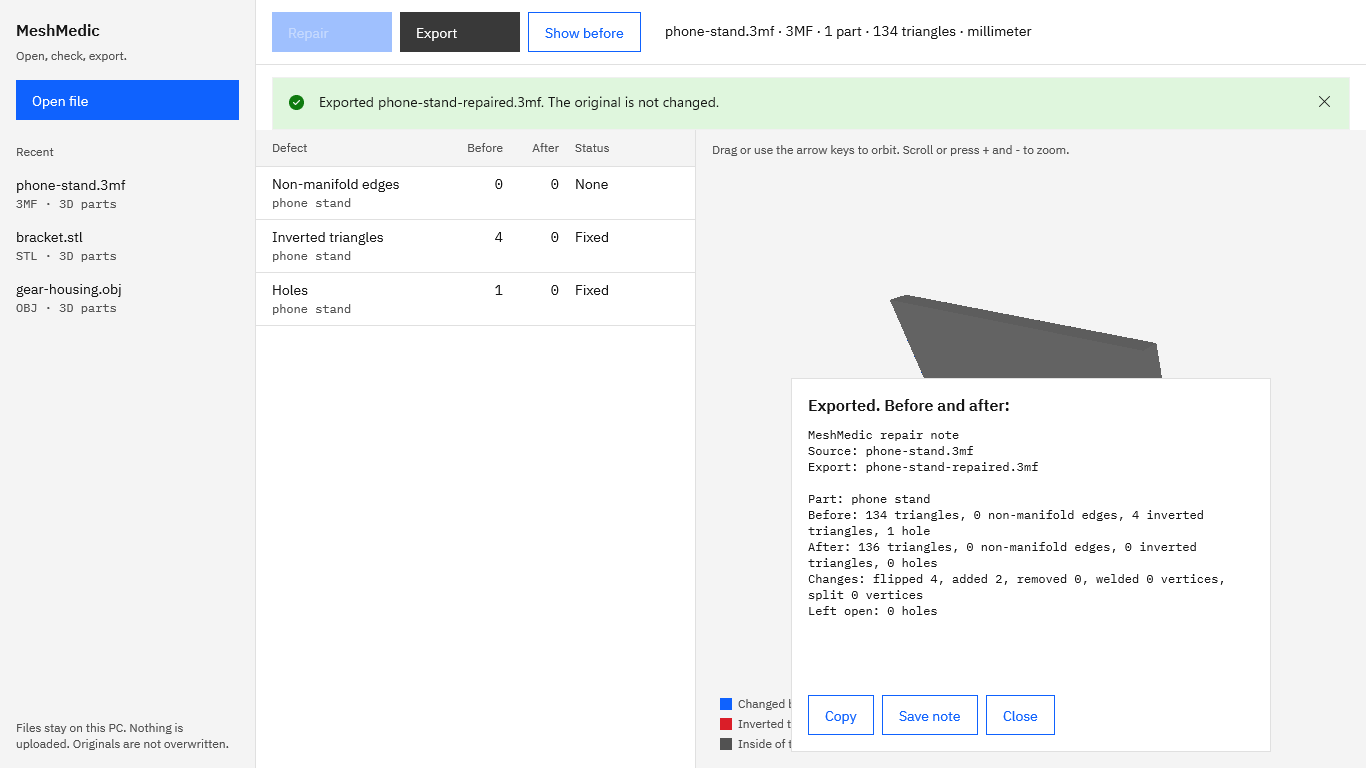
Screenshots show sample parts made for testing.
How to check a file for mesh errors in MeshMedic
- Open the file. Choose “Open file” and pick an STL, OBJ, or 3MF. Opening only reads it.
- Read the table. The columns are “Defect”, “Before”, “After”, and “Status”. Each part has rows for “Non-manifold edges”, “Inverted triangles”, and “Holes”, with a status of “None” or “Found”.
- Stop if it is clean. A file with no errors shows “No defects found”, and the “Repair” button stays off.
- Choose “Repair”. MeshMedic welds corners, removes degenerate and duplicate triangles, splits non-manifold edges and vertices, orients every shell, and caps holes in one pass.
- Compare. The “After” column and the status fill in. Changed triangles turn blue in the preview, and “Show before” switches back to the mesh as it arrived.
- Choose “Export”. Save a new file in the same format. The original is never overwritten.
- Keep the record. In the note panel, choose “Copy” or “Save note” to keep the counts and changes with the job.
Check a file for every error in this table during the 15-day free trial.
Get it from Microsoft
For an intake routine built on these steps, see fix mesh errors before slicing.
Frequently asked questions
What does non-manifold mean in 3D printing?
It means the surface has an edge shared by three or more triangles, or two surfaces touching at one vertex. Slicers rely on every edge having exactly two triangles to decide what is inside the part, so non-manifold geometry leads to warnings and missing or extra walls.
What is a watertight mesh?
A closed, consistently oriented mesh: every edge belongs to exactly two triangles, there are no holes, and every triangle faces outward. MeshMedic’s table counts what most often breaks that, holes, non-manifold edges, and inverted triangles, before and after the repair.
Why does the slicer report errors when the model looks fine?
Many errors are tiny. A sliver of missing surface, one flipped triangle, or an edge shared by three faces can hide among thousands of triangles, and a viewer draws them all the same. MeshMedic counts each error for every part and draws inverted triangles in red, so the small ones are easy to find.
Do 3MF files have the same errors as STL?
The geometry errors are the same, but 3MF sets rules for them. The 3MF Core Specification requires model meshes to be closed, with every edge shared by exactly two triangles and every triangle facing outward. MeshMedic repairs the same errors in 3MF files, inside the package, and keeps their colors, materials, components, and build items. Read 3MF vs STL for 3D printing for the full comparison.
Try MeshMedic
MeshMedic is a one-time purchase in the Microsoft Store, with a 15-day free trial that includes every feature. Open a file your slicer has flagged and read the counts. See the MeshMedic product page, or start with our guide to repairing an STL file.
Find, repair, and record mesh errors on your own PC.
Get it from Microsoft
Last updated 15 October 2026. Published by Automata Labs, a software company in Canada.