Effective ppi is the number of image pixels covering each inch of paper at the size the image is printed: pixel width divided by printed width in inches. A 72 ppi image printed at the size its file suggests puts only 72 pixels on each inch, under half of the 150 ppi that ProofSlip treats as the floor for photos.
The confusion starts with the number an image editor shows. A picture saved from a website often says 72 ppi, and a camera file may say something else entirely, but that number is only a tag. What decides print quality is how many pixels the image has and how large it is placed in the layout. The same file can be too coarse on a poster and more than enough on a business card.
See the effective ppi of every image in a PDF, lowest first.
Get it from Microsoft
How to work out effective ppi
The arithmetic is one division per direction:
effective ppi  = pixels / printed inches
printed inches = printed millimeters / 25.4
Work it out for the width and the height, and use the smaller result. An image stretched more in one direction than the other is only as sharp as its weaker side.
| Image | Pixels wide | Printed width | Effective ppi |
|---|---|---|---|
| A logo saved from a website | 600 | 8.33 in, the size its 72 ppi tag suggests | 72 |
| The same logo, placed smaller | 600 | 2 in | 300 |
| A phone photo | 4,000 | 10 in | 400 |
| The same photo, cropped to a quarter of its width and enlarged to fill 10 in | 1,000 visible | 10 in | 100 |
| A 1-bit scan of a signature | 600 | 3 in | 200 |
Two things stand out. Cropping on its own does not lower effective ppi; enlarging the crop to fill the same space does. And the logo is the same file in both rows: placing it at a quarter of the width raises its effective ppi fourfold.
Why the 72 ppi tag is not the problem
The ppi value stored in a JPEG or PNG is a suggestion for print size, nothing more. Change it from 72 to 300 in an image editor without resampling, and every pixel stays the same; the suggested print size simply shrinks. A 3,000-pixel-wide image tagged 72 ppi and placed 5 inches wide in a layout is a 600 ppi image on paper.
Resampling is different. Telling an editor to make a 600-pixel logo 2,500 pixels wide raises the effective ppi, but the new pixels are made up from the old ones. The number clears the check, and the print still looks soft. A coarse image needs a larger original, or a smaller place on the page.
Why 72 ppi images fail in print
A monitor shows an image with comparatively few pixels per inch, and the eye accepts it at screen distance. Paper held in the hand shows much finer detail, so an image placed at 72 effective ppi prints with soft edges and visible blocks of pixels. That is why print checks set a floor.
ProofSlip’s floor, fixed in this version, is 150 ppi for color and grayscale images, with a warning from 150 to 299. Run the logo from the table through it: at 8.33 inches it is 72 ppi and fails; at 2.5 inches it is 240 ppi and warns; at 2 inches it is 300 ppi and raises no finding. Your printer’s spec sheet sets the figure that counts for your job, and large signs seen from across a room may be held to a lower one, so ask.
Line art needs more
Images stored at 1 bit per pixel, such as scanned signatures and line drawings, have hard black and white edges with no gray to soften them, so jagged steps show sooner. ProofSlip judges them separately: under 300 ppi fails and 300 to 599 warns. The signature scan in the table, at 200 ppi, fails.
ppi and dpi are not the same thing
Ppi counts image pixels. Dpi counts the dots a printer lays down, and a printer uses many dots to render each pixel. Spec sheets and software often use dpi loosely when they mean image resolution, so when a printer asks for 300 dpi images, it usually means effective ppi.
Checking effective ppi inside a PDF
By hand, you need each image’s pixel size from its source file and its printed size from the layout, then a calculator. In a finished PDF that gets harder: the same image can be placed several times at different sizes, nested inside other objects, rotated or stretched. Our guide to checking PDF image resolution compares the approaches.
Meet ProofSlip
ProofSlip measures the effective ppi of every image placement in a PDF on your Windows PC and lists the lowest first, with a PASS or FAIL for the whole file.
ProofSlip is a Windows app that checks a PDF for print on your PC and gives a one-page PASS or FAIL report on its embedded fonts, page size, trim and bleed boxes, color spaces, and effective image resolution. For images it reads the page’s own transformation for each placement, so a scaled, rotated or reused image is measured where it actually lands. It is a check, not a fix, and nothing uploads.
Check effective ppi in ProofSlip
- Choose Open PDF and pick the file in the Windows Open dialog.
- Look at the Images table. It lists every image with its Pixels, its Placed size in millimeters, its effective ppi, its Colour and its Page, lowest ppi first.
- Read the image findings. A failing image appears in Findings as I-01 for color and grayscale or I-03 for 1-bit art, with a message such as “300×300 px placed at 76.2×76.2 mm: 100 ppi (page 1)”. Warnings use I-02 and I-04.
- Select the image row. The Detail pane shows the pixel size and bit depth, the color space, the filters, whether there is a soft mask, the category (continuous tone or bitmap), and every placement with its page, size and ppi in each direction.
- Export the report. Choose Export report (PDF) or Export report (HTML). The HTML report lists every image; the one-page PDF report shows the eight lowest and points to the HTML for the rest.
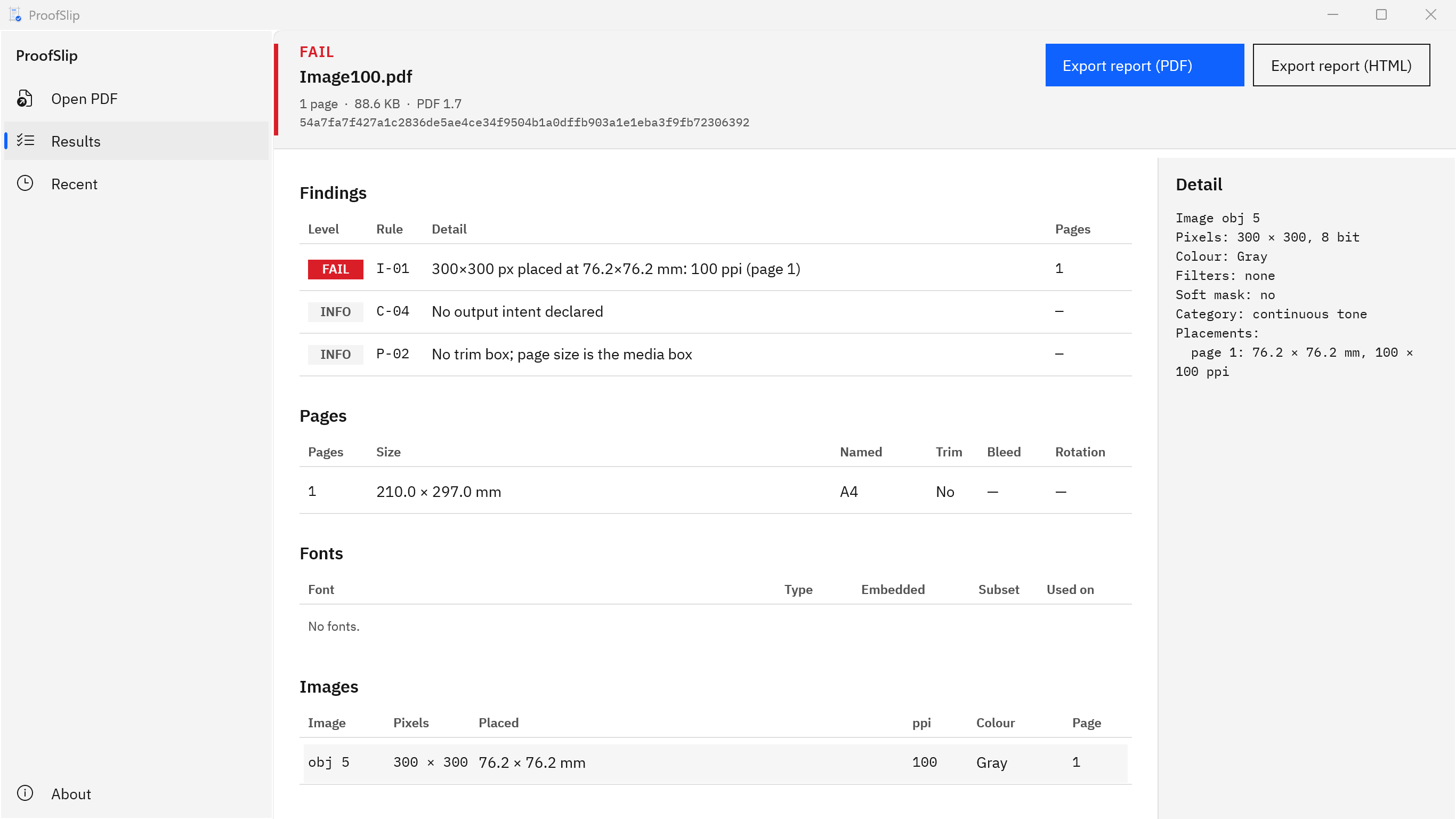
Screenshots show small test PDFs generated for ProofSlip’s own test suite. They contain no client work.
Find the one coarse image in a long document before it prints.
Get it from Microsoft
What effective ppi does not tell you
- Image quality. ProofSlip does not decode image data, so it cannot judge JPEG compression, blur or noise. An upscaled image can pass and still look soft.
- Soft masks and patterns. The resolution of soft masks is not evaluated, and images inside tiling patterns are counted in an INFO note rather than measured.
- Vector artwork. Text, logos and shapes drawn as vectors have no pixels and no ppi; only images are measured.
- Your printer’s figure. The limits are fixed in this version. If your printer asks for 300 ppi, read every image warning as a failure for that job.
- The fix. ProofSlip never resamples or replaces images, and it never writes to the PDF.
For the rest of a pre-press pass, see the print-ready PDF checklist and how to preflight a PDF for print without expensive software.
Frequently asked questions
Is 72 ppi ever fine for print?
Effective 72 ppi is too coarse for anything read up close, and ProofSlip fails it. Large signs and banners viewed from a distance are a different case, and some printers accept a lower figure for them. The printer’s spec sheet for that product is the reference, so ask before you lower the bar.
Does changing an image to 300 ppi in an editor fix it?
Not by itself. Changing the ppi tag without resampling leaves the pixels untouched and only shrinks the suggested print size. Resampling adds pixels, but they are made up from the existing ones, so detail does not improve. Use a larger original, or place the image smaller, and check the new PDF.
What is the difference between ppi and dpi?
Ppi counts the pixels in an image per inch of its printed size. Dpi counts the ink dots a printer lays down per inch, and several dots go into each pixel. Many spec sheets say dpi when they mean image resolution, so a request for 300 dpi images usually means 300 effective ppi.
Does ProofSlip measure vector graphics?
No. Vectors such as text, shapes and most logos from design apps are drawn as outlines, so they have no pixels and print sharp at any size. ProofSlip measures images only, including images inside forms and printable annotations, and reports each placement’s effective ppi with the lowest first.
Try ProofSlip
ProofSlip is a one-time purchase in the Microsoft Store, with a 15-day free trial of the full app run by the Store, so you can open your own PDFs and see the effective ppi of every image before you buy. Nothing uploads, and the original PDF is never written. It runs on Windows 10 version 2004 or later and on Windows 11. Read what ProofSlip checks and the frequently asked questions on the ProofSlip product page.
Measure every image in your next PDF during the 15-day free trial.
Get it from Microsoft
Last updated 7 October 2026. Published by Automata Labs, a software company in Canada.