Data reconciliation is the job of showing that two sets of records agree and explaining every place they do not. The vocabulary is small. A key decides which rows belong together; every row then ends up matched, changed, present in only one file, or duplicated; and near misses are set aside for a person to check. This glossary defines each term with an example and shows where it appears in LedgerPair. The examples use two invoice exports, called file A and file B.
See every one of these categories for your own two exports.
Get it from Microsoft
The terms at a glance
| Term | What it means | Example |
|---|---|---|
| Key column | The column that identifies one record in both files | Invoice |
| Composite key | Two or more columns that identify a record together | Invoice and Date |
| Matched row | A key found once in each file | 1001 in A and in B |
| Changed row | A matched row with at least one value that differs | 1003: Amount 45.10 in A, 54.10 in B |
| Addition | A row only in file B | 1006 only in B |
| Deletion | A row only in file A | 1004 only in A |
| Duplicate key | A key that appears more than once in one file | 1005 twice in A |
| Empty key | A row with no value in the key column | A blank Invoice cell |
| Fuzzy candidate | An unmatched key spelled almost the same as one in the other file | INV-2026-0042 and INV-2026-0O42 |
| Normalization | Reading values the same way before comparing them | 1,250.00 read as 1250 |
Keys
Key column
The key column is whatever identifies one record in both files: an invoice number, a reference, an employee ID, a SKU. Rows with the same key are treated as the same record, wherever they sit, and their other columns are compared value by value. In LedgerPair you tick the key under “Key columns”, once under “In file A” and once under “In file B”, and the two headings can differ, such as Invoice No and Ref.
Composite key
When no single column is unique, two or more columns can form the key together, such as Date and Reference when references restart every month. LedgerPair shows a composite key joined by a vertical bar, such as 1003 | 2026-03-03.
Key normalization
Keys are compared the way a person reads them. Case is ignored, so inv-001 and INV-001 match. Thousands separators and a trailing .0 are ignored, so 1,001 matches 1001. Leading zeros are kept, so 00123 stays a different identifier from 123, and dates used as keys are compared as calendar dates.
Row categories
Matched row
A key found once in file A and once in file B. LedgerPair shows the count first in its summary line, such as “4 matched”.
Changed row and changed cell
A matched row in which at least one compared column differs. The changed cell is the specific value that differs. LedgerPair lists a changed row with a detail such as “1 cell differs: Amount”; select it and both files’ values appear side by side, with the changed cell highlighted. The evidence workbook gives each changed cell its own row on the Changes sheet.
Addition and deletion
An addition is a row only in file B; a deletion is a row only in file A. In a reconciliation they are the reconciling items: records one system has and the other does not. LedgerPair labels them with the file name, such as “Only in basic-b.csv”, and the workbook puts them on the Additions and Deletions sheets. The page on how to find missing rows between two files goes deeper.
Duplicate key
A key that appears more than once within one file, often a record entered twice. LedgerPair lists it as “Duplicate key” with every row number, such as “Key appears 2 times in basic-a.csv (rows 6, 7)”. Duplicates pair with the other file in order of appearance, and an extra occurrence is listed as only in its file and marked duplicate key, so the counts still add up.
Empty key
A row whose key cell is blank. It cannot belong to any record, so LedgerPair lists it as only in its file, marked “(empty key)”, and never pairs it.
Near misses
Fuzzy candidate
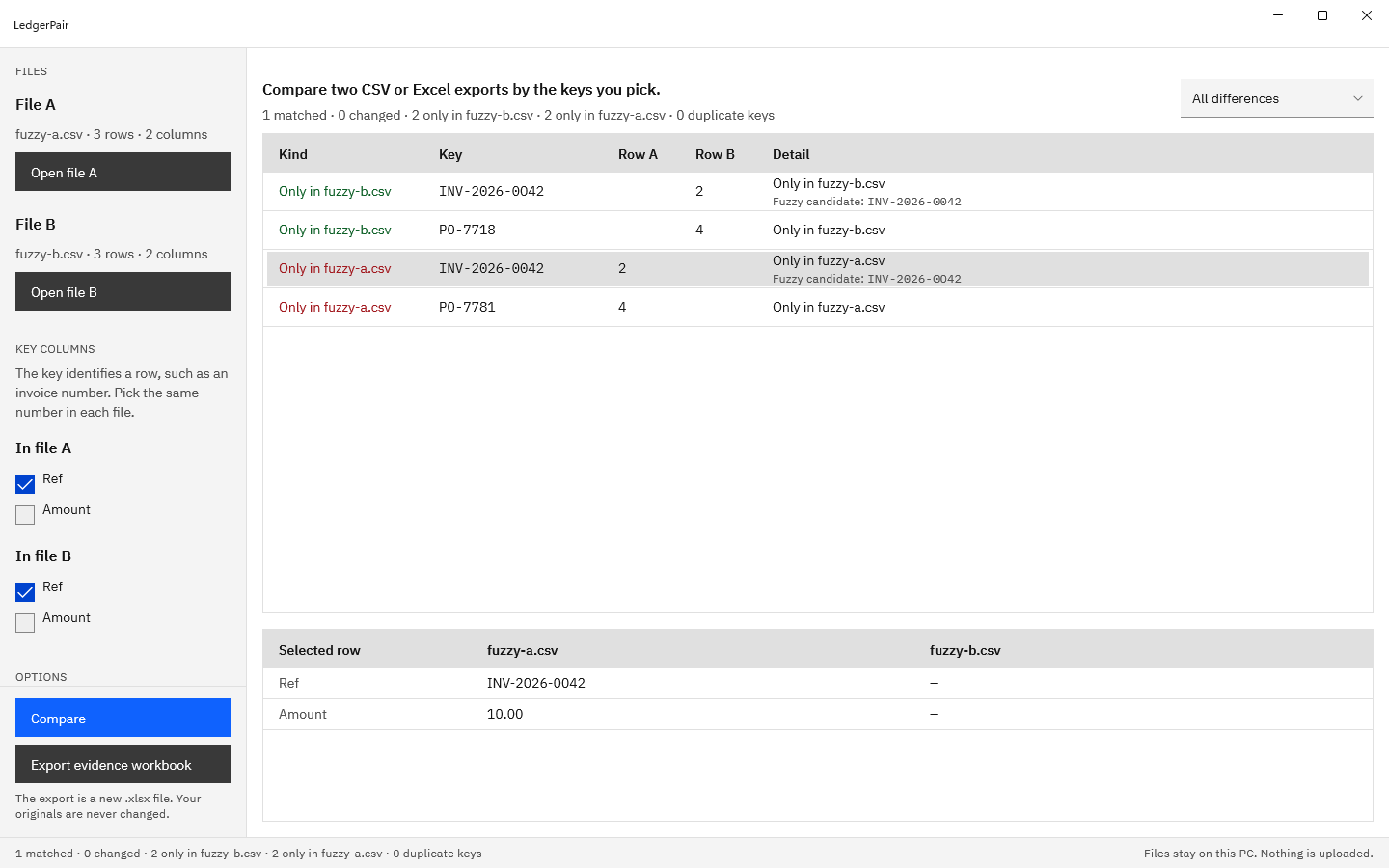
An unmatched key in the other file that is spelled almost the same, usually a typo such as a letter O typed for a zero. LedgerPair shows it under the unmatched row as “Fuzzy candidate: INV-2026-0042”. It is a suggestion for a person to check and is never counted as a match, so the totals stay exact. With a composite key, all parts but one must be equal before a candidate is suggested.
The evidence workbook writes each candidate with its row number and a similarity score; a higher score means the two keys are closer.
Normalization
Spaces, numbers, and dates
Two systems rarely write the same value the same way. Normalization reads both before comparing: leading, trailing, and repeated spaces are ignored; 1,250.00 equals 1250, (45.10) equals -45.10, and 1.234,50 equals 1234.50; and 2026-03-01, 03/01/2026, and Mar 1, 2026 are the same date. A value with a leading zero, such as 007, is kept as text.
Day-first and month-first dates
A date such as 03/01/2026 is 1 March in month-first notation and 3 January in day-first notation. LedgerPair reads month first unless you tick “Dates are day first (31/12/2026)”, counts the dates that could be read either way, and records the order it used on the Summary sheet.
Ways to sort rows into these categories
| Method | Finds changed values | Finds rows in one file | Finds duplicate keys | Good fit |
|---|---|---|---|---|
| Conditional formatting in a spreadsheet | No | Partly, by color | Yes, within one list | A quick look at one column |
| COUNTIF and lookup formulas | With one formula per column | Yes, with #N/A results | With an extra COUNTIF | A one-off check on tidy data |
| A keyed comparison app such as LedgerPair | Yes, every compared column | Yes, listed for each file | Yes, with every row number | Why it works: one result covers every category, after normalization, with an .xlsx record |
The formula methods are covered step by step in how to compare two lists in Excel.
Meet LedgerPair
LedgerPair compares two CSV or Excel exports by the key columns you pick and sorts every row into matched, changed, only in file A, only in file B, or duplicate key, then saves the result as a new .xlsx evidence workbook.
It runs on Windows 10 version 2004 or later and Windows 11, has no network code, no account, and no telemetry, and opens the files it compares read-only.
See each term in LedgerPair
- Choose “Open file A” and “Open file B” and pick two CSV or XLSX exports.
- Under “Key columns”, check the key. LedgerPair suggests an identifier the files share; tick a different column, or several for a composite key, in each file.
- Press “Compare”. The summary line counts matched rows, changed rows, rows only in each file, and duplicate keys.
- Use the filter to show “Changed rows”, “Only in file B” (additions), “Only in file A” (deletions), or “Duplicate keys”.
- Select a row. The “Selected row” pane shows both files’ values; a changed cell is highlighted, and a duplicate key lists each occurrence with its row number.
- Look for “Fuzzy candidate:” under an unmatched row to find near-miss keys.
- Choose “Export evidence workbook” to save the Summary, Additions, Deletions, Changes, and Duplicates sheets to a new .xlsx file.
Put every term to work on your own exports.
Get it from Microsoft
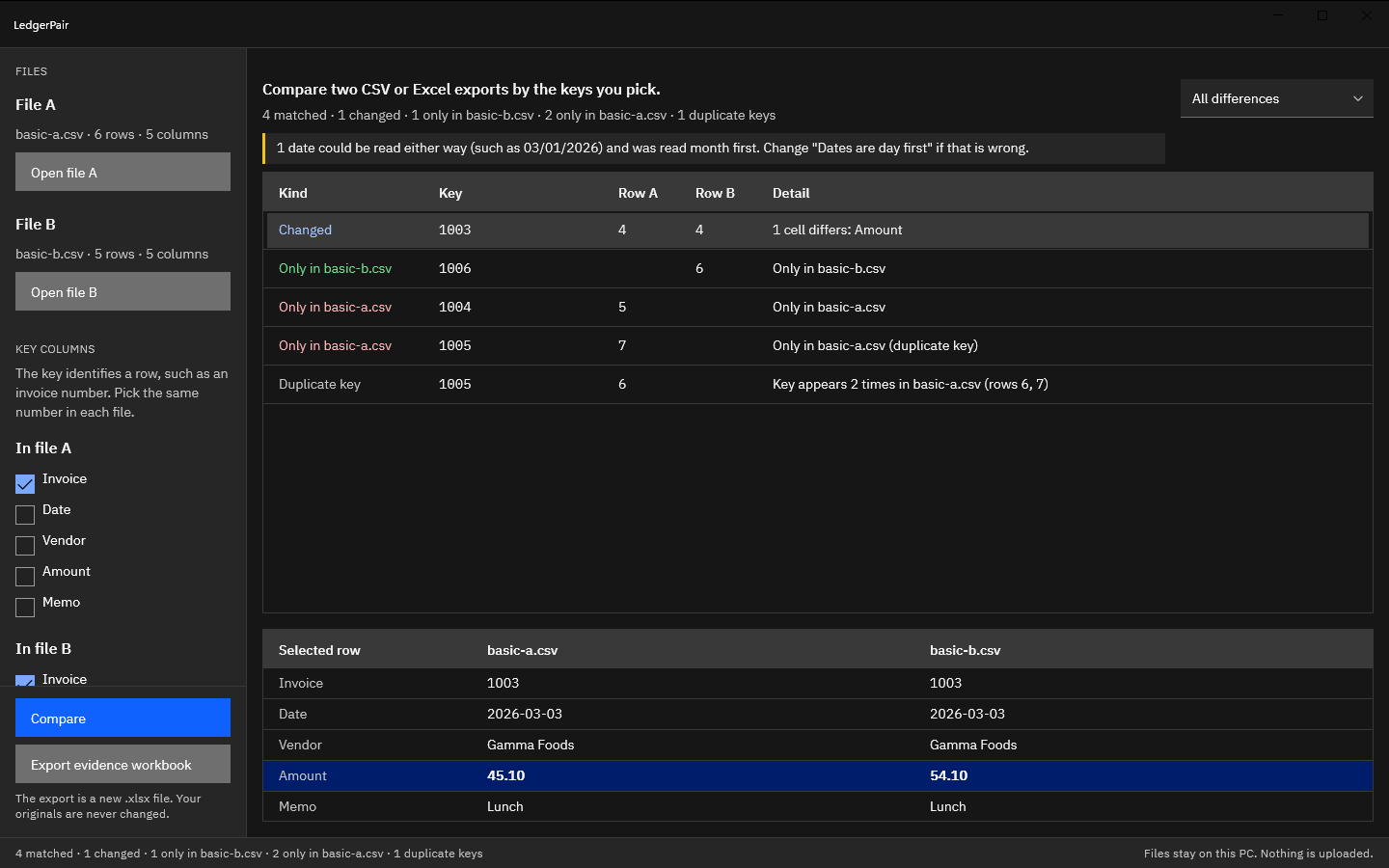
Screenshots use synthetic exports generated for testing.
Frequently asked questions
What is the difference between data comparison and data reconciliation?
Comparison finds the values that differ. Reconciliation accounts for every record: which agree, which agree on the key but differ in a value, which appear in only one file, and which repeat. A reconciliation result therefore has more categories than a list of differences, and it ends with a record of how each one was resolved.
Is a fuzzy candidate a match?
It is a suggestion. LedgerPair shows it beside an unmatched row so a person can check whether the two keys are one record with a typo. It is kept in its own column and never counted as a match, so the matched count reflects exact key matches only.
Try LedgerPair
LedgerPair is a one-time purchase in the Microsoft Store, with a 15-day free trial of every feature run by the Store. Your files stay on your PC and are never changed. For a worked example, follow how to reconcile two exports before the month-end close, see how to compare two CSV files or compare two Excel files for differences, or visit the LedgerPair product page.
Compare your own exports during the 15-day free trial.
Get it from Microsoft
Excel is a trademark of Microsoft Corporation. LedgerPair is made by Automata Labs and is not affiliated with or endorsed by Microsoft.
Last updated 15 October 2026. Published by Automata Labs, a software company in Canada.