ContextCleaner: see every entry in the Windows 11 right-click menu, and which app added it — on the Microsoft Store.
Windows 10 & Windows 11 Updated 2026-10-15

Compare two exports by key and see every difference, on this PC.

LedgerPair is a Windows app from Automata Labs that compares two CSV or Excel exports by the key columns you pick and shows matched, changed, only-in-A, only-in-B, and duplicate rows, on your PC with nothing uploaded. Spaces, numbers, and dates are normalized first, so 1,250.00 and 1250 match; near-miss keys are suggested in their own column; and one click saves a new .xlsx evidence workbook. The originals are never changed.

One-time purchase · 15-day free trial in the Microsoft Store · One-time purchase. No subscriptions. Local-first.
Pay once. Own it forever.

One-time purchase on the Microsoft Store · No subscription · Instant install

Buy through the Microsoft Store—instant install, automatic updates, and a Microsoft receipt for easy expensing. No account needed on our site, and no subscription on Store purchases.

How it works See the screens

keyed comparison · csv and xlsx · normalized values · evidence workbook · originals never changed · nothing uploads

LedgerPair results table and detail pane

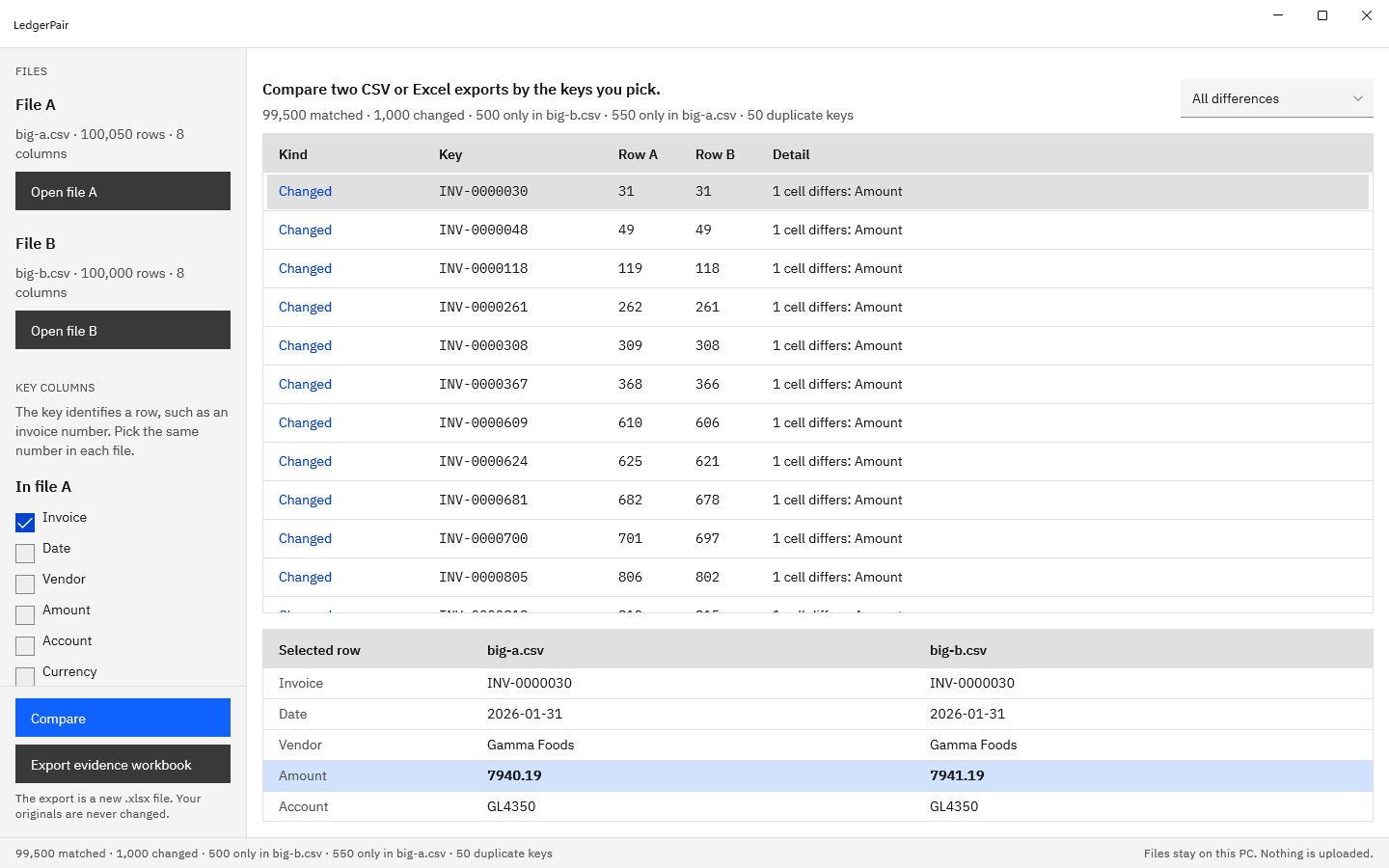
LedgerPair comparing two invoice exports on the Invoice column, with a changed row selected and the detail pane showing both files side by side and the differing Amount, 7940.19 against 7941.19, highlighted.
Pick the key, press Compare, and select a row. Both files’ values sit side by side, and the cell that differs is highlighted.

The problem

Two exports should agree, and the totals say they do not.

The billing system and the ledger, last month’s price list and this month’s, the bank download and the register: two files that ought to match, sorted differently, formatted differently, and thousands of rows long. Lookup formulas break when a column moves, a duplicate hides behind the first match, and 1,250.00 against 1250 shows up as a difference that is not one.

With LedgerPair

Open both files. Pick the key. Compare.

LedgerPair reads both exports as tables, suggests a shared identifier column, and pairs rows on it wherever they sit. Every row lands in one place: matched, changed with the cells named, only in file A, only in file B, or a duplicate key. One export writes the whole result to a new .xlsx workbook. The originals are only read.

Key benefits

Pair the rows, find every difference, keep the record

Rows paired on the keys you pick

Tick one key column or several in each file, and the names can differ, such as Invoice No in one export and Ref in the other. LedgerPair suggests an identifier column the two files share, compares keys without regard to case, and pairs rows wherever they sit, so two exports sorted in different orders still line up row for row.

Changed cells, side by side

Every matched row whose values differ is listed with the columns that changed, such as 1 cell differs: Amount. Select it and both files’ values appear side by side, with the differing cell highlighted.

Formatting is not a difference

Extra spaces are ignored, 1,250.00 equals 1250, (45.10) equals -45.10, and 2026-03-01 equals 03/01/2026. A day-first option reads exports that write 31/12/2026.

Duplicate and empty keys surfaced

A key that appears more than once in a file is listed with every row number, and a row with an empty key is listed on its own, so a repeated record explains a gap in the totals.

Near-miss keys suggested

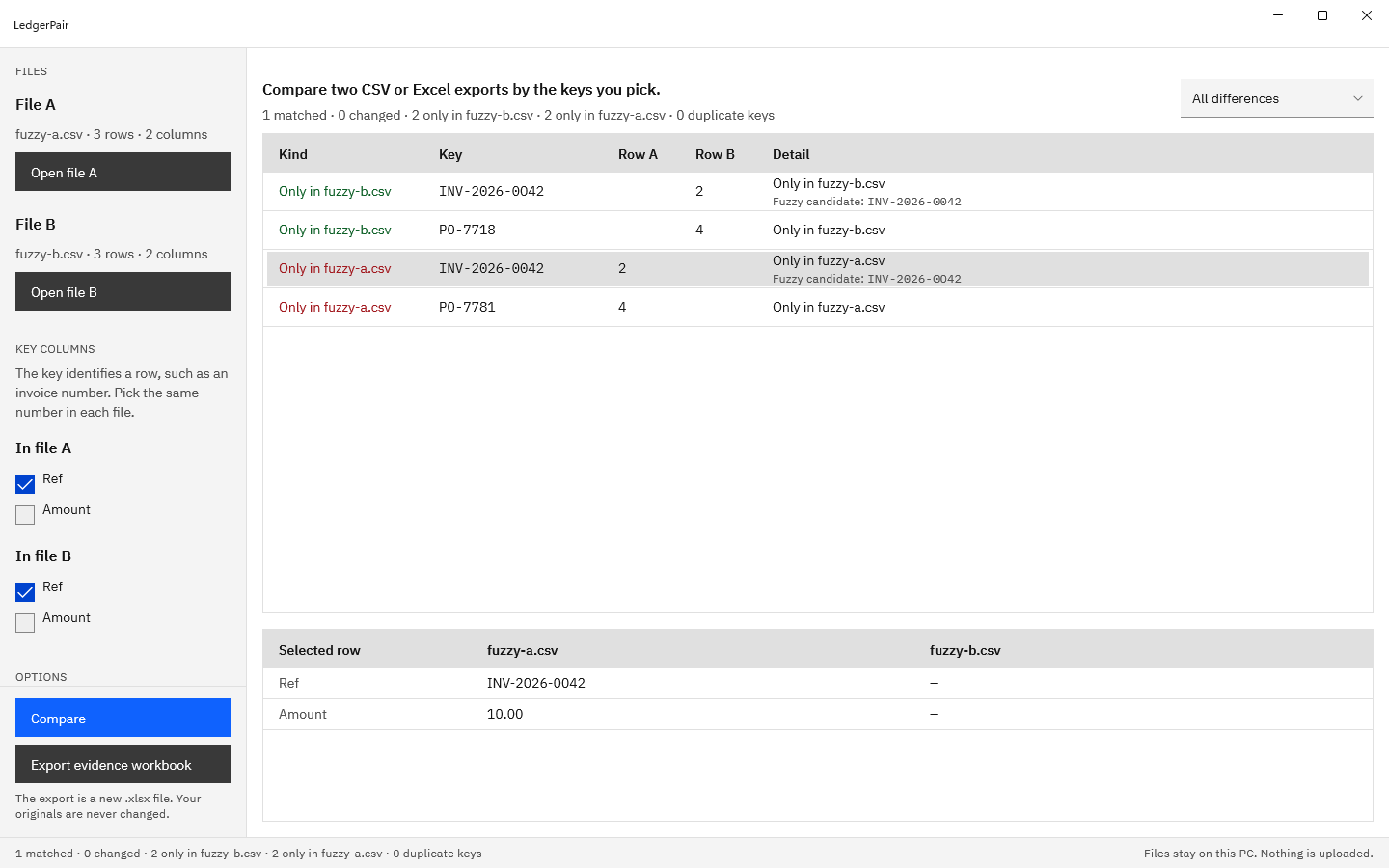
When INV-2026-0042 has no partner and INV-2026-0O42 has none either, each is shown as the other’s fuzzy candidate in its own column. A suggestion is never counted as a match.

An evidence workbook you can keep

Export a new .xlsx with Summary, Additions, Deletions, Changes, and Duplicates sheets, raw values written as text, frozen headers, and filters, named after the two files you compared.

How it works

Open, pick, compare, export

Open

Choose Open file A and Open file B and pick two CSV or XLSX files. Each slot shows the file name, row count, and column count, and a worksheet picker appears for a workbook with several sheets.

Pick

Under Key columns, keep the suggested identifier or tick your own in each file: one column or several, with the same number on each side. Tick Dates are day first if your exports write 31/12/2026.

Compare

Press Compare. The summary counts matched, changed, only-in-A, only-in-B, and duplicate keys, the table lists every difference with its row numbers, and the filter shows one kind at a time.

Export

Choose Export evidence workbook and name a new .xlsx file. Summary, Additions, Deletions, Changes, and Duplicates are written in one go, and the suggested name is built from the two file names.

The next time you open LedgerPair, it offers to reopen the last pair of files in one click, so a monthly comparison starts where the last one left off.

See it in action

The results, the detail, and the near misses

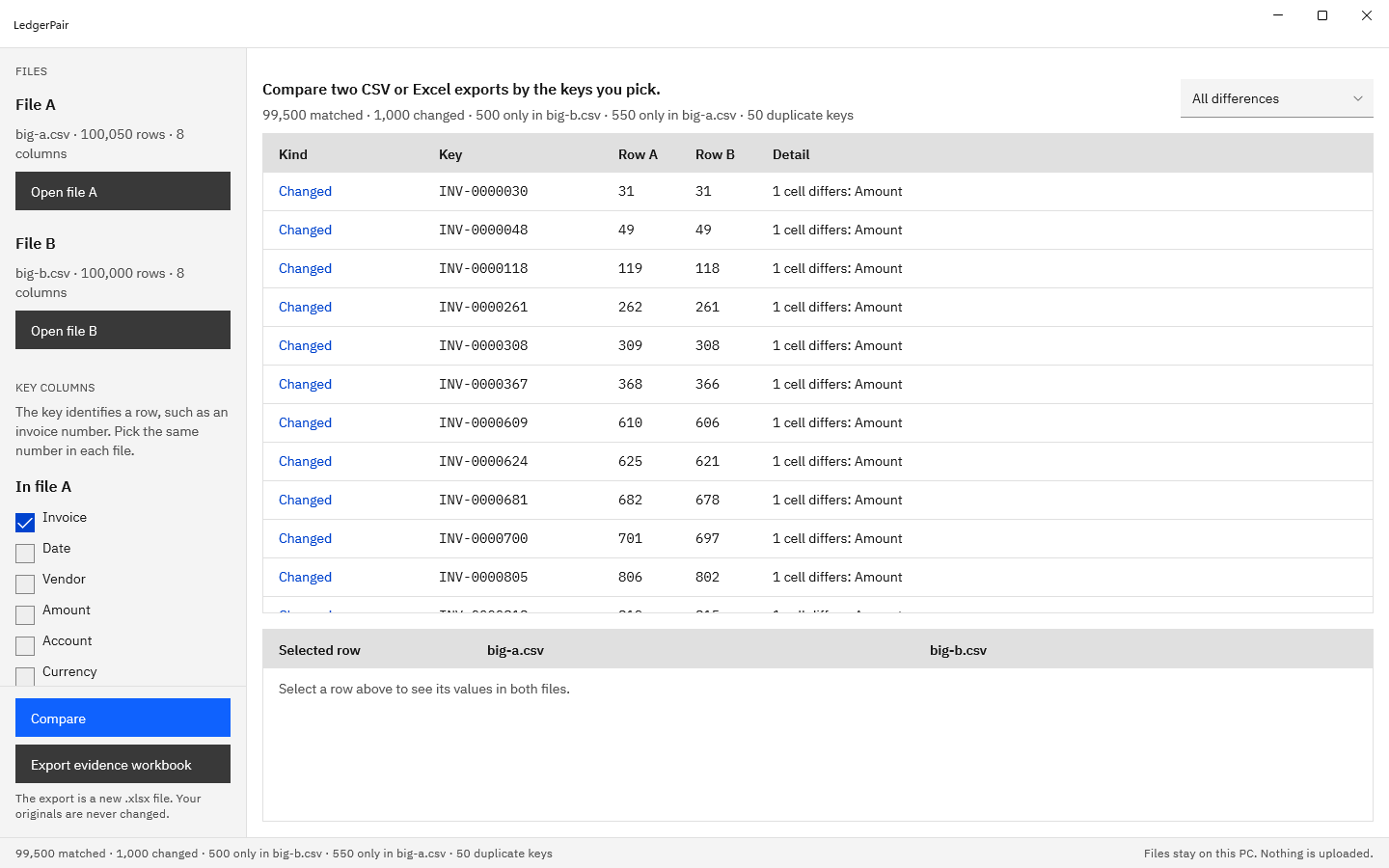
LedgerPair results for two invoice exports compared on Invoice: 99,500 matched, 1,000 changed, 500 only in big-b.csv, 550 only in big-a.csv, and 50 duplicate keys, with changed rows listed by key and row number.
Every difference in one table: the kind, the key, the row in each file, and which cells differ. The summary line counts each kind.
A changed invoice row selected in LedgerPair, with Invoice, Date, Vendor, Amount, and Account from both files side by side and the Amount cell highlighted.
Select a changed row to see every compared column from both files, with the differing cell highlighted.
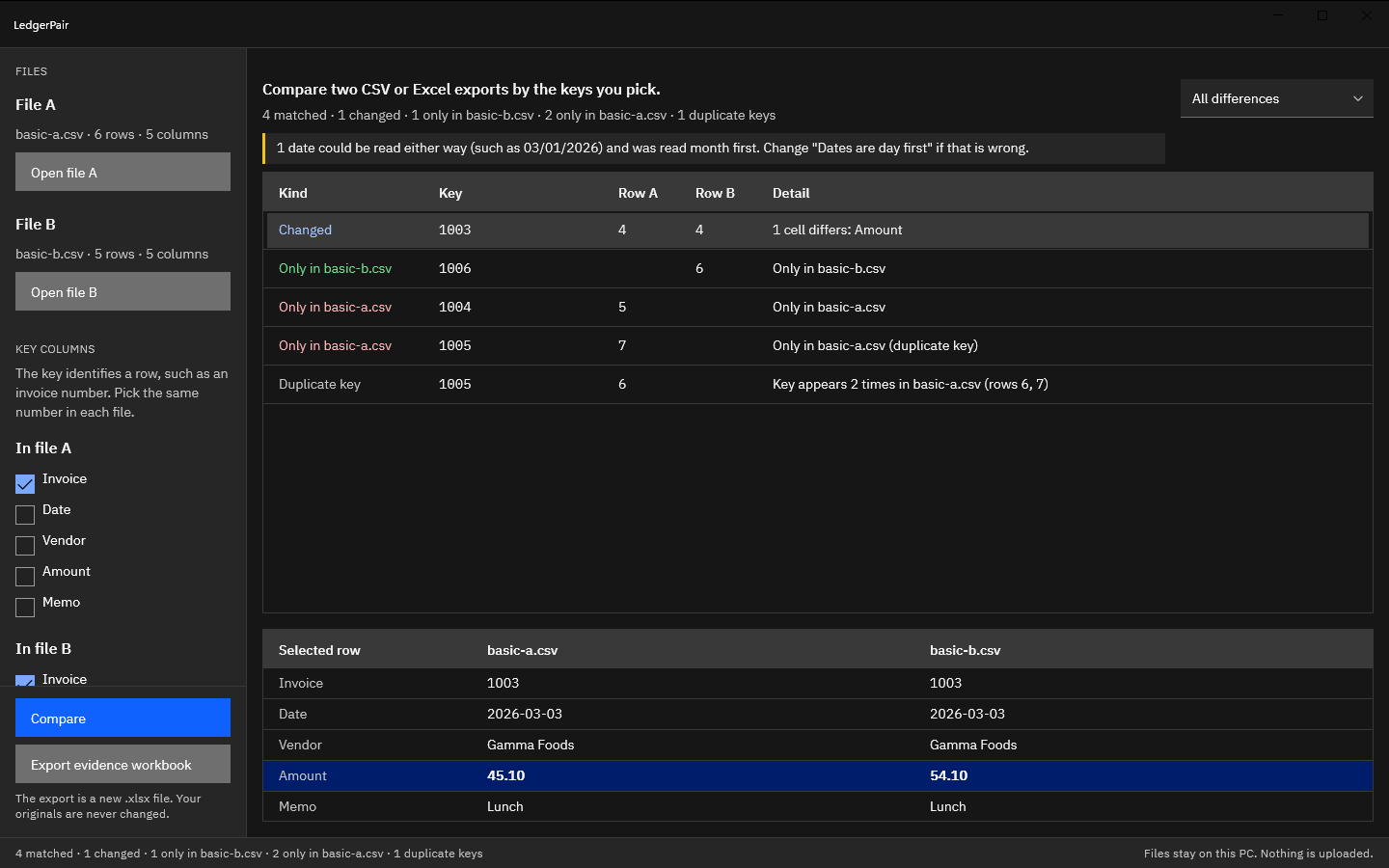
LedgerPair in the dark theme comparing basic-a.csv and basic-b.csv: one changed row, one row only in basic-b.csv, two only in basic-a.csv, duplicate key 1005, and a note that one date could be read either way.
Duplicate keys and day-month dates are called out in plain words, and the dark theme follows Windows.
LedgerPair comparing fuzzy-a.csv and fuzzy-b.csv on Ref: INV-2026-0042 only in one file and INV-2026-0O42 only in the other, each shown with the other as a fuzzy candidate, beside PO-7718 and PO-7781.
Near-miss keys are suggested as fuzzy candidates in their own column, and a suggestion is never counted as a match.

Screenshots use synthetic invoice exports generated for testing, with fictitious vendors and amounts.

Privacy

Nothing uploads

LedgerPair runs on your PC and has no network code. It has no account, no sign-in, and no telemetry. It opens only the files you pick in the Windows file dialog, reads them without changing them, and writes only the new workbook you name in the Save dialog. The last pair of files you opened is remembered on this PC, so you can reopen it next time.

The status bar says so the whole time you work: Files stay on this PC. Nothing is uploaded.

What you get

  • A keyed comparison of two CSV or XLSX files, in any combination.
  • One or several key columns per file, with different names allowed on each side.
  • Matched, changed, only-in-A, only-in-B, and duplicate-key counts in one result.
  • A detail pane with both files side by side and the changed cells highlighted.
  • Normalized spaces, amounts, and dates, with a day-first option for 31/12/2026.
  • Fuzzy candidates for near-miss keys, in their own column with a similarity score.
  • A new .xlsx evidence workbook: Summary, Additions, Deletions, Changes, and Duplicates.
  • UTF-8, UTF-16, and Windows-1252 CSV with comma, semicolon, tab, or pipe delimiters.

The 15-day free trial in the Microsoft Store includes every one of them, so you can run it on your own exports first.

Try it on last month’s reconciliation first.

The Microsoft Store runs a 15-day free trial with every feature. Open two exports you have already reconciled, pick the same key, and compare LedgerPair’s result and evidence workbook with your own. If it fits your close, buy it once. There is no subscription.

Pay once. Own it forever.

One-time purchase on the Microsoft Store · No subscription · Instant install

Buy through the Microsoft Store—instant install, automatic updates, and a Microsoft receipt for easy expensing. No account needed on our site, and no subscription on Store purchases.

Who uses it

  • Bookkeepers reconciling a billing or sub-ledger export against the general ledger before the month-end close
  • Accountants matching a bank transaction download to the cash account register by reference or check number
  • Purchasing and operations teams comparing this month’s price list, stock list, or order export with last month’s by part number or SKU
  • Anyone finding the records missing between two CSV or Excel exports after a migration or import, without uploading them

FAQ

Quick answers about LedgerPair

What is LedgerPair?

LedgerPair is a Windows app that compares two CSV or Excel exports by the key columns you pick and shows matched, changed, only-in-A, only-in-B, and duplicate rows, on your PC with nothing uploaded. It normalizes spaces, numbers, and dates first, suggests near-miss keys in their own column, and saves the result as a new .xlsx evidence workbook.

How do I compare two files with it?

Choose Open file A and Open file B and pick the two exports. Keep the key column LedgerPair suggests under Key columns, or tick your own in each file, and press Compare. Select any row to see both files’ values side by side, then choose Export evidence workbook to save the result as a new .xlsx file.

Which files can it open?

CSV and XLSX files, in any combination. CSV files can be UTF-8, UTF-16, or Windows-1252, separated by commas, semicolons, tabs, or pipes, with quoted cells that span lines. Workbooks can hold several worksheets, and a picker under the file lets you choose which one to compare. A file that is open in Excel can still be read.

Can the key span several columns, or have a different name in each file?

Yes. Tick as many key columns as you need in each file, with the same number on each side, and LedgerPair shows a composite key joined by a vertical bar, such as 1003 | 2026-03-03. The names can differ, such as Invoice No in file A and Ref in file B. Keys are compared without regard to case.

How does it handle different number and date formats?

It normalizes them before comparing. Leading, trailing, and repeated spaces are ignored. Thousands separators, decimal commas, currency symbols and codes, parentheses, and trailing minus signs are understood, so 1,250.00 equals 1250 and (45.10) equals -45.10. Dates compare as calendar dates across ISO, slashed, and named-month notations, and Dates are day first reads 31/12/2026 style exports.

What is a fuzzy candidate?

A suggestion for a key that found no partner: an unmatched key in the other file that is spelled almost the same, such as INV-2026-0042 and INV-2026-0O42. It appears beside the row in its own column, and the workbook adds its row number and a similarity score. A fuzzy candidate is never counted as a match, so the counts stay exact.

How are duplicate keys reported?

Every key that appears more than once in a file is listed as a Duplicate key with all of its row numbers, such as Key appears 2 times in basic-a.csv (rows 6, 7). Duplicates pair with the other file in order of appearance, and an extra occurrence is listed as only in its file and marked duplicate key, so the counts add up.

What is in the evidence workbook?

Five sheets. Summary records when it was made, both files and worksheets, the key and compared columns, every count, and how values were compared. Additions and Deletions hold every column of the rows found in only one file, with any fuzzy candidate and its similarity score. Changes has one row per changed cell with both raw values and the normalized forms. Duplicates lists each repeated key and its rows.

What happens to my original files?

They are opened for reading only and are never written. LedgerPair saves its results to a new .xlsx file you name in the Save dialog, refuses to save over either source file, and refuses a name that does not end in .xlsx. The workbook is built in full before anything is written, so an export that cannot be built leaves no file behind.

Where do my files stay?

On your PC. LedgerPair has no network code, no account, no sign-in, and no telemetry. It opens only the files you pick in the Windows file dialog and writes only the workbook you name. It remembers the last pair of files on this PC, so the next launch can offer to reopen them.

What does it cost, and is there a trial?

LedgerPair is a one-time purchase in the Microsoft Store, and the listing shows the current price in your currency. The Store runs a 15-day free trial with every feature, and there is nothing to activate in the app. There is no subscription.

What Windows version do I need?

Windows 10 version 2004 or later, or Windows 11, on an x64 or ARM64 PC. The window opens at 1100 by 720 and can be made as small as 960 by 600, and it follows the light or dark mode set in Windows.
Still stuck? Email [email protected] after checking the Support Center.

Technical specifications

Technical specifications

Spec Implementation
Data Sovereignty Opens only the two CSV or XLSX files you pick in the Windows file dialog, read-only; writes only the new .xlsx evidence workbook you name in the Save dialog, refusing either source file; remembers the last picked pair on this PC so it can be reopened
Telemetry Status None; no account, no sign-in, no telemetry, and no network code in the app
Core Runtime .NET 10 and WinUI 3 (Windows App SDK), packaged as MSIX; files reach the app only through the Windows file pickers
Network Requirements Fully functional offline; the app makes no network connections
Deployment Compatibility Windows 10 version 2004 or later and Windows 11, x64 or ARM64; one-time purchase on the Microsoft Store with a 15-day free trial
Inputs CSV (UTF-8, UTF-16, or Windows-1252; comma, semicolon, tab, or pipe; RFC 4180 quoting) and XLSX workbooks with a worksheet picker, in any combination; files open in Excel can be read
Keys One or several key columns per file, with different names allowed; compared ignoring case, thousands separators, and a trailing .0, with leading zeros kept; composite keys shown joined by a vertical bar
Normalization Spaces trimmed and collapsed; amounts as exact decimals with thousands separators, decimal commas, currency symbols or codes, parentheses, and trailing minus; dates as calendar dates, with a day-first option
Results Matched, changed (cell by cell), only in file A, only in file B, duplicate keys, and empty keys, with row numbers; fuzzy candidates for near-miss keys in their own column, never counted as matches
Output New .xlsx evidence workbook with Summary, Additions, Deletions, Changes, and Duplicates sheets; raw values as text, frozen headers, and filters; suggested name a-vs-b-evidence.xlsx
Originals Opened read-only and never written; saving over either source file is refused

Two exports in. Every difference out.

LedgerPair pairs the rows on the key you pick, lists every match, change, missing row, and duplicate, and saves the result as a new .xlsx evidence workbook. The originals are never changed, and nothing uploads.

One-time purchase. No subscriptions. Local-first.

Pay once. Own it forever.

One-time purchase on the Microsoft Store · No subscription · Instant install

Buy through the Microsoft Store—instant install, automatic updates, and a Microsoft receipt for easy expensing. No account needed on our site, and no subscription on Store purchases.

Browse catalog