A WhatsApp chat export is a plain text file with one line per message, plus, if you chose to include media, every photo, sticker, voice note, video and document from the chat as a separate file. iPhone names the text file _chat.txt and delivers everything in a zip; Android names it WhatsApp Chat with and the contact or group name. WhatsApp does not publish the line format, but it follows clear patterns, explained below.
WhatsApp’s help pages say an export cannot be imported back into WhatsApp because it is a text file rather than a backup. That makes it a record of the conversation, not a restore point, and knowing how it is put together tells you what each odd-looking line means.
Read any WhatsApp export as a paged PDF, with the media back in place.
Get it from Microsoft
The files in an export
| File | Android example | iPhone example | What it holds |
|---|---|---|---|
| Chat text | WhatsApp Chat with Family.txt | _chat.txt, inside the zip | Every exported message, one per line |
| Photo | IMG-20231224-WA0001.jpg | 00000012-PHOTO-2023-12-24-18-04-05.jpg | A picture sent in the chat |
| Sticker | STK-20231224-WA0002.webp | A WebP file with STICKER in its name | A sticker, as a WebP image |
| Voice note | PTT-20231224-WA0003.opus | An audio file, numbered like the photos | A recorded voice message |
| Video | VID-20231224-WA0004.mp4 | A video file, numbered like the photos | A video sent in the chat |
| Contact card | A .vcf file | A .vcf file | A contact someone shared |
Android names media by type, date and a running number: IMG for photos, STK for stickers, PTT for voice notes, AUD for other audio, VID for videos. iPhone numbers each file and adds the kind and the moment it was sent. Either way, the text refers to every attachment by its exact file name, which is what lets an app put each file back beside its message.
How a message line is written
Every message starts on a new line with a timestamp. An Android line looks like this:
12/31/23, 10:15 PM - Alice: Happy new year!An iPhone line puts the timestamp in square brackets and usually includes seconds:
[31/12/2023, 22:15:05] Alice: Happy new year!The shape is always the same: the date, the time, a separator (a dash on Android, the closing bracket on iPhone), the sender, a colon, and the message. The details follow the phone’s settings. Some phones use a 24-hour clock, some write dates with dots, as in 31.12.23, 22:15 - Alice:, and the AM and PM words come in the phone’s language, sometimes before the time.
Two more patterns matter:
- Multi-line messages. A long message continues on the following lines, which do not start with a timestamp. Everything up to the next timestamp belongs to the same message.
- Chat events. Lines such as “Messages and calls are end-to-end encrypted” or “Alice created group “Family"" are written by WhatsApp, not a person. Android writes them with no sender. iPhone writes them under the chat’s own name, with an invisible mark in front.
The markers WhatsApp writes
| Marker | Where you see it | What it means | In a ThreadBind PDF |
|---|---|---|---|
IMG-20231224-WA0001.jpg (file attached) | Android, with media | That file was sent at this point | The photo, placed under the message |
<attached: 00000012-PHOTO-2023-12-24-18-04-05.jpg> | iPhone, with media | The same, iPhone style | The photo, placed under the message |
<Media omitted> | Android, without media | Something was sent, and the export left it out | A note: Media not included in the export |
image omitted, video omitted, sticker omitted | iPhone, without media | The same, naming the kind | A note such as Image not included in the export |
This message was deleted | Where a message was deleted | A message was removed after sending | Printed in grey, with its time and sender |
<This message was edited> | At the end of a message | The message was changed after sending | An Edited note under the message |
The attachment phrase follows the phone’s language, so a phone set to German writes (Datei angehängt) instead of (file attached).
Hidden characters and dates
Two things in the text file trip people up.
Invisible characters. WhatsApp inserts direction marks before some names and lines, narrow no-break spaces before AM or PM, and embedding marks around phone numbers. They do not show in a text editor, but they break search: the same phone number can fail to match itself.
The date order. The file writes dates in the phone’s region order and never says which order that is. 03/04/24 can be the third of April or March 4. A single date with a number above 12, such as 25/06/24, settles it for the whole file; a chat that only ran in the first twelve days of each month may never settle it at all.
Ways to read an export on a PC
| Method | What you see | Good fit |
|---|---|---|
| A text editor | Raw lines with every marker and hidden character; pictures stay in the folder | Finding one message with search |
| A web browser | The text file as one long page | A quick look at a short chat |
| ThreadBind | The chat in a table, then a paged PDF with photos inline and every file named | Why it works: it reads the markers, dates and hidden characters for you and puts each file back beside its message |
Meet ThreadBind
ThreadBind reads a WhatsApp chat export on your Windows PC and turns it into a paged PDF, with every photo under the message that sent it and every other file listed by name.
It reads the Android and iPhone line formats, strips the invisible marks so one person is one sender, works out the day and month order from the dates, and understands every marker in the table above. It runs locally, with no account and no network connections, and only reads the export.
Read an export in ThreadBind
- Open it. Choose “Pick folder” and select the export folder, or “Pick chat file” and select the text file with its photos.
- Scan the Files column. Each message with an attachment shows its kind, such as “image”, “sticker” or “audio”. “not in export” marks media the export left out, and “video missing” marks a file the chat names that is not in the folder.
- Open a message. Select a row. The detail pane shows the full text and each attachment’s status: “placed in the PDF”, “listed by name”, or “missing from the folder”. Notes such as “Edited” and “Media was not included in the export” appear under the text.
- Settle the dates. If the “Day first” and “Month first” switch appears, pick the order your phone uses.
- Export. Choose “Export PDF”, pick the page size, and save.
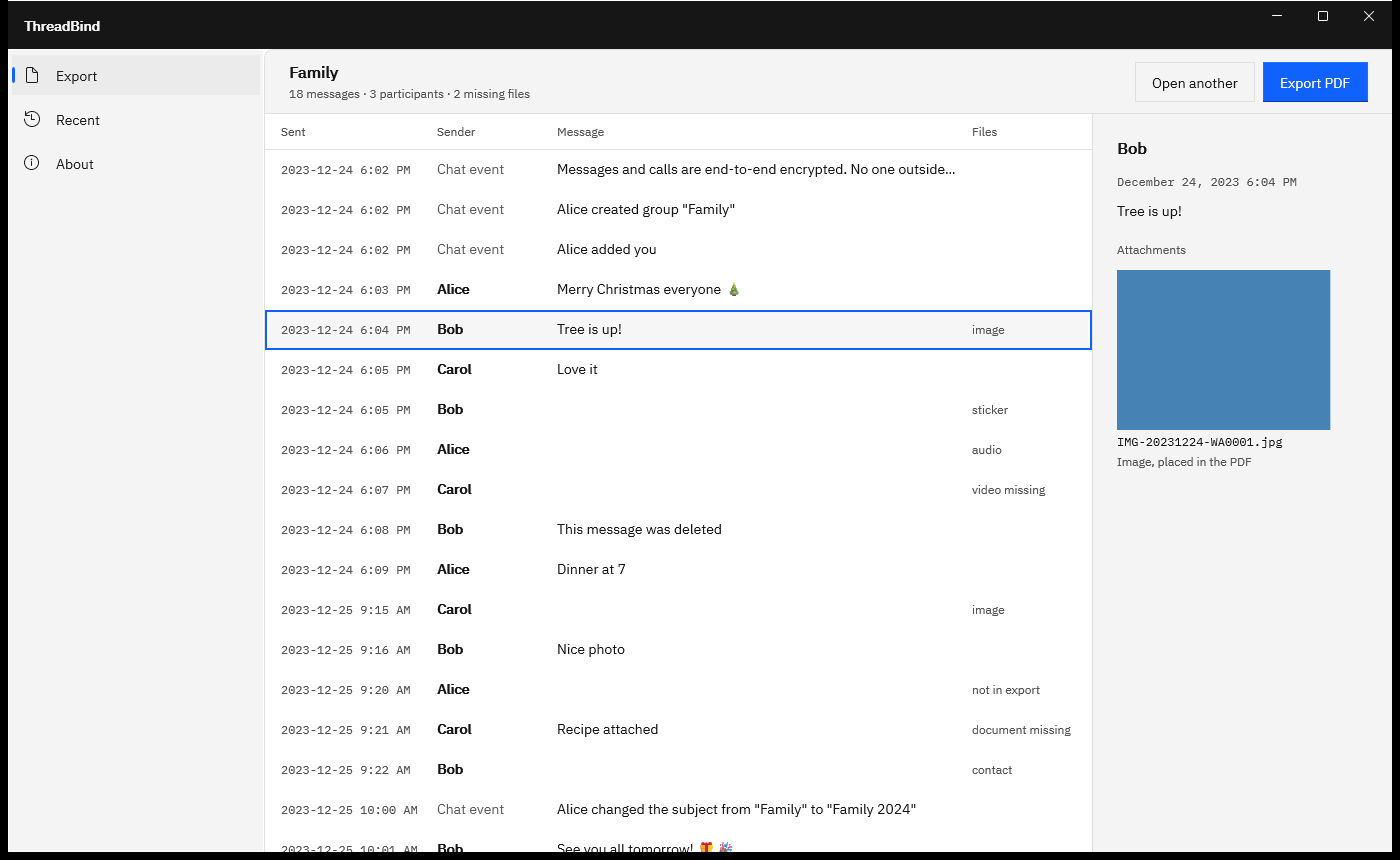
Screenshots use a sample chat export generated for testing, with fictitious names and placeholder pictures.
For the text file on its own, see WhatsApp txt to PDF; for chats full of photos, see WhatsApp chat with media to PDF. The full walkthrough from phone to PDF is in how to export a WhatsApp chat to your PC.
Frequently asked questions
What does “Media omitted” mean in a WhatsApp export?
It means a photo, video, sticker or other file was sent at that point, but the chat was exported without media, so the file itself is not in the export. Android writes <Media omitted>; iPhone names the kind, as in image omitted. ThreadBind keeps the spot visible with a note such as “Media not included in the export”.
Is a WhatsApp chat export the same as a backup?
They do different jobs. A backup, to Google Drive on Android or iCloud on iPhone, restores your chats to WhatsApp on a phone. An export is a text file with optional media that you can open, read and keep anywhere. WhatsApp says an export cannot be imported back. Use backups for changing phones and exports for records.
Why are some dates in my export in the wrong month?
Usually the day and month were read in the wrong order, which happens when every date in the chat could be read both ways. ThreadBind works the order out from the dates, and when they cannot settle it, offers a “Day first” and “Month first” switch above the table so you can set it.
Try ThreadBind
ThreadBind is a one-time purchase in the Microsoft Store, with a 15-day free trial run by the Store, so you can open your own export and read the PDF before you buy. The export is only read, and nothing uploads. Read more on the ThreadBind product page, or see ways to save WhatsApp messages on a PC to compare the other routes.
Open your own export in ThreadBind during the 15-day free trial.
Get it from Microsoft
Last updated 15 October 2026. Published by Automata Labs, a software company in Canada.
WhatsApp is a trademark of WhatsApp LLC. iPhone and iCloud are trademarks of Apple Inc., and Android and Google Drive are trademarks of Google LLC. ThreadBind is not affiliated with or endorsed by WhatsApp LLC, Apple or Google.