ContextCleaner: see every entry in the Windows 11 right-click menu, and which app added it — on the Microsoft Store.
Windows 10 & Windows 11 Updated 2026-10-15

Turn a WhatsApp chat into a paged PDF, on this PC.

ThreadBind is a Windows app from Automata Labs that turns a WhatsApp chat export into one paged PDF with the pictures in place. Pick the export folder, check every message in a table, and export: a heading for each day, the time and sender on every message, photos and stickers under the messages that sent them, and every voice note, video, and document listed by name. Everything happens on your PC, and the export is only read.

One-time purchase · 15-day free trial in the Microsoft Store · One-time purchase. No subscriptions. Local-first.
Pay once. Own it forever.

One-time purchase on the Microsoft Store · No subscription · Instant install

Buy through the Microsoft Store—instant install, automatic updates, and a Microsoft receipt for easy expensing. No account needed on our site, and no subscription on Store purchases.

How it works See the screens

android and iphone exports · pictures inline · every file named · a4 or letter · nothing uploads

ThreadBind finished PDF and export summary

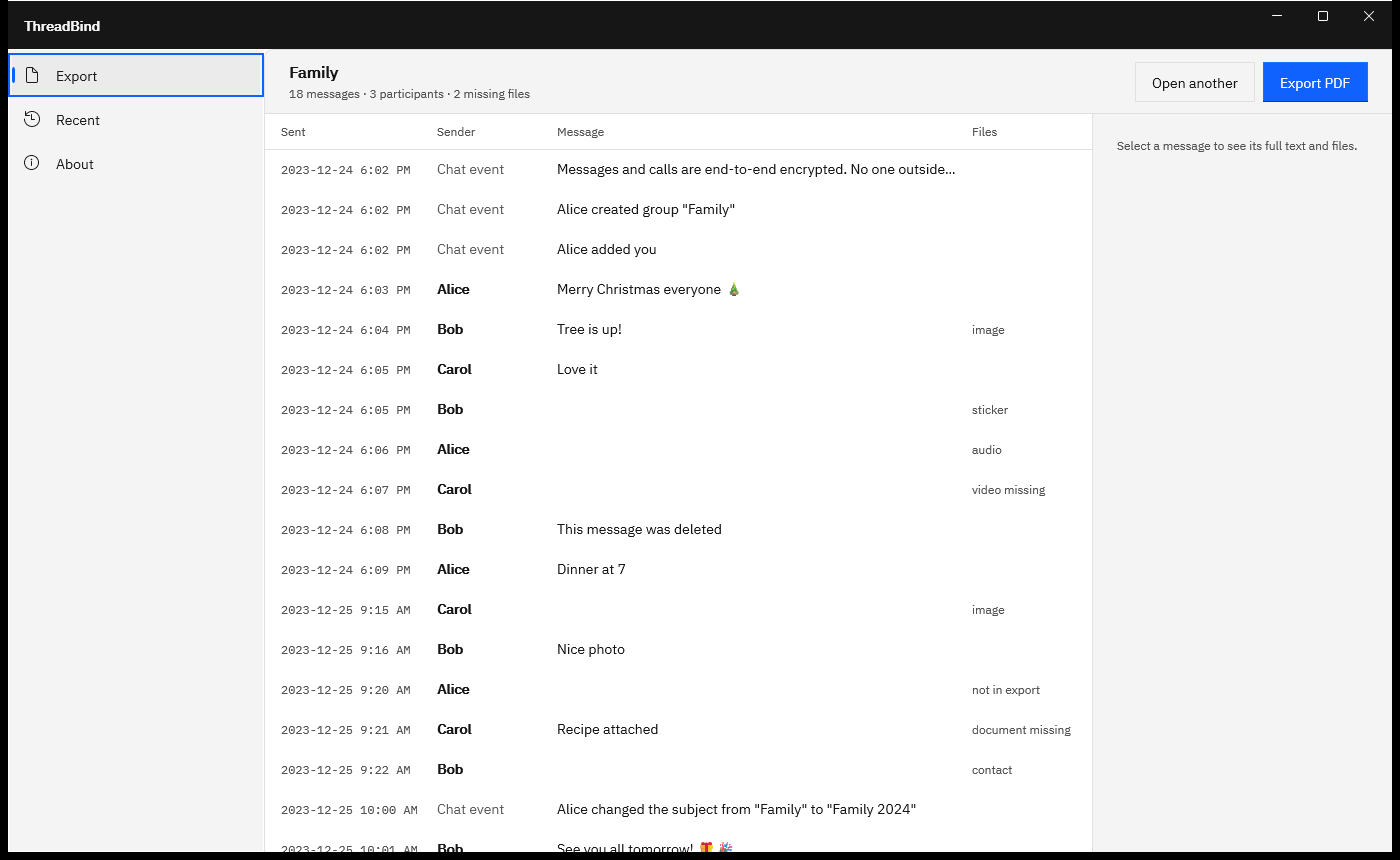
ThreadBind showing Export complete for Family.pdf with 2 pages and 3 pictures placed, beside a preview of the PDF with a day heading, times, senders, a photo, and a sticker.
Export complete. The PDF is previewed in the app, with each day headed, every message timed, and the pictures in place.

The problem

The chat is a text file and a folder of photos.

WhatsApp’s Export chat gives you a .txt file with one line per message and, beside it, every photo, sticker, voice note, and video as a separate file with a name like IMG-20231224-WA0001.jpg. Turning that into something you can read, print, or hand over usually means an afternoon in a word processor: pasting lines, cleaning up dates, and inserting each photo next to the right message by hand.

With ThreadBind

Pick the folder. Check the messages. Export.

ThreadBind reads the export, matches every file to the message that sent it, and lists the whole chat in a table you can check. One export writes a paged PDF with a heading for each day, the photos inline, every other file named, and anything the export left out listed at the end. The export folder is only read.

Key benefits

Every message, every picture, every file, on numbered pages

Pictures under the message that sent them

ThreadBind matches every photo and sticker in the export folder to the line that mentions it and places it inline, scaled to the page. Photos print up to the page width, and stickers print small, the way they look in the chat. JPEG and PNG go straight in, WebP stickers keep their transparency, and other picture formats Windows can open are converted on the way.

Opens the export WhatsApp made

Pick the export folder, or the _chat.txt or WhatsApp Chat with text file together with its photos. Android and iPhone exports open as they are, made with media or without.

Dates and senders read for you

12- and 24-hour clocks, slashes, dots, or dashes, and AM and PM words in many languages. The day and month order is read from the dates, with a Day first and Month first switch when the file leaves it open.

Every file accounted for

Voice notes, videos, documents, and contacts are listed by name under their message. Anything the chat mentions but the folder lacks is noted in place and listed again at the end.

Paged like a document

A title block with the message count, date range, and participants, a heading for each day, the chat name at the top of every page, and page numbers. A4 or Letter.

Check it before you export

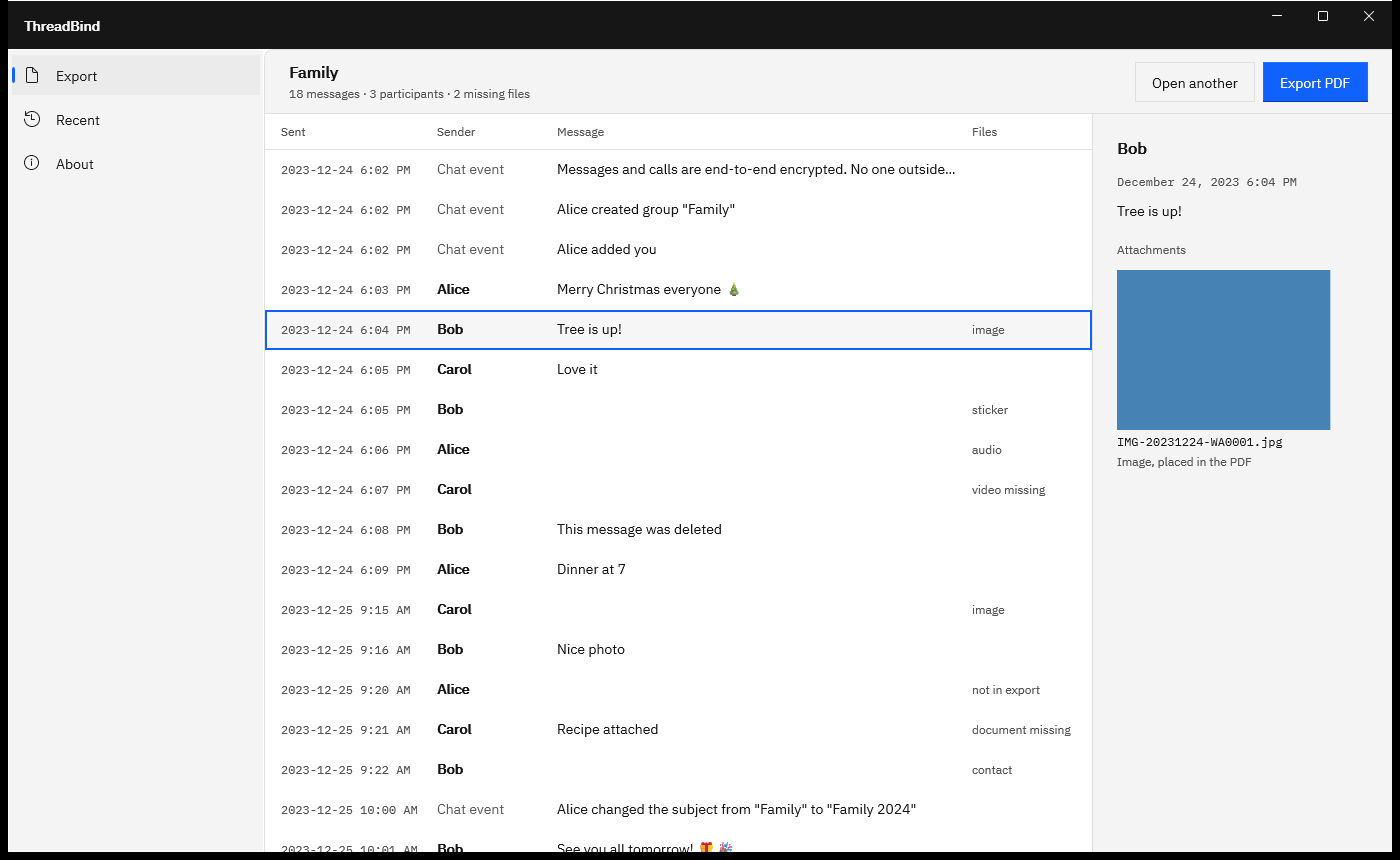
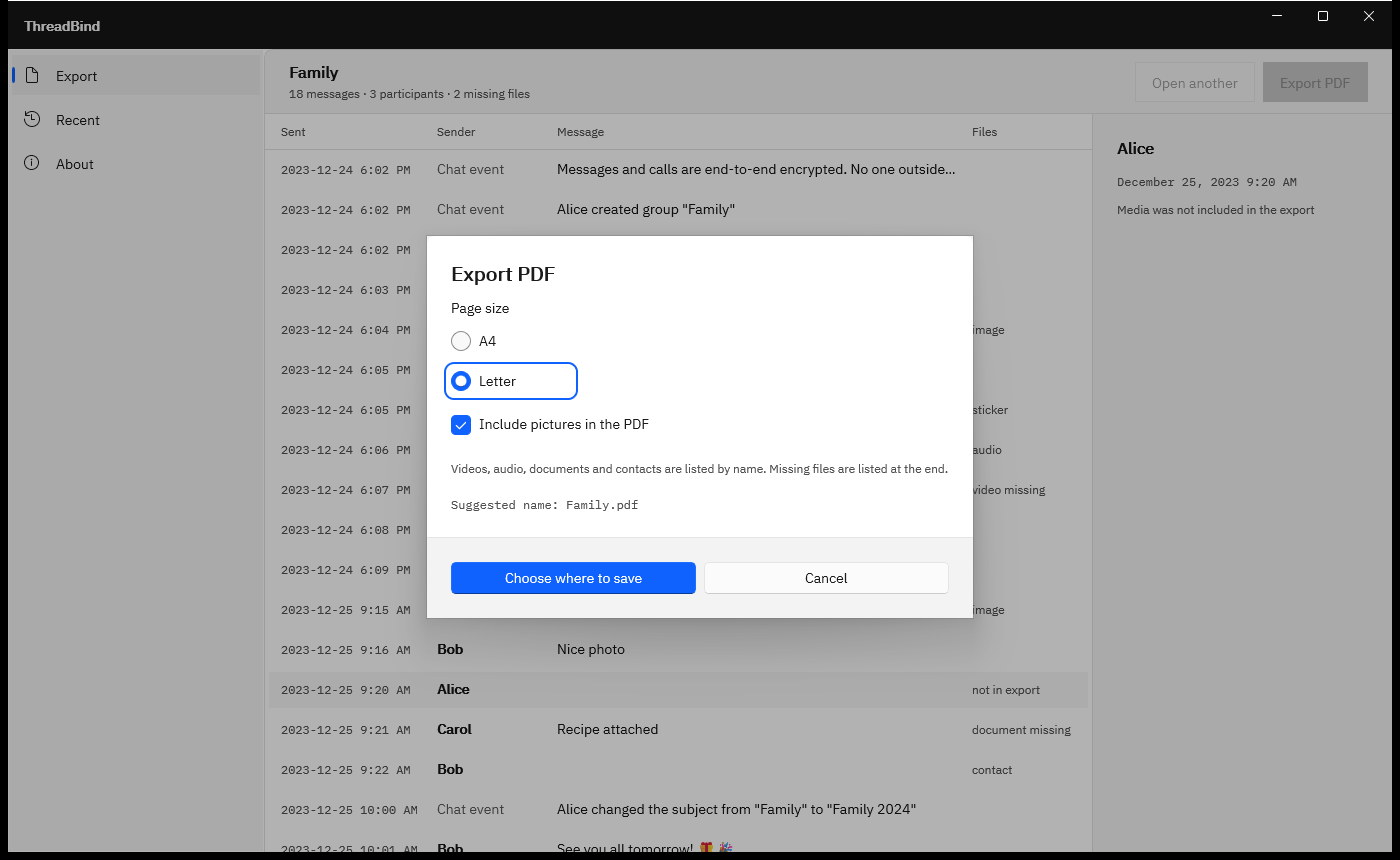
Every message opens in a table with Sent, Sender, Message, and Files columns. Select a row to read the full text and see a thumbnail of each picture, and a preview of the finished PDF follows the export.

How it works

Pick, check, export, open

Pick

Choose Pick folder and select the folder WhatsApp exported, or Pick chat file and select the text file with its photos. ThreadBind reads every line and counts the messages, participants, and missing files.

Check

Read the chat in the table: Sent, Sender, Message, and Files. Select a message to see its full text and a thumbnail of each picture. If the dates read the wrong way round, switch between Day first and Month first.

Export

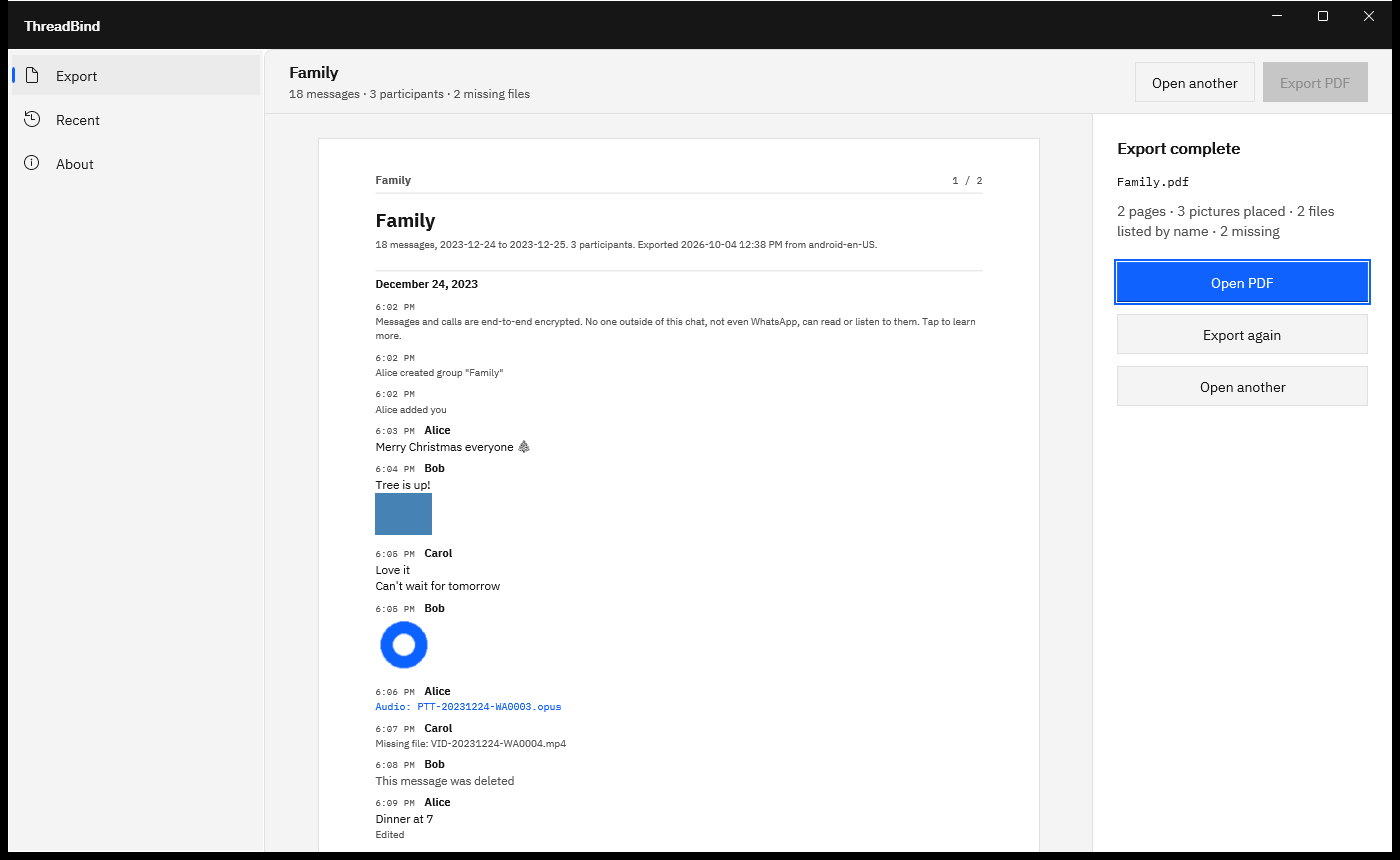
Choose Export PDF, pick A4 or Letter, keep Include pictures in the PDF on or turn it off, and choose where to save. The suggested file name is the chat’s name.

Open

Export complete shows the page count, the pictures placed, and the files listed by name, with a preview of the first pages. Choose Open PDF to read or print it, or Export again with other settings.

Works with exports from Android and iPhone, made with media or without. The Recent page reopens exports you opened before, and the screens below show each step.

See it in action

The messages, the export, and the finished PDF

ThreadBind listing a family chat export in a table with Sent, Sender, Message and Files columns, and the toolbar reading 18 messages, 3 participants, 2 missing files.
Pick the export folder. Every message opens in a table with its time, sender, text, and files, with the counts at the top.
ThreadBind with one message selected and the detail pane showing the sender, the full date and time, the message text, and a picture thumbnail marked Image, placed in the PDF.
Select any message to read the full text and see each picture before you export.
ThreadBind Export PDF dialog with Page size A4 or Letter, Include pictures in the PDF checked, and the suggested name Family.pdf.
Choose A4 or Letter and whether to include pictures. The PDF is a new file you name.
Finished ThreadBind PDF preview with a title block, a December 24, 2023 heading, messages with times and senders, an inline photo, a sticker, and a voice note listed by name.
Done. The summary counts the pages, pictures placed, and files listed by name, and Open PDF opens the finished file.

Screenshots use a sample chat export generated for testing, with fictitious names and placeholder pictures.

Privacy

Nothing uploads

ThreadBind runs on your PC in the Windows app sandbox and declares no capabilities. It makes no network connections, has no account or sign-in, and collects no telemetry. It reads only the folder or files you pick, writes only the PDF you name, and keeps no log or cache.

Your export is opened for reading only and never changed. Files are named in the PDF without your folder path, and the Recent list of exports you opened stays in the app’s own storage on this PC, where Clear list removes it.

What you get

  • One PDF you name, on A4 or Letter pages.
  • A title block with the message count, date range, participants, and export time.
  • A heading for each day, and the time and sender on every message.
  • Photos and stickers placed inline under the message that sent them.
  • Voice notes, videos, documents, and contacts listed by name, with a link to the file.
  • Chat events, deleted messages, and edits marked as what they are.
  • A Missing files list at the end, with each file’s name and time.
  • The chat name and a page number on every page.

Try it on a chat you have already exported.

The Microsoft Store runs a 15-day free trial with every feature. Export a chat with media, pick the folder, and read the PDF ThreadBind writes, with every photo in place and every page numbered. If it fits your work, buy it once. There is no subscription.

Pay once. Own it forever.

One-time purchase on the Microsoft Store · No subscription · Instant install

Buy through the Microsoft Store—instant install, automatic updates, and a Microsoft receipt for easy expensing. No account needed on our site, and no subscription on Store purchases.

Who uses it

  • People keeping a family or group chat as a readable, printable document before they change phones
  • Anyone asked for a WhatsApp conversation by a lawyer, mediator, insurer or landlord, with the date, time and sender of every message
  • Small businesses and contractors keeping a client chat, with its photos, alongside the job file
  • Assistants and family helpers who prepare a chat for someone else and want the original export left untouched

FAQ

Quick answers about ThreadBind

What is ThreadBind?

ThreadBind is a Windows app from Automata Labs that turns a WhatsApp chat export into a paged PDF on your PC. It reads the chat text file and the media beside it, places photos and stickers under the messages that sent them, lists every other file by name, and writes one PDF you name. Nothing uploads.

How do I turn a WhatsApp chat into a PDF with it?

Export the chat from WhatsApp on your phone and copy the export to your PC. In ThreadBind, choose Pick folder and select it. Check the messages in the table, choose Export PDF, pick A4 or Letter, then Choose where to save. Export complete shows a preview, and Open PDF opens the file.

Which WhatsApp exports does it open?

Exports from Android and iPhone, made with media or without. Android names the text file WhatsApp Chat with and the contact or group name; iPhone exports a zip that holds _chat.txt, so extract it to a folder first. ThreadBind reads 12- and 24-hour times and dates written with slashes, dots, or dashes.

Are the photos in the PDF?

Yes. With Include pictures in the PDF on, every photo and sticker in the export folder is placed under the message that sent it. Photos are scaled to the page, and stickers print small, the way they look in the chat. Turn the option off for a text-only PDF, and each picture is listed by name instead.

What happens to voice notes, videos, and documents?

Each one is listed by name under the message that sent it, for example Audio: PTT-20231224-WA0003.opus, written as a link to the file. Shared contact cards are listed the same way. Keep the PDF with the export folder and every voice note and video stays easy to find.

What if the export left some files out?

ThreadBind tells you. When the chat names a file that is not in the folder, the PDF says Missing file with its name at that message, and a Missing files section at the end lists every one with its time. In an export made without media, each spot carries a note such as Media not included in the export.

How does it read the dates?

From the timestamps in the file. ThreadBind reads 12- and 24-hour clocks and dates written with slashes, dots, or dashes, and works out whether the day or the month comes first from the dates themselves. When the dates cannot settle it, a Day first and Month first switch appears above the table.

Can I print the chat?

Yes. The PDF is laid out on A4 or Letter pages, with margins, a heading for each day, the chat name at the top of every page, and page numbers such as 3 / 12. Choose Open PDF and print from your PDF viewer, every page or just a range.

What happens to my original export files?

They are only read. ThreadBind opens the folder or files you pick for reading and writes the PDF as a new file you name in the Windows save dialog. Saving over the chat text or any file the chat refers to is refused, and a cancelled export leaves an earlier file of that name as it was.

Where does my chat go?

It stays on your PC. ThreadBind runs in the Windows app sandbox with no declared capabilities and makes no network connections. There is no account, no sign-in, and no telemetry, and it writes no log. The Recent list stays in its own storage on this PC, and Clear list removes it.

What does it cost, and is there a trial?

ThreadBind is a one-time purchase in the Microsoft Store, and the listing shows the current price in your currency. The Store runs a 15-day free trial with every feature, and there is nothing to activate in the app. There is no subscription.

What Windows version do I need?

Windows 10 version 2004 or later, or Windows 11, on an x64 or ARM64 PC. The Microsoft Store installs and updates ThreadBind, and it works fully offline.
Still stuck? Email [email protected] after checking the Support Center.

Technical specifications

Technical specifications

Spec Implementation
Data Sovereignty Reads only the export folder or files you pick in the Windows file picker, read-only; writes only the PDF you name in the Windows save dialog and refuses to save over the export’s own files; the Recent list stays in the app’s own storage on this PC, and Clear list removes it
Telemetry Status None; no account, no sign-in, no telemetry, and no log or cache files
Core Runtime .NET 10 (carried inside the package) and WinUI 3 (Windows App SDK), packaged as MSIX; runs in an AppContainer that declares no capabilities; the PDF is written by a managed PDF engine inside the app, and pages are previewed with the PDF renderer built into Windows
Network Requirements Fully functional offline; the package declares no internet capability, and the app makes no network connections
Deployment Compatibility Windows 10 version 2004 or later and Windows 11, x64 or ARM64; one-time purchase on the Microsoft Store with a 15-day free trial
Inputs WhatsApp chat exports from Android (WhatsApp Chat with … .txt) and iPhone (_chat.txt), made with or without media: the export folder, or the chat text file picked together with its media files
Chat text 12- and 24-hour times, optional seconds and brackets, dates with slashes, dots or dashes, and AM and PM words in many languages; day and month order read from the dates, with a Day first and Month first switch; UTF-8 with emoji
Media Photos and stickers placed inline (JPEG, PNG and WebP, plus other picture formats the Windows image decoders open); voice notes, audio, video, documents and contact cards listed by name with a relative link
Output One PDF on A4 or Letter pages: a title block with message count, date range, participants and export time; a heading for each day; time and sender on every message; chat name and page number on every page; a Missing files list at the end
Markers Chat events, deleted messages, edited messages, and media left out of the export are marked in the table and in the PDF
File safety The export is only read; the PDF is written through a transacted write, so a cancelled or failed export leaves an earlier file of that name intact; file names appear in the PDF without your folder path

A chat export in. A paged PDF out.

ThreadBind puts every message on numbered pages with its date, time, and sender, places the photos where they were sent, and names every other file. The export is only read, and nothing uploads.

One-time purchase. No subscriptions. Local-first.

Pay once. Own it forever.

One-time purchase on the Microsoft Store · No subscription · Instant install

Buy through the Microsoft Store—instant install, automatic updates, and a Microsoft receipt for easy expensing. No account needed on our site, and no subscription on Store purchases.

Browse catalog

WhatsApp is a trademark of WhatsApp LLC. iPhone is a trademark of Apple Inc., and Android is a trademark of Google LLC. ThreadBind is not affiliated with or endorsed by WhatsApp LLC, Apple, or Google.