Taskbar Sentinel: back up your pinned apps & restore your taskbar in one click — on the Microsoft Store.
Guided workflow variation

Save your whole desk as a profile.Recall it in a click.monitor brightness profiles Windows

MonitorPilot stores named setups — Work, Gaming, Night — that configure every panel at once, and applies them automatically when an app takes focus, so the displays reconfigure themselves hands-free.

MonitorPilot saves named whole-desk profiles and applies them automatically when an app takes focus, reconfiguring every panel at once — all stored and computed locally.

$14.99 USD — Perpetual License

One-time purchase · Lifetime updates · Delivered via the Microsoft Store

Purchased and updated securely through the Microsoft Store. No account needed on our site, no subscription, and a Microsoft receipt for easy corporate expensing.

Full MonitorPilot overview
One-time purchase No telemetry Local-first

windows 11 · ddc/ci · no drivers · offline · no telemetry

If this sounds like your week

You rebuild the same display "look" by hand, several times a day.

Bright and crisp for spreadsheets. Dim and warm for the evening film. A particular input and colour cast for retouching photos. Today you reconstruct each of those arrangements manually, screen by screen, every time the task changes — because Windows has no concept of a saved, recallable display preset.

Where tooling usually breaks

A preset you can't name is a preset you keep redoing.

Without saved configurations, every context switch is a fresh round of dragging sliders across two or three panels. It's repetitive, it's easy to get slightly wrong, and the effort recurs forever because nothing is ever stored.
Where MonitorPilot lands

Capture the whole desk once; recall it in a click — or hands-free.

MonitorPilot lets you save named profiles such as Work, Gaming, and Night that capture every panel at once, then switch the entire setup instantly. Per-app context rules go further: a profile, preset, custom level, or smooth curve can apply the moment a chosen application takes focus, so opening your editor or starting a movie reconfigures the displays for you. Everything is computed and stored locally.

$14.99 USD — Perpetual License

One-time purchase · Lifetime updates · Delivered via the Microsoft Store

Purchased and updated securely through the Microsoft Store. No account needed on our site, no subscription, and a Microsoft receipt for easy corporate expensing.

Learn more about MonitorPilot

windows 11 · ddc/ci · no drivers · offline · no telemetry

What you get

Feature highlights

Control every external display from one window or the tray

brightness, contrast, input source, volume, color temperature, and power over standard DDC/CI—no kernel drivers required.

Named profiles (Work, Gaming, Night, or your own) switch every monitor at once, and per-app automation applies a profile, preset, or custom brightness the moment an app takes focus.

Named profiles (Work, Gaming, Night, or your own) switch every monitor at once, and per-app automation applies a profile, preset, or custom brightness the moment an app takes focus.

Advanced rules engine

combine foreground app, window title, time of day, sunrise/sunset, battery state, idle time, full-screen, and virtual desktop with AND/OR/NOT logic and optional gradual transitions.

Workspaces and window management

restore your whole multi-monitor desk in one click after docking, and move, snap, center, or maximize windows across screens with global hotkeys.

Reliable by design

monitors are keyed by a hardware EDID hash so settings never land on the wrong screen, a serialized bus-safe queue protects fragile DDC/CI controllers, and settings are crash-safe.

Featherweight, native, and private

built in Rust with WebView2 (not Electron), under 15 MB idle RAM target, sub-250 ms cold start, 100% offline with no account, no telemetry, and no network access.

Product Interface

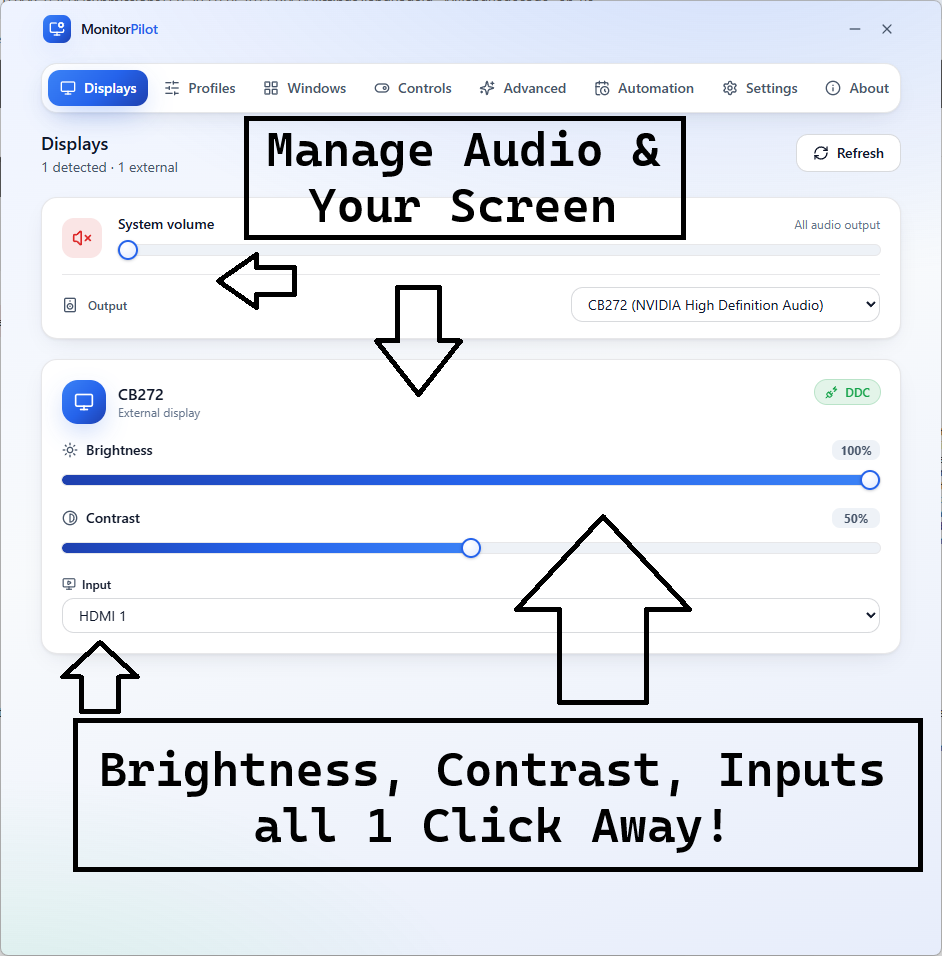
MonitorPilot dashboard showing each external display as a card with brightness, contrast, and volume sliders
Every external display in one window — brightness, contrast, input, volume, and colour at a glance, straight from the tray.

Control every monitor, then let your desk run itself.

MonitorPilot drives brightness, contrast, input, volume, and colour over standard DDC/CI—no drivers—then adds the automation and reliability layer free slider tools skip.

Profiles & per-app rules: switch the whole desk in a click, or apply settings automatically when an app takes focus.
Docking-safe by design: panels are keyed by hardware EDID, so settings never land on the wrong screen after a reconnect.
Native & private: Rust + WebView2 (not Electron), under 15 MB idle RAM, 100% offline, no account, no telemetry.

Especially when

  • Control external monitor brightness, contrast, input, volume, and color on Windows 11 without fumbling with the buttons under the bezel
  • Automate per-app and time-of-day monitor settings across a multi-monitor desk instead of adjusting each screen by hand
  • Restore the correct display settings after docking or undocking without Windows reshuffling which monitor is which

Who benefits

Real-world scenarios

The task switcher

You want a bright, crisp look for spreadsheets and a dim, warm one for the evening film, but you reset every monitor by hand each time you change activity, several times a day.

You save two MonitorPilot profiles and a per-app rule; now opening the editor brightens the desk and starting a movie warms it automatically, with no slider-dragging at all.

The room that changes light

Your external monitors hold one brightness while the room shifts from morning sun to evening lamplight, leaving them glaring at night and washed out at midday.

MonitorPilot follows an on-device sunrise-to-sunset curve, easing the displays brighter by day and softer at night, so the screens stay comfortable without you touching a control.

The daily docking shuffle

Every time you dock the laptop the desk is wrong again — levels reset, the primary panel moved, windows piled on the built-in screen — and you rebuild it by hand before you can start work.

You save the arrangement as a MonitorPilot Workspace and restore it in one click; because it identifies panels by hardware EDID, every setting lands on the correct screen, and it reports what restored.

Deep dive

Profiles and per-app rules: automation that beats a slider

Adjusting monitors by hand is fine once; doing it a dozen times a day is the problem worth solving, and it is the layer free slider tools do not touch. MonitorPilot is built around it. Named profiles capture every display at once — levels, contrast, colour, inputs — so you can switch the whole desk with one click or assign each a global hotkey. That alone removes most of the repetitive fiddling. Per-app context rules make it hands-free. You tell MonitorPilot that a given application should bring a profile, a built-in preset, a specific brightness, or a smooth curve, and it applies the instant that app takes the foreground — your editor brightens the desk, a media player warms and dims it, your IDE restores a crisp high-contrast look. Above that sits an advanced rules engine that combines conditions with AND, OR, and NOT logic: foreground app and window title, time of day, day of week, sunrise and sunset windows, battery state and charge level, idle time, full-screen detection, and the active virtual desktop. A matching rule can apply a profile, restore a workspace, drive a sync group, push exact per-monitor values, or run your window rules, with optional gradual transitions and clear priority when several rules overlap. All of it is evaluated locally; nothing about your apps or schedule leaves the machine.

Trusted by pragmatic desktop users

Built for people who prefer tools that stay local.

Real workflows: focus timers that stay visible, batches that never leave the disk, and renames you can rewind.

Customer review 01

PinPoint: Always On Top saves me so much time as I can organize all my report materials without having to flip between windows or tabs. I love the fact that it is straightforward and simple.

Senior Accountant · Manufacturing Company · United States · PinPoint

Learn more
Customer review 02

I used to get so frustrated when my Taskbar would freeze and disappear. Taskbar Sentinel has eliminated that pain without subjecting me to another subscription.

Darren · Calgary, Alberta, Canada · Taskbar Sentinel

Learn more
Customer review 03

OpticBatch and MetaForge are a lifesaver for me as a person with a passion for photography. They give me the ability to stay organized and keep personal information confidential when I post pictures online.

Sherri · United States · OpticBatch & MetaForge

Learn more

Quotes are shown with customer permission; names and locations appear as reviewers provided them.

Our Core Moat

Engineered to respect your system boundaries.

System Resource Monitor (Idle State Comparison)
Automata Labs sub-5MB idle memory footprint compared to generic Electron applications

Lightweight Native Stack

Compiled Rust core wrapped inside an optimized Tauri shell. No heavy background node loops or duplicate Chromium engines cooking your memory footprint (<5MB idle RAM).

100% Local-First Privacy

Executes entirely on-device with full offline isolation. Absolute zero background telemetry policies, no metrics aggregation, and zero mandatory cloud-sync accounts.

Perpetual Fallback Licenses

Pay a single, clear one-time purchase price. Own your specific native software utility execution tier permanently without artificial subscription paywalls or ongoing usage tax.

FAQ

Straight answers—no glossary dump

Can I save monitor settings as a profile and switch them automatically?

Yes. MonitorPilot saves named profiles — Work, Gaming, Night, or your own — that capture brightness, contrast, colour, and inputs for every panel at once, recalled with a click or hotkey. Per-app rules and a conditional engine can apply a profile automatically based on the foreground app, time of day, sunrise or sunset, battery, idle time, and more.

Does MonitorPilot's automation send my data anywhere?

No. MonitorPilot has no account, no analytics, and no outbound network access by policy. Per-app rules, profiles, schedules, and the sunrise and sunset math are all computed on your device — there are no location lookups and no network calls. The names of the apps you use, your schedules, and your profiles never leave your machine, because the app has no way to send them.

Will MonitorPilot work with my monitor and my laptop screen?

MonitorPilot controls external displays that support DDC/CI, which covers most modern monitors (some need it enabled in their on-screen menu). Laptop built-in panels generally do not expose DDC/CI and can't be controlled this way — a hardware limitation, not a MonitorPilot one. Window management, global hotkeys, and system volume still work regardless, so a laptop setup keeps real value.

Is MonitorPilot a subscription, and how do I get it?

MonitorPilot is a one-time purchase on the Microsoft Store — no subscription and no account required for core use. Because DDC/CI support is hardware-dependent, trying it on your own displays is the best way to confirm they respond. Use the Microsoft Store button on this page for the current listing and price.

Free tools adjust sliders.
MonitorPilot runs your whole desk.

MonitorPilot controls every external display over DDC/CI—brightness, contrast, input, volume, and color—then automates the desk with profiles, per-app rules, workspaces, and window management. Native Rust, under 15 MB idle RAM, 100% offline, no drivers, no account.

$14.99 USD — Perpetual License

One-time purchase · Lifetime updates · Delivered via the Microsoft Store

Purchased and updated securely through the Microsoft Store. No account needed on our site, no subscription, and a Microsoft receipt for easy corporate expensing.

Open full product page

Technical specifications

Technical specifications for procurement

Spec Implementation
Data Sovereignty Profiles, rules, workspaces, and per-monitor names are stored locally; no cloud sync or remote backup
Telemetry Status None; no account, no analytics, and no outbound network access by policy
Core Runtime Rust core with a WebView2 front end (not Electron); controls displays over standard DDC/CI
Network Requirements Fully functional offline; sunrise/sunset and adaptive brightness are computed on-device with no location lookups
Deployment Compatibility Windows 11 only; controls external DDC/CI displays (laptop built-in panels generally do not expose DDC/CI)
Controls Brightness, contrast, input source, volume, color temperature, and power per display
Automation Profiles, per-app context switching, and a rules engine over app/time/solar/battery/idle/full-screen/virtual desktop
Reliability EDID-hash stable identity, serialized bus-safe DDC queue, and crash-safe transactional settings
Footprint Target under 15 MB idle RAM and sub-250 ms cold start (verified on QA hardware)