A revision cloud is the scalloped outline drawn around a change on a reissued drawing. A delta tag, a small triangle holding the revision number or letter, sits beside the cloud and points to the matching line in the revision block, the table in the title block that lists each revision with its date and a short description. Together they tell the reader where to look on a revised sheet.
These marks are a convention, not an automatic record. A drafter draws each cloud by hand after making the edit, so the clouds show what the drafter chose to flag. Knowing how the marks work, and where they fall short, makes a revised set much faster to read.
See every change between two drawing revisions on your own PC.
Get it from Microsoft
The terms at a glance
| Term | What it is | Where you find it |
|---|---|---|
| Revision cloud | A scalloped outline around a changed area | On the sheet, around the edit |
| Delta tag | A triangle with the revision number or letter | Next to the cloud |
| Revision block | A table of revisions: mark, date, description | In the title block |
| Sheet number | The sheet’s identifier, such as A-101 or M-101 | The title block and the sheet index |
| Addendum | Changes issued while the job is out to bid | Reissued sheets, often with a memo |
| Bulletin or supplemental instruction | Changes issued after the contract is awarded | Reissued sheets or sketches |
| Conformed set | The bid set with every addendum folded in | A full reissue of the set |
Revision clouds
A revision cloud is drawn as a chain of arcs around the area that changed: a moved wall, a new door, an edited note. Most offices cloud only the changes in the current revision and remove the clouds from earlier ones when they reissue, so a reader sees what is new in this issue. Some keep earlier clouds and rely on the delta tags to tell revisions apart. The office standard, or the project’s drawing requirements, decides which.
A cloud says “look here.” It does not say what changed inside it, and it says nothing about the changes that did not get one.
Delta tags and the revision block
The delta tag ties a cloud to its revision. A triangle with a 2 inside it beside a cloud means the change belongs to revision 2, and the revision block in the title block lists revision 2 with its date and a description such as “Addendum 2” or “Revised per plan review comments.” The revision block is the sheet’s history; the deltas are its index.
Offices differ on marks. Many use letters for revisions made before a set is issued for construction and numbers afterward, but conventions vary from office to office, so read the legend or the general notes for the set in front of you.
Where revisions come from
- Addenda are issued during bidding, usually as reissued sheets with a memo listing what changed. They tend to arrive close to the bid date, and bid forms often ask bidders to acknowledge each one.
- Bulletins and supplemental instructions carry changes after award, sometimes as full reissued sheets and sometimes as sketches.
- Conformed sets fold all the addenda into one clean set, so the field works from a single current issue.
- Plan review resubmittals answer a reviewer’s comments, with clouds around the corrections that were asked for.
Why some changes are never clouded
Clouds are drawn by people, after the fact. Changes slip through without one for ordinary reasons: an edit made late in the day before issue, a coordination fix made by another discipline in a shared model, a note reworded while fixing something next to it, or a schedule entry updated in a table that nobody thinks to cloud. Each of those is a real change on the sheet with nothing pointing to it.
For anyone pricing, reviewing, or building from the drawings, that is the risk. Reading only the clouds means reading only what someone remembered to flag.
Ways to check what changed
| Method | Good fit | What to expect |
|---|---|---|
| Read the clouds and the revision block | A quick first look at a reissue | Shows what the drafter flagged |
| Flip between the two issues | One or two sheets | Moved items and small text edits depend on your eye |
| Overlay one pair at a time in a PDF tool | A few reissued sheets | Each pair is matched, and often aligned, by hand |
| Drawing Revision Delta | Whole revised sets and addenda, on a Windows PC | Compares the drawings themselves, ranks every changed sheet, clouds every change, and lists edited words |
Meet Drawing Revision Delta
Drawing Revision Delta compares the drawings themselves, so it clouds every change it finds, whether or not the drafter clouded it.
Drawing Revision Delta is a Windows 11 app that pairs the sheets of two revisions by the sheet number in each title block, aligns each pair, and compares them. It ranks the sheets that changed, draws revision clouds around every change, lists edited notes and dimensions in plain words, and exports a PDF change report and a clouded set of the revised sheets. Everything runs on your PC, and nothing uploads.
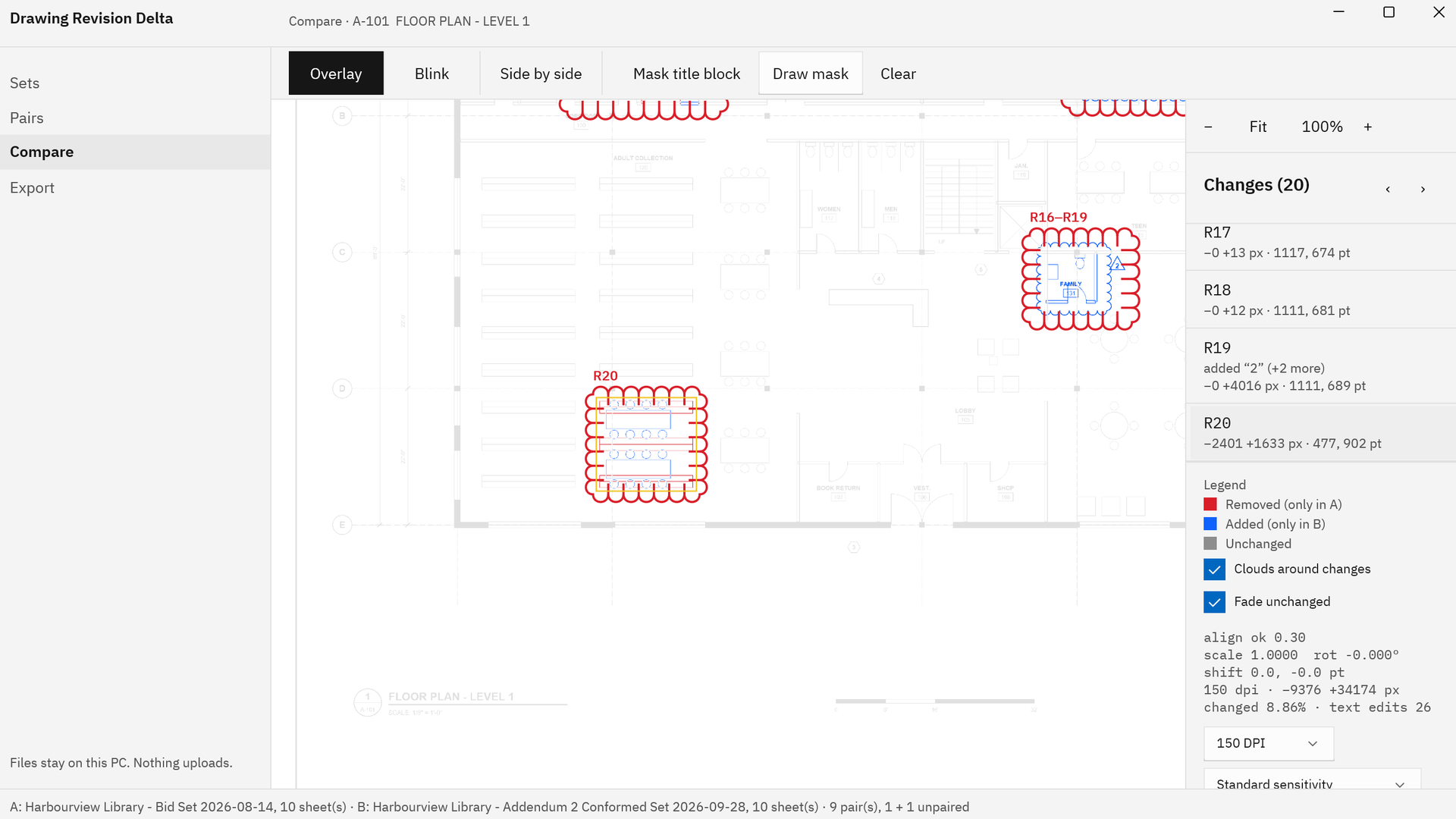
Screenshots use a fictional library drawing set made for software demonstration, with no client’s drawings.
How Drawing Revision Delta marks the changes
- Pick both issues. In Sets, choose “Pick folder” or “Pick files” under “Set A · earlier revision” and “Set B · later revision”. Sheets pair by the number in each title block.
- Compare the set. In Pairs, choose “Compare all”, then set the view to “Most changed first”.
- Open a sheet. Choose “Compare selected”. In “Overlay”, red was only in the earlier revision and blue is only in the later one.
- See the clouds. With “Clouds around changes” on, every change is clouded in red and labeled to match the change list, such as R4 or R16–R19 for a group of nearby changes.
- Spot the unclouded ones. A cloud the architect added is part of the new drawing, so it shows as blue line work around the edit. An app cloud with no blue cloud beside it marks a change nobody called out.
- Read the words. The “Changes” list shows text edits read from the PDF text, such as “GUARDRAIL AT STAIR LANDING.” changed to “GLASS GUARDRAIL AT STAIR LANDING.”
- Mask the revision block. “Mask title block” keeps the new date and revision entry on every sheet from counting as a change.
- Save the clouded set. In Export, “Save clouded set” writes the revised sheets, unchanged, with a cloud markup around every change. The clouds are PDF markups, so they can be moved or deleted in a PDF markup tool.
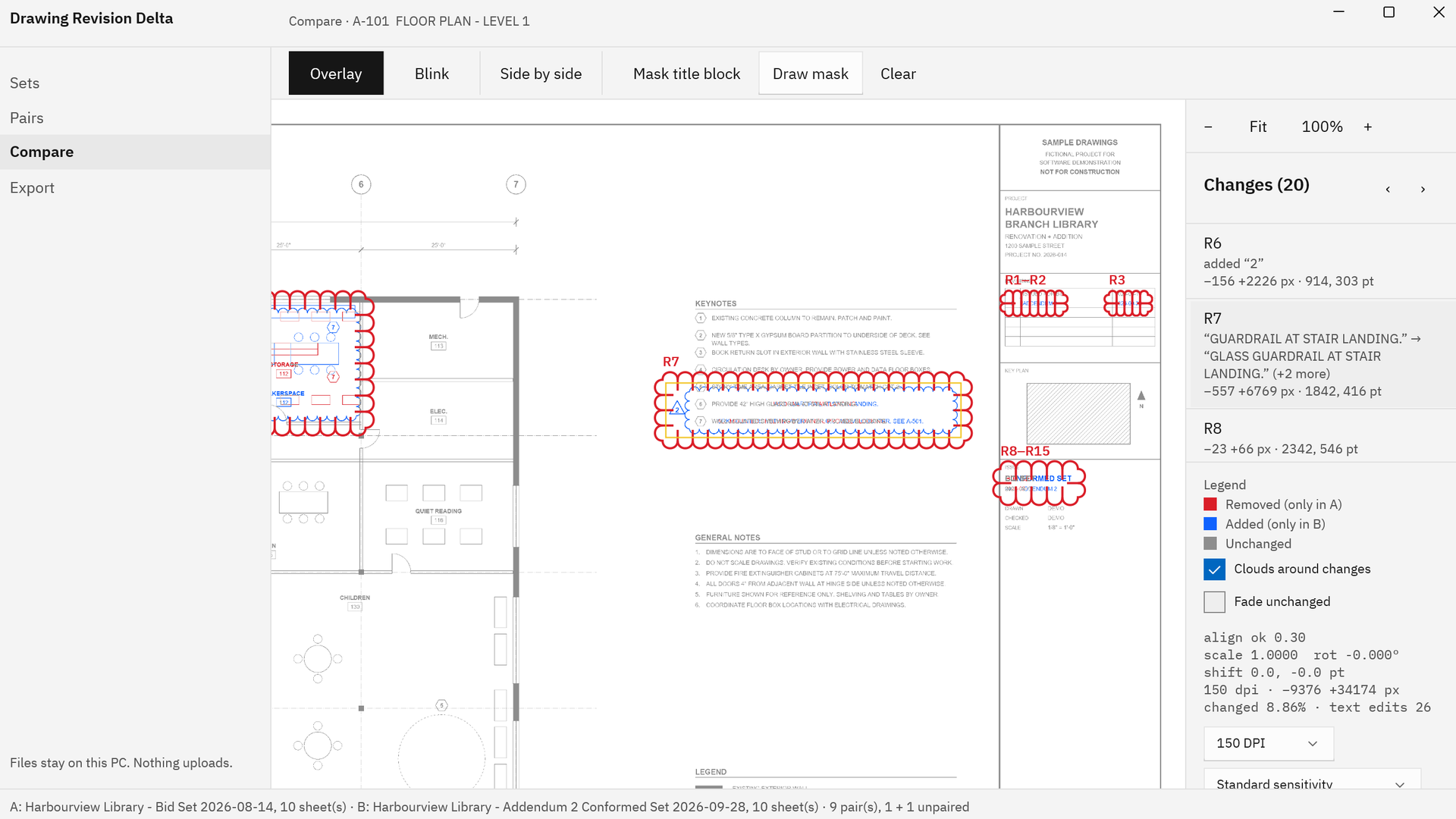
Each exported cloud carries a comment naming the change and any text edit, so the clouded set reads as a list of what changed, sheet by sheet. For a full walk-through, see how to compare two revisions of a drawing set, and for the clouded PDF itself, automatic revision clouds. To focus on the edits the drafter missed, read find unclouded changes.
Cloud every change between two issues of your own set.
Get it from Microsoft
Frequently asked questions
What does a revision cloud mean on a drawing?
It marks an area that changed in the current revision. The delta tag next to it gives the revision number or letter, and the revision block in the title block lists that revision with its date and description.
What is the triangle next to a revision cloud?
It is a delta tag, also called a revision triangle. The number or letter inside it matches an entry in the revision block, which tells you which issue the change belongs to.
Do revision clouds stay on later revisions?
That depends on the office standard. Many offices remove earlier clouds when they reissue, so only the current revision’s changes are clouded, while others keep them and rely on the delta tags. The general notes or the drawing legend usually say which.
How do I find changes that were not clouded?
Compare the drawings themselves instead of reading the clouds. Drawing Revision Delta aligns each revised sheet with its earlier version, marks what was added and removed, and clouds every change, so edits with no cloud on the drawing appear in the change list with the rest. Our addendum drawing review checklist puts that check into a bid-day routine.
Try Drawing Revision Delta
Drawing Revision Delta is a one-time purchase in the Microsoft Store, with a 15-day free trial of the full app run by the Store. Compare a reissue you already read by its clouds and see what else changed. It runs on Windows 11 on x64 and ARM64 PCs, and your drawings never leave your PC. Read more on the Drawing Revision Delta product page or start with compare drawing revisions.
Find the changes nobody clouded during the 15-day free trial.
Get it from Microsoft
Last updated 15 October 2026. Published by Automata Labs, a software company in Canada.