ContextCleaner: see every entry in the Windows 11 right-click menu, and which app added it — on the Microsoft Store.
Windows 11 Updated 2026-10-15

See what changed between two drawing sets, on this PC.

Drawing Revision Delta is a Windows app from Automata Labs that compares two revisions of a drawing set. It pairs every sheet by the sheet number in its title block, aligns each pair, and ranks the sheets that changed, most changed first. Step through each change in a red and blue overlay with revision clouds, read edited notes and dimensions in plain words, and export a PDF change report and a clouded set of the revised sheets. Your drawings never leave your PC.

One-time purchase · 15-day free trial in the Microsoft Store · One-time purchase. No subscriptions. Local-first.
Pay once. Own it forever.

One-time purchase on the Microsoft Store · No subscription · Instant install

Buy through the Microsoft Store—instant install, automatic updates, and a Microsoft receipt for easy expensing. No account needed on our site, and no subscription on Store purchases.

How it works See the screens

sheets paired by number · changed sheets ranked · revision clouds · text edits in words · nothing uploads

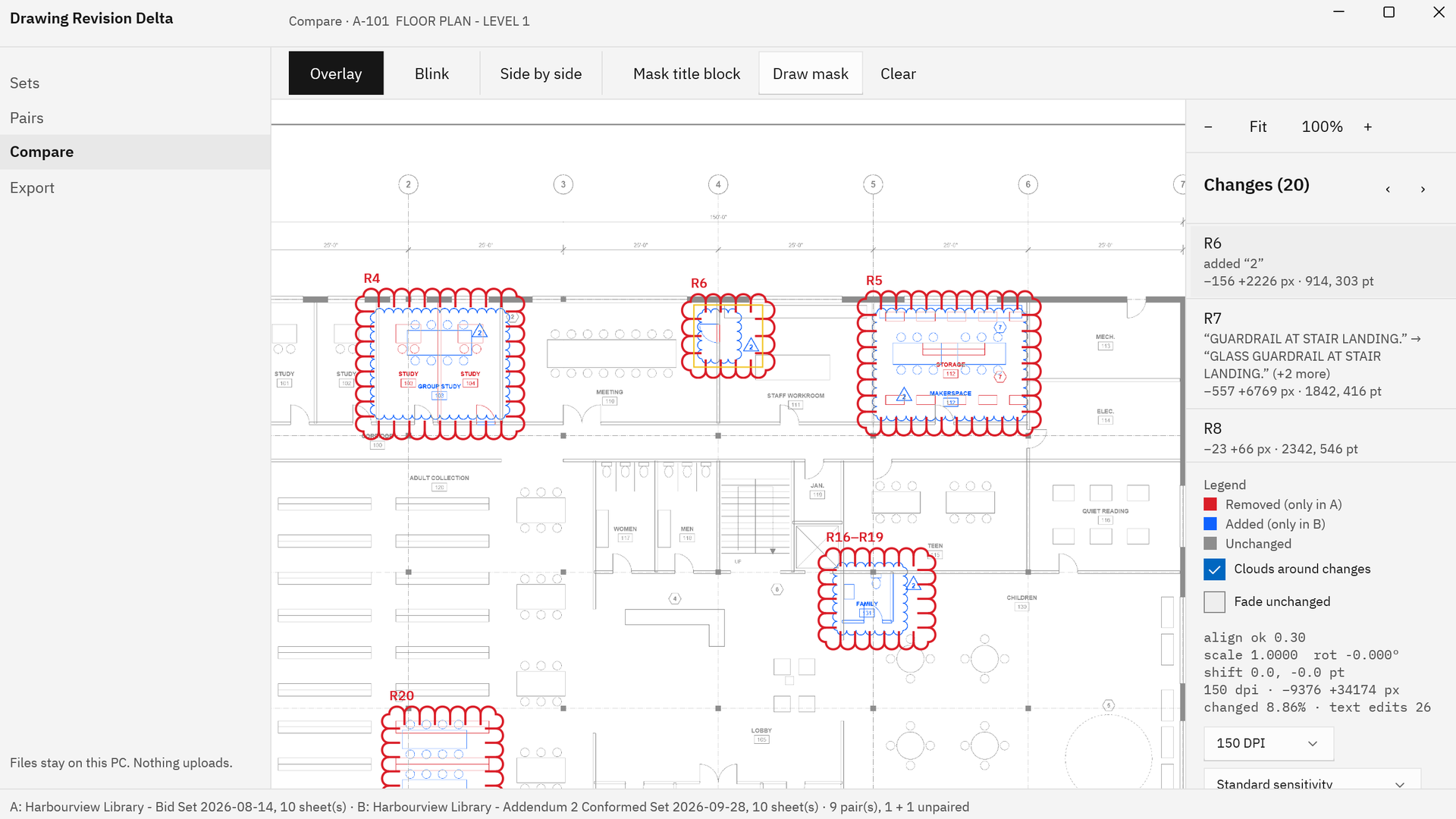
Drawing Revision Delta comparing a revised floor plan

Drawing Revision Delta comparing sheet A-101 of a sample library floor plan: red and blue changes inside revision clouds R4 to R20, with a change list that shows a keynote edited to read GLASS GUARDRAIL AT STAIR LANDING.
Every change on the sheet, clouded and listed. Red was only in the earlier revision, blue is new in the later one, and edited notes are listed in words.

The problem

The revised set is here, and nobody says which sheets changed.

An addendum or a conformed set lands with dozens of sheets. Some carry revision clouds, some changed without one, and some were only re-plotted with a new date. Finding the real edits means flipping between two PDFs sheet by sheet, matching sheet numbers by hand, and reading every note and dimension for the one character that moved.

With Drawing Revision Delta

Pick both sets. Read the ranked list. Open the clouds.

Drawing Revision Delta pairs every sheet by its title block number, aligns each pair, and compares the drawings themselves. The Pairs table puts the most changed sheets first, every change is clouded and listed in the change list, and edited words are listed in plain terms. One export writes the report and a clouded set you can forward.

Key benefits

Every changed sheet and every change, in one pass

Whole sets paired by sheet number

Pick a folder or files for each revision: one combined PDF, a file per sheet, or scans and images in TIFF, PNG, JPEG, and BMP. Sheets are matched by the sheet number in each title block, read from the PDF text or with the text recognition built into Windows, in any file or page order. Sheets with no number pair by title or file name, and any pair can be set by hand.

Changed sheets ranked

Compare all fills in each sheet’s share of change, its number of changes, and its text edits. Most changed first puts the sheets that need a look at the top, Changed only sets the rest aside, and new and removed sheets are listed.

Revision clouds around every change

Every change is clouded and gets a numbered entry in the change list, including the changes nobody clouded on the drawing. Step through them with next and previous, and turn on Fade unchanged to see exactly what moved.

Text edits in plain words

Notes, dimensions, and schedule entries are compared word by word from the PDF text, so a framing change reads “2x6” → “2x8”, even when the edit is a single character in small text.

Aligned before it compares

Each pair is lined up for shift, rotation, and scale, then corrected locally for plotter and scanner stretch, so a sheet re-plotted at a different offset or scale shows its real changes.

A report and a clouded set to send

Export a PDF change report with the ranked sheet list and a SHA-256 hash of every compared file, the revised sheets with editable cloud markups, two CSV files, and PNG snapshots.

How it works

Pick, pair, compare, export

Pick

In Sets, choose Pick folder or Pick files for Set A, the earlier revision, and for Set B, the later one. Multi-page files are split into sheets, and Recent folders keeps the folders you used one click away with Use as A and Use as B.

Pair

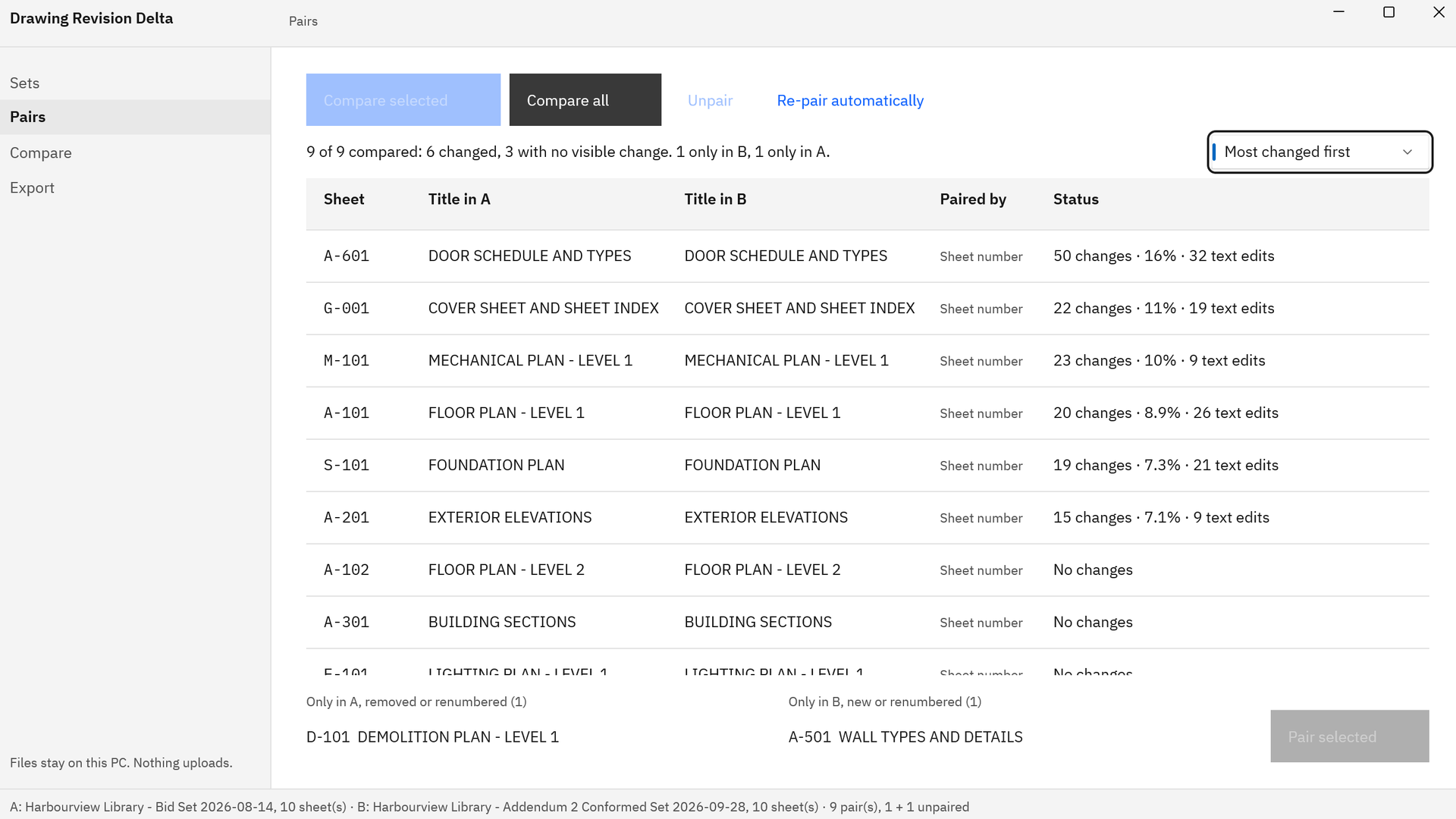
Pairs lists every sheet with its title in A and in B and how it was paired. Adjust any row with Unpair and Pair selected, then choose Compare all to fill the Status column and sort the table Most changed first.

Compare

Compare selected opens a pair in Overlay, Blink, or Side by side, with the change list beside it and revision clouds over the overlay. Mask the title block, choose 150 or 200 DPI, and set the sensitivity from Fine to Ignore small differences.

Export

Choose folder and export writes the change report, the clouded set, sheet-summary.csv, changes.csv, and PNG snapshots. Save clouded set and Save PDF report each write one file under a name you choose.

Every comparison runs on your PC, at the resolution, sensitivity, and mask you choose. See each step in the screens.

See it in action

The ranked list, the clouds, and the export

Drawing Revision Delta Pairs view with nine sheets paired by sheet number and sorted Most changed first, from A-601 DOOR SCHEDULE AND TYPES with 50 changes and 16% down to three sheets with No changes, plus one sheet only in A and one only in B.
Two sets in, a ranked list out. Sheets pair by title block number, the most changed come first, and new and removed sheets are listed.
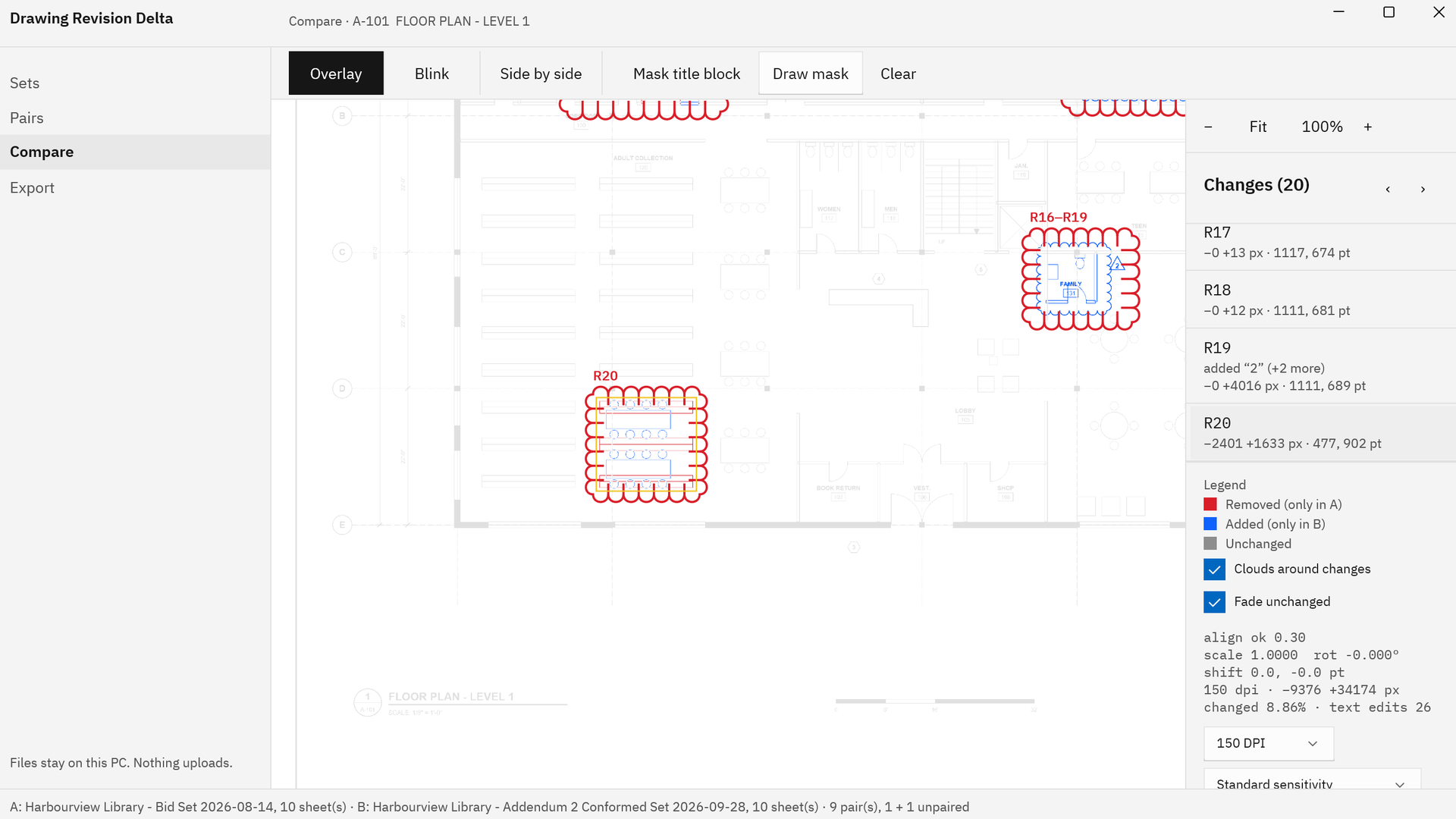
Drawing Revision Delta with Fade unchanged on, showing the changed areas of a floor plan in color, including region R20, a shelving layout replaced by tables that had no cloud in the revised drawing.
It finds the changes nobody clouded. Fade unchanged lightens everything else so the edits stand out.
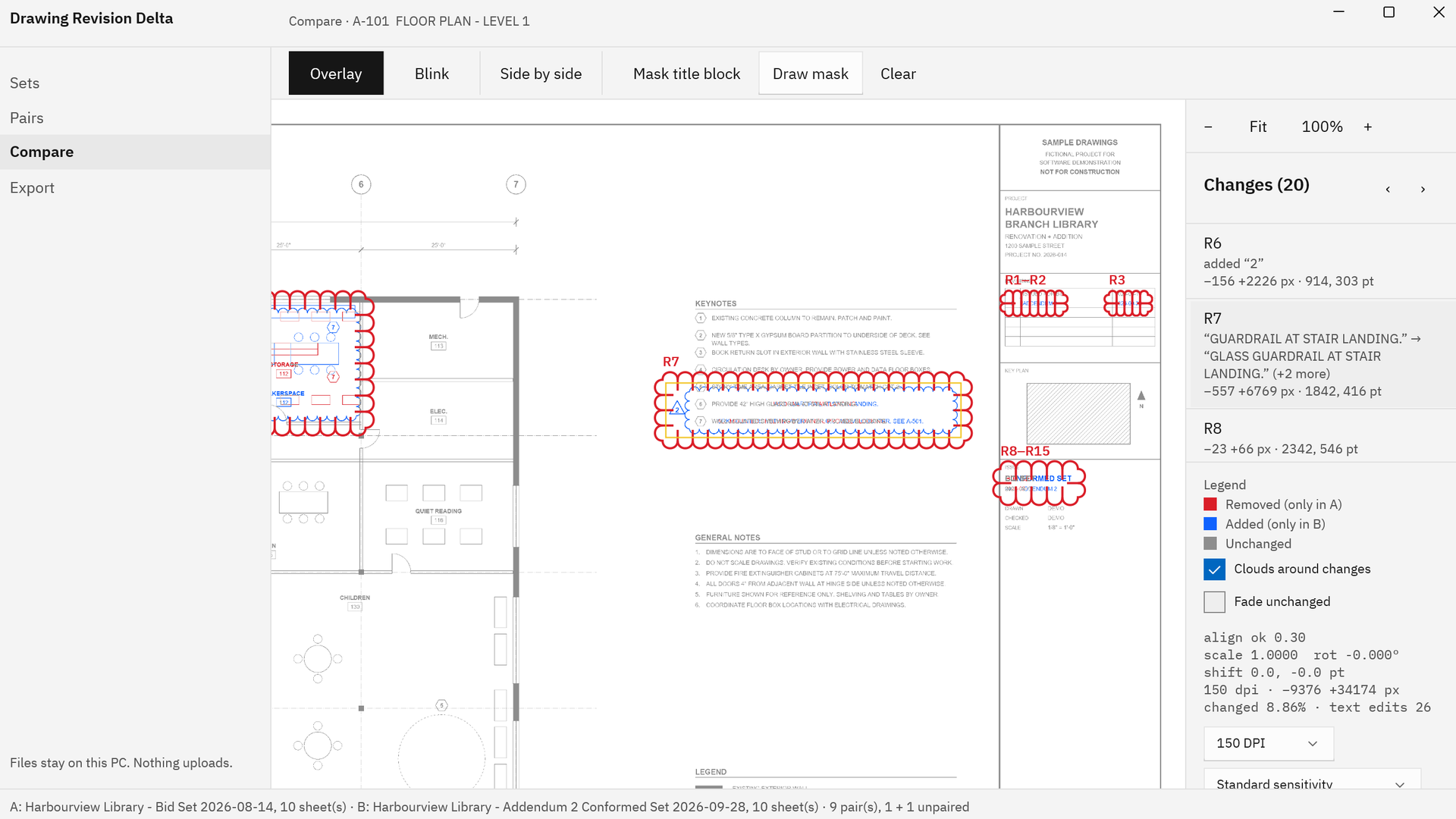
Drawing Revision Delta clouding an edited keynote and the title block changes on sheet A-101, with the change list showing the keynote text before and after the edit.
Edited notes and dimensions are read from the PDF text and listed in words, beside the cloud that marks them.
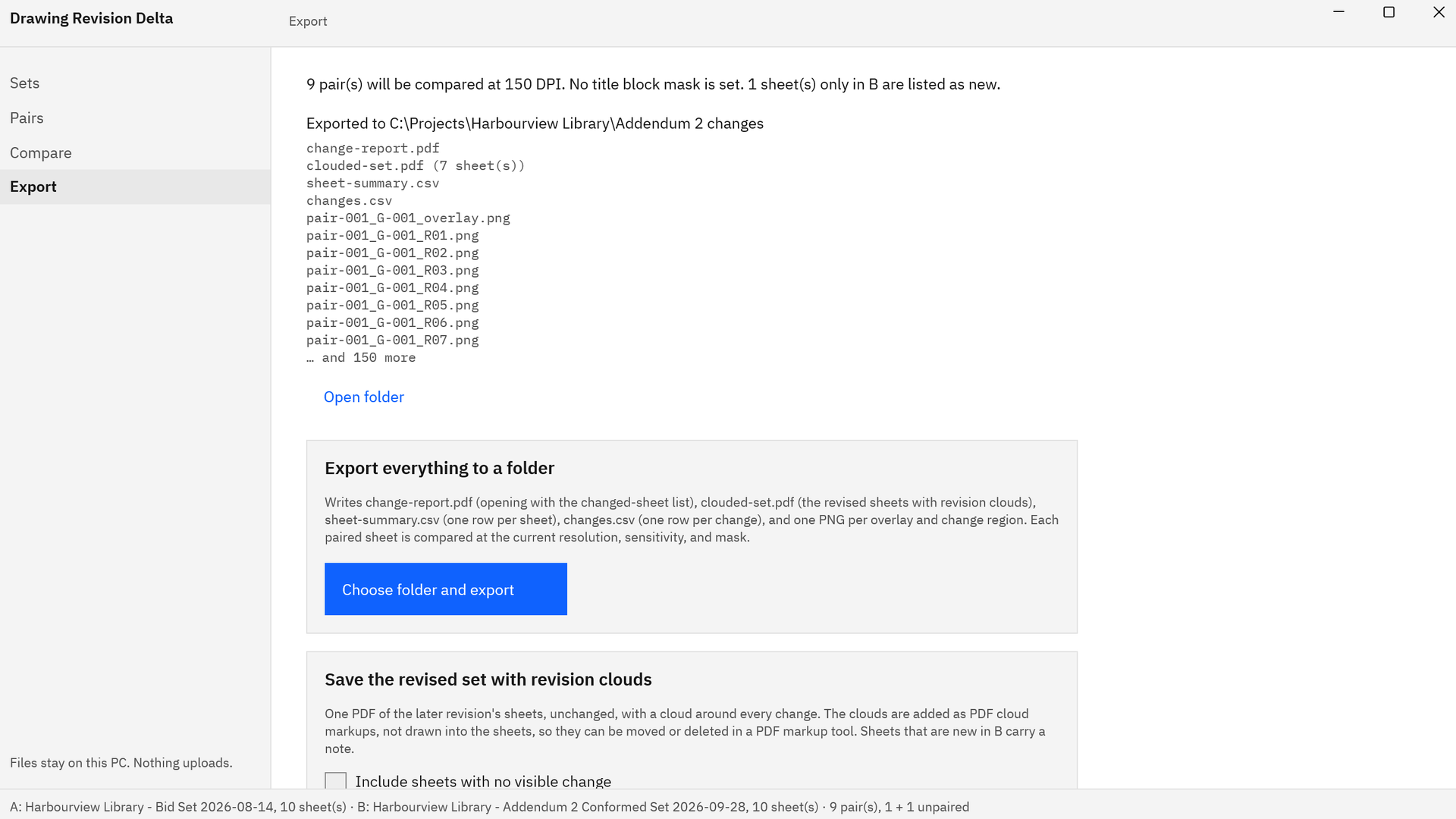
Drawing Revision Delta Export view after exporting to a project folder: change-report.pdf, clouded-set.pdf with 7 sheets, sheet-summary.csv, changes.csv, and PNG snapshots, with an Open folder link.
One export writes the PDF change report, the revised set with revision clouds, two CSV files, and a PNG of every change.

Screenshots use a fictional library drawing set made for software demonstration, with no client’s drawings.

Privacy

Nothing uploads

Drawing Revision Delta runs on your PC in the Windows app sandbox and declares no capabilities. It has no network code, no account, no sign-in, and no telemetry. It reads only the folders and files you pick, reads scanned title blocks with the text recognition built into Windows, and writes only to the folder or file you choose.

The drawings you compare are opened for reading only. The clouded set is a new PDF, with the clouds added as markups on copies of the revised sheets, and the app keeps nothing but its list of recent folders.

What you get

  • change-report.pdf: the ranked changed-sheet list, a section for every compared sheet, and a SHA-256 hash of every input file.
  • clouded-set.pdf: the later revision’s sheets, unchanged, with an editable revision cloud markup around every change.
  • sheet-summary.csv with one row per sheet, and changes.csv with one row per change, text edits included in words.
  • A PNG snapshot of every overlay and change region, named by pair, sheet, and region.
  • Overlay, Blink, and Side by side views, with Fit, zoom, Fade unchanged, and next and previous change.
  • Sheet pairing by title block number across PDFs, scans, and TIFF, PNG, JPEG, and BMP images.
  • A title block mask, 150 or 200 DPI, and three sensitivity settings from Fine to Ignore small differences.
  • Windows 11 on x64 and ARM64, with no account, no telemetry, and nothing uploaded.

Try it on your last addendum first.

The Microsoft Store runs a 15-day free trial of the full app. Pick a bid set and an addendum you already reviewed, choose Compare all, and check the ranked list and the clouds against what you found by hand. If it fits your work, buy it once. There is no subscription.

Pay once. Own it forever.

One-time purchase on the Microsoft Store · No subscription · Instant install

Buy through the Microsoft Store—instant install, automatic updates, and a Microsoft receipt for easy expensing. No account needed on our site, and no subscription on Store purchases.

Who uses it

  • Estimators at subcontractors and general contractors checking addenda and conformed sets against the bid set before bid day
  • Architects, engineers, and drawing checkers confirming that every change in a new revision is clouded before the set is issued
  • Project managers, superintendents, and owner’s representatives finding what changed on a reissued set before work goes to the field
  • Plan review consultants checking a resubmitted set for changes beyond the corrections that were requested

FAQ

Quick answers about Drawing Revision Delta

What is Drawing Revision Delta?

Drawing Revision Delta is a Windows 11 app that compares two revisions of a drawing set on your PC. It pairs the sheets by the sheet number in each title block, aligns every pair, ranks the sheets that changed, puts a revision cloud around every change, lists edited words, and exports a PDF change report and a clouded set. Nothing uploads.

How do I compare two revisions of a drawing set?

In Sets, choose Pick folder or Pick files for Set A, the earlier revision, then for Set B, the later one. The app moves to Pairs with every sheet matched. Choose Compare all to rank the changed sheets, then Compare selected to open one. In Overlay, red is only in the earlier revision and blue is only in the later one.

What files can it compare?

PDF drawing sets, as one combined PDF or one file per sheet, plus scans and images in TIFF, PNG, JPEG, and BMP. Multi-page files are split into sheets, and each revision can be a folder or a selection of files. The two revisions can be organized differently: a combined bid set pairs with a folder of separate addendum sheets.

How are sheets matched between the two sets?

By the sheet number in each title block, read from the PDF text, or with the text recognition built into Windows for scans and CAD plots drawn as lines. Sheets without a number pair by title or file name. Pair selected and Unpair set any pair by hand, and sheets found in only one revision are listed as new or removed.

Will it find changes that were not clouded on the drawing?

Yes. Drawing Revision Delta compares the drawings themselves, not the clouds drawn on them, so every change it finds is clouded and listed in the change list, whether or not the architect or engineer clouded it. Fade unchanged lightens the rest of the sheet so each edit stands out.

Can it list edited notes and dimensions?

Yes. Words are compared from the PDF text and listed in plain terms beside each change, such as “2x6” → “2x8”, or a keynote that now calls for a glass guardrail. A one-character edit in small text gets a change of its own, and every text edit appears in the PDF report and in changes.csv.

What if the revised set was plotted at a different scale or offset?

Each pair is aligned for shift, rotation, and scale before it is compared, then corrected locally for the slight stretch that different plotters and scanners introduce. The alignment figures for each sheet appear in the Compare view and in the report, so you can see how the two sheets were lined up.

How do I keep title block edits out of the results?

Choose Mask title block to cover the usual bottom-right title block area, or choose Draw mask and drag a box over the title block. One mask applies to every pair. Content inside it is shown in light gray and is not counted, so a new date, revision letter, or set of initials leaves the sheet list clean.

What does the export include?

Choose folder and export writes change-report.pdf, which opens with the ranked changed-sheet list and has a section for every compared sheet; clouded-set.pdf, the revised sheets with a revision cloud around every change; sheet-summary.csv; changes.csv; and a PNG snapshot of each overlay and change. The report lists a SHA-256 hash of every compared file.

Do my drawings stay on my PC?

Yes. Drawing Revision Delta runs in the Windows app sandbox with no declared capabilities and has no network code, no account, no sign-in, and no telemetry. It reads only the folders and files you pick, scanned title blocks are read with the text recognition built into Windows, and the drawings you compare are opened for reading only.

What does it cost, and is there a trial?

Drawing Revision Delta is a one-time purchase in the Microsoft Store, and the listing shows the current price in your currency. The Store runs a 15-day free trial of the full app, with nothing to activate in the app itself, and files you export during the trial stay on your PC. There is no subscription.

What Windows version do I need?

Windows 11 (build 22000 or later) on an x64 or ARM64 PC. A PC with 8 GB of RAM handles full-size 36 by 24 inch sets comfortably. The Microsoft Store installs the app and keeps it up to date.
Still stuck? Email [email protected] after checking the Support Center.

Technical specifications

Technical specifications

Spec Implementation
Data Sovereignty Reads only the folders and files you pick in the Windows pickers, opened for reading only; writes the change report, clouded set, CSV files, and PNG snapshots only to the folder or file you choose; the list of recent folders stays in the app’s own local storage on this PC
Telemetry Status None; no account, no sign-in, no analytics, and no network code in the app
Core Runtime .NET 10 and WinUI 3 (Windows App SDK), packaged as MSIX and run in the Windows app sandbox (AppContainer) with no declared capabilities; pages are rendered with the PDF engine built into Windows, and scanned title blocks are read with the Windows text recognition engine
Network Requirements Fully functional offline; the package declares no capabilities, including no internet access, and the app makes no network connections
Deployment Compatibility Windows 11 (build 22000 or later), x64 and ARM64; one-time purchase in the Microsoft Store with a 15-day free trial
Inputs Two sets, each a folder or a selection of files: PDF (one combined file or one file per sheet), TIFF (multi-page), PNG, JPEG, and BMP; multi-page files are split into sheets
Pairing By the sheet number in each title block, from the PDF text or Windows text recognition, then by title or file name; pair and unpair by hand; sheets in one set only are listed as new or removed
Comparison Alignment for shift, rotation, and scale with local correction for plotter and scanner stretch; 150 or 200 DPI; Fine, Standard, or Ignore small differences sensitivity; title block mask
Review Pairs ranked most changed first with share of change and text edits; Overlay, Blink, and Side by side views; revision clouds, Fade unchanged, and a numbered change list with text edits in words
Outputs change-report.pdf with the ranked changed-sheet list and a SHA-256 hash manifest; clouded-set.pdf with editable PDF cloud markups; sheet-summary.csv; changes.csv; PNG snapshots of each overlay and change
Originals Compared drawings are opened for reading only; the clouded set copies each revised sheet unchanged into a new PDF

Two drawing sets in. Every change clouded.

Drawing Revision Delta pairs the sheets by number, ranks the ones that changed, clouds every change, and lists edited words, then writes a report and a clouded set you can forward. Your drawings stay on your PC.

One-time purchase. No subscriptions. Local-first.

Pay once. Own it forever.

One-time purchase on the Microsoft Store · No subscription · Instant install

Buy through the Microsoft Store—instant install, automatic updates, and a Microsoft receipt for easy expensing. No account needed on our site, and no subscription on Store purchases.

Browse catalog